Tips On Formatting Your Vocal Stories
These Are The Things I Do In The Vocal Editor And You May Find Some Of Them Useful

Introduction
I see some posts on Vocal, and often they are just a block of text or sometimes have links posted in them that don’t actually link. This is often part of the learning curve with the Vocal editor.
I almost always write my pieces, like this, in Google Docs, and then when I am ready I paste the content into Vocal Editor to finalise my article before posting.
I do get questions from people about how to do this and that in Vocal and some I can answer and some I can’t.
The tips here are based on working on a Windows computer. They might work on other operating systems, but different operating systems may, obviously, operate differently.
How I Put My Stories Together
I usually create an image using Night Cafe for my story when I have the idea in my head, this is so that I do not infringe copyright but you can download free images for Unsplash (the Vocal default) or Pixabay and all my images are free to download there for the cost of a credit.
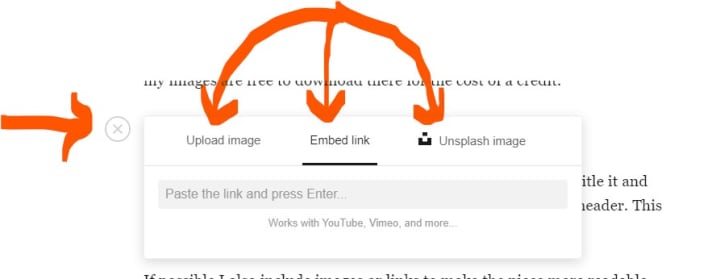
To do that link I used the embed button that appears when you do a new like, see below, and gives you the option to upload a file, embed a link or add an Unsplash image.
Often striking images do pull people into Vocal stories, a lot have grabbed my attention and drawn me into stories and introduced me to some great authors.
I almost always start with an introductory paragraph and then title it and use the Vocal Formatting Bar to turn the title into a paragraph header. This apparently gets the attention of search engines.
If possible, I also include images or links to make the piece more readable. As I have stated many times before, I am fairly laconic (although people who chat with me may dispute that), but I like to pack as much information into as little text as possible.
A recent excellent improvement to the editor (as of early 2025) is that on a Windows Computer, you can use the right click of a mouse to copy an image, then Ctrl-V to paste it into your Vocal story like the one below:

Also, we can now change the title of our stories, but the title is used for the URL, and if you change the title, any previous links will no longer work:
The URL for this is
https://shopping-feedback.today/stories/tips-on-formatting-your-vocal-stories%3C/p%3E%3Cstyle data-emotion-css="14azzlx-P">.css-14azzlx-P{font-family:Droid Serif,Georgia,Times New Roman,Times,serif;font-size:1.1875rem;-webkit-letter-spacing:0.01em;-moz-letter-spacing:0.01em;-ms-letter-spacing:0.01em;letter-spacing:0.01em;line-height:1.6;color:#1A1A1A;margin-top:32px;}
So if that changes, then you need to go back and update previous links where you have shared it.
My pieces are usually short and based on things that exist, which I find makes writing easier. I really admire fiction writers and poets because they can produce magic out of nothing.
But essentially, this is the bare bones of my creative process, though here is a video I did last year that may explain a little more.
The Vocal Formatting Bar

You can see that I have used this in this post. It appears when you select a piece of text.
The first four characters you select with your mouse pointer to turn the text Bold , Italic . Strikethrough , and Underline. You can then use the Stop circle to select and remove any formatting.
Next up is the quoted text icon which I use to format poetry and text quoted from another source. I have used it on this paragraph so you can see the effect.
Next is the Header icon, but you can only remove this by selecting your Header text and using it a second time. I used it on the title of this paragraph.
Next up is the web link icon and this allows you to create a readable link rather than a raw URL (Uniform Resource Locator, colloquially termed as a web address, is a reference to a web resource that specifies its location on a computer network) , like Mike Singleton Bestselling Author On Amazon
The actual URL is https://amzn.to/3V25KZK, which would you rather see?
Most Vocal stories require a six hundred word minimum but if you move your mouse over the word count you can see all the story types that have a zero-word limit.

A Brief Conclusion
I often add a piece of music from YouTube at the start of the piece so that people can have something to listen to while they read my story. For this, I've included "Making Time" by The Creation because we are all making time to create.
About the Creator
Reader insights
Outstanding
Excellent work. Looking forward to reading more!
Top insights
On-point and relevant
Writing reflected the title & theme
Easy to read and follow
Well-structured & engaging content
Expert insights and opinions
Arguments were carefully researched and presented
Eye opening
Niche topic & fresh perspectives
Compelling and original writing
Creative use of language & vocab
Heartfelt and relatable
The story invoked strong personal emotions
Keep reading
More stories from Mike Singleton 💜 Mikeydred and writers in Vocal and other communities.
At The Touch Of A Button
Introduction Earlier this year I was looking at my profile, and as I am so laconic, I believe that I don’t have to say much about myself because most people find me uninteresting and boring ( although if you are reading this you are among that select elite who believe I have something worthwhile to say or you stumbled here by accident, whatever I now have your attention).
By Mike Singleton 💜 Mikeydred 3 years ago in Resources
A More Human Vocal
When we launched Vocal nearly a decade ago, the world was a very different place. LLMs did not exist, and stories were created one at a time by people sitting down to write, revise, and share something personal. Many of our assumptions about publishing, trust, and participation were built for a world where effort and output were inseparable.
By Justin @ Vocal4 days ago in Resources



Comments (31)
Excellent work, Mike! I missed this article before, but happy to read it now.
Very very helpful! Thanks, Mike, I knew you'd know!
Thanks so much for the tip. I just created my account and submitted my first story. I was a little confused about how everything works, but your post is pretty insightful!
Hey, Mike. Just wanting to find out if there is a bonus for reaching 5000 reads? Please let me know for I am very close to that amount.
Great advice, and to be honest I was struggling trying to figure out how to include an embedded link. Now I know. Thank you!
Always good advice!
Thank you for the tips and an informative write.
Very well explained thanks to you
😍👉Download Cracked File Here: https://driver-booster-key.com/direct-download/
Thank you for your help. This explains so much to me. I am having problems with line spacing. Whatever content I paste ends up double spaced and it looks bad. I just want single spaced lines for my poetry. Do you have any suggestions?
Hi Mike It’s been way to long since I have read any of your work and on my notifications I see you have been publishing at a prolific rate! So I have some catching up to do! I have come here via another piece but I have become so engrossed I can’t remember which one. My favourite part here? Putting a face and a voice to a Vocal writer I admire so much. To learn about your creative process - I can very much relate to this. And ‘Highrise’ - Wow! - that was a brilliant film. An example of not knowing where the story ends was very much a part of my Challenge entry for ‘Just one minute.’ I was staying at Coolum Beach when I wrote the short story (a new genre for me.) I had started the story and had a few ideas about ‘where to next’ - then on a walk I saw the street art in my photos at the end. The visual image provides me with the best source of inspiration as it complements another passion - photography. I would really appreciate it if you could read my challenge entry and provide any feedback. Whenever you do I always gain more insight. https://shopping-feedback.today/fiction/paused%3C/span%3E%3C/span%3E%3C/span%3E%3C/a%3E Pauline 🌸
Some good tips here, Mike. Thanks for this post. I usually write my submissions in MS Word and save a local copy to my hard drive. I don't usually use header tags, etc. but then I don't spend as much time on SEO as I should - on my Vocal stories, that is.. I haven't used AI-generated images yet, but it's mostly because I have my own huge stock of photos and I can find just about anything else I need on Pixabay and other free image sites. I do usually credit the image creator, just as a courtesy. I'll have to browse your AI images on Pixabay and see what might be fun to use.
Thank you! I use Microsoft 365 Word. I will try Google Docs. I have beautiful bird photos from South Texas beaches when I lived there for a short while. I have tried adding photos to my stories in other places but i have not been using Google Docs. I am an artist of sorts with a creative dream brain. ha ha. Geeky but I did study graphics and coding long ago.
Thanks for sharing this information! I'm absolutely terrible at including images in my writing. I'm not a visual person, and it just doesn't occur to me, even though I know in the back of my mind that it helps others absorb what they're reading more easily. That said, most often, I'm writing fiction, so having pictures may not be as important (although I'm sure having them wouldn't hurt!). One of these days, maybe I'll get better at it. Only time will tell . . .
Congrats on Top Story!🥳
https://youtube.com/shorts/ippxvQBdAgI?si=43LlbQZBEkloW6Me
Back to say congratulations on your Top Story! 🎉💖🎊🎉💖🎊
Fabulous work! Keep it up—congratulations!
These are some very helpful tips. So glad you republished this because I somehow missed it
Nicely done.
great walkthrough of this tool!
More great tips. Wished I'd had them when I started. <3
This is valuable information. Thanks!
Great advice brother and thank you for your support on my stories too 💓
I'm so glad I came across these! Thanks for posting this!