
Ocoya vs Radaar vs Nuelink : Comparison of Best Social Media Management Tools
Here's a detailed comparison between Ocoya vs Radaar vs Nuelink, explaning their features, user interface and which one really a best social media tool for your business.

What is a Social Media Management Tool?
SMM (social media management) tools let you connect and manage all of your social platform profile into 1 unified dashboard.
From this dashboard you can publish and even schedule content to all social playform in 1 click, without manually go to every platform and publish one by one.
This saves many hours of work and efforts for every week, You can litereally schedule 1 year’s content in few hours for all of your social media profiles.
Nuelink vs Ocoya and Radaar all three are A.i based social media assistants and management tools, which allow users to create, publish or schedule content for all major social media platforms from a single dashboard. And show published post insights in 1 analytical section.
But which one you should choose?, because each one has it’s unique features, pros and cons.
don’t worry this comparison will help you to find out.
So, let’s start!
Ocoya vs Radaar vs Nuelink – Side by Side Comparison
Click here to read sid by side comparison.
Deatiled Comparison – What’s the Difference
📌 Supported Social Platforms Connectivity
Well, this is the first thing I want to compare between them. Which tool gives better social media connectivity and support more platforms.
Lets startt with Ocoya
◼️Ocoya
Social media platforms you can connect,
- Facebook Pages (FB groups connectivity not available)
- Google my business
- Youtube
- Tiktok
- Slack
Plus, Ocoya also have support & integration for major e-commerce platforms such as,
- Shopify
- Woocommerce (wordpress)
Connecting e-com store, users can autopmatically promote products on connected social platforms.
There is also API connectivity option available.
◼️Radaar
Social media platforms supported by radaar,
- Facebook Pages and FB groups
- Tiktok
- Linkedin person and orgnaziation
- Google my business
- Vimeo
- Youtube
- Mastodon
- Google (search engine)
- WordPress (posts and products)
- Telegram
- Twilio (for SMS)
- Whatsapp Business
- Netgem (for SMS)
- Webhook
Users can also post or schedule YT shorts, Reels and stroies using Radaar.
◼️Nuelink
Nuelik supports all these social media
- Facebook Pages and Groups
- Linkedin Orgnaziation and Personal profile
- Google my business
- Youtube Shorts and videos
- Tiktok
Like Radaar, nuelink also support YT shorts and Reels posting but There is no connectivity option available for website or e-com stores as for now.
📌 User Interface & Dashboard
It depends on U.i, how easy to use that platform or tool.
◼️Ocoya
Ocoya user interface is really good and easy to use. Dashboard colors combination is eye comforting.
Users can find all important features such as content planner (which is the main starting dashboard screen), Social profiles, Ai copywriter etc on the left hand side menu.
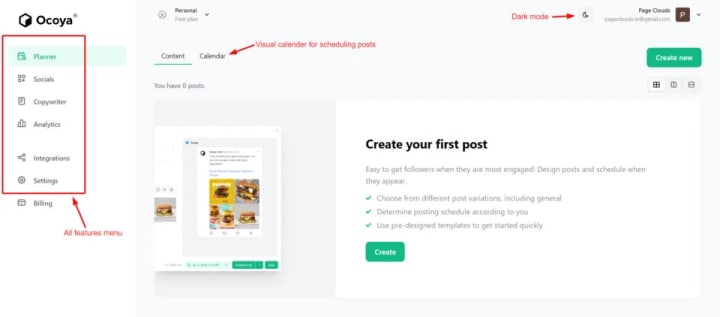
To make the post publishing and scheduling simple Ocoya has a visual calender.
There’s also the dark mode button available for those who prefer dark srceen more.
◼️Radaar
Radaar user interface colors are eye comforting and dashboard full of features shortcuts. But for first time users this is complicated as they don’t know what these features are all about.
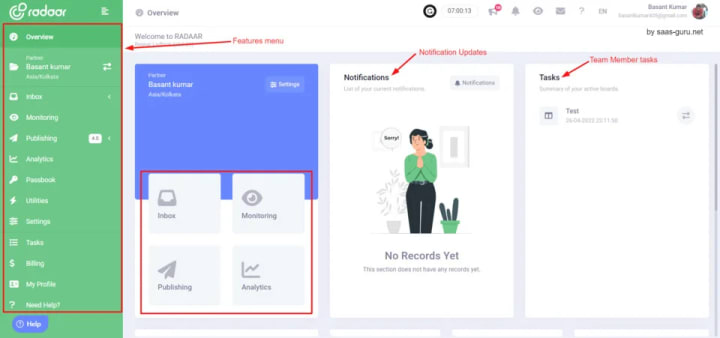
Plus there is no onboarding guidence or features understaning steps, this makes users to explere themself.
In most simple words, Radaar’s U.i is good looking bust not easy to understand. Users need some time to experience all features.
Dark mode also not available on radaar.
◼️Nuelink
The user interface for Nuelink is good and easy to use, all the important features and shortcuts available on the dashboard a click ahead.
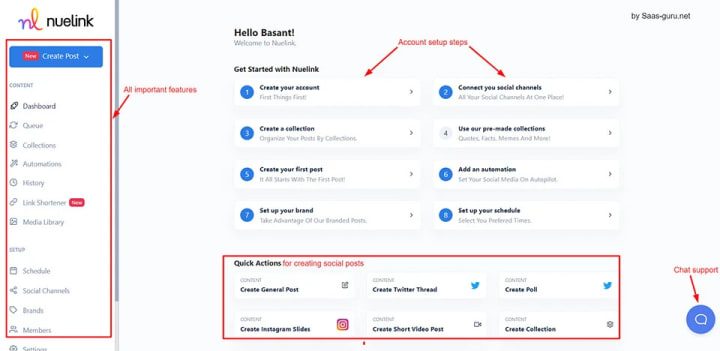
But the only thing I didn’t feel suitable is their color combination for highlightings (hard blue and red color) a little bit eye pitching. Instead if they have used soft colors it will be much better.
Plus there is no dark mode.
Like radaar and ocoya, users can find all features on left side menu. And to make the onboarding process easy they have a account setup steps for guiding users.
This help users after their signin on nuelink account for the first time.
Winner: Click here for continue reading...
"This article originally published in saas-guru.net, link- https://saas-guru.net/ocoya-vs-radaar-vs-nuelink/"
About the Creator
Basant Kumar
Hi, I'm Basant Kumar, Founder of Saas Guru. Our Blog is one stop to get all secret strategies and actionable steps to grow your Blog 10X faster.
Keep reading
More stories from Basant Kumar and writers in Geeks and other communities.
This is Best Tool to Convert Figma Designs into Live Working Apps & Websites without Coding?
Hi guys, this is Basant here, First I want to welcom all you guys reading my article on Linkedin. And yes there's a way to turn your Figma designs into live working apps, websites or web applications without coding.
By Basant Kumar3 years ago in Geeks
Silver Screen Magic with Mae West
American actress and singer Mae West became a popular film actress during the Great Depression. She started entertaining in vaudeville, then performed on Broadway, and finally went to Hollywood. She signed up with Paramount Pictures and made her debut in the 1932 film “Night After Night.” She also starred in musicals, comedies, and crime dramas. The American Film Institute named her one of the best classic Hollywood actresses.
By Rasma Raisters5 days ago in Geeks
Sadie Sink Found Out About Her ‘Spider-Man’ Casting Via Online Speculation: “There’s Sometimes Some Truth To It”
Although sworn to secrecy by the MCU, Sadie Sink admits there’s sometimes some truth to the online fan theories. The actress, who will star in Spider Man Brand New Day in an undisclosed role, admitted “it’s torture” not being able to tell people which character she’s playing in the fourth installment of the Marvel Studios franchise.
By Dena Falken Esq7 days ago in Geeks
How to Succeed at the Benson Directory®
Congratulations and welcome to the Benson Directory® employee #22391! As our newest call handler, you will have the privilege of speaking with dozens of unique and interesting people on a daily basis as well as the opportunity to earn bonuses for high performance. Contained within this handbook you will find a set of ease to follow instructions designed to help you settle in to your new role and begin paving the way to success.
By S. A. Crawfordabout 24 hours ago in Fiction




Comments
There are no comments for this story
Be the first to respond and start the conversation.