
Coupling GPT-3 with speech recognition and synthesis to achieve a fully talking chatbot that runs in web browsers
How I created this web app with which you can talk naturally with GPT-3 about any topic you want, all web-based in your laptop, smartphone or tablet.

I just created a web page-based chatbot that understands what you say and then replies back quite intelligently. I have a couple of articles showing it in action, and here you have a 49-second preview (check my recent article for more examples).
You can try (i.e. talk naturally with) this chatbot at:
https://lucianoabriata.altervista.org/tests/gpt-3/TDSgpt3-speechrec-speechsynth.html
The point of this article is to understand how this app works -a beautiful example of how different libraries, browser APIs, and external services accessible through API calls can work together to achieve cool applications.
Components of this “natural conversation chatbot”
I superficially said in my previous articles that this web chatbot builds on three great tools available for web browsers. Let’s here see these components in more detail.
1. Annyang for speech recognition
(Or you could go straight with the Web Speech API’s SpeechRecognition service)
You can know more about this library at https://www.talater.com/annyang/
Annyang is a small speech recognition JavaScript library that easily allows programmers to incorporate voice commands and voice dictation into their web apps. It has no dependencies, it is very light, and is free to use and modify under the MIT license.
To achieve speech recognition, Annyang uses the SpeechRecognition service of the Web Speech API -which also includes the SpeechSynthesis service described in point 3 below, to allow the chatbot to speak up.
The Annyang library runs very well in Chrome on computers, laptops, tablets, and smartphones, requiring only that the web app be hosted under https and that the user accepts the use of the microphone (by default requested only the first time the library is loaded under a given domain). In my tests Annyang also worked very well on Firefox in a Windows Computer.
Annyang is so easy to use that you as a programmer can insert spoken commands with just these lines of code:

2. GPT-3 as the brain that “understands” what you say and produces a likely reply
GPT-3 is a state-of-the-art language processing model, that is a deep neural network that can read in some text and produce new text from a generative statistical model. The output can be an answer to a question asked in the input, or the summary of the inputted text, or an expansion of it; it can also be the text form of a table, or a piece of code written after a few indications in the input, etc.
For real applications, you won’t probably use GPT-3 exactly as it is but rather adapted to your needs. In particular, you can either fine-tune the model with specific input/output pairs, and you can also provide few-shot learning in the form of a prompt that contains a basic layout of the kinds of text inputs and outputs you expect from it.
I have written several articles about GPT-3 that illustrate the above-mentioned features. Here are the most important ones:
Of most relevance to this article, note that I use a PHP-based call to OpenAI’s API. I explain how to achieve this in the first article of the three listed above.
Besides, I use quite some few-shot learning when calling GPT-3, to make it “understand” that it has to deal with an exchange of information mimicking two persons having a conversation (I’ll show you more later on).
3. The Speech Synthesis API to speak up the text produced by GPT-3
The SpeechSynthesis service of the Web Speech API (which also includes the SpeechRecognition service wrapped by Annyang for simpler use) allows you to rather easily synthesize audio from text prompts.
Instead of using a wrapper (like Annyang for speech recognition), I used the SpeechSynthesis service right away, “vanilla mode”.
For example, I can make a web page say “Hello world, speaking up here!” with this simple piece of code:

Done with the components, now it’s time to see how this all really works together to create a natural speech chatbot.
How the chatbot actually works
It might sound quite trivial that putting the above elements together should lead to a chatbot like the one you’ve seen in my videos. However, when you simply put together all three pieces you start getting problems.
Avoiding that the chatbot ended up “talking with itself”
In my first attempts, the most important problem was that Annyang kept listening while the speech API was talking, therefore creating an infinite loop where the bot was simply talking with itself. And not precisely in an interesting way but rather repeating phrases of the form “Yes, I said that” over and over! It was funny at first, but eventually got a pain to solve out.
Luckily, it turns out that you can switch Annyang on and off. While the commands were supposed to be pause and resume, they didn’t really work -and it was not me, because I indeed found some notes online about this issue.
So, I had to use another method: not pause but actually abort right when a phrase is sent to GPT-3 for analysis; and then start rather than resume when the output produced by GPT-3 was ready to be read.
But even that wasn’t perfect: sometimes Annyang started listening again slightly ahead of the end of the speech API’s talk, so it grabbed its last words and again tried to reply to those last words. I could solve this out very simply by incorporating a timeout function that waits for 1 second after the end of the speech call before activating Annyang:

“Explaining” GPT-3 that it has to follow a conversation, providing answers to questions or reasonable continuations to what the human said, and remembering context
The key for this relies in GPT-3’s capability for few-shot learning. This is essentially shaping the prompt sent to GPT-3 in a way that instructs it to follow the conversation.
When my program begins, the prompt is simply the following question that contains some background information that the chatbot is supposed to know but doesn’t, such as its own nature, how itself works, my name as a developer, etc. The starting prompt also follows a model of how inputs and answers should follow each other, here flagged with letters Q and A as they resemble questions and answers (although they do not necessarily have to be questions and answers, for example when you ask “Hello, good morning.” and the bot replies something like “Hello there.”
Here’s the exact prompt used by my app:

Now, when Annyang understands for the first time some text that was spoken to it, the app appends this text to the prompt and the whole new prompt is sent to GPT-3. For example, if the first thing heard by Annyang is “Hello, how are you doing?” then the prompt as sent to GPT-3 will be something like:

(I formatted in bold what was added to the starting prompt)
The output from GPT-3 will consist of this same prompt plus its addition. For example:
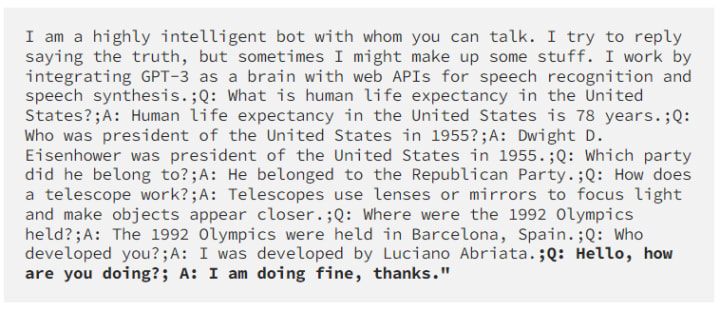
When the next spoken text is heard, it is appended to this last prompt and sent again to GPT-3. The prompt then comes back with the new response added. And so on.
This helps to not only provide information that the chatbot cannot know about (in the first chunk of prompt) but also give continuity to the chat, as the previous exchanges are still there. This is why the few-shot learning capability of GPT-3 is so great. Unfortunately it has a limit, as it is capped to 2048 tokens, so at some point the API will throw an error because the prompt is too long. There could be some ways to improve this, that perhaps you can try out as an exercise.
Cleaning up characters in phrases to feed into and obtained from GPT-3
As you’ve seen in the piece of code above showing how the speech synthesis works, there’s some cleaning to do on the strings. For example, we don’t want the bot to talk the whole prompt, so we have to remove the input. We also want to remove those Qs and As as well as any HTML tags, weird question marks, etc. For this I use a lot of replace() functions in the strings (when I use replace(//g) this means “replace all instances” in JavaScript.
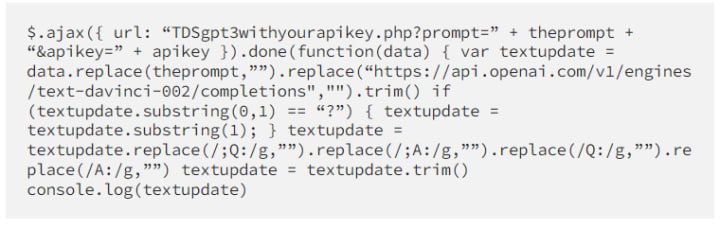
One global look at the whole code
Here’s all the code, with comments that describe briefly what is being done (summary of all the details given above)
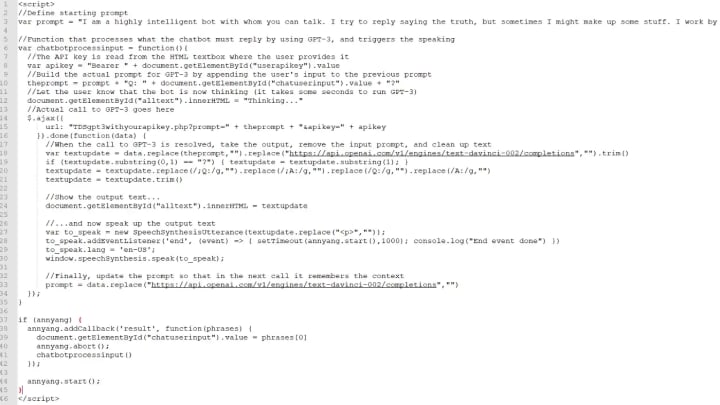
If you found this interesting or love programming cool stuff for the web
https://towardsdatascience.com/the-definitive-guide-to-principal-components-analysis-84cd73640302
https://medium.com/age-of-awareness/metaverse-not-sure-but-webxr-hell-yes-12af5b302e08

--------------------------------------------------------------------------------------
www.lucianoabriata.com I write and photoshoot about everything that lies in my broad sphere of interests: nature, science, technology, programming, etc. Check my website to know my other blogs, which have much more content than this one. Also to consult about small jobs or to find my contact information.
About the Creator
Keep reading
More stories from Luciano Abriata and writers in Geeks and other communities.
The Definitive Guide for Your Campervan Trip to Iceland
Camping card? Heating in the van? Getting to see auroras? Weather? Driving? Get here all my key hints, some even contradicting what paid blogs say. With very few photos and only at the very end, to not break the charm of discovering all by yourself.
By Luciano Abriata4 years ago in Wander
Marvel Zombie
The last entry into our 2025 superhero projects catalogue is Marvel Zombies. This was a show that was anticipated by absolutely no one and it disappeared from the public consciousness as quickly as it was released. There was nothing special about the project that made it a must see, or a must remember. In fact if anything it's a must forget.
By Alexandrea Callaghan17 days ago in Geeks
Debunking The 'Timeline/Continuity Errors' In 'Stranger Things 5'
WARNING! Possible SPOILERS for Stranger Things 5. After five smash hit seasons, the Netflix phenomenon Stranger Things has come to an end. Being set in the 80s, the show has had to keep an eye on it's various popculture references to ensure historical accuracy, and for the most part, has done a good job at this.
By Kristy Anderson5 days ago in Geeks



Comments
There are no comments for this story
Be the first to respond and start the conversation.