
Best Ways to Save Money on Printer Ink
Reduce the Amount Ink Your Printer Uses

1. Print in Draft Mode Requires Less Ink
2. Never Switch Off the Printer
3. Double Check Everything Prior to Printing
4. Make Text in Document Smaller
5. Don't Print in Colour For Less Important Documents?
6. Consider a Laser Printer - They Don't Waste Ink
The end of the summer approaches and the holidays are over for another year. It's time to start thinking about work and the new school year. Printer ink is on the shopping list but prices have jumped higher again. The myth that Ink is more expensive than gold is not sounding too ridiculous.
Ink is so expensive so why does it not last longer in the printer. Print a few large documents and the low ink light is flashing again. Alarmingly, the majority of the ink will not end up on the printed pages... lost in the process wasting up to 50% of the ink. With an average home printer this could mean €100 each year.
The good news is there are lots of things we can do to stop wasting ink and ordering replacement ink is less frequent cutting printing costs substantially.
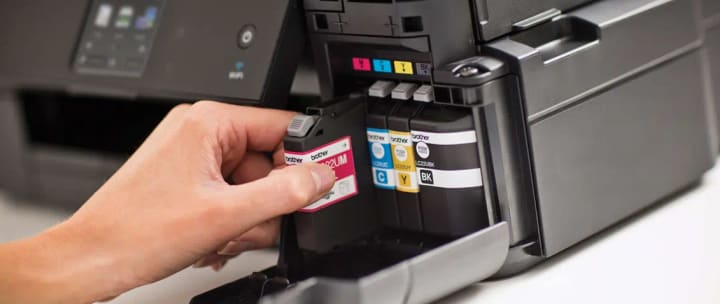
Print in Draft Mode Requires Less Ink
Simply changing the printer to draft mode will make the printer more efficient. Draft mode reduces print pixel size reducing quality ever so slightly and not really visible to the naked eye. If you are concerned about quality use draft mode for less important documents and normal mode for final prints. It will save a lot of ink so worth pursuing.
Never Switch Off the Printer
Do not turn your printer off after using. When inkjet printers are switched on again a cleaning process will be activated. As previously highlighted cleaning the print heads can use as much as 50% of the ink and so should be avoided unless necessary.
Double Check Everything Prior to Printing
It sounds daft but re-printing documents several times needlessly is the second highest ink wastage practice. Printers in the home or at work are always surrounded by scrapped printed pages not used because of mistakes in the document or unsatisfactory layouts. Checking your document thoroughly making sure you are happy before printing. Shocking how much ink and paper is lost if this is not done.
Make Text in Document Smaller
If text size is not a critical feature why not decrease the size of the text. This can be done really quickly in Microsoft work or indeed whatever software you are using. Smaller text can greatly decrease the volume of ink required dramatically reducing the surface area of printed ink and also reducing the amount of paper needed for the print which will also save money in the long-term.
Are You Printing in Colour All the Time?
Colour printing is 3 times more expensive than black and white. So, it makes sense to restrict colour prints where only required. Black and white prints is more efficient with ink so be smart and selective printing casual documents in black and white and essential prints in colour.
Laser Printers Don't Waste Ink
Laser printers do not require ink to clean and align the print heads in the printer. Most home / small office printers use ink for cleaning which is the biggest contributor to wasted ink. Laser printers have alternative cleaning methods saving up to 50% of ink. A popular choice for commercial use where saving money is the priority. Some laser printers can be expensive but Brother do offer a cheaper range and the money save on the toner ink will more than compensate. Not to mention the speed and performance is much superior. The Brother HL-2370DN printer is a perfect example, not expensive to buy and the TN2420 toners are cost efficient..
In general, try to remain conscious of the cost of ink when using the printer. Being aware of costs will push you to re-evaluate each print task. It is really needed? What format will the task print and what possible wastage will there be. For example, printing directly from the internet is less efficient because web page layouts are not designed for printing specifically. PDFs are much slicker if this option is available.
About the Creator
Keep reading
More stories from writers in Geeks and other communities.
Marvel Zombie
The last entry into our 2025 superhero projects catalogue is Marvel Zombies. This was a show that was anticipated by absolutely no one and it disappeared from the public consciousness as quickly as it was released. There was nothing special about the project that made it a must see, or a must remember. In fact if anything it's a must forget.
By Alexandrea Callaghan20 days ago in Geeks
Irish Passports Recalled
Irish passports are widely respected around the world, offering their holders extensive travel freedom and a strong sense of national identity. So when news emerged about Irish passports being recalled, it naturally raised concern, confusion, and plenty of questions among citizens and travelers alike. While passport recalls are rare, they are not entirely unheard of, and understanding the reasons behind them helps separate facts from fear. This article explores why Irish passports were recalled, how the process works, who is affected, and what it means for those planning to travel. Understanding Passport Recalls A passport recall does not automatically mean a security crisis or widespread fraud. In most cases, recalls are precautionary actions taken by authorities to correct an error, protect document integrity, or maintain international trust. Governments treat passports as highly sensitive documents, and even small technical or printing issues can justify swift corrective measures. In the case of the Irish passports recalled, the action was taken to uphold quality standards and ensure compliance with international travel regulations. The Irish Department of Foreign Affairs (DFA), which oversees passport issuance, has emphasized that recalls are part of responsible governance rather than a sign of systemic failure. Why Were Irish Passports Recalled? The recall centered on a limited batch of recently issued passports that were found to contain technical defects. These issues were not related to the personal data of holders but rather to the physical or electronic features of the passport itself. Modern Irish passports include advanced security elements such as biometric chips, specialized inks, and machine-readable zones. If any of these features fail to meet strict international standards, border control systems in other countries may struggle to read the document properly. Even a minor defect can cause delays, questioning, or refusal at immigration checkpoints. To prevent Irish citizens from facing difficulties while traveling, authorities chose to recall the affected passports proactively. Who Was Affected? Importantly, not all Irish passport holders were impacted. The recall applied only to a specific group of passports issued within a defined timeframe. The DFA contacted affected individuals directly using the contact information provided during the application process. Those who did not receive official communication were advised not to panic, as their passports remained valid. This targeted approach helped minimize disruption while ensuring that the issue was resolved efficiently. What Should Affected Passport Holders Do? For individuals whose passports were recalled, the process was designed to be straightforward and free of charge. The general steps included: Official Notification – Affected holders received emails or letters confirming that their passport needed replacement. Return Instructions – Clear guidance was provided on how to safely return the recalled passport. Priority Replacement – New passports were issued on an expedited basis to reduce inconvenience, especially for those with upcoming travel plans. The Irish government reassured citizens that recalled passports would be replaced quickly and that no applicant would be financially penalized for an error beyond their control. Impact on Travel Plans One of the biggest concerns surrounding Irish passports recalled was the potential disruption to travel. While the situation was understandably stressful for some, authorities worked to limit negative impacts. Travelers with urgent plans were encouraged to contact the Passport Service directly. In many cases, emergency or fast-track solutions were made available. Airlines and foreign embassies were also informed, helping ensure smoother coordination. The key takeaway for travelers was simple: if your passport was recalled, do not attempt to travel with it. Doing so could result in delays or denial of entry, even if the passport appeared physically normal. Public Reaction and Trust Public reaction to the recall was mixed. Some expressed frustration, especially those preparing for holidays, work trips, or family visits abroad. Others praised the transparency and swift response of Irish authorities. Overall, trust in the Irish passport system remained strong. Many citizens recognized that recalling passports due to technical issues demonstrated a commitment to quality and international credibility rather than negligence. Lessons Learned The recall highlighted several important lessons for both governments and citizens: Technology Has Limits – As passports become more advanced, the risk of technical issues increases. Communication Is Key – Clear, direct communication helped prevent panic and misinformation. Preparation Matters – Travelers are reminded to check passport validity well in advance of travel. For Ireland, the incident reinforced the importance of rigorous quality checks before distribution. For passport holders, it served as a reminder that even official documents can occasionally require correction. Looking Ahead The issue of Irish passports recalled appears to have been contained effectively, with replacement documents issued and systems reviewed to prevent recurrence. The DFA has since reaffirmed its commitment to maintaining one of the world’s most reliable passport systems. While recalls can be inconvenient, they are sometimes necessary to protect citizens from greater problems down the line. In this case, proactive action helped preserve Ireland’s strong international reputation and ensured that travelers could continue to move confidently across borders. Final Thoughts Passport recalls are unsettling, but they are not always a cause for alarm. The recent recall of Irish passports demonstrated how responsible oversight, transparency, and quick action can turn a potential crisis into a manageable administrative task. For Irish citizens, the message was reassuring: your safety, mobility, and global access remain a top priority. Staying informed and responding promptly to official guidance is the best way to navigate such situations calmly and confidently.
By Saboor Brohi 6 days ago in Geeks


Comments
There are no comments for this story
Be the first to respond and start the conversation.