
Top 10 Access Control System Design software
We bring you a comprehensive guide on the Top 10 Access Control System Design Software that are available in 2025


The current world has a high regard for security and is full of complexity. Thus, access control systems are an essential part of any complete security strategy. These systems are robust, reliable, and easy to use by the users. As a result, the demand for such systems has grown exponentially. They are used in every avenue, such as small & large businesses, hospitals, and schools.
Access control system design software is the most critical component of these systems. They allow security experts to design, configure, and install access control systems. They provide the designs that fit the site requirements and conditions.
Hence, we bring you a comprehensive guide on the Top 10 Access Control System Design Software that are available in 2025. We will learn about what they will be best for and their features. Thus, you will be able to select the right tool for your access control projects with ease.
Before starting, let’s learn about the importance of access control system design software.
The Importance of Access Control System Design Software
Access control system design software is essential for the process of access control solutions. The process involves planning, implementation, and management. These applications give security specialists the power to:
- See and arrange positions for access control. They also work together on building floor plans and architectural designs.
- Pick and set up the proper access controllers for hardware components. These components include readers, locks, controllers, and panels.
- Define the various access levels, user permissions, and authentication methods.
- Combine access control with security measures. They include video monitoring (CCTV), intrusion detection, and fire alarms.
- Producing thorough documentation, comprising wiring diagrams, installation instructions, and system specifications.
- Checking system design against industry standards and compliance rules.
All the above are possible through the use of access control system design software. It helps the security professionals in making the design process more efficient. The software also decreases the errors and inconsistencies.
Moreover, it ensures that the final access control solution tailors to the client’s requirements. Besides, these tools streamline the workflow for different parties involved. As a result, they can work simultaneously from the same information source. The parties involved include security consultants, IT staff, facility managers, and installers.
With that, let’s look at the top 10 access control system design software solutions for the year 2025. We will start from our number one choice, XTEN-AV X-DRAW.
Top 10 access control system design software
1. XTEN-AV X-DRAW
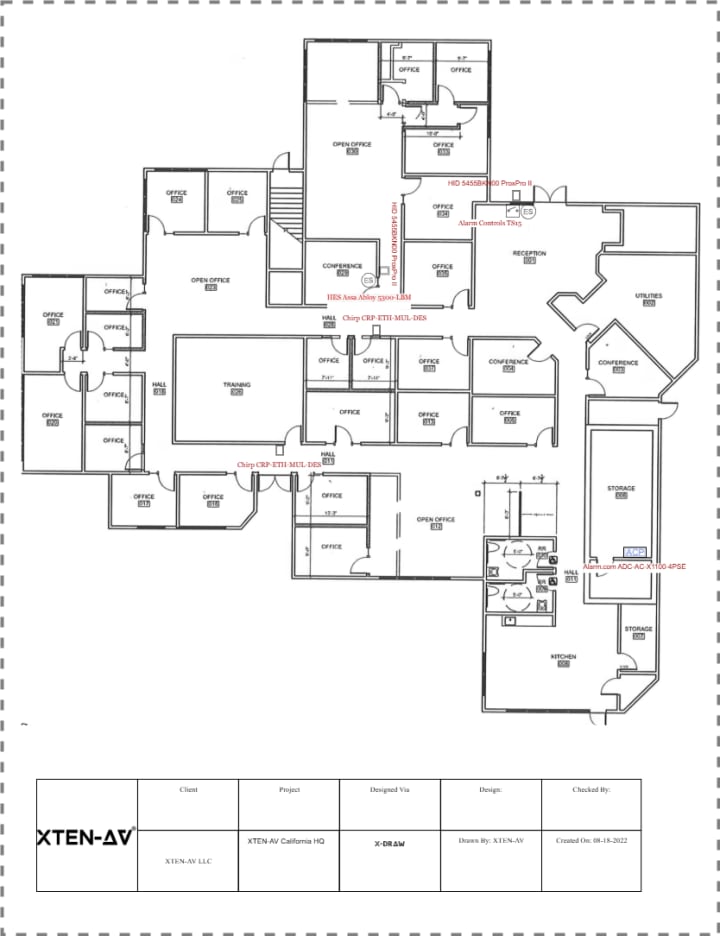
The XTEN-AV X-DRAW is an AV and security-system-based access control system design software. It features proprietary AI-powered automation. It also comprises cloud-based access and trust of over 20000+ professionals.
X-DRAW caters to the user’s needs and is an easy-to-use software. It has a robust and comprehensive feature set. And it integrates seamlessly into AV system design workflows. Here are the reasons why X-DRAW is the best among all the options:
Key Features:
Purpose-built for AV and Access Control Workflows:
Unlike generic CAD tools, X-DRAW caters to a specific niche. This niche comprises audiovisual and low-voltage system integration work. X-DRAW includes built-in libraries of access control hardware devices and cabling connectivity. The libraries also include port types and signal flows, saving designers time and effort.
Extensive, Manufacturer-Verified Product Library:
The X-DRAW comprises an extensive repository of 1.5 million+ products from different brands. The library features accurate specifications, dimensions, power consumption, and connector types. It also includes images and mounting information of the product. Hence, there are minimal mistakes, and the selected components are compatible.
Automated documentation and Signal/Wiring Logic:
X-DRAW automates error-prone, tedious, and unproductive work through access control system design. It automates the routing of wiring and signal flow between devices. And it provides a real-time bill of materials (BOMs).
X-DRAW also automates all the associated documentation associated with the design. The documentation includes cable schedules, rack elevations, layout diagrams, and connection diagrams.
Integration with Floor Plans and Real-World Layouts:
Users can upload their floor plans in different formats (AutoCAD, VISO, etc.). They can also use the built-in templates. Once done, they can place the access control components directly into the plan. This provides a logical and spatial design while accounting for different aspects. These aspects include distances, positioning, line of sight, zones, egress, and the emergency exits.
Cloud-Based Collaboration and Version Control:
X-DRAW offers cloud-based collaboration and version control. As a result, teammates can access the project simultaneously. The team may include security engineers, salespeople, security consultants, and installers. They can also review it and make alterations in real-time. It is the only solution that offers such a feature.
The cloud features ensure all changes are instantly updated. And, the version control ensures team members can comment on the design and approve the workflows. This ensures zero misunderstandings and everyone works with the latest information.
Templates, Reusability, and Customization:
X-DRAW offers the creation of templates for standardized device configurations. It also allows naming conventions, zones, etc. So each new project does not start from scratch. Designers can also make custom blocks or library items as per their organization’s standards. The customized blocks or items improve the consistency and decrease the design time.
Speed and Efficiency:
X-DRAW consists of an extensive library, auto-routing, auto-documentation, and floor plan integration capabilities. Thus, it enables designers to produce proposals, system specs, and drawings much faster. This provides a competitive advantage through efficient responses, cost-effective labor, and fewer change orders.
Interoperability and Exports:
X-DRAW allows import and export for the most common formats (DWG, Visio, etc.). Thus, professionals can share or coordinate design work with other team members using different tools. This results in excellent collaboration between all the professionals participating in the project.
Accuracy and Compliance Support:
X-DRAW also accounts for port compatibility, product specs, power budgets, and proper cable paths. This accountability reduces design errors. Besides, its thorough documentation and visuals ensure compliance with industry standards and regulations. This is especially true in security-sensitive areas.
2. AutoCAD
Autodesk’s AutoCAD is a major player in the CAD software market. And it is an option for access control system design. Designing an access control system was not initially intended for this application. Yet, many security professionals use AutoCAD because of its capabilities in drafting, 3D modeling, and customization.
Key Features:
- Extensive drawing and editing tools for creating detailed 2D and 3D designs
- Support for custom blocks, layers, and attributes to represent access control components
- Integration with other Autodesk products, such as Revit, for building information modeling (BIM)
- Large user community and extensive third-party resources and plugins
3. Visio
Microsoft Visio is a diagramming and vector graphics program. And it is used to create detective layouts and wiring diagrams. It offers ease-of-use accessibility, along with integration with other Microsoft Office products. Thus, it is a preferred option for minor undertakings or companies that are already making use of the Microsoft Office suite.
Key Features:
- Wide range of built-in shapes and stencils for network and security system diagrams
- Ability to create custom shapes and templates for access control components
- Integration with Microsoft Office and SharePoint for collaboration and documentation
- Automated layout and routing tools for simplifying diagram creation
4. D-Tools System Integrator
D-Tools System Integrator is an all-encompassing AV and security system integration software. It comes with advanced access control design features. The software combines a vast product library and proposal generation tools. It also features project management capabilities that attract system integrators and security professionals.
Key Features:
- Extensive, supplier-verified product library with detailed specifications
- Drag-and-drop system design with automatic cable routing and bill of materials generation
- Integrated proposal and documentation generation tools
- Project management features, including scheduling, resource allocation, and change order tracking
5. ONVIF Device Manager
ONVIF Device Manager is a no-cost, open-source program. You can control and set up ONVIF-compatible IP security devices with different equipment. This equipment includes access control readers, controllers, and intercoms.
ONVIF Device Manager is not a comprehensive design tool. But it is helpful in the integration and testing of components involved in the ONVIF-based access control system.
Key Features:
- Automatic discovery and configuration of ONVIF-compliant devices
- Ability to manage user accounts, access levels, and schedules
- Support for event handling and notifications
- Integration with video management systems (VMS) for unified security management
6. SketchUp Pro
SketchUp Pro, which is a product of Trimble, is an all-purpose 3D modeling application. It is one of the foremost access control system design tools. It has a user-friendly interface, an extensive 3D model library, and an option to custom-design parts.
Key Features:
- Intuitive 3D modeling tools for creating detailed access control system layouts
- Extensive library of 3D models, including doors, windows, and security components
- Ability to create custom components and materials for specific access control devices
- Integration with other design software, such as AutoCAD and Revit, through import/export capabilities
7. Genetec Security Center
Genetec Security Center is a platform that strengthens the security system. It includes access control and video monitoring. It also allows license plate recognition and comprises alarm detection capabilities. Its Access Control Manager module provides an extensive and powerful suite. This suite helps manage the entire company’s access control systems. Also, it features designing, configuring, and working tools.
Key Features:
- The graphical map-based interface for visualizing and configuring components of access control
- Support for the most popular manufacturers’ security products. These products are generally various access control hardware.
- Creation of advanced access rules and managing permissions. These permissions also include role-based access control (RBAC)
- Video monitoring and other security systems integration, providing unified threat management.
8. Lenel OnGuard
Lenel OnGuard is an integrated security management platform that comprises access control. It offers an extensive tool set for the design, installation, and operation of enterprise access control systems. The software has a modular architecture and comprehensive integration capabilities. Thus, it is the top choice for large-scale, complex environments.
Key Features:
- Graphical system design tools used in defining readers, doors, and access control components
- The product provides support for various access control hardware and authentication methods.
- Access level management that is well advanced with time-based and conditional access rules
- Integration with video surveillance, intrusion detection, and visitor management systems
9. Honeywell Pro-Watch
Honeywell Pro-Watch is a comprehensive access control solution and security management software. It unifies all the activities of the enterprise access control system to a single interface. These activities comprise designing, configuring, and monitoring the access control system. It has a robust foundation and versatile integration capabilities. Thereby, it is an excellent option for huge enterprises located at many sites.
Key Features:
- Graphical system configuration tools for specifying access control panels, readers, and doors
- Wide support for Honeywell and third-party access control hardware
- Sophisticated access level administration possibilities, featuring time-based and event-driven access regulations
- Connection to video monitoring, intrusion detection, and building management systems
10. S2 Security NetBox
S2 Security NetBox is a web-based platform for access control and security management. It provides a simple interface for different aspects of IP-based access control systems. These aspects include designing, configuring, and monitoring. It has a strong base and open integration capabilities. As a result, it is a preferred option for organizations of all sizes.
Key Features:
- Web-based system configuration tools for specifying access control components and rules
- Wide support for IP-based access control hardware and a variety of authentication methods
- Complex access level management options, including role-based and time-based access control
- Linking with video surveillance, visitor management, and mobile credentialing systems
Case Studies
Healthcare Facility:
A large hospital had to replace its access control system. The need was clear. Raise security. Meet HIPAA rules. Link with the existing video surveillance and visitor management systems. The hospital security team used XTEN-AV X-DRAW to map the site’s needs. X-DRAW lets them draw a complete access control system that fits the site well.
Design work was made easy by the hardware library and docs. Team tools let staff share notes and view changes. Many people took part in the review. Each reviewer could add feedback. The team saw changes at once. This sped up approvals. The final access control system is secure. It meets the rules. It is easy for users. It can grow as the hospital grows.
Educational Institution:
A university campus wanted to swap an old access control system for an IP-based one. They wanted fine control for a mixed user base. Students, faculty, staff, and visitors all need different access. IT and security met to plan a single system. They used Genetec Security Center with the Access Control Manager module. That gave one screen to access and a video.
The software gave precise access level control. Genetec Security Center also offered strong links to other systems. The team made access rules by user role and by time. The system used real-time events to change access when needed. Labs, classrooms, and offices now have the proper rules. The right people go to the right zones at the correct times. The system also logs events and aids audits.
Commercial Office Building:
A large corporate office had to update its access control system. Goals were to boost security, simplify user work, and link to building systems. Using Lenel OnGuard design tools, the security team drew a complete plan quickly. The plan met the needs of the site.
Lenel OnGuard works with many hardware types and login methods. The team picked parts that were safe and easy to use. They used badge readers, mobile keys, and multi-factor logins. The software links the access control system to HVAC, lighting, and energy management systems. This cuts manual work. It also made care and updates easier to do.
Conclusion
Choosing the right access control system design software is a key task. The right tool makes sites safe and systems easy to use. These tools speed the design work. They cut down on errors and mix-ups. They also let teams craft a system that fits their site.
From the ten products we looked at, XTEN-AV X-DRAW stood out. It has a wide set of tools. It is easy to use and to link to AV system design work. X-DRAW has built-in libraries, auto docs, and wiring logic. It also has cloud team tools for many kinds of orgs.
Still, the best software for your firm will depend on your needs. Think of your current kit and your team’s skill set. Check each vendor for features and service. Think about scale, rule needs, and how easy it is to use.
Before you buy, run a pilot in a live area. And check each aspect for ease-of-use and getting your money’s worth for the future. It will help you select the software that goes along with the security landscape.
Security professionals can stay ahead of competitors. They can make projects secure, compliant, and resilient against changing threats. Being aware of the latest trends, technologies, and best practices helps them act fast.
Using innovative tools at their disposal speeds work and improves outcomes. This reduces the response time of the organizations. It also keeps them safer, more resilient, and ready for future risks. So, what are you waiting for? Decide on your requirements and buy the best software that caters to your needs.
User Queries and Answers
Q: What factors should I consider when choosing access control system design software?
A: In the beginning, the software should be very user-friendly. It should operate with your current security infrastructure and accommodate the devices that you plan to use. Besides, you have to think about the future and how easy it will be to upgrade, and if the vendor will be providing excellent support and assistance.
Q: Can access control system design software help ensure compliance with security regulations?
A: Yes. Many access control system design software tools include functions to help meet rules. These compliances include GDPR, HIPAA, and ISO 27001. These functions often include audit trails and access level management. They also comprise reporting to show compliance and that you follow best practices.
Q: How do I integrate access control with other security systems using these design tools?
A: Usually, the design tools allow linking of access control with video surveillance (CCTV), intrusion alarms, and fire systems. Connections are made possible by open protocols like ONVIF, APIs, or built-in connectors, which lead to smooth sharing of events and information between the systems.
Q: What is the learning curve for using access control system design software?
A: Learning time varies with the software and the user’s proficiency. Software like XTEN-AV, X-DRAW, and Microsoft Visio usually comes with a friendly user interface. They allow for drag-and-drop operation and are supported by large libraries of ready-made components. More sophisticated tools, such as AutoCAD, however, might take longer to learn and demand more technical skill to be proficient.
Q: Can access control system design software help with project management and collaboration?
A: Absolutely. Many products are equipped with project management and collaboration features. These features facilitate easier communication among stakeholders and faster design work. Therefore, you need to look out for version control, comments, and approval workflows. And you also should select multi-user editing for concurrent work.
Q: How do I ensure that my access control system design is scalable for future growth?
A: Choose software that is designed for modular, expandable, open-architecture solutions. The right tool allows you to start with a small installation and then gradually increase the number of readers, doors, and components as the business grows. It also takes into account the growth potential of both the hardware and the software platforms, thus avoiding complete system replacement down the road.
Q: What kind of technical support and training is available for access control system design software?
A: The support provided by the vendor is not the same across the board. Some vendors like Genetec and XTEN-AV also offer online resources and training programs. Also, every customer has a support team assigned to them, which will resolve the issue quickly and effectively. Other tools do not have the same level of support and work mainly through community forums and a help desk. When you are checking options, think about how much help you actually need.
Q: How do I choose the right access control hardware components using these design tools?
A: The design software for access control systems invariably comes with libraries of hardware items from well-known major brands. It displays the specifications and compatibility of all the products. When making the selection, divide the parts according to the security requirements. Make sure to examine how difficult it is to fit them already into the building infrastructure. Consider the experience of the user. Confirm that the parts integrate properly with your current system.
A good design tool really helps you in the process of searching out the components that meet your requirements. It is also possible to generate a bill of materials (BOM) through these tools. Take the BOM as a list of parts that you will be buying. It not only prevents items from being missed and thereby hastening the whole installation and testing process, but also makes it easier to manage the overall installation and testing process.
About the Creator
Anni Grey
My name is Anni Grey, and I possess substantial knowledge and proficiency in the field of audio visual (AV) technology.
📢 Raise Your Voice Thread: 01/22/2026
Our “Raise Your Voice Threads” are hosted most alternating Thursdays at 12PM ET to offer creators more avenues to uncover exceptional stories on Vocal. As we are continuously searching for fresh creators and inspiring stories, this thread provides an opportunity to exchange and discuss the stories that have moved and motivated us on Vocal.
By Raise Your Voice by Vocal4 days ago in Resources



Comments
There are no comments for this story
Be the first to respond and start the conversation.