
Why My Phone Gets Hot Even When I’m Not Using It
What Idle Overheating Really Means—and How to Stop It

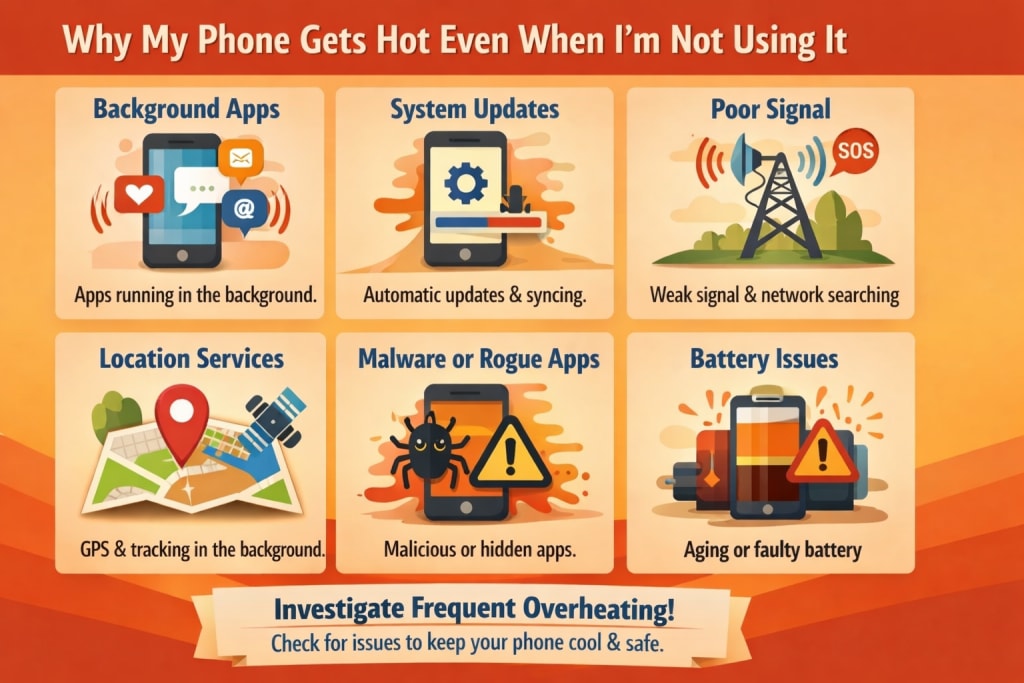
It’s one of the most unnerving phone troubles.
Your phone is simply sitting there.
Screen off.
No apps open.
And yet, when you take it up, it’s warm.
Sometimes uncomfortably so.
The instant response is fear:
“Is my battery damaged?”
“Is something running secretly?”
“Is my phone about to fail?”
In most circumstances, the answer is no.
Phones may heat up even while idle—and the cause is generally unseen background stress, not a hardware issue.
“Idle” Doesn’t Mean Inactive
When your phone seems idle, it’s still performing work.
Even with the screen off, your phone:
keeps connected to the network
listens for calls and texts
syncs applications silently
tracks location changes
conducts system maintenance
This background activity is typical.
Heat arises when too much of it overlaps at once.
Poor Signal Is the Biggest Cause of Idle Heating
A weak or inconsistent signal is one of the most prevalent reasons phones heat up when “doing nothing.”
When the signal is low, the phone:
improves antenna power
retries data connections
changes between towers
keeps network radios activated
All of this creates heat.
That’s why idle heating commonly happens indoors.
at work
in basements
when traveling
in elevators or parking garages
The phone isn’t malfunctioning—it’s trying to remain connected.
Background Sync Loves Idle Time
Apps select idle periods to work.
When you’re not using your phone, applications may:
back up photographs
sync messages
refresh content
upload analytics
check for updates
Individually, these chores are modest.
But when numerous programs sync together, heat builds—quietly.
You don’t notice activity.
You feel the warmth.
Location Services Can Keep the Phone Warm
Many applications seek background location access.
That permits them to:
check movement
update geofences
record location changes
These inspections happen regularly and discreetly.
If numerous applications have “always allow” location access, the phone seldom enters deep rest—leading to heating even while inactive.
Charging Heat Doesn’t Disappear Immediately
If the phone was charging recently—especially with quick charging—heat might remain.
Charging:
boosts battery temperature
relaxes background limitations
permits maintenance duties
Even after disconnecting, the machine may still be cooling down.
Using a thick cover may retain the heat longer, making it seem like the phone is heating “on its own.”
Updates and Maintenance Prefer Idle Moments
After updates or app downloads, phones undertake maintenance in the background:
file re-indexing
app optimization
system checks
These processes frequently run while the phone is idle.
For a few days following an update, idle heating is common—and transient.
Notifications Keep Waking the System.
Each notification:
awakens the processor
activates network radios
illuminates the screen temporarily
If alerts increased recently—new applications, new groups, system suggestions—idle warmth might follow.
A loud phone is a heated phone.
Why Restarting Often Helps (Temporarily)
Restarting:
pauses background processes
clears trapped network activity
resets thermal management
That’s why phones typically feel colder after a restart.
If warmth returns, the cause wasn’t removed—just halted.
What Idle Heating Does Not Mean
In most circumstances, idle heating does not mean:
hacking
battery failure
imminent damage
malware
Those difficulties normally exhibit apparent indicators, not subtle warmth.
Idle heating is mainly environmental and behavioral.
What Actually Reduces Idle Heating?
You don’t require dramatic actions.
These adjustments benefit most users:
utilize steady Wi-Fi while inside
restrict background location access
prohibit background activity for unused applications
minimize unwanted notifications
remove thick casings when not required
avoid poor signal regions where possible
Cooling improves as background tension reduces.
When to Pay Attention
Idle warmth is typical sometimes.
Pay heed if:
the phone turns heated regularly
battery drains fast alongside heat
performance diminishes noticeably
heat occurs instantly after disconnecting, every time
These suggest continuous background stress—not failure.
Last Thoughts
If your phone becomes hot even while you’re not using it, don’t worry.
Phones don’t heat up randomly.
They heat up while they’re silently functioning.
Once you grasp what’s going on in the background, idle warmth ceases seeming mysterious—and becomes tolerable.
Your phone isn’t betraying you.
It’s simply bustling when you’re not looking.
Disclaimer
This article represents my findings and general smartphone thermal behavior. Device temperature may vary based on model, software version, environment, network conditions, and use habits.

About the Creator
abualyaanart
I write thoughtful, experience-driven stories about technology, digital life, and how modern tools quietly shape the way we think, work, and live.
I believe good technology should support life
Abualyaanart
Keep reading
More stories from abualyaanart and writers in The Swamp and other communities.
Trump’s Actions May Be Illegal — But His Greed Might Be the Only Thing Holding Him Back
In American politics, few figures provoke as much controversy, outrage, and relentless fascination as Donald Trump. Years after entering the political arena, he remains a dominant force not only in elections and headlines, but also in courtrooms and public debate. Legal scholars, journalists, and watchdog groups have repeatedly argued that many of Trump’s actions — both during his presidency and after — crossed clear legal and ethical lines. From election interference claims to allegations of abusing executive power, mishandling classified information, and entangling public office with private business interests, the accusations against Trump are neither isolated nor trivial. They form a pattern that critics say reveals a leader willing to push, bend, or outright ignore the law when it suits him. And yet, paradoxically, Trump has not gone as far as many of his harshest critics once feared. The reason may not be respect for democratic norms or fear of legal accountability — but something far more personal: his own greed. This is not a defense of Trump’s conduct. Rather, it is an attempt to understand a reality that even some of his opponents quietly acknowledge. Trump’s obsession with personal wealth, brand image, and financial survival may sometimes limit how far he is willing to go, even when legality appears optional. A Pattern of Questionable Legality Trump’s political career has been accompanied by an almost constant cloud of legal scrutiny. Investigations have examined campaign finance violations, obstruction of justice, business fraud, election interference, and misuse of power. Unlike many politicians who rely on subtlety or plausible deniability, Trump often operates in full public view, openly testing the boundaries of what he can get away with. His response to legal challenges is also strikingly consistent. He rarely engages with the substance of allegations. Instead, he frames investigations as politically motivated “witch hunts” and portrays prosecutors, judges, and journalists as enemies of the people. This narrative has proven effective with his base, many of whom see legal accountability not as justice, but as persecution. The brazenness of this strategy has led critics to argue that Trump believes himself above the law. And yet, despite his rhetoric, he has repeatedly stopped short of actions that would create immediate, irreversible consequences. The question is why. The Central Role of Money and Brand To understand Trump’s restraint, one must understand how he sees himself. Trump has never primarily viewed himself as a public servant or ideological leader. His core identity is that of a businessman and brand. Trump’s wealth — or at least the perception of it — is central to his political power. His properties, licensing deals, fundraising apparatus, and media presence all depend on the image of success. Politics, for Trump, has never been separate from profit. It is another platform for monetization and self-promotion. Unlike leaders driven by ideology, nationalism, or historical legacy, Trump’s decisions often reflect a simple cost-benefit calculation. Actions that threaten his brand value, fundraising ability, or business empire are approached with caution. Actions that energize supporters without endangering his financial interests are embraced enthusiastically. This explains a recurring pattern: Trump escalates rhetorically, but hesitates operationally. He may use inflammatory language, encourage outrage, or flirt with extreme ideas, but often stops short of moves that would directly and permanently damage his wealth. Greed as a Limiting Force Greed is typically viewed as a corrupting influence, and in many ways, it is. But in Trump’s case, it also functions as a brake. Absolute power, while tempting, carries real risks — sanctions, asset seizures, international isolation, and loss of market confidence. Trump may dismiss institutions publicly, but he understands markets instinctively. He knows investors flee chaos, lenders demand predictability, and brands collapse under prolonged legal uncertainty. Even when he attacks courts or regulators in speeches, his actual behavior often reveals caution: delays, negotiations, settlements, and procedural maneuvering rather than outright defiance. This suggests that Trump’s greatest fear is not prison, but bankruptcy. Having faced financial collapse multiple times in the past, he appears determined never to experience it again. His greed does not eliminate risk-taking, but it shapes where he draws the line. Why This Is Not Reassuring It would be a profound mistake to find comfort in the idea that greed will protect democracy. Self-interest is not a moral safeguard; it is an unreliable and fragile one. Trump’s restraint is situational, not principled. When personal profit and political power align, the danger increases dramatically. Relying on greed rather than law also sets a dangerous precedent. Democracy should not depend on whether a powerful individual calculates that illegal actions are “bad for business.” That logic leaves institutions vulnerable to leaders with fewer assets to lose, greater tolerance for chaos, or ideological motivations stronger than personal wealth. In Trump’s case, the line is not legality — it is profitability. The Legal System Still Matters Despite its flaws and delays, the legal system has not been irrelevant in Trump’s story. Courts have imposed fines, restricted business practices, and upheld investigations despite intense political pressure. These outcomes matter, not just symbolically, but financially. Every legal loss chips away at Trump’s carefully constructed image as a “winner,” an image that underpins his fundraising and influence. Ironically, his obsession with money also makes him vulnerable. Legal accountability threatens the very thing he values most. A Calculated Balance Trump operates within a narrow corridor: push boundaries enough to energize supporters, but not so far that financial consequences become catastrophic. This balancing act explains why aggressive speeches are often followed by procedural stalling, appeals, and strategic retreats. It also explains why Trump attacks institutions rhetorically while continuing to rely on them practically. Banks, courts, and markets are not enemies he can afford to lose entirely. Conclusion Donald Trump’s legacy will likely be defined by how often he tested the limits of the law — and how inconsistently those limits restrained him. Yet one constant remains unmistakable: his devotion to personal profit. That devotion may sometimes hold him in check — not because he respects democracy, but because he values his wealth. Democracy deserves stronger guardians than greed. But for now, it remains an uncomfortable part of the equation in understanding Trump’s behavior and the risks he poses to American political life.
By Muhammad Hassanabout 23 hours ago in The Swamp


Comments
There are no comments for this story
Be the first to respond and start the conversation.