
Microsoft Updates Notepad and Paint with More AI Features
“Classic Windows apps evolve as Microsoft brings AI-powered writing and creativity tools to everyday users”

Microsoft has taken another major step in embedding artificial intelligence into everyday computing by rolling out new AI-powered features for Notepad and Paint, two of the most iconic and widely used applications in Windows. Once considered simple, almost nostalgic tools, Notepad and Paint are now being transformed into smarter, more capable apps designed for the modern AI-driven era.
These updates reflect Microsoft’s broader strategy to integrate AI deeply across Windows, making productivity tools more intuitive, efficient, and accessible for users at every level—from casual PC users to professionals.
A New Chapter for Classic Windows Apps
For decades, Notepad and Paint have remained largely unchanged. Notepad was known for its simplicity as a plain text editor, while Paint served as a basic drawing and image-editing tool. However, Microsoft’s latest updates signal a shift away from minimalism toward AI-enhanced creativity and productivity.
By introducing AI features into these apps, Microsoft aims to modernize core Windows experiences without removing their familiar simplicity.
AI Enhancements in Notepad
Notepad is receiving several intelligent upgrades designed to assist users with writing, editing, and understanding text more efficiently.
1. AI-Powered Text Assistance
One of the most notable additions is AI-assisted text generation and rewriting. Users can now:
Rewrite text for clarity or tone
Summarize long passages
Improve grammar and sentence structure
This makes Notepad more useful for drafting quick notes, writing emails, or cleaning up rough text without switching to a full-featured word processor.
2. Smart Formatting and Suggestions
The AI can also suggest formatting improvements, detect inconsistencies, and help organize text logically. While Notepad still remains lightweight, these subtle enhancements significantly boost productivity.
3. Context-Aware Editing
AI features are context-aware, meaning they adapt suggestions based on what the user is writing—whether it’s code snippets, notes, or plain text documents.
AI-Powered Creativity in Paint
Paint has arguably received the more dramatic upgrade. Microsoft is positioning Paint as a beginner-friendly AI creative tool rather than just a basic image editor.
1. Generative Image Creation
Paint now includes AI-powered image generation, allowing users to create images using text prompts. By typing a description, users can generate visuals directly within the app—an ability previously reserved for advanced design software.
This feature is especially useful for:
Quick illustrations
Concept sketches
Social media visuals
2. Background Removal and Object Selection
New AI tools allow users to:
Remove backgrounds with one click
Select and isolate objects more accurately
Apply edits without affecting the entire image
These features significantly reduce the time and skill required to edit images.
3. Enhanced Drawing Tools
AI-assisted drawing tools help refine shapes, smooth lines, and improve color balance automatically. This makes Paint more accessible for users who lack professional design experience.
Why Microsoft Is Bringing AI to Everyday Apps
Microsoft’s decision to upgrade Notepad and Paint is part of a larger vision: making AI a daily companion, not just a premium feature in advanced software.
Key motivations include:
Democratizing AI for all Windows users
Increasing productivity without complexity
Keeping Windows competitive against AI-focused ecosystems
Encouraging creativity at a basic user level
By embedding AI into familiar tools, Microsoft lowers the learning curve and increases adoption.
Integration with Windows Copilot
Many of the new AI features in Notepad and Paint are closely tied to Windows Copilot, Microsoft’s AI assistant. Copilot helps power:
Text suggestions
Image generation
Editing recommendations
This tight integration ensures a consistent AI experience across the Windows ecosystem, from system settings to creative apps.
Privacy and User Control
Microsoft has emphasized that these AI features are optional and user-controlled. Users can choose when and how to use AI assistance, ensuring that the core simplicity of Notepad and Paint remains intact.
The company has also stated that it is committed to responsible AI use, with safeguards in place to protect user data and prevent misuse.
Who Benefits Most from These Updates?
These updates benefit a wide range of users:
Students – For note-taking, summaries, and creative projects
Professionals – For quick drafts, text cleanup, and visual mockups
Casual users – For everyday tasks without complex software
Creators – For brainstorming visuals and refining ideas
By upgrading tools that nearly every Windows user already has, Microsoft ensures maximum reach.
How This Compares to Competitors
Other tech companies are also integrating AI into their products, but Microsoft’s approach stands out due to its focus on core system apps rather than add-ons.
While competitors often introduce AI through separate tools or subscriptions, Microsoft is embedding intelligence directly into apps users already trust and understand.
This strategy could give Windows a strong edge in the increasingly competitive AI software landscape.
What’s Next for Windows AI?
Microsoft has hinted that these updates are only the beginning. Future enhancements may include:
More advanced AI writing tools
Expanded image editing capabilities
Deeper Copilot integration
Voice-based AI interactions
As AI becomes a standard feature across Windows, users can expect even more seamless and intelligent experiences.
Conclusion
Microsoft’s decision to update Notepad and Paint with more AI features marks a significant evolution of two classic Windows applications. By blending simplicity with intelligence, Microsoft is redefining what everyday tools can do.
These updates demonstrate that AI doesn’t have to be complex or intimidating—it can enhance even the simplest apps in meaningful ways. As Windows continues its AI transformation, Notepad and Paint are no longer just basic utilities; they are becoming smart companions for writing and creativity.
For users, this means more power, less effort, and a glimpse into the future of everyday computing.
About the Creator
Keep reading
More stories from Aarif Lashari and writers in The Swamp and other communities.
The Best Cold-Weather Beauty Products Under £50: 24 Skin, Hair, and Body Essentials for Winter
Winter can be tough on our skin, hair, and body. Cold winds, low humidity, and indoor heating often leave us dry, dull, and chapped, making it essential to update your beauty routine with products that offer hydration, nourishment, and protection. Fortunately, you don’t have to break the bank to maintain healthy, glowing skin this season. We’ve rounded up 24 cold-weather beauty products under £50 that will help you survive the winter months with confidence.
By Aarif Lashariabout 12 hours ago in The Swamp
Nvidia Suppliers Halt Work After China Blocks H200 Chip Shipments
The global semiconductor industry is once again caught in the crossfire of geopolitics and technology. This time, the spotlight is on Nvidia’s H200 artificial intelligence chip, as reports confirm that several Nvidia suppliers have halted production after China blocked shipments of the high-performance processor at its borders. What may seem like a routine customs issue is actually far more significant. The decision has disrupted supply chains, unsettled investors, and raised fresh concerns about the future of AI development amid escalating U.S.–China tech tensions. So what exactly happened, and why does it matter so much? What Triggered the Sudden Halt? According to multiple reports, Chinese customs authorities recently informed logistics agents that Nvidia’s H200 chips would not be allowed into the country. This instruction came quietly, without a public policy announcement, but its effects were immediate. Suppliers responsible for producing specialized components used exclusively in the H200 chip responded by pausing operations. These parts are highly customized and cannot easily be repurposed for other products, meaning continued production would risk piling up inventory that cannot be sold or shipped. For suppliers already operating on tight margins, stopping work was the safest financial option—even though it came at a significant cost. Why the Nvidia H200 Chip Is So Important The H200 chip is one of Nvidia’s most advanced AI processors, designed specifically for heavy-duty workloads such as training large language models, data-center AI operations, and advanced cloud computing tasks. It builds on Nvidia’s earlier AI chips and delivers improved memory performance and processing speed, making it especially attractive to companies working at the cutting edge of artificial intelligence. China has been a major market for Nvidia’s AI hardware. Demand for the H200 reportedly surged among Chinese tech giants, research institutions, and cloud service providers eager to stay competitive in the global AI race. Some estimates suggest Chinese orders reached well over one million units, far exceeding initial supply expectations. That demand is exactly why the shipment block has sent shockwaves through the industry. The Role of U.S. Export Controls To understand the bigger picture, it’s important to look at U.S. export restrictions on advanced semiconductors. Earlier this year, U.S. authorities allowed Nvidia to sell the H200 to China under strict licensing conditions. These included safeguards to prevent military use, third-party verification requirements, and limits on shipment volumes. While the approval was narrower than Nvidia had hoped for, it still opened the door for legal exports. However, China’s decision to block the chips suggests that U.S. approval alone is no longer enough. Beijing appears to be asserting its own strategic priorities, regardless of Washington’s licensing decisions. Why China May Be Blocking the Chips China has not issued an official explanation, but several motivations are widely discussed: 1. Reducing Dependence on Foreign AI Hardware China has been investing heavily in domestic semiconductor development. Limiting access to advanced foreign chips could push companies to adopt homegrown alternatives faster. 2. Strategic Leverage Advanced AI chips are now viewed as strategic assets. Controlling their flow gives governments leverage in broader trade and diplomatic negotiations. 3. National Security Concerns Even with export safeguards in place, China may be wary of relying on U.S.-designed technology for critical infrastructure and AI systems. Whatever the reason, the message is clear: AI hardware is no longer just a commercial product—it’s a political tool. Impact on Nvidia’s Supply Chain For Nvidia’s suppliers, the fallout has been immediate and painful. Many of these companies manufacture chip packaging, substrates, and printed circuit boards specifically designed for the H200. These components have little value outside Nvidia’s AI ecosystem, making them difficult to sell elsewhere. By halting production, suppliers are trying to avoid deeper losses—but the pause also highlights how vulnerable global supply chains have become to sudden regulatory decisions. This is not the first time Nvidia has faced such disruption. In the past, China-specific chips designed to comply with export rules were also shelved after regulatory uncertainty made them commercially unviable. Market Reactions and Investor Concerns News of the production halt has unsettled investors, raising concerns about Nvidia’s revenue projections and long-term China strategy. China represents a massive portion of global AI demand, and losing or delaying access to that market could force Nvidia to: Redirect inventory to other regions Adjust pricing strategies Slow future capacity expansion Reevaluate product designs to meet shifting regulations While Nvidia remains dominant in AI chips globally, repeated disruptions could give competitors—both Western and Chinese—an opportunity to gain ground. What This Means for China’s Tech Giants For Chinese companies, the shipment block creates new challenges. Major firms such as Alibaba, Tencent, and ByteDance rely heavily on advanced AI hardware to train models, power cloud services, and develop consumer applications. Without access to the H200, these companies may have to: Rely on older Nvidia chips Explore alternative suppliers Accelerate development of domestic AI processors In the short term, this could slow some AI projects. In the long term, it may strengthen China’s push for technological self-sufficiency. A Bigger Signal in the Global AI Race The Nvidia H200 situation is not an isolated incident—it’s a sign of where the world is headed. Artificial intelligence has become a strategic priority, and the chips that power it are now treated like critical infrastructure. Governments are increasingly willing to intervene, restrict, or block access in pursuit of national goals. As a result, companies operating in this space must now navigate not just market forces, but geopolitical risk at every stage of production and distribution. What Happens Next? At this stage, it’s unclear whether China’s block is temporary or the beginning of a longer-term policy shift. Much will depend on behind-the-scenes negotiations, future export rules, and how aggressively China pushes domestic alternatives. One thing is certain: the pause in Nvidia’s H200 supply chain underscores a new reality—the future of AI will be shaped as much by politics as by innovation. And for companies like Nvidia, adaptability may be just as important as technological leadership.
By Muhammad Hassan4 days ago in The Swamp
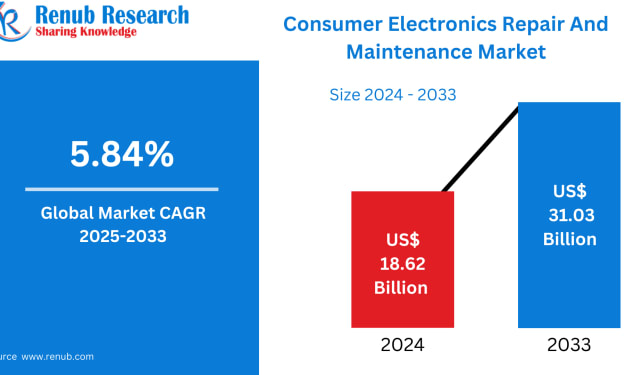
Consumer Electronics Repair and Maintenance Market Size, Growth & Forecast 2025–2033
Introduction: The Global Shift from Replacement to Repair The global Consumer Electronics Repair and Maintenance Market is undergoing a profound transformation. Once seen as a secondary service, repair has now become a strategic necessity as consumers, governments, and manufacturers respond to rising device costs, environmental concerns, and sustainability goals.
By Marthan Sira day ago in The Swamp



Comments
There are no comments for this story
Be the first to respond and start the conversation.