
A Guide to Creating Backups for Your Amazon EC2 Instance
How to Backup Amazon EC2 Instance
In the modern digital landscape, data is king. The integrity and availability of your data are crucial for the smooth operation of your business or project. With the rise of cloud computing, services like Amazon Elastic Compute Cloud (Amazon EC2) have become integral to many organizations' infrastructure. However, even in the cloud, the importance of data backup cannot be overstated. Unforeseen events such as hardware failures, human errors, or security breaches can result in data loss, potentially disrupting your operations and causing financial and reputational damage. That's why creating backups for your Amazon EC2 instances is a critical practice.
Why Back Up Your Amazon EC2 Instances?
Amazon EC2 provides resizable compute capacity in the cloud. It's highly scalable, flexible, and suitable for a wide range of applications. However, this scalability comes with its own set of challenges, particularly when it comes to data protection. Here are a few reasons why backing up your Amazon EC2 instances is essential:
Data Loss Prevention: Accidental deletion, hardware failures, software bugs, and cyberattacks can lead to data loss. Regular backups ensure that you can recover your data in case of such incidents.
Disaster Recovery: In the event of a major disruption, such as a region-wide outage or a catastrophic failure, having backups allows you to quickly recover and restore your services.
Security: Backups play a crucial role in data security. If your data gets compromised, having a clean backup from a known secure point in time can minimize damage and data leakage.
Compliance: Many industries and regulatory frameworks require organizations to have data retention and backup strategies in place. Failure to comply can result in legal and financial consequences.
Strategies for Backing Up Amazon EC2 Instances
Creating backups for your Amazon EC2 instances requires a well-thought-out strategy that aligns with your operational needs and risk tolerance. Here are some strategies to consider:
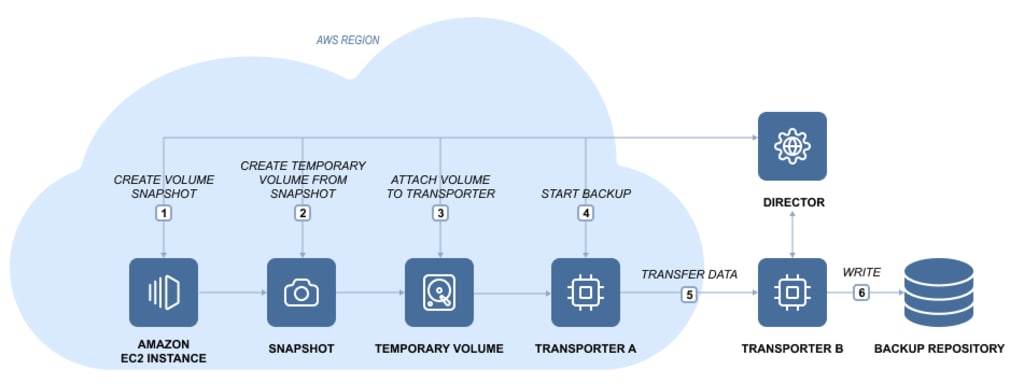
Amazon EBS Snapshots: Amazon Elastic Block Store (Amazon EBS) is a block storage service that provides persistent storage volumes for EC2 instances. EBS snapshots capture incremental changes to the data over time, allowing you to create point-in-time backups. These snapshots can be used to restore data volumes or create new volumes.
AMI (Amazon Machine Image) Backups: An Amazon Machine Image is a pre-configured virtual machine image used to create EC2 instances. Creating custom AMIs of your EC2 instances allows you to capture both the root volume and any additional data volumes. This is useful for preserving the entire state of your instance.
Third-Party Backup Solutions: Several third-party backup solutions are available that offer advanced features such as automated scheduling, cross-region backups, and enhanced data retention policies. These solutions can provide a more comprehensive and tailored backup approach.
Best Practices for Creating Backups
While the method you choose depends on your specific needs, there are some best practices that apply universally:
Regular Backup Schedule: Establish a regular backup schedule that suits your business needs. Consider factors like data volatility, recovery time objectives (RTO), and recovery point objectives (RPO).
Automate Backups: Whenever possible, automate the backup process. Automation reduces the risk of human error and ensures that backups are consistently created.
Off-Site Backups: Store backups in a different region or even outside the AWS ecosystem to safeguard against region-wide failures or account compromises.
Testing Backups: Regularly test your backup process by restoring data from backups to ensure that they are viable for recovery.
Data Retention Policies: Define clear data retention policies based on regulatory requirements and business needs. Avoid excessive data retention, as it can lead to storage costs and potential compliance issues.
Encryption: Whenever you create backups, consider encrypting them to ensure the security of your sensitive data.
The Recovery Process
Creating backups is only half the battle; the ability to restore your data effectively is equally important. Make sure you have well-documented and tested recovery procedures in place. Regularly simulate recovery scenarios to ensure that you can bring your systems back online smoothly when needed.
Conclusion
In the world of cloud computing, where flexibility and scalability are paramount, data protection should not be overlooked. Backing up your Amazon EC2 instances is an integral part of your overall data protection strategy. By implementing a well-defined backup strategy, adhering to best practices, and ensuring a robust recovery process, you can safeguard your data, minimize downtime, and maintain the integrity of your services, no matter what challenges arise.
About the Creator
Keep reading
More stories from writers in Lifehack and other communities.
Absolutely 100% Free Stuff With No Shipping Costs
In a world where everything seems to come with a price tag—including “free” offers that sneak in unexpected shipping fees—it can feel impossible to get truly free items. But with the right strategies, resources, and platforms, it is completely possible to score legitimate, 100% free stuff with no shipping costs or hidden charges. Whether you're looking to save money, reduce waste, or simply love the thrill of discovering freebies, this guide will walk you through the best ways to find authentic no-cost items online and in your local community.
By Master Binz4 days ago in Lifehack
Complete Guide to Wi-Fi Password Recovery & Protection
Understanding Wi-Fi Security Forgetting your Wi-Fi password is a common frustration in our connected world. This comprehensive guide explores legitimate methods to recover lost Wi-Fi credentials while emphasizing network security best practices. Whether you're a homeowner locked out of your network or an IT professional assisting users, this article provides ethical solutions while reinforcing the importance of protecting wireless networks from unauthorized access.
By Alexander Hoffmann2 days ago in Lifehack
Silver Screen Magic with Mae West
American actress and singer Mae West became a popular film actress during the Great Depression. She started entertaining in vaudeville, then performed on Broadway, and finally went to Hollywood. She signed up with Paramount Pictures and made her debut in the 1932 film “Night After Night.” She also starred in musicals, comedies, and crime dramas. The American Film Institute named her one of the best classic Hollywood actresses.
By Rasma Raisters4 days ago in Geeks


Comments
There are no comments for this story
Be the first to respond and start the conversation.