
How I Used IMEI to Track My Phone
Tracking your IMEI number is one of the simplest yet most important steps you can take to protect your phone and verify its authenticity.
Tracking your IMEI number is one of the simplest yet most important steps you can take to protect your phone and verify its authenticity. Whether you’ve misplaced your device, need to confirm ownership, or want to stay prepared in case of theft, understanding how to track imei number can make things a whole lot easier.
The IMEI acts like your phone’s digital fingerprint. It’s unique, permanent, and essential for things like device tracking, warranty claims, and blocking a stolen phone. In this guide, we’ll walk through the most reliable ways to find and track yours so you never feel stuck or unprepared again.
1) Use Your Device Settings
Explanation
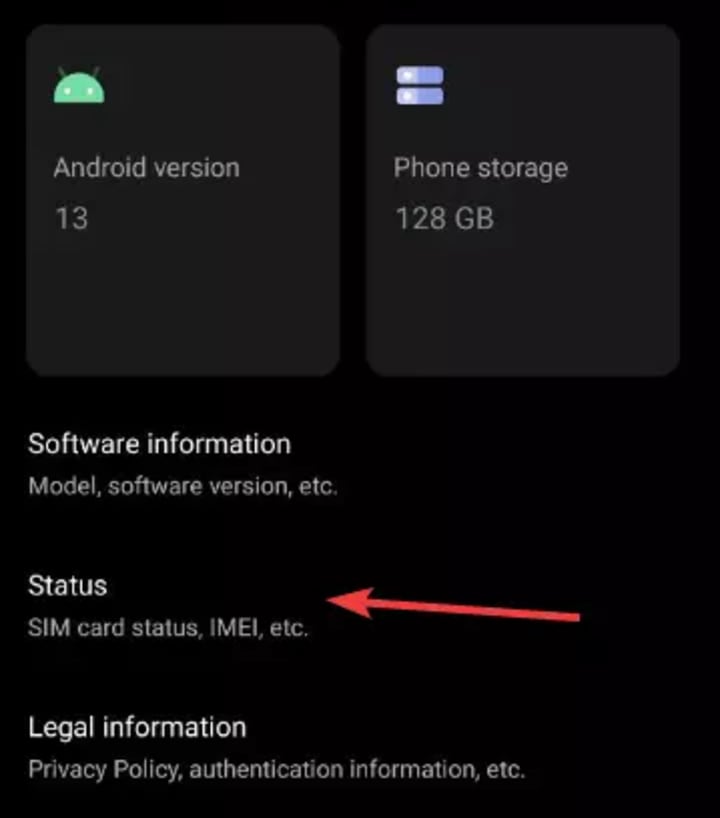
The easiest way to find your IMEI is right through the device’s built-in settings. Every smartphone—regardless of brand—stores its IMEI in the system menu.
For Android:
Open Settings
Tap About Phone
Look for IMEI or Status
For iPhone:
Go to Settings
Tap General
Select About
You’ll see a long 15-digit number—this is your IMEI. It’s accurate, direct, and doesn’t require an internet connection. This method is perfect when your phone is still operational and unlocked.
2) Check Your Phone Packaging
Explanation
Most phone manufacturers include the IMEI on the original box. You’ll usually find it printed on the sticker near the barcode. This is incredibly helpful if your phone is lost or stolen because you can still access the IMEI needed to file a complaint or lock the device.
Keeping your box or taking a photo of the sticker is a wise practice. It’s an offline, tamper-proof source of truth.
3) Dial a Simple USSD Code
Explanation
Perhaps the fastest method of all—just dial:
*#06#
The IMEI instantly appears on your screen. This code works universally on nearly all devices, even older feature phones. It doesn’t require internet or carrier support.
Because it’s universal, travelers and users with limited technical knowledge find this method extremely convenient. It also eliminates the need to browse settings, which may differ between phone models
4) Use Online Account Dashboards (Google/Apple)
Explanation
If you’re signed into a cloud account, you can easily retrieve your IMEI online—even without your phone.
Google Account (Android):
Visit Google’s Find My Device
Select your device
Look for IMEI Information
Apple ID (iPhone):
Log into appleid.apple.com
Go to Devices
Select your iPhone to view its IMEI
These dashboards offer secure, verified IMEI access, and they’re highly reliable. This is also where you can remotely lock or erase your device.
Later in this article, we’ll discuss tools like an imei number tracker, but your cloud account is often the most trustworthy starting point.
5) Try a Carrier Support Portal
Explanation
Most mobile carriers store IMEI data linked to your account. This helps them activate your SIM, unlock your device, or block the phone if it’s stolen.
You can usually:
Log into your carrier account
Go to My Devices
Select your line to view IMEI details
This method works even if you’ve swapped SIM cards or changed phones in the past. Carriers also keep more accurate device records than many third-party tools. When filing theft or loss reports, this is one of the primary sources law enforcement accepts.
6) Retrieve It Using Backup Records
Explanation
If you’ve ever synced your device with a computer, you might be able to retrieve your IMEI from backup files.
For iPhone + iTunes/Finder:
Connect your device (or open a previous backup)
Go to Preferences
Select your device to view IMEI details
For Android + Device Manager Tools:
Some PC companion apps (Samsung Smart Switch, Xiaomi Device Manager, etc.) store hardware IDs, including IMEI.
This is a lesser-known approach but a great fallback if your phone is broken or inaccessible. Having multiple ways to access your IMEI increases your chances of recovering a lost device.
7) Use Law-Enforcement or Lost-Phone Services
Explanation
If your phone is lost or stolen, your IMEI becomes critical. Many regional databases allow you to report or look up IMEI status to determine whether a device is:
Reported stolen
Blacklisted
Under investigation
This is also where advanced tools like an imei checker or specialized imei number tracker can come into play. While these tools differ in accuracy depending on the provider, they help confirm whether the device is still active or has been flagged.
However, always prioritize official channels—such as government or carrier-verified tracking databases—over unverified online services.
Conclusion
Knowing how to track your IMEI number isn’t just about tech skills—it’s about protecting your data, reclaiming your device, and maintaining peace of mind. From simple USSD codes to cloud dashboards and carrier tools, you now have multiple reliable ways to find your IMEI whenever you need it. Extra layers of visibility, nothing beats saving your IMEI somewhere safe today. Maintaining this number makes future troubleshooting, device replacement, and theft recovery far smoother.
About the Creator
Keep reading
More stories from Track IMEI and writers in Journal and other communities.
Understanding Verizon IMEI Check
In today's highly connected world, ensuring your mobile device is compatible with your carrier and not subject to any restrictions is crucial. One essential tool for this is the IMEI tracker, specifically for Verizon customers. The International Mobile Equipment Identity (IMEI) is a unique number assigned to every mobile device, which helps in identifying its make, model, and specifications. For Verizon users, the IMEI tracker plays a vital role in various aspects, from verifying compatibility with the network to ensuring the device is not blacklisted. This comprehensive guide will delve into the significance of the Verizon IMEI check, its functionality, and how to effectively utilize this tool.
By Track IMEI2 years ago in 01
Which Type of Plastic Yields the Highest Oil Output During Pyrolysis?
Plastic waste is a growing environmental challenge, and one of the promising methods for managing this waste is pyrolysis. Pyrolysis involves heating plastic to high temperatures in the absence of oxygen to break it down into smaller molecules, producing valuable by-products such as oil, gas, and solid residues. However, not all plastics yield the same amount of oil during the pyrolysis process.
By Bestonpyrolysis4 days ago in Journal



Comments
There are no comments for this story
Be the first to respond and start the conversation.