
How to Create Stunning Infographics Using ChatGPT
(Even If You Have No Idea What You’re Doing)

Some people can grow basil on a windowsill and suddenly feel like gods. Others try to bake banana bread, burn it twice, and end up blaming the oven. I fall squarely into the second category—especially when it comes to anything visual. Graphic design? You may as well ask me to fly a plane with chopsticks.
So imagine my quiet horror when I found out that infographics—those cheerful, information-packed little pieces of digital art—were the new “must-have” for online marketing, teaching, and even job hunting. Everywhere I looked, someone was slapping colorful facts onto perfectly designed charts like it was second nature. Meanwhile, I was still learning how to align text in Google Docs.
Then came ChatGPT’s updated image generation feature.
The Rise of AI-Generated Infographics
Not long ago, if you wanted a polished infographic, you had to either:
- Learn design software (and slowly descend into madness), or
- Pay someone else to do it (and then regret it when they use Comic Sans).
Today, we’re living in a world where you can type a few sentences and watch AI do the heavy lifting. That includes creating infographics that are clean, cartoonish, colorful, and—here’s the kicker—actually legible.
With ChatGPT’s new image creator, you can create infographics with perfect text, vibrant visuals, and design styles that make you look like you spent days on them (when in fact you were watching cat videos on the side).
How It Works: AI + Prompts = Magic
If you’ve ever tried an AI art tool, you know the routine. You type a prompt, wait for the digital fairy dust to settle, and—voilà!—you get something resembling your request, though sometimes with an extra hand or two thrown in for flair.
ChatGPT’s new image creator, however, is surprisingly accurate when it comes to text—which is the #1 problem in most AI-generated infographics. Want an infographic on “How to Compost Like a Woodland Fairy” or “Seasonal Garden Planning”? Type in a prompt like:
"Create image of an infographic for garden planning by season, colorful and fun, cartoonish style, for social media."
That’s it. No Photoshop degree required.
Real-World Example: Garden Planning by Season
Let’s say you want to create an infographic for your Instagram gardening account. You're not exactly sure what you want—but ChatGPT is more patient than any art school professor.
Just type something like:
“Help me create an infographic for gardening.”
ChatGPT will then gently interrogate you like a friendly customs agent:
- What kind of gardening?
- Where will it be used?
- What style do you prefer?
Once you respond (e.g., "garden planning by season, social media, colorful, cartoonish"), it gets to work. A few moments later, you’re looking at something that looks like it was pulled from a Martha Stewart PowerPoint—except, of course, you didn’t spend three hours formatting the margins.
The results? Delightful.
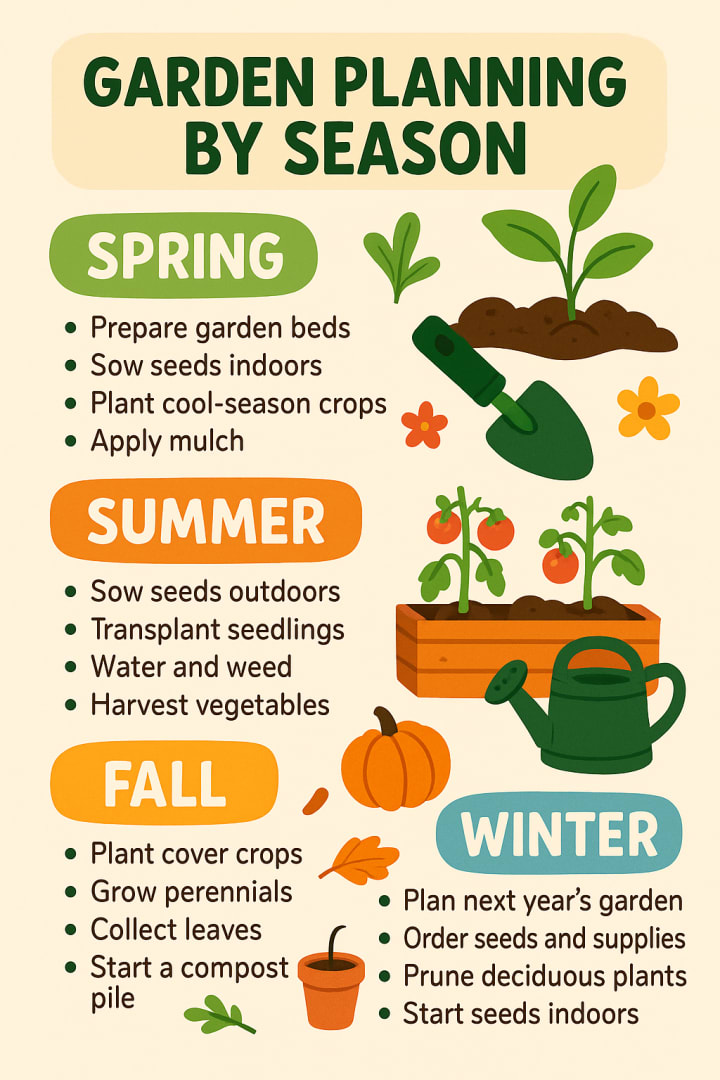
It’s clean. It’s visual. And unlike me, it doesn’t forget to water the tomatoes.
Pro Tips
Like all things AI, there’s a little imperfection baked into the system. Every now and then, the AI might get a character or two wrong in the text—turning “compost” into “compsot” like some kind of dyslexic wizard. But there’s an easy fix: just regenerate the image.
Click the little refresh button like you’re pulling a slot machine, and 9 times out of 10, you’ll get a crystal-clear version with perfect spelling. You can repeat this until it’s perfect. (I do this for almost everything in life, including online dating.)
Do You Need ChatGPT Plus?
Here’s the good news: You don’t need ChatGPT Plus to use this feature.
The free version will work just fine—though you may be subject to generation limits depending on the server load. Think of it like showing up to an all-you-can-eat buffet during lunch hour. You’ll get served, but you might have to wait in line.
If you’re planning to make dozens of infographics a day—for clients, your business, or your insatiable Pinterest board—you might want to upgrade. But for most casual users, free is more than enough.
Use Cases
You don’t need to be a designer. You just need to be someone who:
- Has a message to share
- Wants to stand out on social media
- Needs to explain complex info simply
- Is starting a blog, business, or course
- Wants to look professional without hiring anyone
From teachers making classroom visuals to digital marketers posting on LinkedIn, infographics made with ChatGPT are a smart way to save time, reduce costs, and increase impact.
And you can use them anywhere:
- Instagram Reels & Stories
- YouTube thumbnails
- Email marketing
- Online courses
- Even printed brochures if you’re feeling analog
Prompt Examples That Work
Want to get started? Here are a few tried-and-true prompts you can use immediately:
- “Create an infographic about the benefits of meditation, minimalist style, calming colors.”
- “Create a colorful infographic for beginner indoor plant care, cartoon style, social media use.”
- “Generate an infographic for how to start freelancing, vibrant and modern look, for Pinterest.”
- “Make a step-by-step infographic about how to make sourdough bread, fun and whimsical style.”
- Modify the content, vibe, and platform to match your needs. The AI takes care of the rest.
Final Thoughts
Infographics used to be reserved for the design elite, the kind of people who drink cold brew and say things like “brand voice.” But now, thanks to tools like ChatGPT, anyone with a decent internet connection can create visual magic with just a few words.
No subscriptions to design software. No YouTube rabbit holes trying to figure out how to align text boxes. No stress.
Just you, your idea, and a few sentences. And frankly, that’s kind of revolutionary.
So next time you need to explain something—whether it’s how to grow a tomato or how to file your taxes—try making an infographic with ChatGPT. It might just become your favorite way to communicate.
Besides, it’s way more fun than banana bread.
About the Creator
Roy Hendershot
AI enthusiast sharing insights, articles, and trends on how artificial intelligence is reshaping industries, creativity, and everyday life. Let’s explore the future together!
Keep reading
More stories from Roy Hendershot and writers in Geeks and other communities.
Finally, an AI Image Generator That Gets the Text Right
In the ever-evolving world of artificial intelligence, one of the most persistent problems has been the inability of AI image generators to render clean, readable, and accurate text within the images they create. While AI platforms such as Midjourney, DALL·E, and others have made huge strides in image realism, artistic creativity, and stylistic flexibility, the inclusion of accurate textual elements within those images has remained a significant limitation.
By Roy Hendershot9 months ago in Geeks
Marvel Zombie
The last entry into our 2025 superhero projects catalogue is Marvel Zombies. This was a show that was anticipated by absolutely no one and it disappeared from the public consciousness as quickly as it was released. There was nothing special about the project that made it a must see, or a must remember. In fact if anything it's a must forget.
By Alexandrea Callaghan25 days ago in Geeks
Selena Gomez Just Matched Her Bronze Manicure to Her Makeup—and It Works
Bronze makeup is often reserved for summer, but Selena Gomez is proving it works year-round. (TBH, I love a beauty rule breaker.) At a Rare Beauty launch celebrating the new Warm Wishes Soft Matte Powder Bronzer, she wore a rich brown dress paired with matching bronze makeup and nails. The monochromatic look felt elevated, warm, and undeniably chic—making a strong argument for bronze as the ultimate winter pick-me-up.
By Dena Falken Esqabout 24 hours ago in Geeks
Smart phones, Humans and Aliens.
WARNING. I will be tapping into one of your favorite creative tensions: The absurdity of humans worshipping their glowing rectangles as if they were tiny oracles. There’s something deliciously poetic about that contradiction, and it lends itself beautifully to an instructive proviso.
By Novel Allen4 days ago in Poets



Comments
There are no comments for this story
Be the first to respond and start the conversation.