
How Thread Scheduling Impacts Mobile App Responsiveness?
A first-person look at how invisible scheduling decisions decide whether a mobile app feels instant or frustrating.

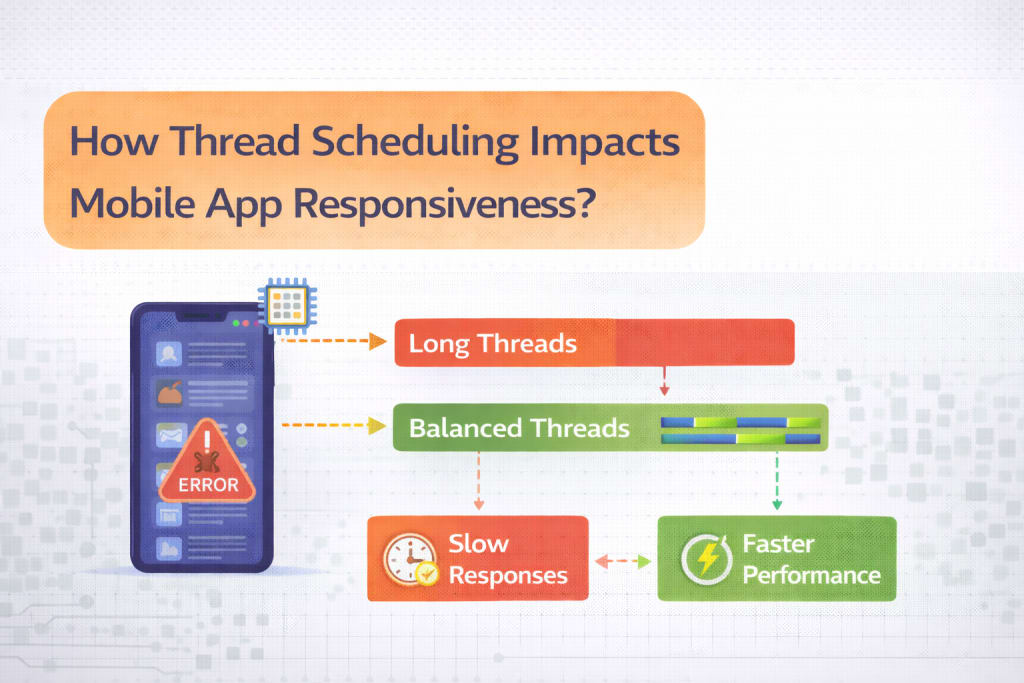
I used to think responsiveness was mostly about speed.
Faster APIs.
Faster devices.
Better animations.
If something felt slow, I assumed we needed optimization. Maybe fewer network calls. Maybe lighter layouts. Maybe caching.
It took me years to realize that many responsiveness problems aren’t about speed at all.
They’re about when work runs, where it runs, and what gets to run first.
They’re about thread scheduling.
The Day I Realized Nothing Was “Slow”
The moment it clicked for me was during a debugging session that made no sense.
The app froze for half a second when a button was tapped. Logs showed the API call returned quickly. The UI code was simple. Profiling didn’t reveal heavy computation.
Yet users kept describing the app as “laggy.”
What I eventually discovered was uncomfortable.
The work wasn’t slow.
It was just running at the wrong time.
A background task was stealing attention from the main thread. Not enough to crash. Just enough to delay input handling.
That tiny delay was all users needed to lose trust.
Why Responsiveness Is About Priority, Not Power
Modern phones are powerful.
According to Statista, smartphone CPU performance has increased dramatically over the past decade, with multi-core processors now standard even in mid-range devices.
Yet users still complain about lag.
That’s because responsiveness is not about raw power. It’s about priority.
Thread scheduling decides which tasks get attention first. On mobile, that decision is ruthless.
UI input must win.
Rendering must win.
Everything else must wait.
When background work competes at the wrong moment, the UI loses, even if only briefly.
The False Comfort of “It’s on a Background Thread”
One of the most dangerous phrases in mobile development is this.
“It’s fine, it’s on a background thread.”
That statement hides a lot of assumptions.
Background threads still consume CPU.
- They still compete for memory bandwidth.
- They still trigger garbage collection.
- They still wake the system.
If too much background work runs at once, the main thread suffers even if it never blocks directly.
The app doesn’t freeze. It hesitates.
Users notice hesitation immediately.
Why Mobile Scheduling Is Less Forgiving Than Desktop
Desktop systems assume long-lived processes and stable resources.
Mobile systems do not.
Mobile operating systems aggressively manage CPU time to protect battery life and thermal limits. Threads don’t just run slower. They get deprioritized, paused, or delayed.
According to Android developer documentation, the main thread is expected to stay responsive within very tight time windows, often under 16 milliseconds for smooth interaction.
Miss that window, and the frame drops.
Miss several, and users feel lag.
How Thread Scheduling Breaks Mental Models
As developers, we often think linearly.
Button tapped → code runs → UI updates.
Thread scheduling breaks that mental model.
The button tap is queued.
The UI thread waits its turn.
Other tasks might already be running.
The user experiences delay even though the code is “fast.”
This is especially painful because logs rarely show it clearly. Everything completes. Nothing errors. The app technically works.
It just feels wrong.
The Compounding Effect of “Small” Tasks
One background task rarely causes issues.
The problem is accumulation.
- Analytics batching.
- Cache cleanup.
- Sync retries.
- Database compaction.
- Image decoding.
Each task feels reasonable on its own.
Together, they create contention.
According to Harvard Business Review, systems that handle many small concurrent tasks often suffer more from coordination overhead than from heavy computation itself.
Thread scheduling is exactly that coordination problem.
Why Input Feels Laggy Before Rendering Does
One pattern I noticed is this.
Users complain that taps feel delayed before screens feel slow.
That’s a scheduling signal.
Input handling and rendering share the same thread budget. If input is delayed, it means something else is already competing at a higher priority than it should.
This is where responsiveness dies quietly.
The app still animates.
The screen still changes.
But the user feels ignored for a moment.
That moment is enough.
Real-World User Sensitivity to Delay
Humans are remarkably sensitive to delays.
Research cited by Google UX teams has shown that delays above 100 milliseconds start to feel perceptible. Beyond 300 milliseconds, interactions feel sluggish.
Users don’t measure milliseconds.
They feel disrespect.
Thread scheduling errors push interactions past those invisible thresholds.
Why Thread Scheduling Bugs Are Hard to Reproduce
Scheduling bugs depend on timing.
- CPU load.
- Device temperature.
- Battery state.
- Background apps.
- OS version.
That’s why the app feels fine on a developer’s phone and laggy on a user’s.
This is a common frustration for teams working in mobile app development Indianapolis, where apps behave differently across devices and environments even when the code is identical.
The scheduler decides differently each time.
The Hidden Role of Garbage Collection
Garbage collection is one of the most underestimated contributors to responsiveness issues.
Allocations happen everywhere.
Collections pause threads unpredictably.
Even when GC runs off the main thread, it competes for CPU time.
If scheduling isn’t respected, GC pauses line up with user interactions.
The result feels like random lag.
It isn’t random.
It’s scheduling debt.
Expert Warnings That Changed How I Think
Over time, I found myself returning to certain voices.
Jake Wharton has repeatedly emphasized that the main thread is sacred and anything that threatens it must be treated with suspicion.
Martin Fowler has written that performance issues often emerge from coordination costs rather than slow algorithms.
Don Norman observed that users judge systems not by correctness, but by responsiveness and feedback timing.
Thread scheduling sits at the intersection of all three ideas.
Why “Async Everywhere” Makes Things Worse
Another trap is overusing concurrency.
Async code feels safe.
Coroutines feel elegant.
Promises feel clean.
But more concurrency means more scheduling decisions.
If you don’t control priority and scope carefully, async code floods the scheduler.
The app becomes busy instead of responsive.
Busy is not the same as productive.
The Visual I Use to Explain It
I describe thread scheduling like a crowded kitchen.
The head chef is the UI thread.
Everyone else is a background task.
If too many people shout instructions at once, the chef hesitates.
Nothing stops completely.
But meals come out slower.
The problem isn’t skill. It’s coordination.
What Actually Improved Responsiveness for Us
The biggest improvement didn’t come from faster code.
It came from restraint.
- We reduced background work during active interaction.
- We deferred non-critical tasks until idle moments.
- We limited concurrent jobs aggressively.
- We respected priority boundaries strictly.
Responsiveness improved without touching APIs.
Why Scheduling Decisions Are Architectural
Thread scheduling is not an implementation detail.
It’s an architectural choice.
Where work runs.
When it runs.
How much can run at once.
Those decisions shape the user experience more than many features.
Once scheduling is wrong, no amount of micro-optimization fixes trust.
Why This Problem Isn’t Going Away
Apps are doing more in parallel.
AI features.
Real-time sync.
Rich media.
Background processing.
All of this increases scheduling pressure.
According to McKinsey, software complexity grows faster than performance gains in many digital systems.
That gap shows up as responsiveness problems.
The Lesson I Took Forward
Responsiveness isn’t about speed.
It’s about respect.
Respecting the user’s tap.
Respecting the UI thread.
Respecting timing over throughput.
Once I stopped chasing performance numbers and started protecting scheduling discipline, the app felt better almost immediately.
Not because it did less.
But because it did the right things first.
And users felt that difference right away.
Frequently Asked Questions
Why does thread scheduling affect responsiveness even when code is fast?
Because responsiveness depends on when work runs, not just how fast it runs. If background tasks compete with UI work at the wrong moment, input handling is delayed even though individual operations complete quickly.
What’s the difference between slow performance and poor responsiveness?
Slow performance means tasks take a long time to complete. Poor responsiveness means the UI doesn’t react immediately to user input. An app can be fast overall and still feel laggy if scheduling priorities are wrong.
Why does running work on background threads still cause UI lag?
Background threads share CPU, memory bandwidth, and garbage collection with the main thread. Too much concurrent background work can starve the UI thread indirectly, causing delayed input and dropped frames.
Why are thread scheduling issues hard to reproduce?
They depend on timing, device load, battery state, thermal throttling, OS behavior, and what other apps are running. Small changes in environment can lead to very different scheduling outcomes.
How sensitive are users to small delays?
Very sensitive. Delays over roughly 100 milliseconds start to feel noticeable, and delays over 300 milliseconds often feel sluggish. Users don’t measure time precisely, but they instantly feel hesitation.
What role does garbage collection play in responsiveness?
Garbage collection competes for CPU time and can pause or slow threads unpredictably. Poor allocation patterns combined with heavy background work can cause GC to run at exactly the wrong moment.
Does more concurrency always improve responsiveness?
No. More concurrency increases scheduling complexity. Without strict limits and priorities, async work can overwhelm the scheduler and reduce responsiveness instead of improving it.
What’s the biggest mistake teams make with thread scheduling?
Assuming that moving work off the main thread automatically makes the app responsive. Without controlling priority, timing, and concurrency, background work can still harm the UI.
How can teams improve responsiveness without major rewrites?
By deferring non-critical work during active user interaction, limiting concurrent jobs, batching background tasks, and strictly protecting the main thread’s time budget.
Why is thread scheduling considered an architectural issue?
Because decisions about where, when, and how work runs affect every feature. Scheduling shapes user experience at a foundational level, not as a last-minute optimization.
How do users experience scheduling problems?
As hesitation. Taps feel ignored, animations stutter briefly, and the app feels unresponsive even though nothing visibly breaks.
What mindset shift helps most with responsiveness?
Stop focusing only on speed and start prioritizing order. Doing the right work first matters more than doing all work quickly.
About the Creator
Keep reading
More stories from Samantha Blake and writers in Geeks and other communities.
How Medical Apps Influence Decisions Without Being Noticed?
Medical apps don’t shout. They whisper. That’s what makes them powerful, and a little unsettling if you think about it too long. They don’t tell clinicians what to decide. They don’t tell patients what to choose. They just arrange information, timing, and defaults in a way that nudges decisions forward.
By Samantha Blake2 months ago in Geeks
Spongebob Review
The episode “The Paper” delivers a surprisingly layered exploration of mundane outer life in Bikini Bottom, turning the simple act of delivering a roll of paper into an absurdist comedy of errors that mirrors the frenetic energy of modern bureaucratic systems. From the opening shot of SpongeBob cheerfully shuffling through a sea‑of‑files to the climactic showdown with the post‑office manager, the narrative thrives on rapid‑fire dialogue and visual gags that never allow the audience’s attention to waver. The animation, saturated with bright coral hues and meticulous background detail, reinforces the episode’s underlying satire: the absurdity of a world where a single piece of paper can wreak havoc on an entire community. Moreover, the writers cleverly pepper the script with meta‑references to the paper industry, subtly commenting on the disposable nature of both the medium and the characters themselves, all while keeping the tone light enough to entertain a multigenerational viewership.
By Forest Greenabout 12 hours ago in Geeks




Comments
There are no comments for this story
Be the first to respond and start the conversation.