
How Resource Starvation Affects Mobile App Stability?
What I started noticing when apps didn’t crash, but still couldn’t be trusted

There’s a certain kind of failure that doesn’t show up in logs.
No stack trace. No fatal error. No red alert in monitoring tools.
The app opens. Screens load. Users move through flows. Everything looks fine until it doesn’t. Not broken. Just unreliable.
That’s usually when I start thinking about resource starvation.
The Day Stability Stopped Meaning Crash-Free
Early on, I thought stability meant one thing. The app didn’t crash.
If users weren’t force-quit back to the home screen, we were doing okay. That belief lasted until I started seeing apps that stayed open but behaved unpredictably. Buttons stopped responding. Data loaded late or not at all. Animations stuttered just enough to feel wrong.
The app was alive. It just wasn’t healthy.
That’s when I learned that stability is less about survival and more about consistency under pressure.
What Resource Starvation Really Looks Like
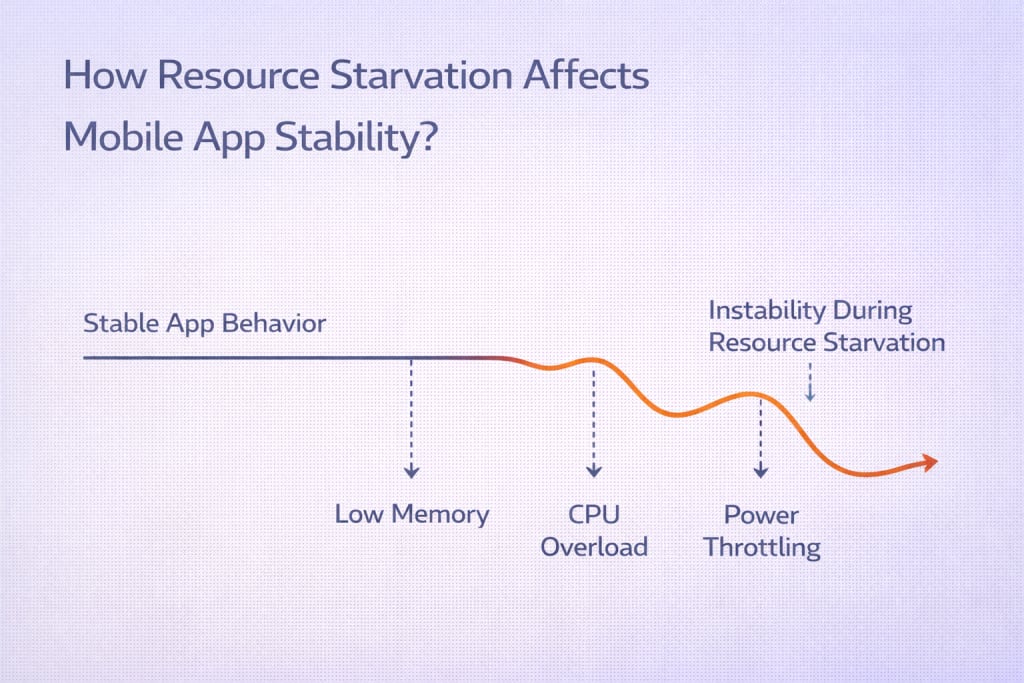
Resource starvation happens when an app technically runs, but the system no longer gives it what it expects. Memory gets squeezed. CPU time gets rationed. Background execution windows shrink.
Nothing fails outright. Things just arrive late. Or partially. Or not when the app needs them.
Those are the hardest bugs to explain to anyone who isn’t watching closely.
Memory Pressure Changes Behavior First
Garbage Collection Becomes a Hidden Enemy
Under memory pressure, cleanup routines trigger more often. Objects live shorter lives. Caches stop helping.
I’ve watched screens reload data repeatedly because memory couldn’t hold onto state long enough. From the user’s perspective, the app felt forgetful.
Not broken. Forgetful.
State Loss Feels Random to Users
When memory runs tight, state becomes fragile.
Forms reset. Scroll positions jump. Background tasks lose context. Users don’t report this as a memory issue. They report it as “the app doesn’t remember what I was doing.”
They’re not wrong.
CPU Starvation Creates Timing Bugs
Tasks Start Competing Quietly
When CPU time gets constrained, timing assumptions break.
A network response arrives later than expected. A UI update misses a frame. A callback fires after the user already moved on.
None of these show up as errors. They show up as hesitation.
I’ve seen apps where features worked perfectly on powerful devices and felt unreliable on mid-range ones. Same code. Different scheduling reality.
Background Limits Starve Logic, Not Screens
The App Looks Fine Until You Leave It
Background restrictions are ruthless.
Sync jobs get delayed. Notifications arrive inconsistently. Deferred work never runs.
From the user’s perspective, the app becomes untrustworthy. It doesn’t do what it promised unless they babysit it.
That erosion happens slowly. Stability fades without any dramatic failure.
Why These Issues Slip Past Testing
Testing environments are generous.
Fresh installs. Ample resources. Clean memory. Minimal background competition.
Real devices aren’t polite. They’re juggling apps, system tasks, media playback, location services, and whatever else the user installed last week.
Resource starvation lives in that mess. You don’t see it until the app competes for survival.
Analytics Rarely Tell the Whole Story
Most analytics answer one question. Did the event fire.
They don’t answer how hard it was to get there.
When an action takes three seconds instead of one, the event still logs. When a background task misses its window, nothing logs at all.
By the time metrics shift, users have already adjusted their behavior. They tap less. They trust less. They open the app less often.
Architectural Choices That Make Starvation Worse
Over-Reliance on Long-Lived State
Systems that assume continuity struggle under pressure.
When state must survive uninterrupted execution, resource limits expose every assumption. Designs that tolerate interruption hold up better.
Heavy Startup Paths
Apps that do too much on launch feel starvation first.
Under constrained resources, startup work competes with rendering. Users see blank screens, delayed interaction, or unresponsive gestures.
That first impression matters more than most teams admit.
How I Started Designing With Starvation in Mind
I stopped assuming availability.
I design for interruption. For delay. For partial execution. I expect background work to fail silently and recover later.
I test on older devices with other apps running. I watch how the app behaves when it doesn’t get what it wants.
That mindset shift improved stability more than any refactor ever did.
Where Mobile App Development Portland Teams See This Early
Teams working in mobile app development Portland settings often run into resource starvation sooner.
Users adopt updates quickly. Devices vary widely. Expectations stay high.
That combination exposes weak assumptions fast. Apps that rely on generous system behavior feel unstable early. Apps built for constraint hold up better.
It’s an unforgiving environment, but an honest one.
Stability Is About Trust, Not Survival
Apps don’t fail the moment they close.
They fail when users stop trusting them to behave the same way twice.
Resource starvation erodes that trust quietly. One delayed action at a time. One forgotten state. One missed background task.
Once I started treating starvation as a design constraint instead of an edge case, my apps became calmer.
Not perfect. Just dependable.
And in mobile, dependable lasts longer than anything else.
About the Creator
Keep reading
More stories from Mary L. Rodriquez and writers in Geeks and other communities.
How Build Tooling Decisions Affect App Stability in Production?
I remember the day stability became a question mark instead of an assumption. The app hadn’t changed in any meaningful way. Features were the same. Tests were green. Still, production behaved like it had developed a personality of its own. Some users sailed through sessions. Others hit crashes that vanished the moment we tried to reproduce them.
By Mary L. Rodriquez2 months ago in Geeks
Book Review: "Dead in the Water" by John Marrs
The last time I read a book by John Marrs, it was the deceptively clever book The Good Samaritan, which I thought was incredible. So, of course when books by him are going for cheaper than usual - I will be on the look out to get them. Dead in the Water has a shocking opening chapter and then, is followed by a slightly slow burning start. I quite enjoyed learning more about the characters and the way in which their lives intertwine. By the end of the book, I was left enthralled by what had just happened, though I won't share the ending I will say that even though it is predictable - you won't be able to see the bigger picture unless you've understood all the turns. The question here is: were you really paying attention?
By Annie Kapur4 days ago in Geeks



Comments
There are no comments for this story
Be the first to respond and start the conversation.