
Hacker Typer | Fake Hacker Simulator
Want to pretend you’re a hacker? Try out Hacker Typer! Learn how to use this fun tool, explore its features, and see how it can be great for content creation, parties, or just passing the time.

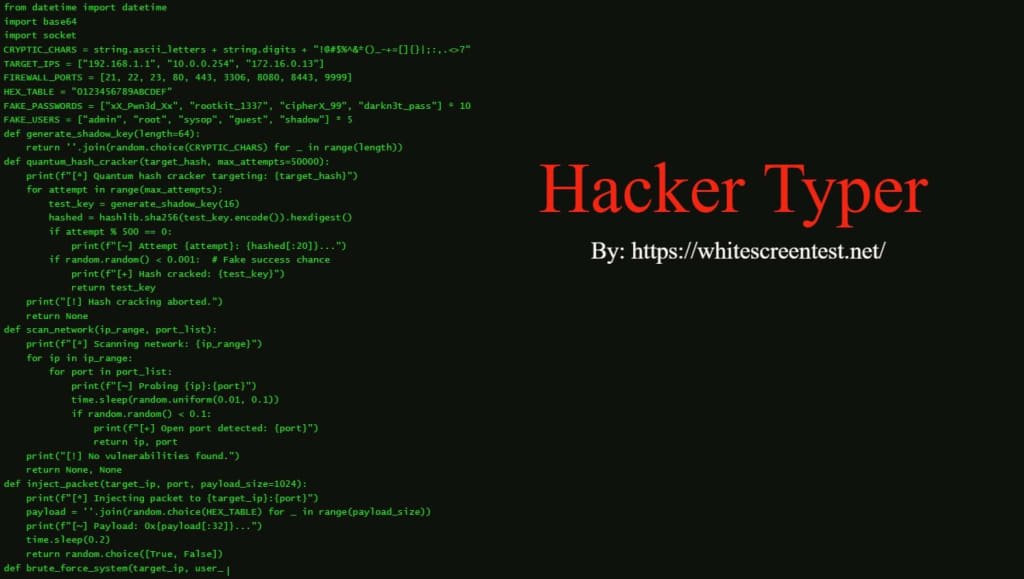
If you’ve ever wanted to look like you’re doing some serious hacking, without actually knowing how to code, there’s a fun tool that might just be what you’re looking for. It’s called Hacker Typer, and it’s designed to give you the illusion of typing out complex code while you press random keys on your keyboard. It’s all for fun, of course, but it can be surprisingly entertaining. Whether you want to impress someone or just waste some time pretending to hack into a computer system, it’s simple and amusing to use.
What is a Hacker Typer?
Hacker Typer is an online tool that lets you simulate being a hacker, even if you don’t know a thing about coding. When you start typing on your keyboard, a screen fills up with random lines of code, making it seem like you’re working on some high-level operation. It’s a bit like how hackers are portrayed in movies – fast typing, lots of complex code, and no real understanding of what’s going on behind the scenes. The tool doesn’t actually do any hacking; it just makes it look like you do. It’s a neat way to have some fun and see what it would feel like to type like a professional hacker.
How to Use the Hacker Typer Tool Online
Using Hacker Typer is pretty straightforward. Just visit the site, and you’re good to go. Here’s how you do it:
- Go to the Hacker Typer website: https://whitescreentest.net/hacker-typer/.
- Start typing on your keyboard.
- Watch as the screen fills up with fake hacker code.
- You can press any key, and the code will keep appearing.
- For extra effects, there are usually some background and theme options you can tweak.
It’s that simple. No need for any technical skills, just a bit of typing and a lot of fun.
Fun and Useful Usage of Hacker Typer
Even though it’s mostly for entertainment, there are some pretty fun ways you can use Hacker Typer. Let’s take a look at some of them.
Fake Hacking for Fun
Of course, the main reason people use Hacker Typer is to pretend like they’re hacking into something. It’s a fun way to impress your friends or give the impression that you’re a tech genius. Just start typing, and you’ll see the fake code rolling in, making it look like you know what you’re doing. It's great for showing off (even if it's all just for show), and you don’t need any real hacking skills to pull it off. Whether you want to impress someone or just get a good laugh out of the whole thing, it’s an easy way to simulate the “cool hacker” image.
A Beginner’s Intro to Coding
Although Hacker Typer doesn’t teach you how to code, it can still serve as a kind of introduction to what the world of coding looks like. You get a feel for the kind of windows and screens developers and hackers often work with. It can even make you curious about learning real programming. Sure, the code on the screen is just random gibberish, but seeing a bunch of it appear might inspire you to learn what it all means. For anyone thinking about learning to code, it might just be a fun first step to get familiar with the environment.
Content Creation and Parodies
If you’re into creating content, whether it’s videos, memes, or anything in between, Hacker Typer can be really useful. Need a quick scene showing someone typing away at their computer? Open up Hacker Typer and let it do the work. It’s great for adding some hacker drama to your work without needing to actually write real code. Plus, it can make things look more professional than just using some random image of a terminal. The fake code helps give your content the right vibe if you want to play up the hacker theme.
Parties and Events
Throwing a hacker-themed party? Or maybe just a tech-themed get-together? Hacker Typer can add an interactive element to the event. You can have the tool running on a screen for everyone to see while people take turns “hacking” away. It’s a great icebreaker and definitely adds to the fun atmosphere. Watching the fake code pop up on the screen as people type can be entertaining for everyone, especially if you set the scene with other hacking-themed elements.
A Quick Distraction
Sometimes you just need a little break from the regular grind. If you’re bored and need something quick to entertain you, Hacker Typer is perfect for that. You can type for a few minutes and enjoy the illusion of hacking while you take a mental break. It’s not a serious activity, but it’s light and fun. If you find yourself wasting time on the web, why not do it by pretending to hack into a system?
Typing Practice
Though it’s not designed for serious typing practice, Hacker Typer can help you improve your typing speed. Since the code keeps coming at you fast, you might find yourself trying to type quicker to keep up. The tool doesn’t force you to type in a particular way, but it can encourage you to be a little more speedy, all while having fun with the fake code.
Features of Hacker Typer
Realistic Hacker Look
One of the standout features of Hacker Typer is how much it mimics the look of real hacker environments. The random lines of code fill the screen quickly, just like what you might see in a movie when hackers are working at top speed. It’s pretty convincing and adds to the experience of feeling like a tech expert. The interface looks just like the kind of terminal window that professionals and hackers might use, so it’s easy to get sucked into the illusion.
Customization Options
Though it’s simple, Hacker Typer does let you change up the look of the interface. You can alter the background color, the font, and the size of the text to make things feel more personal. Whether you like the classic black-and-green look or want something a bit different, you can tweak it to your liking. This customization helps make the experience feel more unique and tailored to how you want it to look.
No Coding Skills Needed
The best part about Hacker Typer is that you don’t need to know any coding to use it. All you have to do is start typing, and the tool will automatically generate lines of code for you. It’s perfect for people who want to simulate hacking but don’t know how to write a single line of code. You get the illusion of being a hacker without any of the hard work or actual coding knowledge.
Easy to Use
Getting started with Hacker Typer is as simple as visiting the website and typing on your keyboard. There’s no complex setup or confusing options to worry about. Just start typing, and you’ll see the fake code appear on the screen. It’s designed to be quick and easy for anyone to pick up and use, which is part of what makes it so popular.
Free to Use
Another great thing about Hacker Typer is that it’s completely free. You don’t have to pay for a subscription or worry about hidden fees. You can use it as many times as you want without spending a dime. It’s one of those tools that’s fun and accessible without any strings attached. So, if you’re looking for a free and easy way to fake being a hacker, this is a great choice.
Interactive Experience
Hacker Typer is interactive in a way that keeps you engaged. As you type, the code keeps changing in real-time, so it feels like you’re part of an ongoing process. Whether you’re pretending to break into a system or just randomly typing, the dynamic nature of the tool adds to the fun. The code appears quickly, so it keeps things fast-paced and exciting.
FAQ
Q1: What is Hacker Typer exactly?
Hacker Typer is a fun, interactive tool that lets you simulate typing out complex code on your screen. The text that appears is entirely random, but it makes it look like you’re hacking into a system. It’s just for entertainment and doesn’t actually do any real hacking.
Q2: Do I need to know how to code to use it?
No, you don’t need any coding knowledge to use Hacker Typer. Just type randomly, and the tool will generate fake code on the screen. It’s designed for fun, so no technical skills are required.
Q3: Can I customize the look of Hacker Typer?
Yes, Hacker Typer offers customization options. You can change the background color, text size, and font style to make it look how you want. It’s a nice feature if you want to personalize your experience.
Q4: Is it free to use?
Yes, Hacker Typer is completely free to use. There are no charges or hidden fees. You can visit the website and use the tool as often as you like without paying anything.
Q5: Can I use Hacker Typer for something other than fun?
While Hacker Typer is primarily designed for fun, it can also be useful for content creation. You can use it to simulate hacker scenes in videos or memes, or even for themed parties. It’s not meant for serious hacking, but it can be a creative tool in other contexts.
Conclusion
Hacker Typer is a simple yet entertaining tool that lets you simulate hacking without needing to know any code. It’s fun, easy to use, and completely free, making it a great choice if you want to look like a hacker or just need a quick distraction. While it doesn’t teach you anything about real coding, it’s still a fun way to explore what the world of hacking might look like, even if it’s just for a few minutes. So go ahead, type away, and enjoy the experience of pretending to break into the digital world.
About the Creator
Keep reading
More stories from casper rues and writers in Geeks and other communities.
5 Funniest Harmless Digital Pranks to Try on Friends
Digital pranks are a great way to have a little fun without causing any real harm. Whether you're looking to trick a coworker, a friend, or a family member, these harmless yet hilarious pranks are sure to get a few laughs. Inspired by tools from WhiteScreenTest.net, here are five of the best digital pranks you can try!
By casper rues12 months ago in Geeks
Silver Screen Magic with Mae West
American actress and singer Mae West became a popular film actress during the Great Depression. She started entertaining in vaudeville, then performed on Broadway, and finally went to Hollywood. She signed up with Paramount Pictures and made her debut in the 1932 film “Night After Night.” She also starred in musicals, comedies, and crime dramas. The American Film Institute named her one of the best classic Hollywood actresses.
By Rasma Raisters11 days ago in Geeks
Sania Mirza flags structural gaps in Indian Women’s tennis at Australian Open
New Delhi, Jan 16: India U19 pacer Henil Patel credited former South Africa pacer Dale Steyn as his inspiration behind his match-winning performance against the USA at the ICC Under-19 Men’s Cricket World Cup.
By Dena Falken Esq8 days ago in Geeks


Comments
There are no comments for this story
Be the first to respond and start the conversation.