
Gemini AI Photo Prompt Copy Paste: How to Craft and Use High-Quality Prompts for Stunning Visuals
How to Use Ready-Made Prompts for High-Quality AI Image Creation

Artificial intelligence image generation has evolved into a new creative frontier, allowing anyone to produce compelling artwork, polished product images, and stylized portraits simply by describing them. With Google’s Gemini AI, users now have an incredibly powerful tool that can generate unique visuals through text-based prompts. But the key to getting truly high-quality, accurate, and visually pleasing images lies in how you write your prompts. This is where Gemini AI photo prompt copy paste resources come in handy.
Many users struggle with finding the right words to describe the image they want. A good prompt is like a roadmap for the AI, guiding it clearly toward the desired artistic style, lighting, mood, composition, and subject details. Without structure and specificity, the AI may produce results that feel generic or mismatched. The solution many creators rely on is using curated, pre-written prompts that can be copied, pasted, and customized.
This article will explore how Gemini handles image prompts, why copy-paste prompts are useful, and how to write (or adapt) your own prompts effectively. Plus, you’ll get free prompt templates you can use right away.
What Makes Gemini AI Unique for Photo Generation?
Gemini AI is designed to understand human language in a highly contextual way. This means it does more than simply match keywords; it interprets meaning, stylistic intention, and emotional tone. When you tell Gemini you want “a dreamy dusk landscape with soft lavender skies and shimmering water reflections,” it doesn’t just grab generic elements. It tries to construct a visual that aligns with ambience and aesthetic.
Some strengths of Gemini AI include:
Strong visual reasoning: It can interpret complex scene relationships.
Natural language understanding: It accepts prompts that read like poetry or storytelling.
Art style replication: It can reproduce styles ranging from watercolor to hyper-realistic photography.
Flexibility: It works for product shots, character design, branding, social media images, and digital art.
Because of this depth, well-written prompts significantly improve output quality.
Why Use Copy-Paste Prompts?
Not everyone has experience describing visuals in artistic terms. Even skilled designers sometimes rely on prompt frameworks to create structure. Copy-paste prompts:
Save time. No need to reinvent description patterns.
Provide consistency. Your images will follow a coherent visual identity.
Improve accuracy. You control the prompt details instead of relying on default interpretations.
Help beginners learn. After copying prompts, many users naturally begin modifying them.
Think of these templates as creative scaffolding: you can rework, remix, simplify, or expand them depending on your project.
How to Structure Effective Gemini AI Photo Prompts
A strong prompt typically includes:
Element Description
Subject Who or what is the image about?
Composition How is the subject arranged or framed?
Visual Style Realistic, surreal, anime, cinematic, etc.
Color Palette Warm, neon, monochrome, pastel, etc.
Lighting Soft, dramatic, backlit, studio, daylight.
Mood / Tone Calm, futuristic, nostalgic, bold, mysterious.
Extra Details Texture, background elements, environment.
A sample structure:
[Subject] + [Setting/Background] + [Camera/Composition] + [Art Style] + [Lighting] + [Color Palette] + [Mood] + [Details]
Gemini AI Photo Prompt Copy-Paste Examples
Below are ready-to-use prompts. You may copy and paste them directly into Gemini and edit details to suit your needs.
1. Realistic Portrait Photography
Ultra-realistic portrait of a young woman with freckles, facing camera, shallow depth of field, soft studio lighting, creamy background tones, 85mm lens effect, natural skin texture, subtle warm color grading, peaceful expression, professional photography style.
2. Product Mock-Up
Minimalist product photo of a matte black water bottle on a clean white surface, soft ambient lighting, reflective highlights, crisp detail, symmetrical centered composition, luxury brand aesthetic.
3. Fantasy Character Artwork
Elegant elven warrior with silver hair and emerald armor, standing in an ancient forest clearing, mystical fog, ethereal ambient lighting, painterly fantasy art style, intricate costume detailing, heroic posture, high-resolution digital illustration.
4. Landscape Photography
Golden hour mountain landscape, glowing sunlight across rolling valleys, crystal clear lake reflection, dramatic sky with rich orange and violet tones, ultra-sharp detail, nature photography style.
5. Cyberpunk Neon City
High-detail cyberpunk street scene at night, glowing neon billboards, reflective puddles, diverse crowd silhouettes, holographic signage, vivid electric color palette, cinematic atmosphere.
Tips for Customizing Prompts
Replace subject words with your own characters, products, or scenery.
Adjust Style descriptors to match your desired artistic direction.
Include lighting terms to control mood more precisely.
Don’t hesitate to add mood or emotion; Gemini understands nuance.
Example quick customization:
Change "peaceful expression" to "playful smile" to shift tone.
Final Thoughts
The magic of AI art truly unfolds when language becomes the brush. Gemini AI allows users to generate compelling and refined images by simply guiding it with expressive, well-crafted prompts. Using Gemini AI photo prompt copy paste templates gives both beginners and professionals a strong creative foundation. Once you get comfortable, you’ll start shaping your own distinctive prompt style, transforming your imagination into share-worthy visuals with consistency and clarity.
About the Creator
Keep reading
More stories from Juan Martinez and writers in Feast and other communities.
Emerging Trends Shaping the MRI Systems Market
Magnetic Resonance Imaging (MRI) has long been a cornerstone of diagnostic imaging, known for its ability to produce highly detailed images of soft tissues without radiation exposure. However, the market is undergoing a noticeable transformation as healthcare settings seek systems that are faster, smarter, more comfortable for patients, and increasingly connected to digital ecosystems. The MRI systems market is being reshaped by innovations in hardware, software, workflow automation, and artificial intelligence. These trends not only influence purchasing decisions but also support broader healthcare goals such as early detection, precision treatment, and streamlined operations.
By Juan Martinez2 months ago in Feast
My Tous les Jours Trip
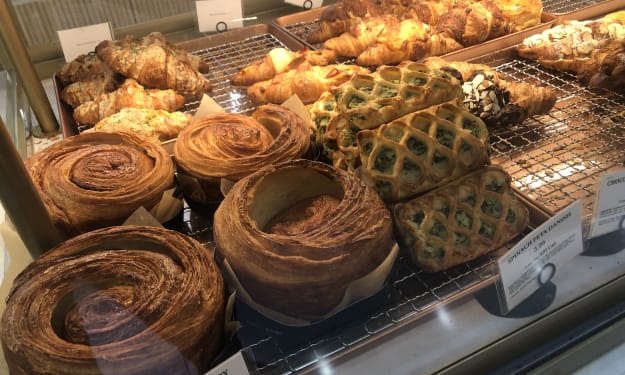
As someone who lives in a rural area, I don't get the chance to visit fancy restaurants or bakeries that often. So, when a friend told me about a French-Asian bakery that's less than an hour away, I knew I had to check it out and grab some pictures for social media. Tous les Jours ended up providing an immersive experience that went above and beyond my expectations--although I did leave with a few reservations.
By Kaitlin Shanks23 days ago in Feast
Guide to Choosing the Best Essential Kitchen Knives
Have you ever stood at the counter, staring at a pile of vegetables, wondering which knife would actually make the job easier? Many people assume they need a massive knife block filled with matching blades to cook well, but that’s rarely true.
By Chris Jones5 days ago in Feast



Comments
There are no comments for this story
Be the first to respond and start the conversation.