
How to make money on YouTube
How To Make Money With A YouTube Channel On A Phone


This article will demonstrate how to monetize your YouTube channel on a mobile device. Understanding how to monetize your YouTube channel is crucial knowledge for any YouTube content creator. We provide a step-by-step tutorial on how to monetize your content on mobile if you're interested.
Click here to no the best way to monetize your YouTube

Step-by-step instructions for monetizing a YouTube channel on a mobile device:
Your channel must have at least 1,000 subscribers and at least 4,000 hours of recent public viewing time to be eligible for monetization. As of 2023 this rule is another way for YouTube to give watch time (in contrast to view count, which was the former emphasis of the platform). Making sure users stay on the site for as long as feasible is the platform's main objective.
Once you've met the qualification criteria, launch any browser on your phone.
Open YouTube.com and sign in with your Google account. Choose Desktop Site from the menu by clicking on the hamburger icon.
Following that, select your channel's icon to bring up a menu. Simply select YouTube Studio.
Your YouTube Studio page will launch and appear as shown.
Click Monetisation as you descend past your channel symbol on the left.
Check to see if you have the required 1000 subscribers and 4000 hours of watch time. If so, select Apply Now.
Click Start in Review Partner Program Conditions after doing that.
Scroll down to the bottom of the pop-up and check the boxes there. Click Agree Terms after that.
By selecting Start, a Google AdSense account can be created. In case you already have one, sign in.
Complete all the instructions as shown on the screen, including the fields for your name, city, address, etc.
Choose ads as your main monetization strategy or method. Your earnings will then be displayed on your screen.
Return to the home page, where Done would be shown above the Google AdSense sign-up form. It will also demonstrate that the review process is ongoing. Your account will be monetised once it has been finished.
A notification would appear on the screen after the review is complete, informing and congratulating you on being accepted into the YouTube Partner Program. Your channel is currently earning money.
In conclusion, these are a few straightforward instructions you should remember if you want to monetise your YouTube channel on your smartphone.
You may learn how to make money on YouTube using these straightforward procedures. I wish you luck in using this guide to monetize your YouTube channel on mobile.
You may make money from the YouTube videos you post if you follow these basic and straightforward methods.
YouTube introduced stricter guidelines and procedures in 2018 for the commercialization of videos on their site.
These policies outline a number of standards that one must meet in order to be eligible for the YouTube Partner Program (YPP).
Only then is it possible to charge for your videos on the platform. The steps that you must take are listed below.
You may learn how to make money on YouTube using these straightforward procedures. I wish you luck in using this guide to monetize your YouTube channel on mobile.
Monetize your YouTube here by clicking now
That is how you can monetize your YouTube and start make money online so what are you waiting for go and monetize your YouTube now and start make money how you understand if you don understand just click any of the link I give you so that you no more about to monetize your YouTube channel buy for now
About the Creator
Yung Raba
am Yung Raba I will be showing you how to make money online
Keep reading
More stories from writers in Education and other communities.
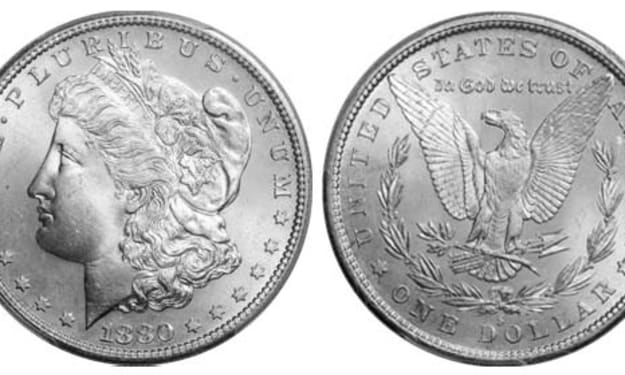
Morgan Silver Dollars: A Beginner's Guide to Identifying Key Dates and Mint Marks
For over eight years as a Senior Numismatic Analyst, I've seen the glint in a new collector's eye when they hold their first Morgan Silver Dollar. It's a powerful feeling—the weight of 90% pure silver, the history in Lady Liberty's profile, the sheer size of America's most iconic coin. Yet, with hundreds of millions minted across 27 years and five mints, it's easy to feel overwhelmed. A common 1921 Morgan might be worth $50, while a pristine 1895 Proof commands over $100,000. The difference lies in the tiny details of dates and mint marks. This guide will give you the foundational map to navigate this classic series, turning confusion into confident identification.
By Laura Bennett4 days ago in Education



Comments
There are no comments for this story
Be the first to respond and start the conversation.