
Is It Real? How to Detect AI-Generated Images Instantly
Is that photo real? Learn how to spot an AI-generated photo with our definitive guide. We cover everything from weird hands and text to subtle lighting flaws and deepfake detection. Become a digital detective today.
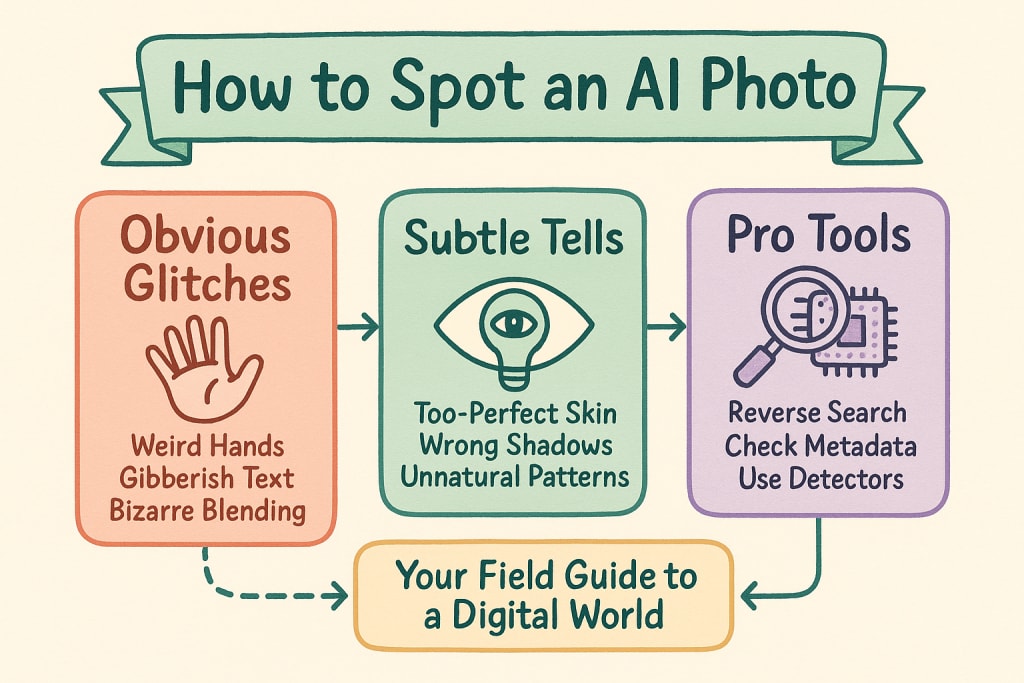
In the last year, you’ve likely seen it: a stunningly detailed portrait of a historical figure, a bizarrely beautiful landscape that doesn't exist, or maybe the Pope in a high-fashion puffer jacket. The rise of the powerful ai photo generator has flooded our social media feeds and news cycles with images that blur the line between reality and digital fiction. While this technology unlocks incredible creative potential, it also demands a new kind of digital literacy. How can you trust what you see?
This is your definitive field guide. We’re moving beyond the basics to give you a multi-layered framework for detecting AI-generated images. Whether you're a curious social media user, a journalist verifying a source, or a creator wanting to understand the technology better, this guide will equip you with the skills to become a confident digital detective. We'll cover everything from the laughably obvious glitches to the subtle, almost-imperceptible tells that separate a real photo from a synthetic one.
The Uncanny Valley Gets Wider: Why Spotting AI Images is Getting Harder (and More Important)
Not long ago, AI-generated images were easy to mock. They were warped, nightmarish, and clearly machine-made. But with the rapid evolution of models like Midjourney, DALL-E 3, and Stable Diffusion, that's no longer the case. Today's AI can produce photorealistic images that can fool even a skeptical eye at first glance.
This leap in quality makes the skill of detection more critical than ever. The stakes are high:
Misinformation: Fake images can be used to create false narratives, defame individuals, or sway public opinion during political events.
Scams: Fraudsters can use AI-generated headshots to create fake professional profiles on platforms like LinkedIn or craft elaborate catfishing schemes.
Erosion of Trust: When we can no longer believe our eyes, our collective trust in digital media is undermined.
But don't worry. Even the most advanced AI has its tells. You just need to know where—and how—to look.
Level 1: The Obvious Glitches & "Funny" AI Fails
This is your first line of defense. These are the classic, often humorous, mistakes that AI models make because they lack a real-world understanding of anatomy, physics, and language. This is where you can often spot an AI image that's gone "funny," because the errors defy logic in a comical way.
H3: The Infamous Hand Problem
Hands are notoriously complex. They have a specific number of fingers, a precise arrangement of joints, and they need to interact with objects logically. AI models, trained on billions of 2D images, struggle to grasp this 3D complexity.
What to look for:
Wrong Finger Count: The most famous tell. Look for six fingers, four fingers, or just a jumble of digits.
Unnatural Poses: Fingers bending in impossible ways, palms twisting unnaturally.
Weird Merging: Fingers blending into each other or into the object they are holding.
Extra Joints: Fingers that appear to have one too many knuckles.
Why it happens: AI doesn't understand "a hand"; it understands pixels that are commonly associated with hands. This leads to frequent errors in anatomical structure and counting.
H3: Gibberish Text & Warped Logos
If you see text in an image, zoom in. While AI is getting better at rendering letters, it often fails spectacularly. It sees text as a pattern or texture, not as a system of symbols with meaning.
What to look for:
Nonsensical Words: Lettering that looks like a real language but is complete gibberish (e.g., "Sonder Blivet" on a storefront).
Warped Characters: Letters that are misshapen, melted, or inconsistently sized.
Inconsistent Fonts: A single word might appear to be written in three different fonts.
Mirrored or Upside-Down Text: A clear sign of a machine's misunderstanding.
H3: Bizarre Blending & Merging
AI models sometimes get confused about where one object ends and another begins. This leads to surreal and illogical combinations.
What to look for:
A person with three arms.
A coffee cup with two handles on the same side.
A tree growing directly out of a person's head.
A fork that is also a spoon on the same end.
H3: Asymmetrical Features
Perfect symmetry is rare in humans, but AI often messes up symmetry in ways that are just plain wrong.
What to look for:
Mismatched Earrings: One earring is a stud, the other is a giant hoop.
Uneven Glasses: One lens is square, the other is round, or the arms connect to the face in a weird way.
Irregular Pupils: One pupil might be a different size or shape from the other. Look closely at the eyes.
Level 2: The Subtle Tells for a Trained Eye
Once you've cleared the obvious glitches, it's time to look deeper. These are the more subtle artifacts that current-generation AI models often leave behind. Spotting these requires a more critical eye.
H3: The "Too Perfect" Sheen
Ironically, sometimes AI images are too good. They lack the tiny imperfections of the real world, giving them a sterile, plasticky, or overly smooth appearance.
What to look for:
Skin without Pores: AI often generates skin that is flawlessly smooth, like a doll's. Real skin has texture, pores, and minor blemishes.
Perfectly Uniform Hair: Strands of hair that are too identical, without any of the usual flyaways or frizz.
Digital "Painting" Look: Upon close inspection, the image has a slightly illustrative or airbrushed quality rather than a photographic one.
H3: Unnatural Patterns & Repetition
The real world is chaotic and random. AI, being a computer system, sometimes falls back on perfect, repeating patterns.
What to look for:
A brick wall where every single brick is identical.
A field of grass where every blade is the same shape and size.
Fabric patterns (like on a shirt) that repeat with mathematical perfection, ignoring folds and wrinkles.
H3: The Laws of Physics Don't Apply
AI doesn't have an intuitive grasp of physics. This is most evident in how it handles light, shadows, and reflections.
What to look for:
Inconsistent Shadows: An object might cast a shadow in the wrong direction based on the light source, or multiple objects might have shadows pointing in different directions.
Flawed Reflections: Look at sunglasses, mirrors, or puddles. The reflection might be distorted, blurry, or show something that isn't in the scene.
Impossible Lighting: Light seems to be coming from nowhere, or a person's face is lit from the left while the shadow behind them suggests a light source on the right.
H3: The Soulless Stare & Dead Eyes
The eyes are the window to the soul, and it's a window AI still struggles to build properly. While anatomical correctness is improving, there's often something "off."
What to look for:
Lack of Depth: The eyes look flat, glassy, or lack the subtle complexity of a real human eye.
Perfectly Symmetrical Reflections: The light reflection (catchlight) in both eyes might be a perfect, identical dot, which is rare in real life.
The Uncanny Valley Stare: The gaze just feels empty or directed at nothing in particular.
AI-Generated Images vs. Deepfakes: What's the Difference?
The terms are often used interchangeably, but they are technically different. Answering the question, "How do I know if my photo is Deepfake?" requires understanding this distinction.
AI-Generated Image (Text-to-Image): This is a completely new image created from scratch based on a text prompt. The Pope in a puffer jacket was created this way; it's a synthetic scene. The methods we've discussed so far are excellent for spotting these.
Deepfake: This is an existing photo or video that has been manipulated, usually by swapping one person's face onto another's body. It's a form of digital puppetry.
Telltale Signs of a Deepfake
Detecting deepfakes requires looking for signs of digital grafting.
Blurry Edges: Look for a strange, blurry, or shimmering line around the edge of the face where it meets the hair or neck.
Mismatched Skin Tones: The face's skin tone or texture might not perfectly match the neck and chest.
Unnatural Blinking (for video): Deepfake models used to be trained on images where subjects had their eyes open, leading to videos with little or no blinking. This is improving, but still a potential tell.
Awkward Facial Positioning: The head might seem to be at a slightly wrong angle for the body.
Level 3: Technical & Forensic Verification
If your visual inspection leaves you uncertain, you can escalate to more technical methods to identify manipulated images. These steps provide stronger, more data-driven evidence.
H3: The Power of Reverse Image Search
This is one of the most powerful tools in your arsenal. Upload the suspicious image to Google Images, TinEye, or other reverse image search engines.
What it can reveal:
If the image is real, you may find the original source, photographer, and context.
If it's an AI image that has gone viral, you'll see dozens of other sites and fact-checks discussing it.
It might reveal components of a composite image, showing you the original photos that were manipulated.
H3: Analyzing Metadata (EXIF Data)
Every photo taken with a digital camera or smartphone contains hidden data called EXIF data. This includes the camera model, shutter speed, ISO, date, time, and sometimes even GPS location.
How to check: Use an online EXIF viewer. Just upload the image.
What to look for:
Presence of Data: If you see detailed camera data, the image is more likely to be authentic (though this data can be faked).
Absence of Data: Most AI generators do not embed any camera EXIF data. An image completely stripped of this information is a red flag.
Software Clues: Some AI tools or editing software (like Photoshop) will leave a trace in the metadata.
H3: Using AI Detection Tools (A Cautious Approach)
Several tools claim to be able to detect AI-generated content (e.g., Hive's AI-Generated Content Detection, Hugging Face detectors).
The Reality: These tools can be helpful but are not foolproof. They work by looking for the subtle digital fingerprints left by AI models. However, this is a constant cat-and-mouse game. As AI generators get better, detection tools must constantly be updated.
Best Practice: Use a detection tool as one data point in your investigation, not as a definitive answer. A result of "98% likely AI" is a strong signal, but a result of "55% likely human" should be taken with a grain of salt.
A Practical Workflow: How to Investigate a Suspicious Image
Feeling overwhelmed? Here’s a simple, step-by-step process to follow when you encounter a photo that feels "off."
Trust Your Gut (Initial Reaction): Does the image evoke an immediate emotional response? Is it too perfect, too strange, too shocking? High-emotion content is often faked.
Perform a Level 1 & 2 Visual Scan: Systematically check for the common tells: hands, text, symmetry, weird blending, lighting, shadows, and skin texture. Zoom in and look closely.
Analyze the Context: Where did you see this image? Was it from a reputable news source or a random anonymous account? Who benefits from you believing this image is real? Context is king.
Conduct a Reverse Image Search: This is a crucial step. It often provides the answer immediately by either locating the original photo or linking to existing fact-checks.
Check the Metadata: If you're still unsure, use an EXIF viewer to see what data the image file contains—or what it's missing.
Use a Detection Tool (Optional Final Step): As a last resort, run the image through an AI detection tool for a final data point.
The Future: Watermarks, Provenance, and the AI Arms Race
The fight against fake images is evolving. Major tech companies are working on new standards to help. The C2PA (Coalition for Content Provenance and Authenticity) is developing a technical standard that can act as a "digital nutrition label," showing where an image came from and how it's been altered.
Companies like Google and Meta are also starting to implement invisible watermarks (like SynthID) and visible labels on AI-generated content. However, determined bad actors will always try to strip this information. Therefore, the most powerful tool will always be your own critical thinking.
Conclusion: Your Eyes Are Your Best Tool
The world of the ai photo generator is not something to fear, but something to understand. It is a technology with the power to create breathtaking art and dangerous lies in equal measure. By learning to spot the signs of digital manipulation—from the six-fingered hand to the inconsistent shadow—you are not just protecting yourself from misinformation; you are becoming a more discerning, responsible, and empowered citizen of the digital world.
As the technology continues its relentless march forward, the specific "tells" will change. But the fundamental principle will not: always approach what you see with a healthy dose of skepticism. Look closer, ask questions, and check the source. In the age of AI, critical thinking is your ultimate superpower.
Call to Action
Now that you're equipped with the knowledge to spot AI-generated images, you can explore the creative side of this technology with a more informed perspective. Understanding the engine behind the art allows you to appreciate its potential and its quirks. To see what a state-of-the-art model is capable of and to begin your own creative journey, you can experiment with a powerful and versatile ai photo generator from eroai.
About the Creator
Keep reading
More stories from Zenobios Tomiko and writers in Art and other communities.
Top Free AI Photo Generators Without Filters in 2025
In 2025, AI photo generators have reached remarkable levels of sophistication. From ultra-detailed portraits to stylized fantasy worlds, the tools now available can create nearly anything your imagination conjures. But while quality has skyrocketed, so have limitations. Many popular platforms watermark your images, throttle your usage, or outright ban NSFW and experimental content.
By Zenobios Tomiko9 months ago in Art
'Till Death We Do Art
There would be nothing divine in this world without art. Nature may surpass the divine to all intents and purposes, but like everything it absorbs and is absorbed by, it remains here, stuck on the surface of this world, ever-present, physically bound to the universe.
By Avocado Nunzella BSc (Psych) -- M.A.P 22 days ago in Art
The Great Museum Scandal: Half of the Artworks in French Museums Found to Be Fake
France is home to some of the most famous museums in the world, attracting millions of visitors each year who come to admire priceless works of art and historical artifacts. However, a recent investigation has sent shockwaves through the art world after suggesting that a significant number of artworks displayed in certain French museums may actually be fake.
By Irshad Abbasi about 4 hours ago in Art



Comments