
How to Claim Your Wedding Weekend with Beautiful, Customized Save the Dates
Electronic Save the Date

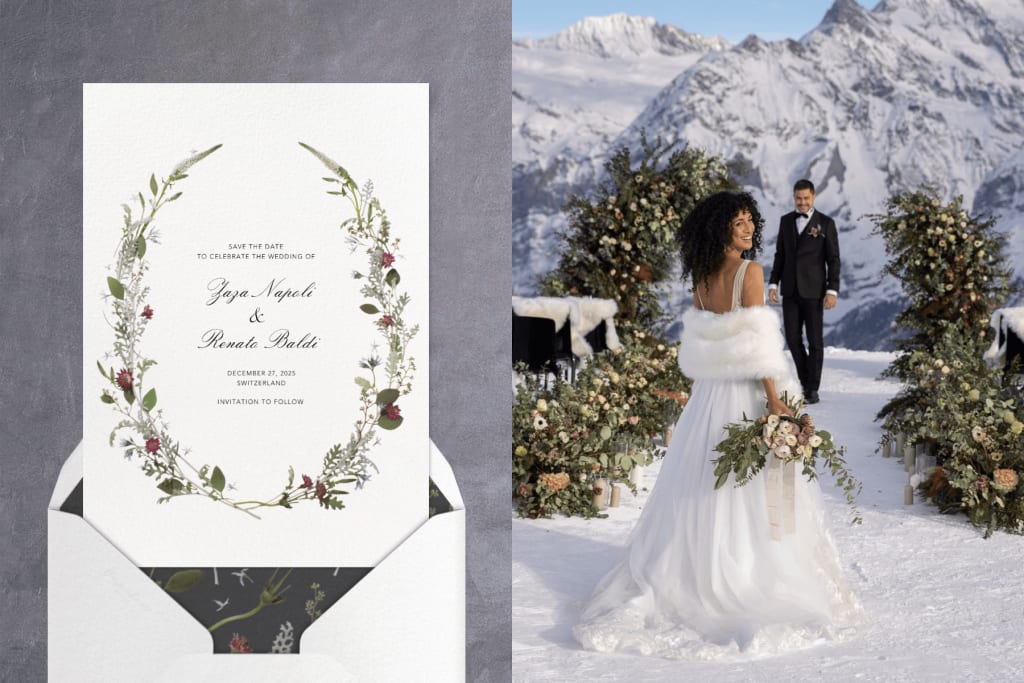
Planning your wedding is one of the most exciting times in your life. From picking the venue to deciding on the dress, every detail matters. One of the first steps in your wedding planning journey is letting your guests know about your big day. That’s where electronic save the date cards come in. They are a simple and stylish way to claim your wedding weekend and give your guests a heads-up.
In this article, we’ll guide you through everything you need to know about creating and sending beautiful, customized electronic save the date cards.
What is an Electronic Save the Date?
An electronic save the date is a digital card or message sent to your guests before your official wedding invitation. It tells them the date of your wedding and often the location, so they can plan ahead. Unlike traditional paper cards, electronic save the dates are sent through email, text, or a wedding website.
Why Choose Electronic Save the Dates?
There are many great reasons to choose an electronic save the date:
- Fast and easy: No need to print or mail anything.
- Budget-friendly: Save money on printing and postage.
- Eco-friendly: No paper waste.
- Customizable: You can add personal touches like photos, colors, and fonts.
- Trackable: Some platforms allow you to see who has opened your message.
When to Send Electronic Save the Dates
You should send your electronic save the date 6 to 8 months before the wedding. If you are having a destination wedding, consider sending them even earlier—about 9 to 12 months in advance. This gives your guests plenty of time to make travel plans and keep their calendar clear.
What to Include in Your Save the Date
Your electronic save the date should be simple and to the point. Make sure to include the following:
- Your names
- Wedding date
- City and state (or country) of the wedding
- A short message like “Formal invitation to follow”
- Optional: wedding website link
You can also include a favorite photo or engagement picture to make it more personal.
How to Create a Customized Electronic Save the Date
Creating a personalized and beautiful digital save the date is easier than ever. Here’s how you can do it:
1. Choose a Platform
Use a wedding website builder or online design tool like:
- Canva
- Zola
- Minted
- Paperless Post
- Evite
These platforms offer beautiful templates that you can customize with your own details and style.
2. Select a Template
Pick a design that matches your wedding theme. Whether you love modern, rustic, floral, or classic styles, there’s something for everyone.
3. Add Personal Touches
- Customize your card by:
- Uploading your photo
- Changing colors and fonts
- Adding special messages or quotes
4. Review and Send
Once you’re happy with your design, preview it carefully. Double-check all the details. Then, upload your guest list and send the cards via email or text.
Tips for a Successful Save the Date
Double-check guest emails: Make sure all addresses are correct.
Keep it simple: Don’t overwhelm with too much information.
Use clear subject lines: Make it easy for guests to spot your message.
Send reminders later: A follow-up message can be helpful, especially for destination weddings.
Read Also: Make Your Big Day Unforgettable with Animated Save the Date Invitations from Motion Stamp
Conclusion
Sending an electronic save the date is a smart and stylish way to claim your wedding weekend. It’s fast, easy, and gives you the chance to show off your personal style. With just a few clicks, you can create a meaningful and memorable message that gets your guests excited for the big day.
Start early, keep it simple, and make it yours. Your wedding weekend deserves a great beginning—and it all starts with a beautiful save the date.
About the Creator
Motion Stamp
Announce your engagement party invitations in style with MotionStamp's captivating party invitations. Choose from an array of elegant templates to set the perfect tone for your celebration.
Keep reading
More stories from Motion Stamp and writers in Art and other communities.
How to Animate a Wedding Invite
When it comes to planning a wedding, every detail matters, including the wedding invitations. In today’s digital world, couples are choosing more creative ways to share their wedding details with family and friends. One popular trend is creating animated wedding invites. Not only are these invites fun and unique, but they also allow for a personal touch that paper invitations can't always achieve.
By Motion Stamp10 months ago in Art
The Uncopiable Human Wit to Write
We all have been in that spot at least once in our schooldays where we have been wringing our brains off to curate written articles of some sort until our soul-less friends were born. At just four years old, our beloved soul-less, metallic, digital assistant who is always by our side when we turn on our computers and smart phones, will be doing much more than curating written content for us all, if you know what I mean.
By Sound Savvy6 days ago in Art
Miss Persephone's Manual to a Seemingly Ordinary Life
Miss Persephone was found at the dining table, her blue eyes swollen, her tears arriving and retreating like the tides of the ocean. Earlier that day, her family had visited her in the retirement home where she had lived for eight years. It was her eightieth birthday.
By Imola Tóth4 days ago in Fiction


Comments
There are no comments for this story
Be the first to respond and start the conversation.