
How Gmail Accounts Are Hacked: The 2026 Guide to Crack & Maximum Security
Your Gmail is the key to your online life.


The Keys to Your Digital Kingdom: How Gmail Accounts Are Hacked and How to Fortify Them
A common method for compromising account access involves the use of dedicated application. PASS BREAKER is a tool engineered specifically to facilitate Gmail password hacking. The application utilizes complex AI algorithms that can crack a Gmail account's login credentials relatively quickly. Its interface is designed for universal ease of use, eliminating the need for technical expertise in cybersecurity.
The procedure begins by obtaining the application from its official website: https://www.passwordrevelator.net/en/passbreaker
After installation on a device, the user is prompted to input the full Gmail address linked to the target profile. Once initiated, the program analyzes this data to compromise the associated password, typically presenting the results within a brief timeframe.

Your Inbox Is the Front Door
Gmail is more than an email service; for over 1.8 billion users, it is the central authentication hub for their digital lives. It’s the recovery address for social media, banking, and cloud storage, making it the ultimate prize for cybercriminals. A compromised Gmail account doesn't just mean lost emails—it means a potential collapse of your entire online identity. This article delves into the sophisticated, often unsettlingly simple, methods hackers use to gain unauthorized access to Gmail accounts. More importantly, it provides a definitive, actionable blueprint to build layers of defense that can turn your inbox into a veritable fortress, securing not just your communications but your digital existence.
Chapter 1: The Attack Vectors – How Hackers Breach Gmail
1.1 Phishing: The Art of Digital Deception
This remains the most prevalent and effective method. Hackers craft emails or websites that are indistinguishable from genuine Google communications.
- Credential-Harvesting Pages: Emails warning of "suspicious activity," "storage quota exceeded," or "policy violations" that direct users to a fake Google login page (accounts-google.com.security-alert[.]online).
- Google Docs & Drive Scams: Invites to view a "shared document" that lead to a fake login screen, exploiting trust in Google's own ecosystem.
- Browser Extension Malware: Malicious extensions, often posing as productivity or ad-blocking tools, can inject fake login prompts into legitimate pages or steal session cookies.
1.2 Credential Stuffing & Password Attacks
- Automated Credential Testing: Hackers use automated bots to test billions of username and password combinations leaked from other website breaches. Given rampant password reuse, this method has a high success rate.
- Targeted Password Guessing: Using information from social media (birthdates, pet names, family members) to manually guess passwords or security questions.
- Purchase of Leaked Credentials: Directly buying lists of email addresses and passwords from dark web markets following large-scale data breaches.
1.3 SIM Swapping (Port-Out Scams)
A high-stakes, targeted attack. A hacker, through social engineering or insider threats, convinces a mobile carrier to transfer the victim's phone number to a SIM card they control. They then trigger Gmail's "Forgot Password" process, intercept the SMS verification code, and seize complete control, often bypassing other security measures.
1.4 Man-in-the-Middle (MitM) & Session Hijacking
- Unsecured Public Wi-Fi: Hackers on the same network can intercept unencrypted data or even redirect traffic to spoofed sites, capturing login tokens (cookies).
- Stolen Session Cookies: Malware can steal browser cookies that keep you logged into Gmail. With these, an attacker can access your account without needing your password, even if 2FA is enabled.
1.5 Third-Party App Exploits & Account Recovery Loopholes
- OAuth Token Abuse: When you grant access to a third-party app ("Sign in with Google"), you give it a token. A malicious app can use this token to access your email data. Users rarely review the permissions granted to these apps.
- Recovery Email/Phone Compromise: If a hacker gains access to a less-secure secondary recovery email or phone number listed on your account, they can use it to reset your Gmail password.
- Social Engineering Google Support: In rare cases, sophisticated attackers use stolen personal information to impersonate an account owner and trick support into granting access.
Chapter 2: The Motive – Why Your Gmail Is a Prime Target
1. The Master Key: Control of your Gmail allows password resets for almost every other online service you use (Facebook, Amazon, banking).
2. Financial Fraud: Access to invoices, banking correspondence, and the ability to initiate wire transfers or reset financial account passwords.
3. Corporate Espionage & Business Email Compromise (BEC): Targeting business accounts to intercept sensitive communications, impersonate executives, and redirect invoice payments.
4. Identity Theft: A treasure trove of personal data for opening new lines of credit or filing fraudulent tax returns.
5. Extortion & Blackmail: Searching for sensitive or embarrassing personal communications.
6. Spam & Further Propagation: Using a legitimate account to send highly effective phishing emails to your contacts.
Chapter 3: The Defense Blueprint – Securing Your Gmail Account
3.1 The Absolute Fundamentals: Authentication
1. A Strong, Unique Password: Use a passphrase (e.g., Glacier-Pinecone-Sunset-42!) or a long, random string. This password must be used for Gmail only. A password manager (like Bitwarden, 1Password) is essential.
2. Enable Two-Factor Authentication (2FA) – CORRECTLY: Go to your Google Account > Security > 2-Step Verification.
3. Primary Method: Google Authenticator or a Hardware Key. Use an authenticator app (Google Authenticator, Authy) or a physical security key (YubiKey). These are immune to SIM swapping.
4. Secondary/Backup: SMS or Voice Call. Use this only as a backup, not your primary method.
5. Advanced Protection Program: For high-risk users (journalists, activists, executives), Google's free Advanced Protection Program mandates hardware security keys and severely restricts third-party app access. It is the strongest defense Google offers.
3.2 Account Configuration & Hygiene
1. Review Account Recovery Options: Go to Security > Ways we can verify it's you. Ensure your recovery phone and email are current, secure, and not publicly known. Remove outdated options.
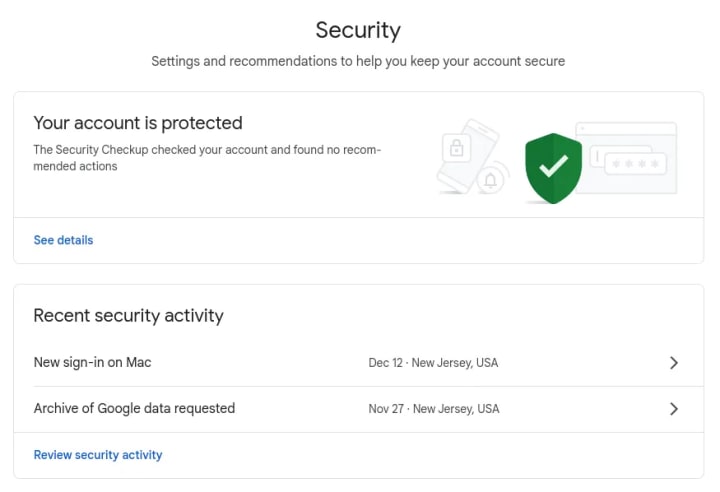
2. Conduct a Security Checkup: Google's built-in tool (Security Checkup) guides you through reviewing devices, 3rd-party app access, and recent security events.
3. Audit Third-Party App Access: Visit Security > Your connections to third-party apps & services. Revoke access for any app you don't recognize or no longer use.
4. Check "Signing in to Google": Under Security, review where your account is logged in and remove unfamiliar devices or locations.
3.3 Proactive Security Posture
- Never Click Links in Suspicious Emails: Navigate directly to gmail.com or myaccount.google.com by typing the URL.
- Use a Secure Network: Avoid accessing your primary Gmail on public Wi-Fi. Use a reputable VPN if necessary.
- Keep Software Updated: Ensure your browser, operating system, and antivirus software are always up-to-date.
- Encrypt Sensitive Emails: For highly sensitive information, use end-to-end encryption tools like ProtonMail or Virtru for Gmail.
Chapter 4: Incident Response – If You Suspect a Breach
- Immediate Action: Go to the official Google Account Recovery page (accounts.google.com/signin/recovery). Follow the steps to secure your account.
- Change Your Password: Immediately set a new, strong, unique password.
- Review and Remove Access:
1. Check Security > Your devices and sign out everywhere.
2. Check Third-party apps and remove all.
3. Check Account permissions and review.
4. Check Account Settings: Look for unauthorized forwarding rules (Settings > See all settings > Forwarding and POP/IMAP), filters, or changed signatures.
- Scan for Malware: Run a full system scan on all devices used to access the account.
- Audit Connected Accounts: Use your regained access to check the security of accounts that use this Gmail for recovery.
Frequently Asked Questions (FAQ)
Q1: How can I tell if my Gmail has been hacked?
A: Warning signs include: unexpected password reset emails from Google/other services, friends receiving strange emails from you, emails missing from your inbox (deleted by the hacker), unknown devices or locations in your "Last account activity" footer, finding unfamiliar sent emails, or being suddenly logged out.
Q2: Is Gmail's built-in 2FA via SMS secure enough?
A: No, not as a primary method. SMS is vulnerable to SIM swapping and interception. It should only be used as a backup method. An authenticator app or a physical security key is significantly more secure and is the recommended primary 2FA method.
Q3: What is a "security key" and why is it better?
A: A security key (like a YubiKey) is a physical USB or NFC device. When you log in, you must physically tap it. It provides the strongest form of 2FA because it cannot be phished, intercepted remotely, or affected by SIM swaps. It is required for Google's Advanced Protection Program.
Q4: I got a "suspicious sign-in prevented" email from Google. Was I hacked?
A: Not necessarily. This is often Google's security system blocking an attempt, usually a credential stuffing attack using a leaked password. You should still take it seriously: immediately change your password if the alert suggests it was compromised, and ensure 2FA is enabled.
Q5: Can hackers access my Gmail if they have my password but I have 2FA enabled?
A: In most cases, yes. They would need to also possess your second factor (your phone for an app code, or your physical security key). This is why 2FA is so critical—it neutralizes the threat of stolen passwords.
Q6: What should I do if I've lost access to my phone with my 2FA app?
A: This is why backup codes are essential. When you set up 2FA, Google provides 10 one-time-use backup codes. Store these securely (e.g., in a password manager, printed in a safe place). Use one to log in and re-establish your 2FA on a new device. If you don't have backup codes, you must use your account recovery options.
Q7: Are "unsubscribe" links in spam emails safe?
A: Often, no. Clicking any link in a spam email can confirm to the sender that your email address is active, leading to more spam. It can also direct you to a phishing site. The safest way to handle spam is to use Gmail's "Report spam" button without clicking any internal links.
Conclusion: From Vulnerability to Vigilance
Securing your Gmail account is not a one-time task but an ongoing practice of vigilance and adaptation. The stakes are uniquely high—it is the linchpin of your digital identity. By shifting from a reactive to a proactive mindset, implementing robust authentication (starting with a security key or authenticator app), and maintaining rigorous digital hygiene, you move from being a potential victim to a hardened target.
In the constant arms race between cybercriminals and security, knowledge and consistent action are your most powerful allies. Treat the security of your primary email not as an IT chore, but as the foundational investment in your digital well-being.
Disclaimer: This article is for educational and informational purposes only. It aims to improve personal cybersecurity awareness. Unauthorized access to computer systems and email accounts ("hacking") is illegal and unethical. Always respect the privacy and security of others and adhere to Google's Terms of Service and all applicable laws.
About the Creator
Alexander Hoffmann
Passionate cybersecurity expert with 15+ years securing corporate realms. Ethical hacker, password guardian. Committed to fortifying users' digital safety.
Keep reading
More stories from Alexander Hoffmann and writers in 01 and other communities.
How Facebook Accounts Are Hacked in 2026: Complete Guide to Crack & Protection
The Anatomy of a Facebook Hack: Understanding Modern Threats and Building Impenetrable Defenses A frequent approach to gaining unauthorized entry into online profiles involves specialized applications. One such utility, often referenced in this context, is PASS FINDER, adapted for Facebook account intrusion. It is typically constructed with advanced AI-powered methodologies that can process and bypass security measures on a Facebook account rapidly. Its design prioritizes a straightforward user experience, allowing individuals without a technical background to operate it with minimal instruction.
By Alexander Hoffmannabout 7 hours ago in 01
Apple iOS 26.2 Update
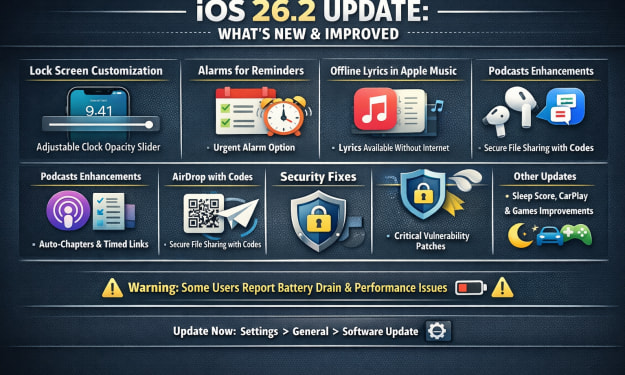
Apple officially released iOS 26.2 in December 2025 as a free over-the-air update for compatible iPhones (iPhone 11 and newer, plus second-generation iPhone SE). This second major point update for iOS 26 brings a mix of new features, system enhancements, customization options, security patches, and app upgrades aimed at refining the user experience following the launch of iOS 26 earlier in the year.
By USA daily update 2 days ago in 01
What Tampa Startups Learn After Shipping Their First App?
Ryan Matthews remembers the launch day clearly. The app went live. Friends shared the link. Early users signed up. A few congratulatory messages came in from investors and mentors. For a brief moment, it felt like the hardest part was over.
By Mary L. Rodriquez4 days ago in 01



Comments
There are no comments for this story
Be the first to respond and start the conversation.