
Apple iOS 26.2 Update
What’s New, What’s Improved, and What to Know

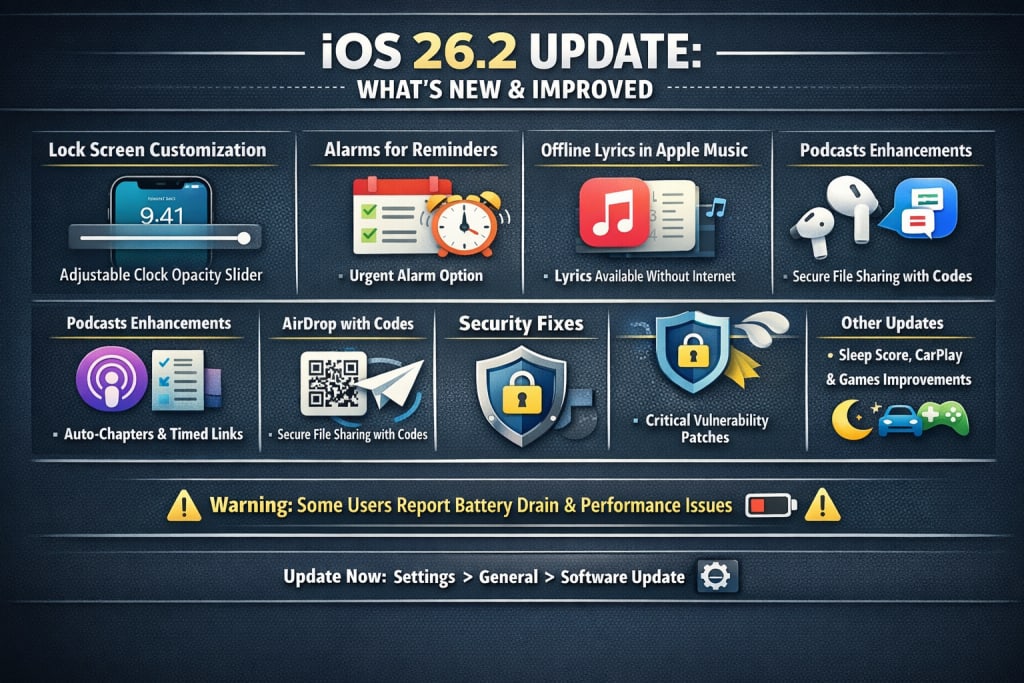
Apple officially released iOS 26.2 in December 2025 as a free over-the-air update for compatible iPhones (iPhone 11 and newer, plus second-generation iPhone SE). This second major point update for iOS 26 brings a mix of new features, system enhancements, customization options, security patches, and app upgrades aimed at refining the user experience following the launch of iOS 26 earlier in the year.
In this article, we’ll break down the major additions, improvements, and important considerations in iOS 26.2 so you can understand what this update truly offers.
Lock Screen and Customization Updates
One of the most visible changes in iOS 26.2 is enhanced Lock Screen customization. Apple has expanded the “Liquid Glass” visual language introduced with iOS 26 by adding a new slider that adjusts the opacity of the clock on the Lock Screen. This lets you fine-tune how transparent or “frosted” the clock appears against wallpapers, improving readability and personalization.
Combined with other UI tweaks such as quicker, bouncier menu animations and Liquid Glass updates in apps like Measure, iOS 26.2 continues Apple’s push on its signature design aesthetic while adding user control.
⏰ Productivity Enhancements
🔔 Alarms for Reminders
A notable new productivity feature is the ability to set alarms for Reminders. When adding a task in the Apple Reminders app, you can toggle on an “Urgent” alarm option to make your phone sound a full alarm instead of a simple notification. This is useful for time-critical tasks like taking medication or meeting deadlines.
🎧 Media and Entertainment Improvements
🎵 Apple Music: Offline Lyrics
Apple Music gets a meaningful upgrade in iOS 26.2: offline lyrics support. Now, when you download songs, you can view synchronized lyrics even without a Wi-Fi or cellular connection.
Additionally, your Favorite Songs playlist now appears more prominently in the Home tab, making it easier to access your most-loved tracks.
🎙️ Apple Podcasts Enhancements
The Podcasts app also sees several refinements:
Automatically generated chapters to make navigating episodes smoother.
Timed links on screen to jump to referenced parts.
The ability to view and follow other podcasts mentioned in an episode, right from the player or transcript.
📡 Connectivity and Sharing
📤 AirDrop with Codes
iOS 26.2 introduces a more secure way to share files via AirDrop with strangers or people not in your contacts. A receiver can display a temporary AirDrop code that senders enter to complete transfers — valid for 30 days — adding safety and convenience, especially in public or crowded spaces.
🌍 Expanded Features and Localizations
👂 AirPods Live Translation in the EU
Live Translation on compatible AirPods (Pro 2 and later) becomes available in the European Union with iOS 26.2. This feature lets Siri translate speech in real time, making cross-language conversations more natural when using your AirPods.
🛡️ Safety and Security Enhancements
📣 Enhanced Safety Alerts
In the United States, iOS 26.2 brings Enhanced Safety Alerts, providing detailed notifications about imminent threats like natural disasters. These alerts can include maps of affected areas and links to guidance resources to help users respond quickly.
🔒 Security Fixes
Importantly, the update also patches several critical security vulnerabilities, including flaws in WebKit (the engine behind Safari) that were actively exploited, and a kernel vulnerability that could allow apps to gain root access. Updating helps protect your device from targeted attacks and malware.
🧠 Miscellaneous System Improvements
iOS 26.2 includes a handful of additional tweaks and under-the-hood changes:
Sleep Score recalibration in Health and Apple Watch apps to better reflect real sleep quality.
CarPlay updates, including options for disabling pinned Messages for simpler driving view.
Games app improvements: new library filters, real-time challenge score banners, and enhanced Bluetooth controller support.
Screen flash alerts for notifications now work directly with the screen (not just the LED) under Accessibility settings.
⚠️ User Reports: Issues and Considerations
While many users report general improvements and stability gains with iOS 26.2, some have encountered bugs and performance quirks:
Reports of battery drain, heat, and occasional lag following updates.
Some users note accessibility issues, particularly with VoiceOver and Zoom.
Other discussions cite slow performance, Wi-Fi glitches, or interface responsiveness challenges on certain devices.
These experiences vary by device model and individual usage, but they highlight that even broad updates can carry transitional issues.
🧠 Conclusion
Overall, iOS 26.2 is a significant update focused on fine-tuning iOS 26 with practical feature additions, enhanced customization, important security patches, and app improvements across music, podcasts, sharing, and safety. Whether you prioritize personalization, productivity, or protection, there’s something in this release for most users — though it’s wise to be aware of community-reported bugs and occasional performance hiccups.
If you haven’t updated yet, you can do so by going to Settings → General → Software Update on your compatible iPhone.
About the Creator
USA daily update
News, Politics, Technology Updates
Keep reading
More stories from USA daily update and writers in 01 and other communities.
iPhone 5s Gets new software update 13 years after launch
In a surprising and impressive move, Apple has released a new software update for devices many people assumed were long forgotten. On January 26, 2026, alongside iOS 26.2.1, Apple quietly pushed out iOS 12.5.8 for older iPhones still running the iOS 12 operating system. This update specifically targets the iPhone 5s and iPhone 6 — devices launched in September 2013 and September 2014.
By USA daily update a day ago in 01
How Chinese Crypto Marketing Agencies Drive Community Growth in 2026?
In 2026, Chinese crypto marketing agencies have become central architects of community growth across the global blockchain ecosystem. What was once a regional approach has evolved into a global strategy, with agencies in China blending deep cultural nuance with advanced technological engagement. These agencies are no longer just promoters they are builders of communities, designers of narratives, and orchestrators of long-term engagement strategies.
By Jack santoa day ago in 01
How to Choose a Mobile App Development Company in 2026
The Google ecosystem is currently undergoing a structural realignment that fundamentally changes how mobile applications are discovered and validated. We are witnessing a tectonic movement away from traditional index-based search toward a unified Trust Graph where Entity Signals dictate market survival.
By Devin Rosario7 days ago in 01



Comments
There are no comments for this story
Be the first to respond and start the conversation.