
Matterport 3D Tours and the Construction Industry
BIM and CAD files for architects, consulting engineers, and developers during both planning, execution, and operation.
Advanced Documentation Methods and 3D Photography in Planning and Construction
Originally posted on: https://rtrosenberg.dk/
Advanced documentation methods and 3D photography during project planning and construction are not breaking news in 2024, but they remain important and are evolving rapidly. Integration with newer technologies such as Matterport exports creates new possibilities for precision, efficiency, and quality assurance during both design and execution.
Most professionals in the construction industry have likely encountered BIM files (Building Information Modeling) or CAD files (Computer-Aided Design) at some point in their careers. Both file types are cornerstones of modern construction and can be found in everything from planning and design to execution and evaluation.
Both BIM and CAD have earned their place in AEC (Architecture, Engineering, and Construction) projects, but what exactly do they contain, and when should you use one over the other? And where do Matterport and virtual tours fit into the picture?
Building Information Modeling (BIM)
A Building Information Model (BIM file) is a more advanced representation of a construction project that goes beyond simple 3D models like those found in Google Street View or RealityScan. The model allows engineers, construction professionals, and architects to integrate detailed data about the building’s physical and functional aspects into a more 'intelligent' 3D model.
Key Features of BIM Files:
Contains multiple layers of data: Unlike a traditional 2D drawing, a BIM file includes layers of data about each building component, such as materials, dimensions, and specifications.
Usable from start to finish: A BIM file can be used throughout the entire lifespan of a building, from initial design to construction, maintenance, and even demolition.
Enables cross-industry collaboration: BIM files allow various professionals to work on the same model, reducing errors between systems like plumbing, electrical, and ventilation while improving collaboration.
Computer-Aided Design (CAD)
CAD files are used for drawing, designing, and modeling objects or structures in 2D or 3D. These files are commonly used in architecture, engineering, manufacturing, and construction to create precise technical drawings and diagrams.
Key Features of CAD Files:
Precision: CAD files enable accurate designs, making them ideal for detailed technical work and production specifications.
Supports 2D and 3D: CAD supports both 2D drawings, such as floor plans, and 3D models, though it does not include the data layers found in BIM files.
Isolated object focus: Unlike BIM files, which encompass entire building systems and life cycles, CAD files often represent individual parts, components, or specific layouts—ideal for focused technical drawings.
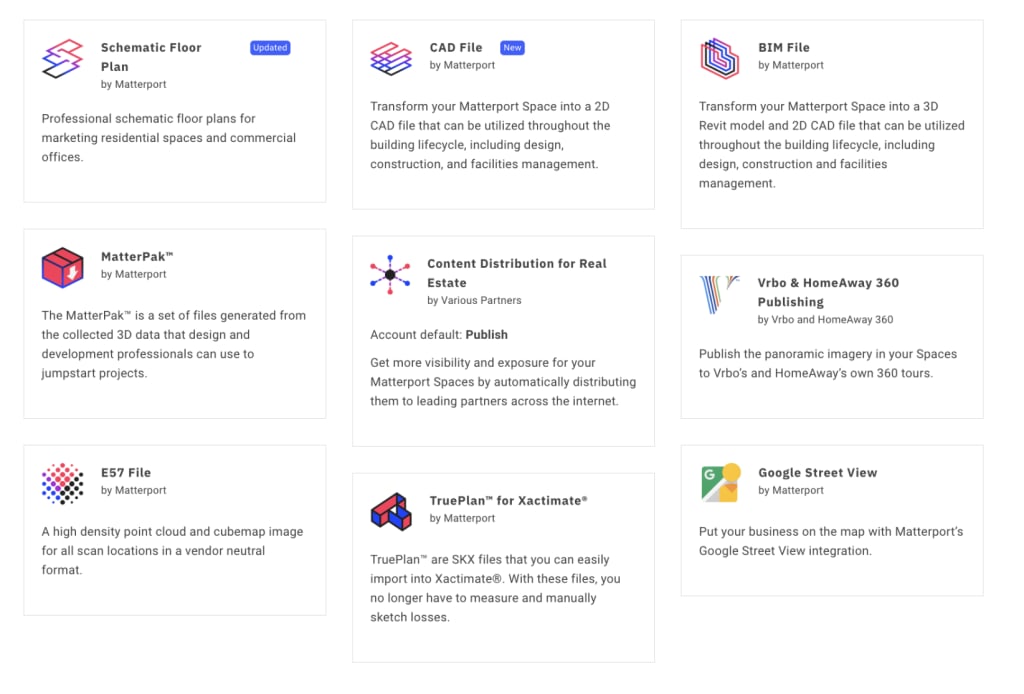
Between manual measurements and ordering suppliers to visit the site, creating BIM and CAD files can take time. With Matterport, we can export a wealth of data directly from scanning, with 1,000 square meters taking about three hours to scan.
The BIM file from Matterport includes:
.RVT file: Compatible with Autodesk® Revit® 2022 and newer
.DWG files: Floor plans and ceiling plans
.IFC file: Industry Foundation Classes format (IFC4)
.RCS file: ReCap Scan point cloud
What does the RVT file include?
Interior: Everything visible in the point cloud is modeled according to LOD 200. Note that wall elements (construction) will be modeled as generic walls.
Exterior: External elements are not included. The following elements are not included: plants and trees, vehicles, and the building's exterior. The following elements may be included if visible in the point cloud: pathways, railings, entrance steps, and swimming pools.
Roof: If the roof is visible in the point cloud, its simple geometry will be modeled according to LOD 200. The best roof modeling occurs when scanning points are available from the outside, ensuring the roof is visible in the point cloud.
Matterport CAD Files
The CAD file from Matterport includes:
.DWG file: AutoCAD-compatible file (2020 version)
.DXF file: Exported from the .DWG file
PDF set: Images for each included floor plan
.RCS file: Point cloud file with support folder
.CTB file: AutoCAD plot styles for print standards
Read more about virtual tours here.
While there is some overlap between BIM and CAD in terms of functionality, there are specific instances where one file type is more appropriate than the other.
When to Use BIM:
For detailed 3D model-based coordination between multiple stakeholders
When data about the building's actual performance is required in the model
To manage complex building life cycles from design to maintenance
To visualize and simulate building behavior (e.g., energy efficiency, space utilization)
When to Use CAD:
For 2D drawings of initial design concepts or diagrams
When creating precise technical drawings without 3D elements
For quick and efficient creation and modification of specific object details
For projects or tasks that do not require 3D modeling or extensive data integration
About the Creator
Rasmus Thor Rosenberg
Rtrosenberg is a photography business based out of Aarhus, Denmark, specializing in photography, drone imaging, and immersive virtual tours. See more at https://rtrosenberg.dk
Keep reading
More stories from Rasmus Thor Rosenberg and writers in Photography and other communities.
The Image Bank – Is Yours Full?
Originally posted on: https://rtrosenberg.dk A full-day photoshoot can provide most businesses with enough content to meet their communication needs for an entire year—so it’s surprising that many companies don’t have one.
By Rasmus Thor Rosenbergabout a year ago in Photography
Gold Chrysotype Photography Is Back and the Colours Are Breathtaking
There is a moment when a chrysotype print is lifted from its chemical bath and held up to the light stops people mid-breath. The colours that bloom across the surface — soft dusty pinks fading into deep magenta, rich cyans pooling at the edges, velvety blacks settling into the grain of the paper — look less like a photograph and more like something pulled from a dream.
By CurlsAndCommasa day ago in Photography




Comments