
I Use Canva to Create My YouTube Videos
I had no idea the perfect platform was in right in front of me all along.

I had been wanting to create horror videos for my YouTube channel for a long time, but I didn't know what platform to use. Then I found out that some people liked to use Canva, a platform that is used to create any sort of online project. I was in shock when I first learned about this. I had to check out this platform for myself to see the proof, and I was so happy when I realized how easy it was to pull off a YouTube video.
I was lowkey mad at myself, because I had been using this platform for years throughout my years of college. The perfect tool was right under my nose, and I did not see it until much later.
I'm so glad I have a lot of experience with Canva, and I was able to figure out how to create my YouTube videos right away!
To create a YouTube video, I click on Video Landscape. I don't like to use the YouTube landscape. In my opinion, the Video Landscape works much better for me.
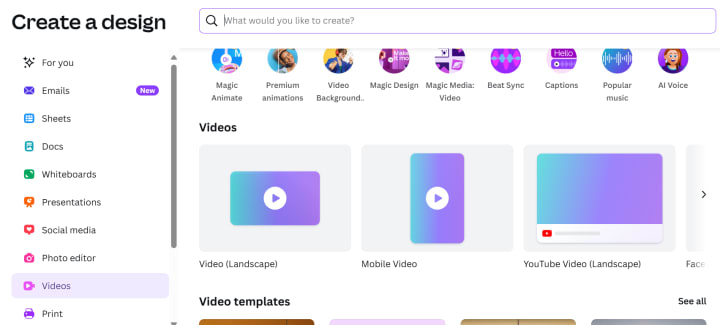
I am taken to a site that looks like this. I had to hide the top part of the image that shows all of the tools to use, because my account is present, and I would like to keep that private lol.
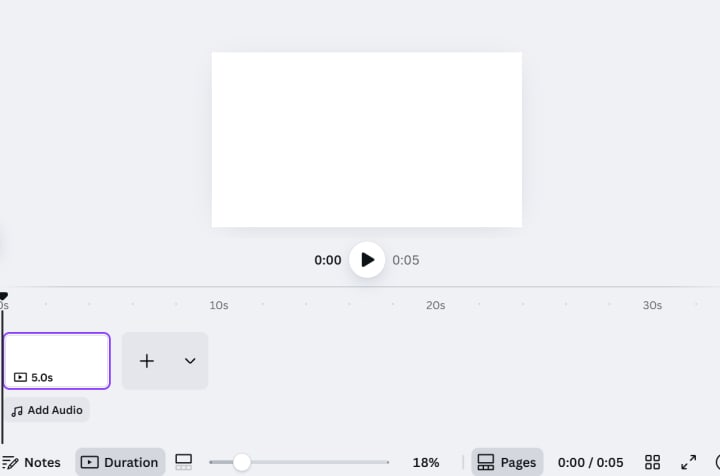
I would record my videos on my phone, and then add the video through the spot that is highlighted in purple. I would then proceed to add images to my videos, to make my YouTube channel a bit more immersive, since I do focus on horror.
I know that I mentioned that Canva is super easy to use, and yes, that is correct, but the tough part is the editing process. The videos can take a long time to edit, and I now understand why some YouTubers constantly complained about the editing part. I don't know how some people are able to edit an hour's worth or more. My videos are short, and that is already hard enough, it's crazy how long it can take.
And I also have started to edit my thumbnails for my videos too. I don't like how I use boring images for my videos, and I know I need to stand out on this platform somehow. When it comes to YouTube, if you want someone to click on your videos, you gotta have something that will catch anyone's attention. Since I focus on the horror genre, I know I need some eye catching material for people to check out my videos.
I use Canva for this process as well.
I use Photo Editor to edit my photos, because I want my images for the video to really stand out. My last video that goes over the film Eraserhead, was my first attempt at creating a good thumbnail.
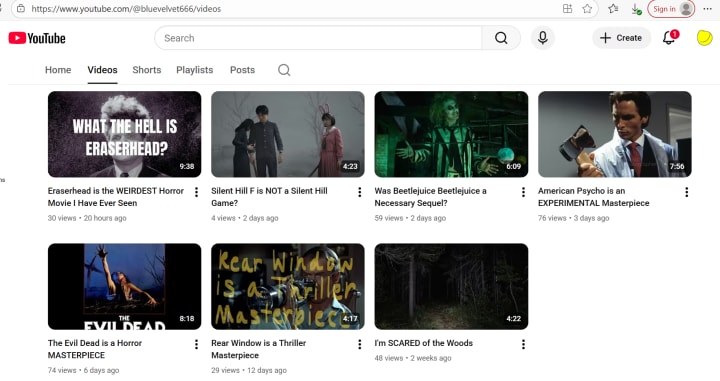
I wish I had done the same for my other videos, but some of them are still getting some views, so I suppose it's best to leave them alone for now. I'm going to stick with creating thumbnails for my videos, I'm curious to see what will be the best thumbnail for horror fans who come across my video.
I'm so determined to become monetized, because I really want to know how it works! I have become even more motivated, ever since I saw that I have finally received one hour's worth of public watch hours through my videos. I want to reach the goal of 3,000 or 4,000 watch hours. I think I can pull this off, as long as I keep trying!
I can't wait to see where my YouTube journey takes me!
---
Thank you for reading!
Emy Quinn
About the Creator
Emy Quinn
Horror Enthusiast. I love to learn about the history of horror, I write about all kinds of horror topics, and I love to write short horror stories!
Keep reading
More stories from Emy Quinn and writers in Motivation and other communities.
I’m Having a Lot of Fun with My YouTube Channel
I have finally been uploading horror videos on my YouTube channel. It has been a fun experience. I’m still uploading mini horror stories on my channel as well, since that was what attracted my followers to my channel in the first place. I’m so happy to see that people are watching my longer videos based on random horror topics I come up with on the spot.
By Emy Quinn3 months ago in Motivation
How I earn $100 in a day
There was a time when earning $100 in a single day felt like a fantasy to me. Not a goal — a fantasy. I remember staring at my phone late at night, doing small mental calculations: If I earn $5 today and $10 tomorrow, maybe by the end of the month… Even those numbers weren’t guaranteed. Some days, nothing came in at all. And that silence — the absence of notifications, emails, or messages — was louder than failure. People online love to talk about success like it’s loud and shiny. For me, it was quiet. Heavy. Full of doubt. The day I earned $100 didn’t begin with excitement. It began like every other day: tired eyes, a slow morning, and a question I kept asking myself — Is this even worth it? What kept me going wasn’t motivation. It was necessity. I didn’t suddenly become smarter or more talented. I didn’t discover a secret website or a hidden trick. I simply stopped waiting for the “perfect” moment and started using what I already had. I offered small digital work. Simple things. Work that wouldn’t impress anyone on social media — but work that people genuinely needed. And I did it sincerely. That day, the first payment came in early. It wasn’t big. Just enough to remind me that someone trusted me with their money. That feeling mattered more than the amount. Later, while I was offline, something unexpected happened. A digital product I had created earlier — something I almost didn’t upload because I thought it wasn’t good enough — sold. Then it sold again. I stared at the screen for a few seconds, unsure whether to smile or stay calm. By evening, another small task came my way. Then one more. None of these moments felt dramatic. No fireworks. No victory music. Just quiet confirmations that effort, even imperfect effort, still counts. When I finally added everything together late at night, my heart paused. It crossed $100. I didn’t jump. I didn’t celebrate. I just sat there — still — because for the first time, the number felt real. What hit me hardest wasn’t the money. It was the realization that I had been underestimating myself for a long time. I believed earning like this was reserved for “others” — more confident people, more skilled people, luckier people. That belief was wrong. Earning $100 in a day didn’t change my life instantly. But it changed something inside me. It replaced doubt with proof. And proof is powerful. Now I understand something important: money doesn’t always come from doing big things. Sometimes it comes from doing small things consistently and with sincerity. Some days I still don’t reach $100. Some days are quiet again. But the fear is gone. Because once you know something is possible, it stops being a dream and starts being a process. I no longer wait for motivation. I work, even when I feel unsure. I trust that effort never disappears — it just takes time to show itself. If you’re reading this while feeling stuck, tired, or invisible, I want you to know something honestly: You’re not behind. You’re just early in your story. And one ordinary day — without warning — things can start to add up.
By Shah Fayaz 5 days ago in Motivation



Comments
There are no comments for this story
Be the first to respond and start the conversation.