
Garmin Fenix 8 — broken touchscreen functionality with software 13.35 — temporary workaround and additional information
On March 7, 2025, Garmin released software update 13.35, which introduced a bug that disables touchscreen functionality under certain conditions.

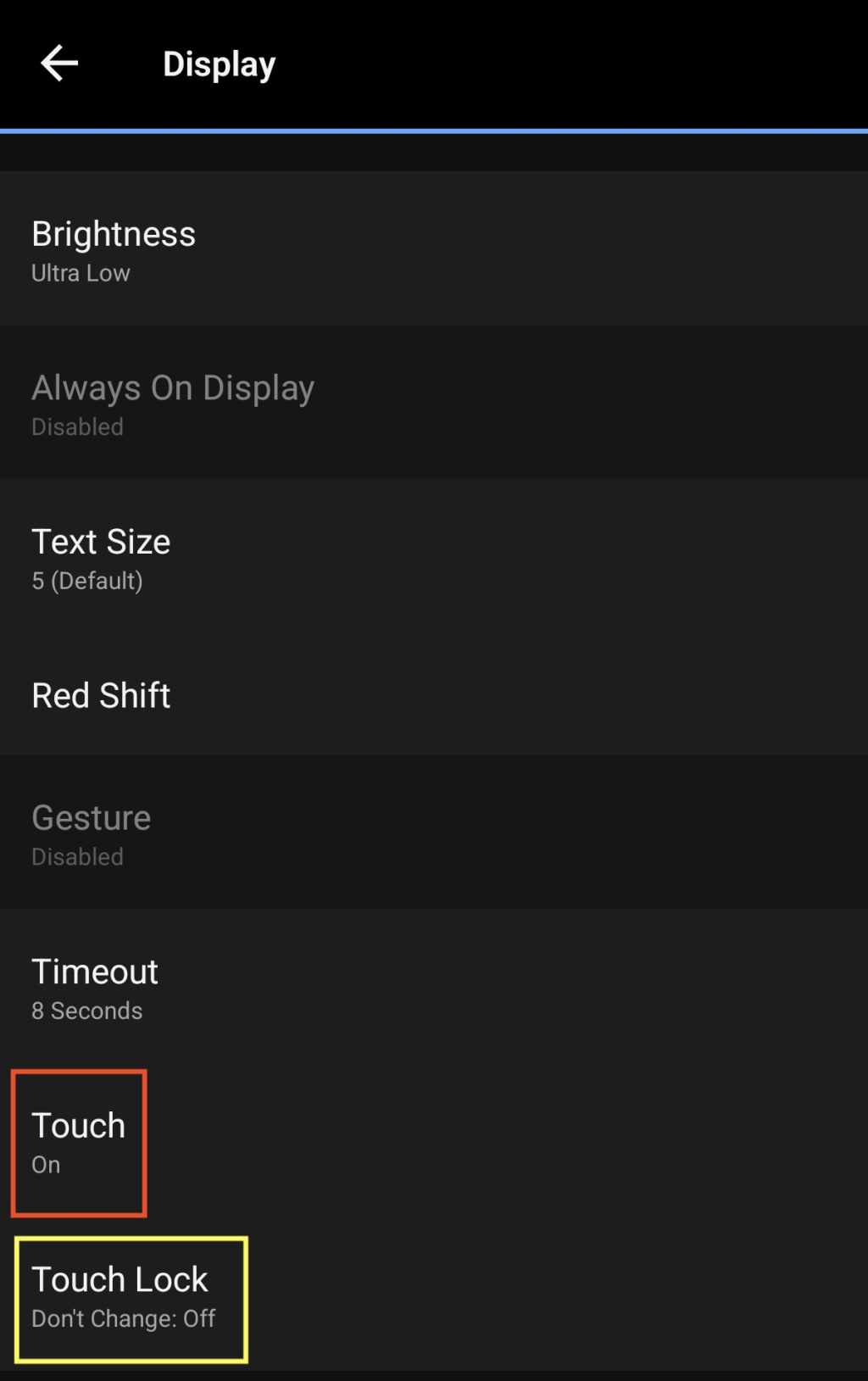
Issue Summary
I wrote about this on March 8th, 2025.
Here’s a quick recap: If you disable Sleep Mode before the scheduled Focus Mode: Sleep mode ends and have the Touchscreen Disabled option enabled for Sleep Mode, the touchscreen will not re-enable as expected.
Even rebooting the watch won’t restore touch functionality if the device is still within the Sleep Mode time window. However, once you exit this time slot or manually adjust the schedule in settings, the touchscreen starts working again after you reboot the watch.
The Workaround
I’ve identified a workaround that can restore touchscreen functionality.
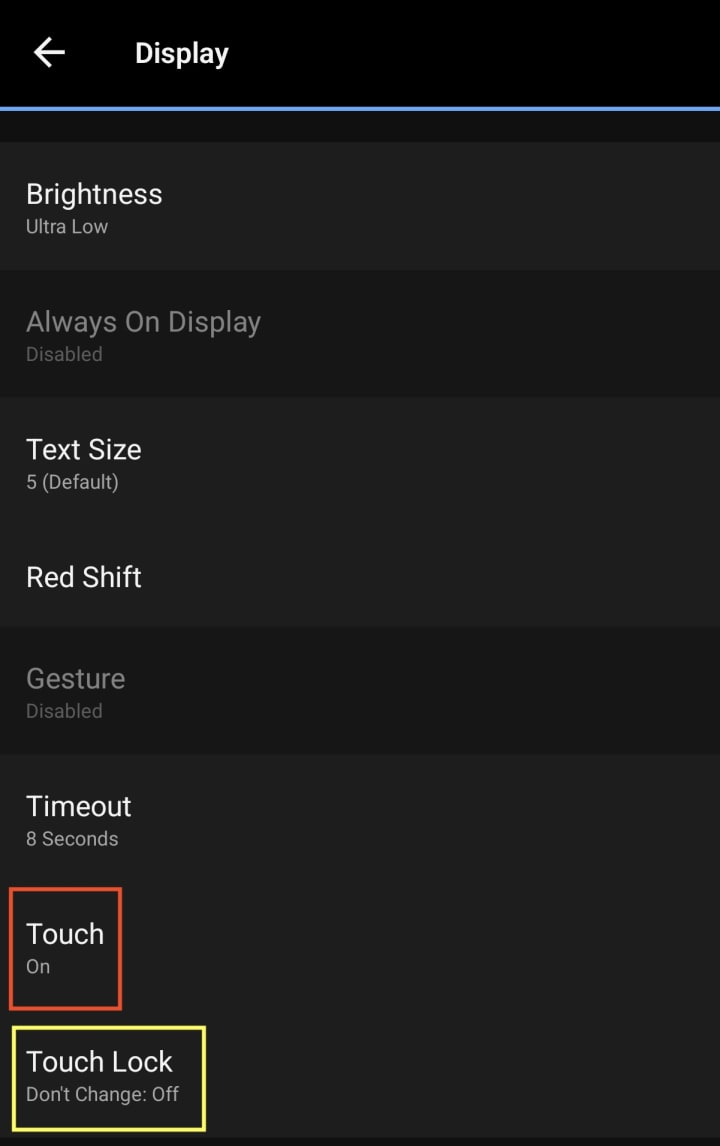
I’ve identified a workaround that can restore touchscreen functionality:
- Open the Settings on your watch or in the Garmin Connect app.
- Navigate to Focus Modes > Sleep > Display & Brightness.
- Adjust the following settings:
- Touch → Set to On
- Touch Lock → Set to Don’t Change
This will keep touchscreen functionality enabled even during Sleep Mode. While this isn’t ideal, you can manually toggle the touchscreen on or off at any time using the shortcut: Bottom Left Button + Start Button (Top Right).
Morning Report Behavior
One of the more peculiar aspects of this issue is how the touchscreen behaves when the Morning Report is active. Even if you attempt to enable the touchscreen using the shortcut keys (Bottom Left Button + Start Button (Top Right)), it remains unresponsive while the Morning Report is displayed.
This means that during your morning routine, if you rely on touchscreen interactions, you may find your watch unresponsive until the Morning Report is dismissed. This can be frustrating, especially if you're used to checking stats or interacting with widgets right away using the touchscreen.
However, once you exit the Morning Report, the shortcut key method works as expected, and the touchscreen functionality is restored. While this behavior may not affect every user, those who frequently check their stats or notifications in the morning will likely find it inconvenient.
Update Since March 8, 2025
Since initially reporting this issue, I have been actively following discussions on the Garmin Forums. Several users have reported experiencing the same problem, confirming that it is not an isolated case.
A recent forum post from another user revealed that Garmin is aware of the issue and has acknowledged the bug. However, according to this report, Garmin does not plan to release a fix until the May software update. This means that users will have to rely on temporary workarounds for at least another couple of months before an official patch is rolled out.
Additionally, I have noticed that Garmin has not released any new beta versions since the 13.xx update. This is somewhat surprising, as one might expect a quick beta release to address such a significant bug. The lack of new beta versions suggests that Garmin may be taking longer than usual to implement and test a solution.
For now, if you are experiencing this issue, the best course of action is to apply the workaround described earlier. While it is not a perfect fix, it will allow you to regain touchscreen functionality when needed. Hopefully, Garmin will provide additional updates or an interim fix before the planned May release.
In the meantime, I will continue monitoring the situation and will update this post if any new developments arise. If you've encountered this issue and have additional insights, feel free to share them in comments to increase visibility and push for a quicker resolution.
About the Creator
Keep reading
More stories from Aleš Sušnik and writers in Longevity and other communities.
Garmin Fenix 8 - Software 13.35 breaks touchscreen functionality
Garmin has quietly rolled out software update 13.35, and unlike previous beta versions, this is an official release. However, for some users—including myself—this update has brought unexpected issues. This morning, I was convinced that my Garmin Fenix 8 51mm AMOLED’s touchscreen had completely stopped working.
By Aleš Sušnik11 months ago in Longevity
Day 4 of Quitting
If this is how sobriety feels, maybe it’s better to go through life a little buzzed… this, along with other hits like, I want to kill myself, I wish I was dead, and I’m going to throw myself off a bridge have been the only thoughts on rotation these past few days. I promise myself that if, in a month, I still feel like this (‘this’ meaning despondent, full of rage, and simultaneously numb) I can go back to smoking. Until mid-February though? Nicotine is off the table.
By sleepy drafts19 days ago in Longevity
Sleeping in Total Darkness: The Simple Nightly Habit That Strengthens Your Brain and Protects Mental Health
How turning off the lights at night can improve sleep, memory, and overall well-being Sleep is essential for physical health, mental clarity, and emotional balance. While most people know that getting enough sleep is important, new research suggests that sleeping in complete darkness—without nightlights, electronic screens, or ambient light—can have profound benefits for your brain and mental health. This simple nightly habit may enhance memory, reduce stress, and protect against cognitive decline, making it a powerful yet overlooked tool for overall wellness. Why Darkness Matters for Sleep The human body relies on circadian rhythms, an internal clock that regulates sleep and wake cycles. Light, particularly blue light from screens, can disrupt melatonin production, the hormone responsible for inducing sleep. Key points include: Melatonin regulation: Darkness signals the body to produce melatonin, helping you fall asleep faster and sleep more deeply. Hormone balance: Proper sleep in darkness supports cortisol regulation, reducing stress and improving emotional stability. Circadian alignment: Sleeping in darkness keeps your internal clock synced with natural day-night cycles, enhancing overall health. Even low levels of light, such as streetlights or electronics, can interfere with these natural processes, reducing the quality of sleep and mental restoration. Brain Benefits of Sleeping in Darkness Sleeping in total darkness is not just about feeling rested—it has direct effects on brain function. Studies suggest that complete darkness during sleep can: Improve memory and learning Deep sleep phases, particularly slow-wave sleep, are critical for memory consolidation. Darkness supports longer periods of uninterrupted deep sleep, which enhances problem-solving and information retention. Boost cognitive performance Sleep in darkness allows the brain to clear toxins accumulated during the day. Improved brain detoxification can reduce mental fog and increase focus. Protect against mental decline Poor sleep and exposure to light at night are linked to higher risks of neurodegenerative diseases such as Alzheimer’s. Maintaining complete darkness during sleep may slow cognitive decline over time. Mental Health Advantages Mental health is closely tied to sleep quality and circadian rhythms. Sleeping in total darkness can help: Reduce anxiety and depression: Better melatonin regulation supports mood stabilization and reduces stress hormones. Improve emotional resilience: Quality sleep strengthens the prefrontal cortex, which manages emotional responses. Enhance stress management: Darkness promotes deeper restorative sleep, which helps the body recover from daily stressors. Even small improvements in sleep quality can have significant effects on mental health and overall emotional balance. Practical Steps to Achieve Total Darkness Implementing this habit is easier than it may seem. Here are some tips: Eliminate electronic light sources Turn off phones, tablets, TVs, and laptops at least 30 minutes before bed. Consider using blue light filters if devices are unavoidable. Block external light Use blackout curtains or blinds to prevent streetlights from entering the room. Sleep masks can be helpful for travelers or those in brightly lit areas. Dim or remove nightlights Even small LED nightlights can interfere with melatonin production. If necessary, use motion-activated red lights, which have minimal impact on sleep. Create a bedtime routine Go to bed at the same time every night to support circadian rhythms. Avoid caffeine or stimulating activities close to bedtime. Consistency is key; sleeping in darkness becomes more effective when paired with regular sleep schedules and healthy lifestyle habits. Research Highlights Several studies highlight the benefits of total darkness during sleep: Sleep and brain health: Research shows that melatonin levels are significantly higher when sleeping in darkness, supporting memory consolidation and brain detoxification. Mental health impact: A 2020 study found that individuals exposed to low light at night had higher rates of depression and anxiety symptoms. Cognitive performance: Participants who slept in complete darkness scored better on memory and attention tasks compared to those exposed to ambient light. These findings underscore that darkness is a critical yet often overlooked factor in restorative sleep. Beyond Sleep: Lifestyle Benefits Adopting total darkness at night may also improve: Energy levels: Quality sleep increases morning alertness and productivity. Metabolism: Proper melatonin and circadian regulation support healthy weight management and metabolic function. Overall wellness: Better sleep contributes to immune system strength, reduced inflammation, and longer lifespan. In short, turning off the lights at night is a low-effort, high-impact habit with benefits far beyond just feeling rested. Conclusion Sleeping in total darkness is a simple yet powerful nightly habit that strengthens the brain, protects mental health, and improves overall well-being. By eliminating even small sources of light, individuals can enhance memory, emotional resilience, and long-term cognitive health. In a world filled with screens, artificial lighting, and constant stimulation, returning to natural darkness during sleep is a small change that can yield lasting benefits. For anyone looking to improve mental health, boost brain function, and enjoy restorative sleep, turning off the lights is a habit worth embracing tonight.
By Fiaz Ahmed about 19 hours ago in Longevity


Comments
There are no comments for this story
Be the first to respond and start the conversation.