
How To Run a YouTube Channel With AI Tools
AI tools that will make better videos than you.


YouTube is the second-largest search engine in the world, and it has a huge influence on the world around us.
It’s no wonder that many people set up YouTube channels to share their thoughts, opinions, and experiences with others.
However, creating a YouTube video can be time-consuming, expensive, and tedious.
So, if you are at the beginning of your YouTube journey, or you just want to help with video making, I want to share with you my favorite AI tools anyone can use for YouTube.
But before I start, let me talk about something called YouTube automation.
Why Should You Automate YouTube?
YouTube automation is a trending term that describes a way of running a YouTube channel.
It simply means, you are outsourcing video production to hired freelancers and all you are doing is uploading the videos on the channel.
It is common practice for bloggers to hire content writers or purchase articles from freelance websites in order to grow their blogs. It is also normal to have virtual assistants to run social media profiles.
So, why should YouTube be different?
Why not try to run YouTube like a business, even with a low budget, and hire people to create engaging videos.
Or you can use tools that can eliminate the hassle of hiring people, that are powered by advanced AI, and can help you save time or make your videos more attractive for viewers.
In this part of the article, I want to focus on AI tools that will help you with video script writing, recording voice overs, and video editing.
Video Script
Writing an engaging video script is a difficult and often frustrating endeavor.
A good script should be able to hold the viewer's attention and keep them engaged until the end.
It should also be written in a way that is easily digestible for users on any screen size.
Luckily, there are tools to help you write any piece of content. I'm talking about AI-powered writing assistants that use open-source GPT-3 technology.
While the market is full of AI writers that are claiming to be the best or fastest on the market, I like only two of them - Jasper and Rytr.
Jasper is an awesome AI writer that is considered the best on the market. And I agree with this statement. But it is also expensive.
While it comes with wide pricing plans, to be able to write long-form content, you have to sign for a Boss Mode option, where the price starts at $59 per month and comes with a 50,000-word limit.
However, Jasper is quite easy to use, and you can write scripts for your videos in a few minutes when you know how to use the boss commands. All you need to do is paste a few sentences and Jasper writes the rest. It is incredible.
But still expensive for many starting content creators.
That's why I love Rytr. A budget AI writing assistant that has a $29 monthly plan with unlimited words. Which is awesome when you need to write multiple blog posts or scripts.
However, the difference between Rytr and Jasper is that Rytr is not as automatic as its competitor and requires a little bit of time to learn. But it is worth every penny, at least in my opinion.
My recommendation:
Voice Over

Making a voice over for your video is not as easy as it may sound. This is because people consider voice acting to be an art and thus making a voice over for your YouTube video can be a challenging and time-consuming process.
Hiring a person to do a voice over for your video is not a cheap process. Most people, even on Fiverr, are charging their skills per word, so for a 1,500-word script, you can easily pay over $100.
This is insane if you are just starting on YouTube.
That's why I'm using Murf as a tool, which is generating human-sounding voice overs for my YouTube videos.
And it's an incredible experience. Murf offers an easy-to-navigate interface and offers over 120 voices, most of which sound like a human.
Moreover, the pricing is incredible. In a basic monthly plan, which cost $19, you get 60 voices, unlimited downloads, commercial usage rights, and 2 hours of voice generation per month.

In my opinion, Murf is an excellent AI tool, that is much cheaper than a human voice over artist.
My recommendation:
- Best Voice Over - Murf
Video Editing
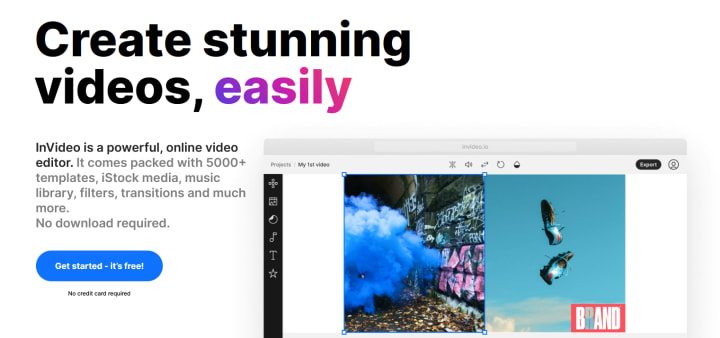
Not everyone has the time and skills to learn how to use Adobe Premiere Pro to create engaging videos. I understand that.
That's why AI-powered video editors come in handy.
AI-powered tools like inVideo and Pictory aim to save time and make the process of creating videos accessible to a wide audience. They can transform any video into an engaging, shareable piece of content.
Both are working on the same text-to-video technology, where you paste your script and the tool will generate the video around your text with music, images, and video footage from over 3 million royalty-free items.
And what's more useful, both these video editors are offering AI voice overs that can be used in the video. T
A single 5-minute video will take you only around 10 minutes to render, all with images, video footage, music, and narration.
This is called time-saver.
My recommendation:
Conclusion
AI-powered technology is here to stay. So, it is time to take advantage of this fact and start using artificial intelligence to make money.
In my opinion, AI tools should be a standard part of any successful YouTube growth strategy.
Disclosure: Some of the links above may contain affiliate partnerships, meaning, at no additional cost to you, I may earn a commission if you click through to make a purchase.
About the Creator
NechCloud
Blogger, websites owner, YouTube creator. I create content about personal growth, money making ideas and share my knowledge about interesting income methods.
Keep reading
More stories from NechCloud and writers in Lifehack and other communities.
Snapchat Account Hack in 2026: The Real Methods and How to Protect Yourself
Your Snaps Aren't as Disappearing as You Think When you send a Snap, you probably believe it vanishes into the digital void after being viewed. This illusion of ephemerality creates a dangerous false sense of security for millions of Snapchat users. Behind the playful lenses and streaks lies a constant, hidden battle for account access—a battle where your personal conversations, photos, and location data are the prize. Understanding this landscape isn't about promoting hacking; it's about empowering you with the knowledge to build digital fortresses around your private life.
By Alexander Hoffmann3 days ago in Lifehack


Comments (1)
GOOD ONE . READ MY STORY ON Rytr: My New Favorite Tool to Become a Better Writer LINK BELOW https://shopping-feedback.today/education/rytr-my-new-favorite-tool-to-become-a-better-writer%3C/span%3E%3C/span%3E%3C/span%3E%3C/a%3E%3C/p%3E%3C/div%3E%3C/div%3E%3C/div%3E%3Cstyle data-emotion-css="w4qknv-Replies">.css-w4qknv-Replies{display:grid;gap:1.5rem;}