
How to Import Lotus Notes Mail into Outlook?
Effortless Solution For How to Import Lotus Notes Mail into Outl
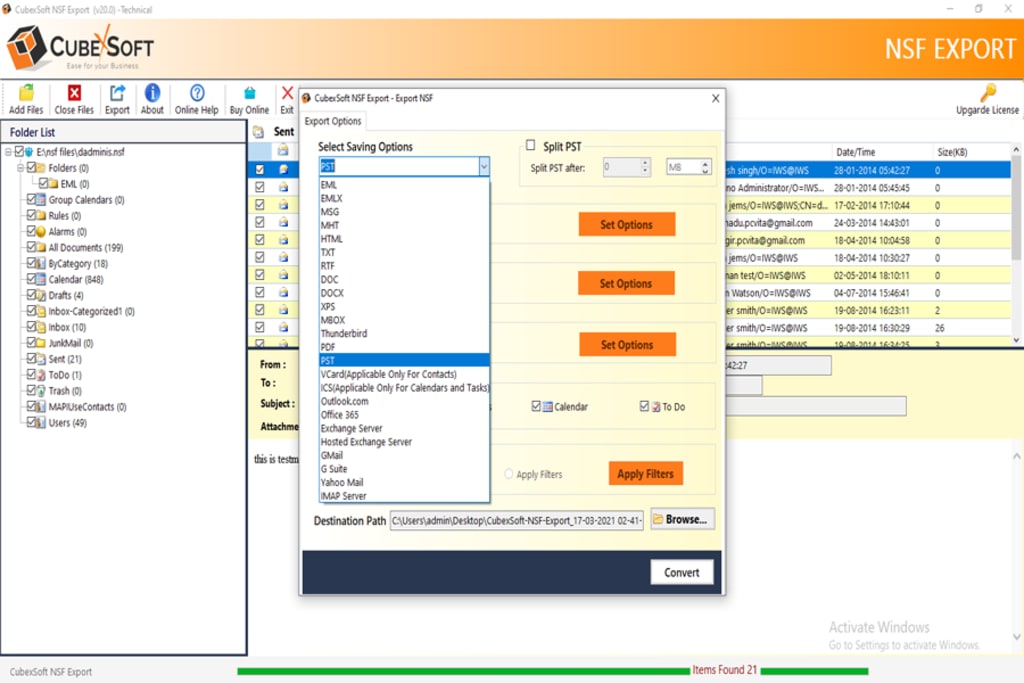
In Today’s arena, all the organizations depend on numerous email applications for the purpose of e-communication. Moreover, all email applications will provide a wide range of inbuilt functionalities to the user that is required for the email organization. So, due to the occurrence of this restriction all the users’ requirement to switch from one email client to other email client. One such conversion is from Lotus Notes to Outlook. Therefore, in the upcoming section, we are going to discuss common reasons to convert Lotus Notes to Outlook. Before describe all such things, first, we have to understand about Lotus Notes in detail.
Overview: IBM Lotus Notes
Lotus Notes: It is a collaborative client-server software platform, which includes emailing, browsing, file sharing, and other business related information. Moreover, IBM Notes is well known for the security feature, no other email clients offer a safe platform as much Lotus Notes can. Also, users can encrypt NSF database or an email message while sending or receiving. So, Lotus Notes helps to work smarter, faster and brings the world to the desktop.
Solution for How to Import Lotus Notes Mail into Outlook?
There are two methods presented for you to import email from Lotus Notes to Outlook application i.e. Manual Method and Professional NSF Converter Tool to migrate Lotus Notes to Outlook.
Manual Method
There are following steps to perform Lotus Notes NSF to PST conversion process:-
Important Note: Before moving on the migration, its need to take backup of original NSF file. There are risks that original file get damaged during the migration process. The complete conversion process can be considered into two parts:
1. Export NSF Files to CSV Format
2. Import CSV to PST Format
Part 1. In the first part of this process, you will need to move NSF files to CSV Format.
- Open IBM Lotus Notes Email Client
- Choose the NSF file you want to open.
- Then tap to Menu, go to the file option and press the Export button from the menu.
- On the Export Window, select a location for the new file. Click Save as and pick Comma Separated Value or Structured Text.
- Give a name for this file, and then click the Export button
- If you take Comma Separated Value, the dialog box pops up, select the required options from the same and click OK
- Or, if you take Structured Text, the dialog box pops up, and select the options and click Ok
Part 2. Now you need to import data to MS Outlook
- Run MS Outlook application on your machine
- Click on File Menu and then Open
- Click Import option in the list
- From the Import/Export wizard, select import from another program or files option. Then Click Next.
- After that select the format to import from. Then choose Comma Separated Value and then press the next button.
- Now select the required folder where you want to import the CSV file. Click Next
- Now the procedure will be started and it will be complete within a few seconds. Finally. Click Finish.
- Now you can efficiently open Lotus Notes NSF data into MS Outlook application.
There is accessibility of manual solutions but not recommended because of the following drawbacks:
The procedure is too long to continue with. This will lead to produce difficulties because at a time only one file can move into Outlook PST. If the emails are in bulk then process is highly complicated and time consuming as well.
However the process can be used if emails are few in countable numbers say 10 or 15.
In additional to these points, if you are not well-versed with the technology then such a process will not work for longer and cause server hurdles too. If you ever skip the steps then repetition of the process from the beginning is mandatory.
The process is full of risks. The chance of losing data is higher is cases like poor internet connectivity etc. So users like to go with third-party software which provides exact results.
Professional Method:
Other way to export Lotus Notes emails in Outlook is using professional solutions i.e. NSF to PST Converter tool. The tool has ability to export bulk Lotus Notes mailboxes in Outlook without altering their original properties of files. The Lotus Notes to Outlook software provides users with an easy option to import and migrate all their emails and data from IBM Notes to Outlook email platform. The software converts all the data contained in the Lotus Notes Email client to MS Outlook in quick time without any loss of data. The user interface is simple and easy to use for converting multiple Lotus Notes emails at one time.
About the Creator
Keep reading
More stories from Maria Hirthe and writers in Lifehack and other communities.
How Do I Add an Outlook OST Data File to Outlook 2016?
If you are looking for a solution on how do I add an Outlook OST data file to Outlook 2016? If yes, then no need to worry, here we are providing a best and reliable solution – OST Converter, for all technical and non-technical users to migrate OST emails in Outlook PST file along with attachments.
By Maria Hirthe5 years ago in 01


Comments
There are no comments for this story
Be the first to respond and start the conversation.