
💻 Seamless Integration Achieved: How to Use the New iPhone Mirroring Feature on Your MacBook
Decoding Apple’s latest ecosystem breakthrough: A step-by-step guide to controlling your iPhone directly from macOS and the strategic significance of this cross-device fusion

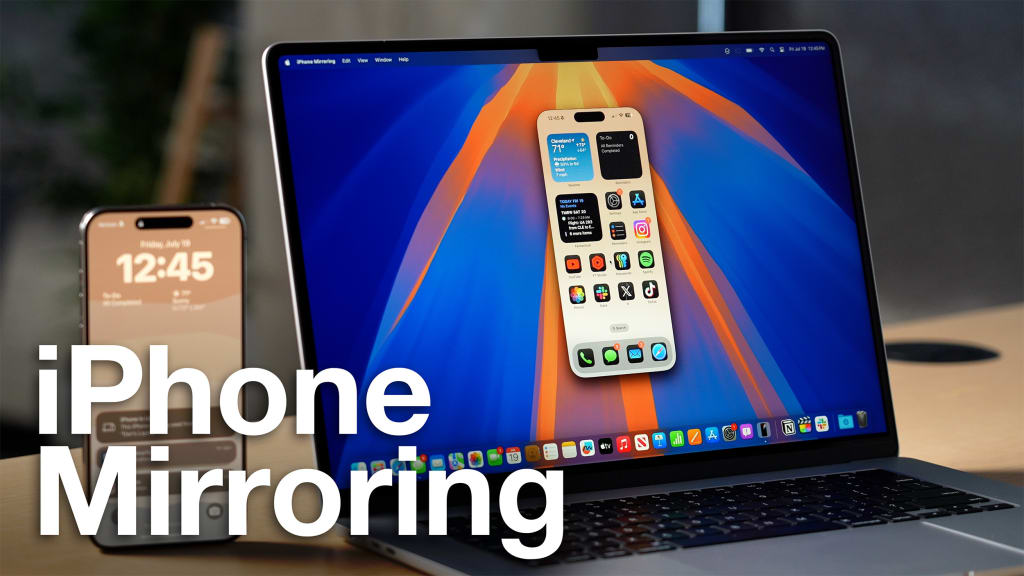
he holy grail of the Apple ecosystem has always been maximum efficiency and minimal friction between devices. With the arrival of iOS 18 Beta 2 and its accompanying desktop OS, macOS 15 Sequoia, Apple has finally delivered a revolutionary feature long demanded by users: iPhone Mirroring. This functionality allows users to see and fully interact with their iPhone screen directly on their MacBook display, enabling unprecedented cross-device workflow continuity.
This feature is more than just a convenience; it’s a powerful new layer of integration that effectively dissolves the boundary between the mobile and desktop environments. For the busy professional who constantly juggles tasks, the ability to access a critical text message, review a photo, or open a specific mobile app without physically touching the iPhone is a monumental leap in productivity.
The Magic Behind the Mirror: How It Works
iPhone Mirroring leverages Apple’s specialized hardware and software integration to create a secure, low-latency connection. Unlike simple screen-sharing used by competitors, Apple's implementation allows for true bi-directional control.
Core Requirements: To unlock this functionality, users must ensure they meet three key criteria:
iPhone running iOS 18 (or later).
MacBook running macOS 15 Sequoia (or later).
MacBook must be equipped with the T2 Security Chip or newer Apple Silicon (M-series chips). This hardware is crucial for secure, fast processing and authentication necessary for the feature.
Connectivity and Authentication: The connection relies on the seamless cooperation of three Apple technologies:
Shared Apple ID: Both devices must be logged into the same Apple ID.
Wi-Fi and Bluetooth: Both must be enabled for initial device discovery and maintaining the wireless link.
Proximity Authentication: To initiate mirroring, the iPhone must be placed in close proximity to the MacBook for quick authentication, usually when the phone is locked.
The Workflow: The user simply opens the dedicated iPhone Mirroring application on the MacBook. The full iPhone screen appears as a window on the desktop. From here, the MacBook trackpad and keyboard become the direct input for the iPhone—allowing users to swipe through apps, type texts, and interact with the mobile interface using desktop peripherals.
Productivity Gains: The End of Context Switching
The practical benefits of iPhone Mirroring are immediately apparent to anyone who splits their focus between multiple screens.
Unified Workflow: Tasks that previously required breaking workflow—such as fetching a two-factor authentication code from the iPhone, replying to a message on WhatsApp, or quickly cropping a photo saved on the mobile device—can now be executed without ever leaving the desktop environment.
Drag-and-Drop Efficiency: The ability to seamlessly drag and drop files, photos, and documents between the macOS desktop and the mirrored iOS interface will save countless minutes previously spent relying on AirDrop or cloud uploads. This streamlines content creation and document management.
Mobile App Access: Developers and power users can fully utilize mobile-exclusive apps (like Instagram, TikTok, or specialized enterprise tools) directly from the comfort of their desktop, transforming the MacBook into a versatile hub for all applications.
Current Limitations: The Early Stages
As with any first-generation Apple feature, iPhone Mirroring arrives with a few expected, yet temporary, limitations that highlight the complexity of synchronizing two operating systems:
Disruption Upon Unlock: The connection is designed to immediately terminate the mirroring session if the physical iPhone is unlocked and accessed by the user. This prevents simultaneous input and confusion between the two interfaces.
Access Restrictions: The current beta does not support using the iPhone's camera (likely due to privacy and security protocols) or initiating cellular phone calls via the mirrored interface. These functions still require direct interaction with the physical handset.
Hardware Threshold: The requirement for the T2 chip or Apple Silicon immediately excludes older Mac models, demonstrating that the feature is heavily reliant on Apple’s specialized security and processing hardware.
Conclusion: A Glimpse into the Unified Future
iPhone Mirroring is more than a simple novelty; it is a profound philosophical statement by Apple. It signals a future where the lines between macOS and iOS become increasingly blurred, with the user's focus remaining the center of the computing experience, not the device itself.
By enabling direct, seamless control of the iPhone from the MacBook, Apple has significantly raised the bar for cross-device integration, ensuring that the convenience of its proprietary ecosystem remains its single most powerful competitive advantage.
About the Creator
Author’s Advice
If you would’ve asked me 20 years ago did I know I’d become a writer and an author, I would’ve said “nope, ain’t happening”. As fate would have it I did become an author and I can honestly say I’m loving it so far. It really does feel good to be a writer. I’ve learned a lot on this journey and I feel like with even me being as new to this world as I am, there’s some wisdom I need to share with every other aspiring author.
By Joe Patterson3 days ago in Journal



Comments
There are no comments for this story
Be the first to respond and start the conversation.