
Effective Tips to Perfectly Optimize Your Roofing Company's GMB Listing
Local SEO Tips for Roofing Businesses
Google My Business Listing has today become a necessity for all local businesses looking for local visibility. If you are already using GMB ( acronym of Google My Business), it's good to maintain it for a lifetime and take huge benefit of the free-to-use platform. However, if you are a startup roofing business and searching to grow your leads count, GMB can be a game-changer for your business.
Only listing your website in Google My Business isn't required to take leverage and enhance your organic visibility. There are numerous tactics that you must follow to strengthen the GMB listing of your roofing company and grow your lead count.
GMB is the root of any local SEO campaign. If you are investing in roofing SEO services, GMB listing will definitely be there. However, the right usage and proper optimization of Google Business listing are essential.
Don't worry; here we are providing you effective practices to optimize your Google My Business listing that will complete your listing and take your local roofing business to the next level.
Get Verified Before Anything Else
Before you start using your Google Listing, make sure your listing is approved and verified. Google provides you different ways to verify the listing. Among all, physical passcode is the most effective way, where a passcode is sent to your doorstep via local delivery. Make sure you have submitted all the business details (including Business name, Address, Phone number, website, etc.). Once received, you need to add the passcode to the GMB listing and complete the verification process.
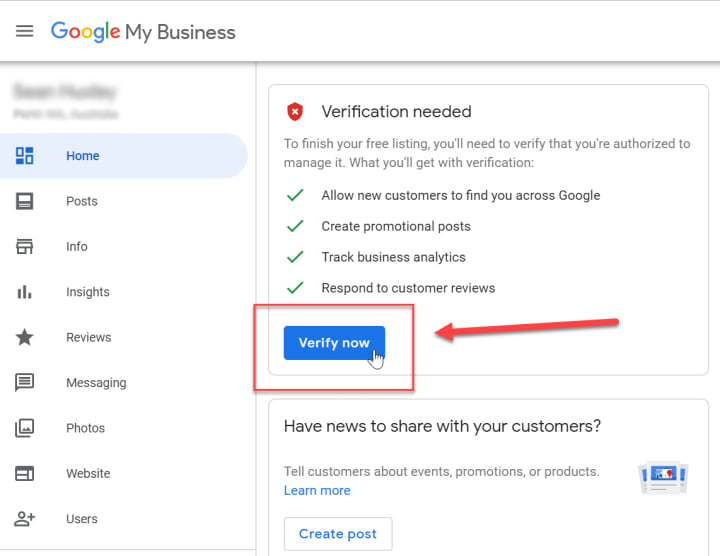
More often, you will get the passcode within 1 week, which, however, varies based on your area and available delivery system.
Running an unverified business listing for your roofing company is entirely worthless. An unverified listing won't stay alive for long. Hence, you should ensure the listing is verified before proceeding further.
Choose Right Business Category
YES! category selection is a must when creating your GMB listing, but your local organic visibility depends upon what category you have selected. You can choose from a broad category. Be specific and precise when selecting the right category for your business. Right category selection will help your business achieve the desired visibility and get better SERP rankings.
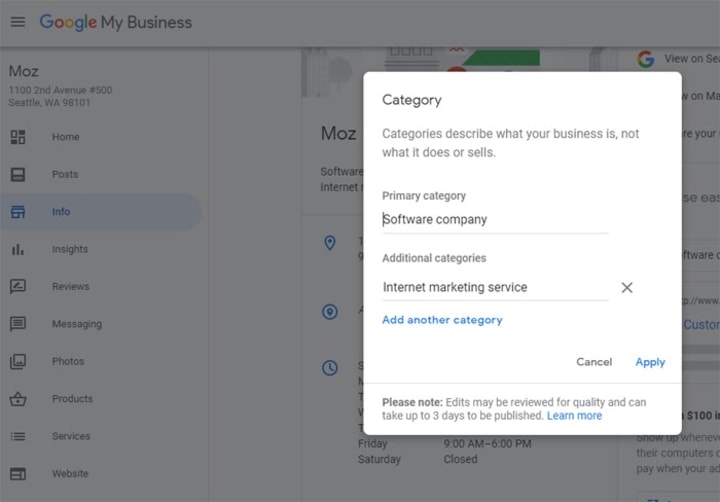
E.g., If you are a roofing contractor, you can add the primary category as "Roofing Contractor." For additional categories, you are provided additional space to mention other categories and teach Google better about your business niche.
Add Business Description & Photos
Business description is the elaboration that helps Google, as well as customers, better understand your business. The business description is the comprehensive piece of content that you can use to bind the customers with your servings and compel them to prefer your roofing services over other alternatives. Remember to add business-specific keywords, but about spamming your description. This will definitely help you rank at the top in the local search results.
Business Photos are also an essential part of Google My Business Listing. Photos primarily include your business logo, cover photo, business services, etc. The photos show how your business works and what it serves. Try to provide as many photos of your office exterior/interior as possible to build trust.
Recommendation: Whatever photos you are uploading to the GMB must be named with local SEO keywords. E.g., save services files as "roofing-SEO-services.jpg."
Get Google Reviews & Respond Them
When your GMB listing is LIVE, and you have already started serving roofing clients, it's natural to get the review for your work. Some clients put reviews on the GMB by themselves. However, you need to ask some of them to share their feedback. In totality, it's essential to take advantage of every roofing customer you serve and collect the maximum possible number of Google reviews.
Google reviews are helpful in decision-making, and that's why you should have a maximum number of positive reviews. Moreover, every review you receive must be responded to. Responding to every feedback (positive or negative) will make your clients feel special. Responding to negative reviews will also help the client rethink the issue and negotiate it with your team for an answer.
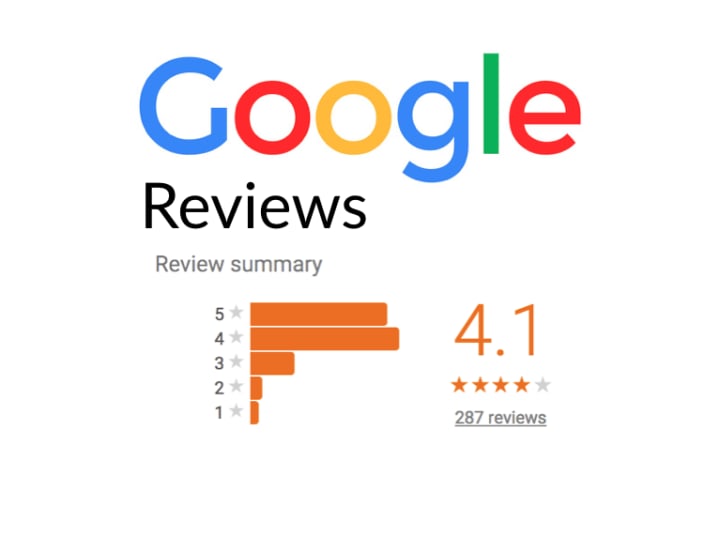
In many cases, resolving client's issues can help you convert a negative Google review into a positive one.
Put Google Posts Regularly
Google posts is the new social platform to update your clients/customers about any updates. Google Posts is also an excellent way to inform the clients of ongoing offers available on your roofing services. Create a post with plain-text, visuals, or even videos to engage the clients with your unique offerings and convert a standard user into potential customers. Using videos is highly recommended in Google posts as Video content works better than other content types.
Stay active on Google Posts and regularly post your roofing updates to keep users active with your services and offerings.
So, these are the prominent and practical tips to optimize the Roofing company's GMB listing. Remember, follow each and every step keenly to avoid errors and generate significant leads.
About the Creator
Keep reading
More stories from writers in Journal and other communities.
Motherhood After Loss
If you’d asked me 10 years ago how many children I thought I’d have I would of told you zero. At that point in life I was almost convinced I couldn’t have children. It wouldn’t be long and I’d be proven wrong. February 2016 my now husband and I found out we were pregnant with our first daughter. Due to my medical history I was terrified. Pregnancy went well and baby girl was happy and healthy. We had a few road bumps with her gaining weight but we overcame that obstacle! My husband and I thought it would be several years before we had another child if we ever had another child and then in June of 2018 we were once again surprised! We were pregnant with a baby boy. January 21, 2019 we welcomed our son. He had the most beautiful blond curls! He was always so happy and such a sweet boy. If you’d asked my husband and I we would of said we were done having kids. We had a beautiful girl and boy. What more did we need.
By Kimberly Nightengale6 days ago in Journal
Five—One Grounding
Five—Locked in a perpetual battle against my failing senses and reason, I fight to survive, to get through; I am afraid of... nothingandeverythingallatonce—...—my mouth is dry, and my muscles seize up... what can I see? I can see the birdcage and birds; I can see the watercolour my beautiful wife painted many years ago and unlocked her journey into art; I can see the empty mug of tea as it sits perilously on the arm of the sofa; how many is that now? Three down, two to go; I can also see a jackdaw on the roof of our neighbour's house across the road and a bookcase of potential—Five things you can see.
By Paul Stewart5 days ago in Poets


Comments
There are no comments for this story
Be the first to respond and start the conversation.