
Streamlining Student Registration: Building a Matriculation Number System with the MERN Stack
Streamlining Student Registration Process Using the Power of MERN Stack
Developing a smooth and efficient matriculation number system requires careful planning and visualization of the system's architecture. In this blog post, we will explore the importance of creating a flowchart as a roadmap for the development process. Additionally, we will discuss the challenges faced and the valuable lessons learned while building the system using the MERN stack (MongoDB, Express.js, React.js, and Node.js). From handling authentication with JSON Web Tokens (JWT) to optimizing data modeling and implementing CORS for secure communication, this post aims to provide insights and guidance for creating similar systems.
Introduction:
To ensure a well-structured and efficient development process, visualizing the architecture of the matriculation number system through a flowchart is crucial. The flowchart acts as a roadmap, allowing developers to identify potential bottlenecks and optimize the system. In this post, we will discuss the significance of a flowchart and its role in streamlining the development of the matriculation number system built with the MERN stack.
The Flowchart:
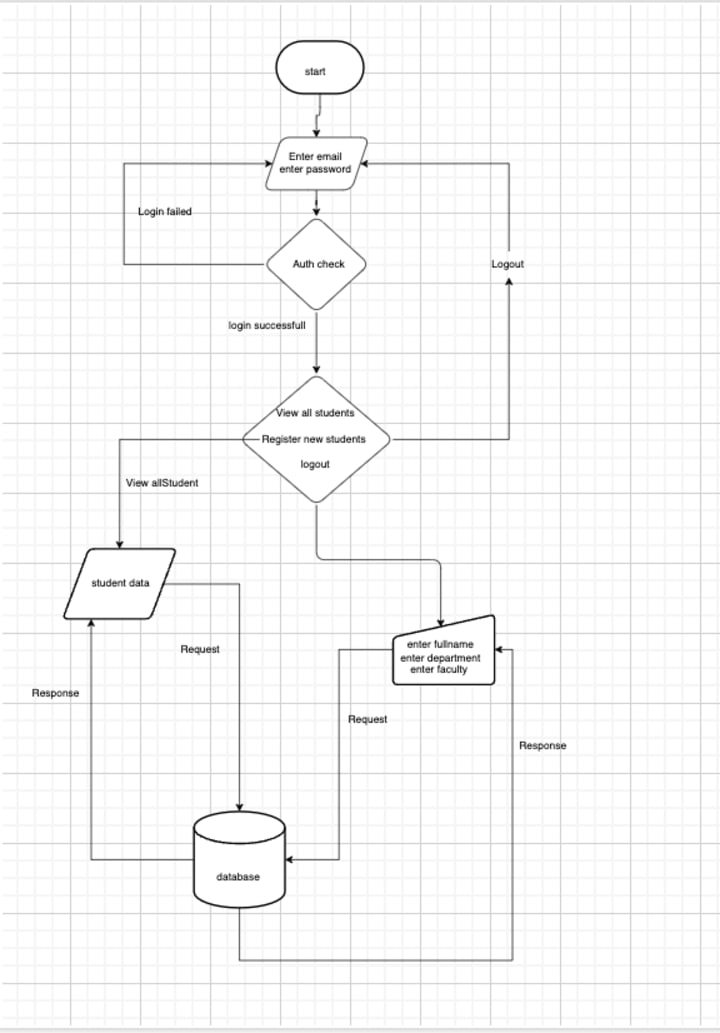
To illustrate the sequential steps involved in the matriculation number system, we present a comprehensive flowchart. The flowchart starts from the login page, where the admission officer enters their credentials for authentication. Once authenticated, they are directed to the home page, which provides various options such as viewing all students, adding a new student, and logging out.
If the admission officer selects the "View All Students" option, a request is made to the server, which communicates with the database to retrieve all registered student details. The server then responds back with the requested information, displaying it on the page.
Alternatively, if the admission officer selects the "Add New Student" option, they are redirected to a form where they can enter the student's name, department, faculty, and year. Upon submitting the form, the server validates the data and checks if the student's name already exists in the selected department and year. If not, the student is registered and assigned a unique matriculation number.
Lastly, if the admission officer chooses to log out, they are directed back to the login page, where they can reauthenticate if needed.
This flowchart provides a visual representation of the workflow and interactions within the matriculation number system, showcasing the login/authentication process, various actions available on the home page, and the database interactions involved in registering new students and retrieving student information.
Frontend Design:
In addition to the flowchart, it is essential to pay attention to the frontend design of the matriculation number system. An intuitive and user-friendly interface can greatly enhance the user experience. Here are some screenshots showcasing the frontend design:
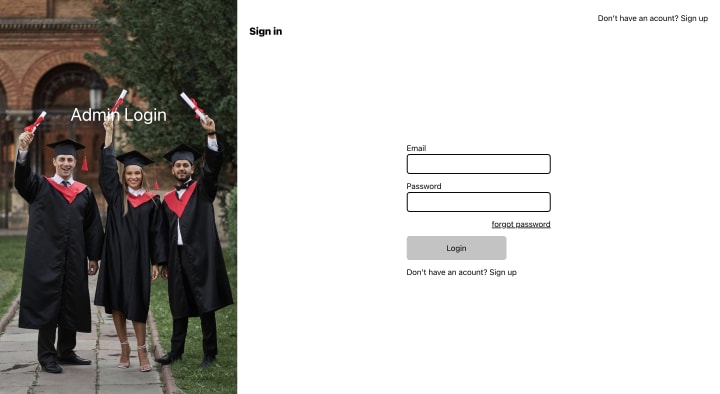
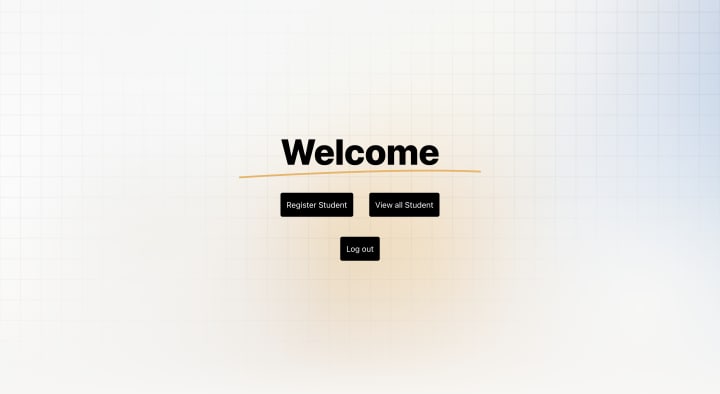
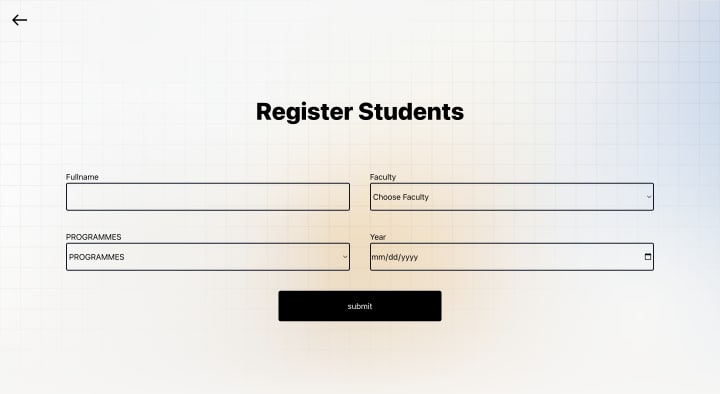
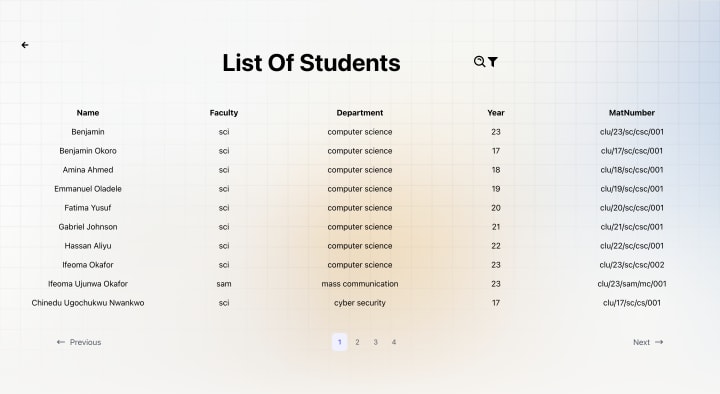
These designs reflect the clean and modern approach adopted in the user interface, ensuring ease of use for the admission officer .
Backend Design:
To support the functionality of the matriculation number system, several endpoints were created on the backend. These endpoints handle different operations and provide the necessary APIs for the frontend to interact with the server. Here are the key endpoints that were implemented:
Login Endpoint: This endpoint handles the authentication process for the admission officer. It verifies the provided credentials and generates an authentication token for subsequent requests.
Register Admin Endpoint: This endpoint allows the registration of new admin users. The admission officer can provide the necessary details, such as username and password, to create a new admin account.
Register Student Endpoint: This endpoint is responsible for registering new students in the system. The admission officer can send a request with the student's information, including name, department, faculty, and year. The server validates the data and assigns a unique matriculation number to the student.
Forgot Password Endpoint: In case the admission officer forgets their password, this endpoint handles the password recovery process. It generates a password reset token and sends it to the registered email address, allowing the officer to reset their password.
View All Students Endpoint: This endpoint retrieves the details of all registered students from the database. When the admission officer requests this endpoint, the server fetches the student records and sends them back as a response, allowing the officer to view and manage the student information.
These endpoints provide the necessary functionality for the backend to handle user authentication, registration of admin and student accounts, password recovery, and retrieving student records. They enable seamless communication between the frontend and backend components of the matriculation number system, ensuring smooth operations and efficient data management.
How Was The Matric Number Achieved ?
The generation of the matriculation number in the system follows a specific format that incorporates various components. The matriculation number is created using the abbreviation of the school name, faculty, department, year, and the number of students.
Let's break down the components of the matriculation number:
School Name Abbreviation: The matriculation number begins with the abbreviation of the school's name. This abbreviation represents the specific educational institution and helps to uniquely identify it.
Faculty Abbreviation: Following the school name abbreviation, the matriculation number includes the abbreviation of the faculty to which the student belongs. This component signifies the area of study or academic discipline that the student is enrolled in.
Department Abbreviation: Next, the matriculation number incorporates the abbreviation of the department to which the student is affiliated. This component represents the specific department or program within the chosen faculty.
Year: The matriculation number includes the year of admission or the academic year in which the student is registered. This component helps to differentiate students based on their admission cohort or academic session.
Number of Students: Lastly, the matriculation number incorporates a numerical component that represents the unique identifier for each student. This number is assigned sequentially and helps to distinguish one student from another within the same department and academic year.
By combining these components, the matriculation number is generated, providing a distinctive identification code for each student in the system. This format ensures that each matriculation number is unique and can be used for efficient tracking and management of student records.
System Demo:
To demonstrate the functionality and user experience of the matriculation number system, we have prepared a short video showcasing key features and interactions:
https://youtu.be/K_F7HfWTVoI
In this video, you can observe how the system empowers administrators to efficiently register new students, generate unique matriculation numbers, and manage student records seamlessly. The intuitive interface and streamlined workflow contribute to a more productive and organized registration process.
Challenges Faced and Lessons Learned:
Throughout the development process, several challenges were encountered, leading to valuable lessons. One such challenge involved ensuring the security of student data by implementing robust authentication measures using JSON Web Tokens (JWT). This helped in safeguarding user access and maintaining the system's integrity.
Another significant lesson learned was the importance of handling errors effectively. By implementing proper error handling mechanisms, such as graceful validation, database, and network error handling, we were able to provide meaningful feedback to users, improving the overall user experience.
Furthermore, the significance of data modeling and database design became evident. Efficiently structuring data and leveraging MongoDB's document-oriented approach allowed for optimized data retrieval and improved system performance.
Moreover, the role of Cross-Origin Resource Sharing (CORS) in enabling communication between the frontend (built with React.js) and the backend (running on Node.js) was explored. By configuring CORS, we ensured secure and controlled cross-origin requests, enhancing the system's security.
Conclusion:
Building a student matriculation number system using the MERN stack proved to be an enriching experience. The flowchart and frontend design served as guiding tools throughout the development process, while the challenges encountered provided valuable insights and learnings. By incorporating secure authentication, robust error handling, efficient data modeling, and proper CORS configuration, a streamlined and secure registration system for new students was achieved. We hope that sharing our experiences and lessons learned will assist others in their journey to build similar systems using the MERN stack.
About the Creator
Anoruo Benjamin
web developer
Keep reading
More stories from writers in Interview and other communities.
Center Stage with Paul Stewart
*** I'm keen to republish the interviews I did for my series with Vocal creators. It's been a few years and I thought it might be nice to revisit these wonderful conversations. I'll be releasing them one at a time for a few weeks/months.
By Heather Hubler2 days ago in Interview
A Story of Taylor Swift
On a quiet Christmas morning in Reading, Pennsylvania, a young girl sat on the edge of her bed holding a guitar that was nearly as big as she was. Her fingers pressed carefully against the strings as she tried to match the melodies she heard in her head. Her name was Taylor Swift, and even at that young age, she understood something important: music was not just sound—it was a way to tell the truth. Long before stadium lights and chart-topping records, Taylor was learning how to turn feelings into stories.
By Organic Products about 16 hours ago in Interview



Comments
There are no comments for this story
Be the first to respond and start the conversation.