
Tools for Email Analytics
Why is email analytics important? Because email is one of the main channels of converting users into customers.

What to track in your emails
Email delivery
This is the ultimate metric required for campaigns of all types. Whether you are sending notifications about new comments to the blog post or a limited time offer for your special products, you need to know whether they were delivered. Otherwise, what sense does it make to send emails at all? You should be able to track soft and hard bounces and monitor your spam rate. The latter is not an easy task because none of the existing tools is able to report whether your message landed in the main inbox folder or went to spam.
Open rate
Some resources claim that an open rate should be considered to be unreliable. From one perspective, if your recipients open your messages, it doesn’t mean that they read them. But from the other, monitoring the open rate and reviewing its historical data can help you to understand if something went wrong. For instance, users almost stopped opening password reset messages. Are they going to spam folders?
Click tracking
It’s hard to imagine that you haven’t included any links in your email. It’s good to know what attracts recipients in your messages, notwithstanding the email type. If it’s a short notification with a link to more details that requires some actions, you can understand if your message is clear enough.
Unsubscribe rate
The number of recipients who unsubscribe from your campaign is also quite a popular metric to track. In most cases, it is used for marketing emails like newsletters, promotions, etc. If you follow all the data protection rules, you have to put unsubscribe links in all the campaigns you send, including transactional emails.
Conversion Rate
This is actually the main thing you should track. When you send emails, you need to understand whether they are bringing you good results. Usually, by “conversion” we mean “purchases”, but in fact, your emailing goals might be different. Depending on the aim of your email campaign, the conversion rate might be calculated as the ratio between the number of delivered emails and completed goals (sign-ups, purchases, responses, etc.).
Email tracking vs email analytics
When you start exploring this topic and looking for tools for email analytics, you will see a variety of options for email tracking. From the first glance, these two concepts look similar but in fact, they collect different metrics and have different purposes.
Email tracking tools like Mailtrack, Docsify, or the more advanced Bananatag platform, notify you when your email was opened, whether the recipient clicked the link in your message, downloaded an attachment, etc. (the list of options varies from app to app). Mostly, they work as plugins for Gmail and Outlook and help you monitor email conversations rather than email campaigns.
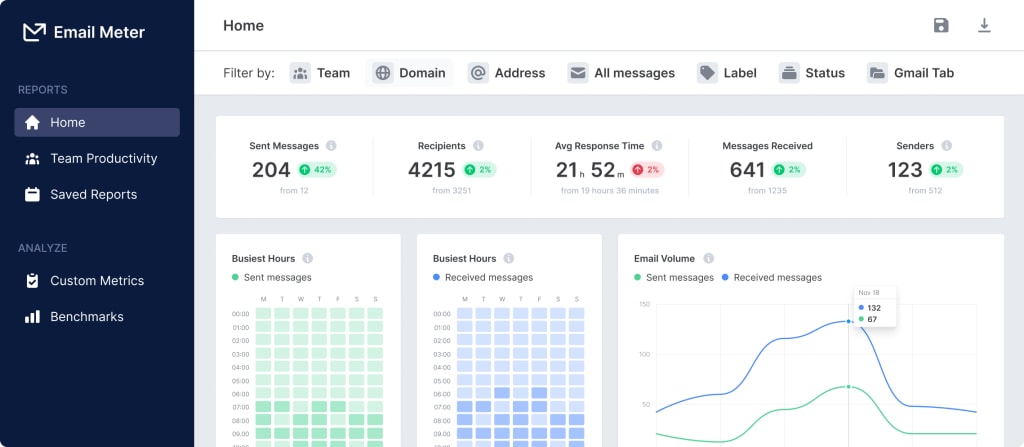
There is another type of tool that is also called email analytics – email analytics for Gmail, like EmailAnalytics and Email Meter. The main app in this category is EmailAnalytics, and it is designed to analyze the usage of your Gmail account. It provides you with statistics of sent and received emails, overall email traffic, email categories, etc.
Free email analytics tools
Your choice of free email analytics tools is quite limited. Data analytics is a complicated and sometimes sensitive task, so, there are almost no tools with a free plan available.
The first thing you can do to analyze your email campaigns for free is to use an email sending platform like Mailjet, SendPulse, Sparkpost (or any other featuring a free tier).
Every dedicated email sending platform provides its own analytics. If you use email marketing automation software or CRM like Hubspot, Salesforce, or Zoho you get quite a powerful toolset.
But what should you do if you craft your own email campaigns and send them via SMTP or sending tool like Amazon SES? The most comprehensive option is Google Analytics!
Google Analytics and emails
If you have a website and link your emails to it, then you can track and analyze your messages with the help of Google Analytics (GA). There are several ways to do this.
Tracking can be performed with the help of a pixel, which you should insert as an image tag to your HTML email code. However, it doesn’t work for Gmail and Yahoo email clients.
The other way to connect your email to GA is to use UTM tags for your links. UTM tags are special marks that instruct GA how to interpret the link source. You can create them manually or with the free Campaign URL Builder tool by Google. Then you will find the related data in the Acquisition report for your website (add email as a segment to view an instant report on email campaigns performance).
In addition, many email sending platforms (for example, Mailchimp) provide direct integration with GA.
Thanks for your interest in the original Mailtrap article about email analytics tools.
About the Creator
Keep reading
More stories from Mary Hlmln and writers in Geeks and other communities.
Book Review: "The Palace"by Gareth Russell (Pt. 3)
This review covers chapter 7 to chapter 12 *** We're carrying on with our review of The Palace by Gareth Russell and I cannot lie, I am devouring this book so thoroughly I might just go back and read the whole thing again. Chapters are named after rooms, whispers are carrying gossip from chamber to chamber, ladies in waiting are also ladies of intrigue, there's so much to digest. I love Gareth Russell's writing as well, it makes for such interesting reading as I feel like I could shut my eyes and watch Edward VI participating in jousts and games in a place like Hampton Court, made for entertainment.
By Annie Kapur3 days ago in Geeks


Comments
There are no comments for this story
Be the first to respond and start the conversation.