
How to Install and Run DeepSeek-R1 Locally
AI Under the Radar: Run DeepSeek-R1 Locally to Bypass Bans and Keep Your Data Sovereign
Looking for a privacy-focused, powerful, and free AI alternative? Welcome to the world of DeepSeek-R1! This guide (forged from my own trials and community wisdom) will walk you through:
- What DeepSeek-R1 is and why it’s a game-changer.
- Installing it locally using Ollama.
- Pairing it with Docker for a sleek web interface.
- Integration paths, from local tinkering to cloud scaling.
What Is DeepSeek-R1?
DeepSeek-R1 is an open-source AI model crafted for heavy-lift reasoning—think coding puzzles, advanced math, or logic-heavy tasks. It´s magic? Everything runs on your machine, shielding your data from third-party servers while dodging monthly fees from mainstream providers.
Deepseek Under the Radar
The recent ban on TikTok by the United States, citing national security concerns over its Chinese ownership, sets a precedent that could similarly affect DeepSeek's AI technologies. The launch of DeepSeek's R1 model has already caused major disruptions in global tech markets, with US tech stocks experiencing substantial losses of billions of dollars.
This development has heightened government fears regarding foreign applications of AI, which could lead to increased scrutiny and possible bans on DeepSeek's products. Such actions could hinder the global adoption of innovative AI solutions and increase technological tensions between nations, but what the average user cares about is no longer having access to this magnificent tool.
In addition, there are reports of hacking attempts and service interruptions due to high user demand, which are massively opting for this AI as it is equal to or better than chatGPT in its paid version, with Deepseek being free.
Why DeepSeek-R1 Stands Out?
1. Reinforcement Learning Over Traditional Training
Unlike models spoon-fed labeled data, DeepSeek-R1 learns through trial and error—like solving a maze blindfolded. This boosts its self-checking abilities and long-chain reasoning, perfect for untangling complex problems.
2. Budget-Friendly Power
Run trimmed-down versions (1.5B to 70B parameters) on everyday GPUs or even beefy CPUs with some tweaks. No token fees, no subscriptions.
Crave more muscle? The full 671B-parameter beast exists—but you’ll need hardware that could launch a spaceship.
3. Open-Source Freedom
No chains. Tweak its gears, fuse it with other tools, or build your own AI-powered service. The code is yours to bend.
Preparing Your Setup
- Basic terminal fluency.
- Linux/macOS (or Windows via WSL2).
- Docker (for the web UI).
- Ollama (to fetch and run models locally—don’t worry, I’ll guide you).
Installing Ollama
Ollama is your AI model orchestrator—think Docker, but for language models.
Linux:

macOS:

Summoning DeepSeek-R1 via Ollama
Pick a distilled model that fits your hardware:
- 1.5B parameters (~1.1GB, runs on a toaster): ollama run deepseek-r1:1.5b
- 7B parameters (~4.7GB, mid-tier GPUs): ollama run deepseek-r1:7B
- 70B parameters (needs 24GB+ VRAM): ollama run deepseek-r1:70b
- 671B parameters (enthusiast-grade, 300GB+ VRAM): ollama run deepseek-r1:671b
Once triggered, Ollama gulps down the model, then hands you a terminal prompt.
Pro Tip: If your machine isn’t a powerhouse, start small. The 1.5B model weighs ~1GB—limited, but functional.
Spinning Up the Web UI with Docker
For those who crave buttons and boxes, Open Web UI wraps DeepSeek-R1 in a visual shell.
- Install Docker (grab it from docker.com).
- Launch the Open Web UI container. Note: --network=host shares your machine’s network with Docker—ideal for dev, risky otherwise.
- Access the UI at http://localhost:8080.
- Create an admin account, then select deepseek-r1:1.5b. Now chat freely—no data leaks.
Testing DeepSeek-R1
Once Ollama has tucked the model into your system, poke at it:
Terminal:
ollama run deepseek-r1:1.5b
Web UI:
Just type away in the browser.
Stitching DeepSeek-R1 Into Your Projects
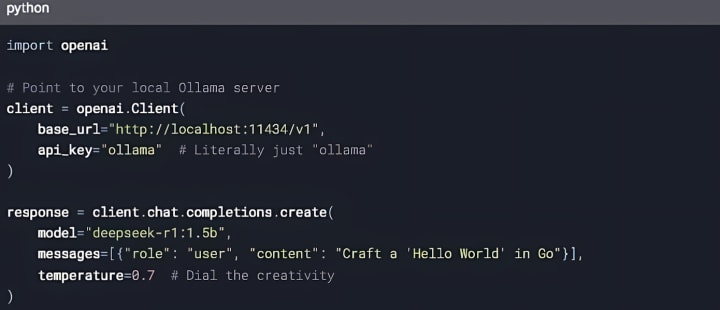
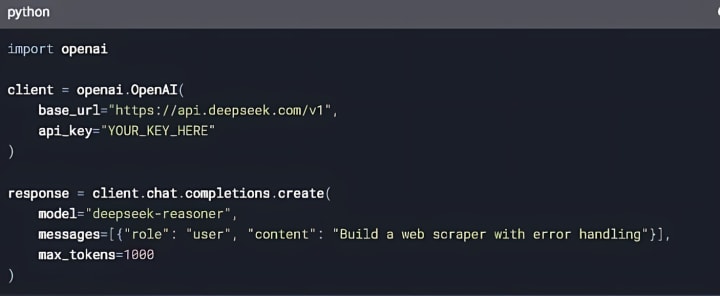
Two paths: local (privacy-first) or cloud (scale-ready).
Local Mode (Ollama as OpenAI Clone):
Cloud Mode (DeepSeek’s API):
Why DeepSeek-R1?
- Slash costs—no monthly ransom.
- Lock down data—no prying servers.
- Mold it—hack the code, make it yours.
Its knack for deep reasoning makes it a beast for coding snags, math monsters, or logic labyrinths. Test it. You’ll see—it outpaces pricey rivals while keeping your secrets yours.
Ready to untangle complexity without selling your data soul? DeepSeek-R1’s waiting. 🧠✨
About the Creator
Francisco Navarro
A passionate reader with a deep love for science and technology. I am captivated by the intricate mechanisms of the natural world and the endless possibilities that technological advancements offer.
Keep reading
More stories from Francisco Navarro and writers in Geeks and other communities.
DeepSeek Janus Pro 7B Is Outsmarting Silicon Valley
You’re scrolling through tech news, half-asleep, when a headline jolts you awake: “Chinese AI Model Outperforms DALL-E 3.” Wait—what? You squint. DeepSeek, a name you’ve only vaguely heard, has unveiled Janus Pro 7B, a multimodal AI that’s not just competing with Silicon Valley’s golden children but beating them in benchmarks. No flashy demos yet, no viral social media posts. Just cold, hard metrics. And suddenly, the game feels rigged—but in whose favor?
By Francisco Navarroabout a year ago in Geeks
Book Review: "The Palace"by Gareth Russell (Pt. 2)
This review covers chapter 4 through to the end of chapter 6 *** We've covered people such as Elizabeth of York, Thomas Woolsley, Martin Luther and even Anne Boleyn but now it is time to move on from these figures. It is proven that Gareth Russell has done such an incredible amount of research here and the book itself is a fantastic achievement of nonfiction literature regardless of your personal feelings towards the royal family. Gareth Russell's writing and insight makes the book even more intriguing to read as he offers us arguments to consider, thoughts to ponder on and stories of whispering gossip that lurk inside the walls of this great palace.
By Annie Kapur2 days ago in Geeks




Comments (2)
Thanks For sharing knowledge about Deepseek AI. I visited the new website " https://zerodeepseek.com/ " today, and it is good knowledge sharing.
Thanks For sharing knowledge about Deepseek AI. I visited the new website " zerodeepseek.com " today, and it is good knowledge sharing.