
Advanced Techniques to Optimize React Performance
React Optimization


A popular front-end library called React is used to create online applications that are quick, responsive, and interactive. Yet, the likelihood of performance problems rises along with the size and complexity of React apps. This blog article will cover sophisticated methods for improving React performance and making sure your application functions properly.
1- Use React.memo ()
The higher-order component React.memo() can be used to enhance the functionality of functional components. To evaluate whether a component has to be re-rendered, it compares the old props that were cached with the new ones. Performance will be quicker if the component is not re-rendered if the props have not changed.
Take the following functional element, for instance:

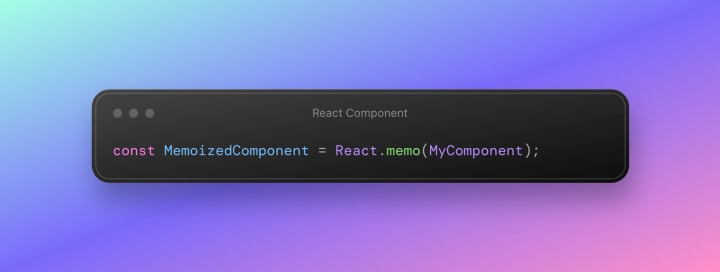
To optimize this component with React.memo(), simply wrap it as follows:
2- Use the useCallback() Hook
In React, components are the building blocks of a user interface. These components are made up of functions that are called whenever the component is rendered. When a function is called, React updates the component's virtual DOM and checks if it needs to re-render the component. If the function has changed, React will re-render the component even if the new function returns the same output as the previous function. This can cause unnecessary re-renders and hurt the performance of the application.
To solve this problem, React provides the useCallback Hook. The useCallback Hook is a function that returns a memoized version of a callback function. The memoized version of the function is cached, and a new instance is only created if the dependencies have changed.
The useCallback Hook takes two arguments: the callback function to memoize and an array of dependencies. The dependencies are used to determine whether the memoized version of the function needs to be recomputed. If any of the dependencies change, the memoized version of the function is discarded, and a new version is created.
Consider the following element, for instance:
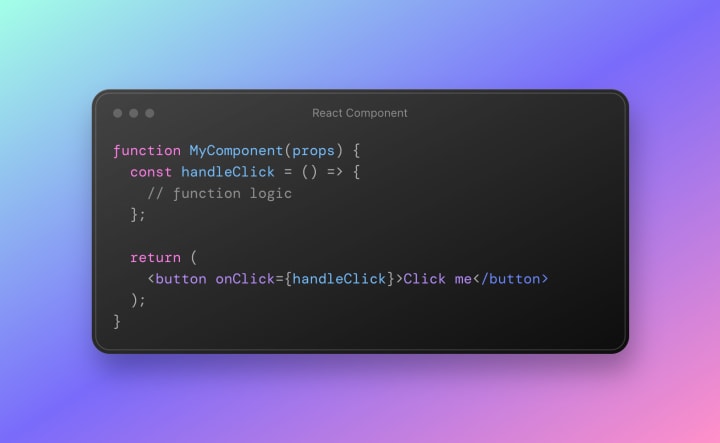
To optimize this component with useCallback(), simply wrap the handleClick function as follows:

3- Use the useMemo() Hook
In React, components are re-rendered whenever their state or props change. If a component's state or props are used to compute a value, that value will be recomputed every time the component is rendered. This can be inefficient if the computation is expensive or if the component is re-rendered frequently.
To avoid unnecessary recomputations, React provides the useMemo Hook. The useMemo Hook is used to memoize a value that is derived from other values. The memoized value is cached, and it is only recalculated if the dependencies have changed.Consider the following element, for instance:

To optimize this component with useMemo(), simply wrap the computeExpensiveValue() function as follows:

4- Use the React Profiler
To locate performance bottlenecks in your application, use the built-in React Profiler tool. It operates by timing the amount of time it takes for each component to render and showing the results in a graph.
Simply import the React Profiler from the “react” package and include the “Profiler” component in your application to start using it:
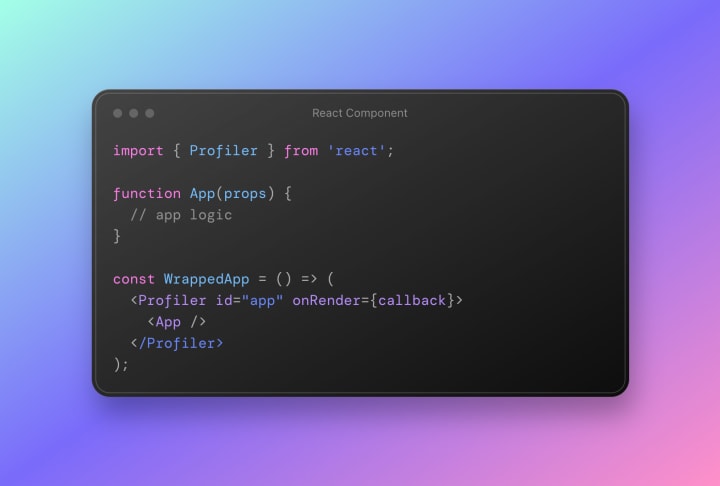
While the onRender attribute is used to specify a callback function that will be triggered after each render, the id prop is used to identify the component that is being profiled.
5- Use Code Splitting
With the code splitting technique, your programme is divided into smaller “bundles” that may be loaded as needed. This can speed up your application’s initial load time and cut down on the amount of JavaScript that needs to be downloaded.
You can use a tool like Webpack or create-react-app, which come with built-in support for code splitting, to add code splitting to your React application. As an alternative, you can load modules asynchronously using the dynamic import() function:

Conclusion
To summarize, here are the key techniques for optimizing React performance:
- Use React.memo() to memoize functional components and prevent unnecessary re-renders.
- Use the useCallback() Hook to memoize functions and prevent unnecessary re-renders.
- Use the useMemo() Hook to memoize values and prevent unnecessary re-computations.
- Use the React Profiler to identify performance bottlenecks in your application.
- Use code splitting to break up your application into smaller chunks and improve initial load time.
By implementing these techniques, you can ensure that your React application runs smoothly, even as it grows in size and complexity. Remember to continually monitor and optimize your application’s performance to provide the best user experience possible.
About the Creator
Qaiser Abbas
Frontend Web Developer | ReactJS Expert | Shopify Expert | Wordpress Expert | Mobile App Developer
Keep reading
More stories from Qaiser Abbas and writers in Geeks and other communities.
Seven Essential CSS Concepts
CSS or Cascading Style Sheets is a language used to describe the presentation of a document written in HTML or XML. It enables web developers to control the layout, typography, and color of a website. In this blog, we will discuss seven essential CSS concepts that every web developer should know.
By Qaiser Abbas3 years ago in Geeks
Goodbye, Mr. Duvall
It is turning out to be an interesting year. I was in the middle of teaching a class when a pop-up appeared on the screen announcing the death of Mr. Robert Seldon Duvall (yes, that was his full name). I was in the middle of a discussion on the obsession we have with winning when it comes to sports (the Winter Olympics was a theme), and I felt as though things were coming full circle. We had already lost Gene Hackman last year, and along with that titan, it feels though one particular golden age has closed off to be replaced by...?
By Kendall Defoe 27 days ago in Geeks
Book Review: "The Palace"by Gareth Russell (Pt. 5)
This review covers chapter 18 to the end of the book *** Chapter 18 covers the reign of Queen Anne, the final queen of the Stuart household and mostly seems to look at the idea that she could barely marry, she had lots of miscarriages and in the end the only child she had lived to eleven years' old and so, she had no heir. There were many questions of Queen Anne's marriage, from her husband participating in homosexual affairs to the ideas put forward in the film The Favourite in which it is Queen Anne who is homosexual and promiscuous. Whatever it was, I definitely feel sorry for Queen Anne - everything must have hurt by the end of her reign, too many pregnancies and miscarriages meant her health was declining quickly towards the end. It's quite sad.
By Annie Kapura day ago in Geeks



Comments
There are no comments for this story
Be the first to respond and start the conversation.