
7 Best Digital Business Cards
Looking for the digital business card app that's right for you? Here are my top seven picks to share contacts, track scans, and level up your networking game.
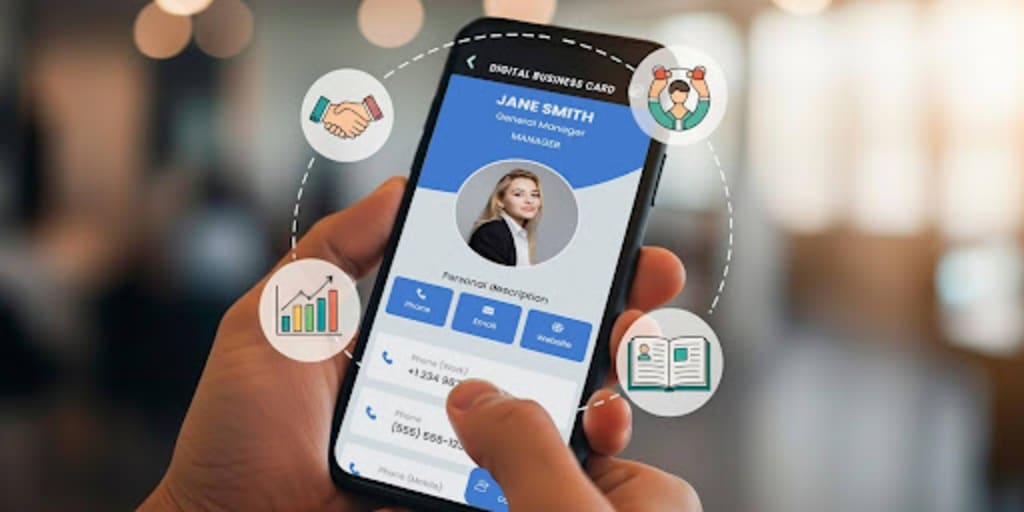
Digital business cards make networking easier and way less awkward than fumbling with paper cards.
Most printed cards don’t survive a week. Digital business card statistics state that over eight billion business cards are thrown out every year.
That’s a significant waste of cards as well as lost connections and networking opportunities.
Digital cards are smarter. You can update their information anytime, share them in seconds, and even see how many times they have been scanned. These tools simply give you a cleaner, greener way to connect.
I tested a bunch of platforms to see which ones are actually worth the time and money for individuals, teams, and companies. Below are my top picks.
Disclaimer: The information and features mentioned here are accurate as of October 2025. Platforms update their tools and pricing often, so check their official websites for the latest details.
The best digital business card platforms
There are plenty of options out there, and every platform claims to be the best. Each comes with its own unique set of features that match our different networking styles.
To cut through the noise, I tested them myself and compared what they bring to the table. My goal was to see which ones truly deserve to be called the best digital business card in 2025, based on real testing instead of just marketing claims.
I tried each of the platforms below and judged them based on clear criteria: usability, features, and overall value.
1. QR TIGER vCard QR Code Generator
QR TIGER is often hailed as the best QR code generator for creating customizable dynamic QR codes, including digital business cards.
Its vCard QR code solution for digital business cards lets you store crucial information for networking in a unique landing page QR code, with your professional photo and all.
Since it’s QR code-based, it's easy to store in your phone or wallet apps and let people easily save your info to their phone when they scan it.
⭐ Rating:
- 4.8 stars on G2
- 4.7 stars on Trustpilot
- 4.8 stars on SourceForge
- 4.8 stars on App Store
- 4.6 stars on Google Play
✅ Pros:
- Customizable templates for vCard QR codes
- Bulk vCard QR code generator
- Compatible with Apple and Google Wallets
- Dynamic QR codes
- Multiple QR code solution
- Highly customizable
- Real-time advanced tracking and scan analytics
- API and CRM integrations
- GDPR, CCPA, ISO 27001
❌ Cons:
- The advanced feature requires a subscription
How QR TIGER vCard works
QR TIGER’s setup process is quick and straightforward. Using their vCard QR code solution, you can create a digital business card QR code in minutes.
Once ready, you can share the code via scan, email, or even add it to physical materials like ID cards. The look is professional, customizable, and flexible enough for both individuals and companies.
They provide a free plan for basic cards and paid options with analytics, bulk creation, and team management. Even the free version allows full branding customization with logos, colors, and unique frames, which is a nice touch compared to other free tools.
It’s also important to note that free users can create three dynamic QR codes. This means if your number or job title changes, you just edit it on the backend, and the same QR keeps working until scans last. That’s one of the most practical features for professionals.
The paid plans unlock deeper tools like scan analytics, password protection, and multi-user management. I tested the analytics, and it was helpful to see the number of scans, their location, and their time. Businesses can use this to track networking impact.
Teams can generate hundreds to thousands of vCards in one go, keeping everything under consistent branding. Security is also strong, with compliance standards to protect data.
This dynamic QR code maker works well for both freelancers and companies. It gives flexibility without being overwhelming, making it one of the most reliable platforms I tested.
💲 Pricing:
- Regular: $7/month
- Advanced: $16/month, billed annually
- Premium: $37/month, billed annually
- Professional: $89/month, billed annually
- Enterprise: Custom pricing
2. Wave Connect
Wave is one of the most user-friendly platforms for digital business cards I've tried. It’s very simple, affordable, and surprisingly generous with its free plan.
You can quickly manage your information right in the dashboard and choose from different options for sharing the digital business card.
⭐ Rating:
- 4.6 stars on G2
- 4.0 stars on Trustpilot
- 4.7 stars on App Store
- 4.4 stars on Google Play
✅ Pros:
- Permanent free plan
- Unlimited contact storage
- Contact labels and tags for organization
- Compatible with wallet apps
- Quick booking with Calendly
- Built-in lead capture form
- Custom NFC cards available
- SOC 2 Type II
❌ Cons:
- QR codes are not customizable
- No bulk creation
- No multiple profile management under one account
- No payment integrations
How Wave Connect works
Wave Connect’s onboarding process is the simplest among digital business card tools. You can create a free profile in just two minutes, and it’s ready to use right away.
Sharing options include QR code, SMS, email, and even Apple or Google Wallet. The profiles look polished and are business-appropriate.
The Wave digital business card offers free, PRO, and Teams plans. Even the free version is loaded: You can add a logo, unlimited websites, a contact info gallery, and social links. You can even add a branded background image, something not every platform gives away for free.
Free users can also scan paper cards, store unlimited contacts, and use widgets. Unlimited storage is particularly useful for networking.
The paid plan adds CRM integration, analytics, and video intros. I liked the video intro option; it makes your card stand out in a personal way.
Wave combines simplicity with smart features, making it a top pick for professionals and small teams.
💲 Pricing:
- Pro: $7/month, billed annually
- Teams: $5/user/month (3 users minimum), billed annually
- Enterprise: Custom pricing
3. HiHello
HiHello keeps things minimal and straightforward, covering all the basics you’d expect. In the dashboard, you can easily create a custom digital business card with a QR code for personal or work purposes.
You can also add it as your email signature on different email apps like Apple, Gmail, Outlook, and others.
⭐ Rating:
- 4.6 stars on G2
- 4.7 stars on Trustpilot
- 4.8 stars on Google Play
- 4.9 stars on App Store
✅ Pros:
- Free plan covers essential features
- Easy sharing via QR code, link, or Apple Watch
- Address book for all connections
- Auto-updated contact info between HiHello users
- SOC 2 compliance
❌ Cons:
- Limited design options unless paid
- Uncustomizable QR code
- Paid plan is pricier
- The business card scanner requires manual review
How HiHello works
The HiHello digital business card is easy to set up and use. The design is simple, though the default purple theme may not suit all professional settings. Creating a profile is straightforward; sharing is just a tap via QR code, email, or link.
The free plan lets you add your contact details, social media links, and more. I liked that profiles automatically update if another HiHello user edits theirs, which keeps contacts fresh.
The paid plan unlocks more personalization, like better design options and advanced tools, but it has a cost, which is more expensive than similar competitors.
HiHello is best for individuals who want a no-fuss, reliable card. It’s not the most customizable, but it does the job well.
💲 Pricing:
- Professional: $6/month, billed annually
- Business: $25/month, billed annually
- Enterprise: Custom pricing
4. Blinq
Blinq is a great choice if you’re into simple, minimalist tools. It doesn’t try to do everything but keeps the basics solid. Its QR code-powered business card makes it easy to share with others as an email signature or virtual meeting background.
⭐ Rating:
- 4.8 stars on G2
- 4.4 stars on Trustpilot
- 4.8 stars on Google Play
- 4.9 stars on App Store
✅ Pros:
- Free basic card option
- Unlimited contact sharing
- Apple Watch widget for QR access
- Customizable landing page with links and social media
- SOC 2 Type II, CCPA, GDPR, ISO 27001/27017
❌ Cons:
- No analytics or CRM integrations
- No video support
- No automated follow-ups
- Logo addition to the QR code is locked behind a paywall
How Blinq works:
Blinq is refreshingly straightforward. The interface is clean, and creating a card takes just minutes. It focuses on essential contact sharing without extra frills.
The free version lets you set up a simple landing page with your info, links, and social media. Sharing options include QR, text, and email.
The paid plan adds more flexibility, like customized pages and NFC products, but it lacks analytics and integrations compared to other platforms.
Blinq is ideal for freelancers or professionals who don’t need deep analytics but still want a clean, reliable card.
💲 Pricing:
- Premium: $5.89/month, billed annually
- Business: $4.99/card/month (5 cards minimum)
- Enterprise: Custom pricing
5. Popl
Popl is flashy, customizable, and built around NFC products. It’s a digital business card-making platform with crucial networking tools such as QR code sharing, virtual background, lead capture, email signature, and others.
⭐ Rating:
- 4.6 stars on G2
- 4.3 stars on Trustpilot
- 4.6 stars on Sourceforge
- 4.8 stars on App Store
- 4.7 stars on Google Play
✅ Pros:
- Wide range of NFC cards, badges, and wristbands
- Highly customizable landing pages
- Multiple profiles for different roles
- Integrations with 5,000+ tools
- SOC 2 Type II
❌ Cons:
- The free plan only saves five contacts
- Expensive plans
- Customer support can be slow
How Popl works:
Popl’s landing pages are among the best-looking. They support video embeds, payment options, and extensive customization, which makes them stand out.
The free plan is restrictive, though, since it only lets you store five contacts. That’s too limiting if you’re actively networking.
Upgrading removes the cap and gives you dual profiles, which is useful if you switch between roles or businesses. The integrations with CRMs and HR systems also make Popl attractive for larger teams.
If you’re willing to pay, Popl offers excellent flexibility. If not, the free version won’t get you far.
💲 Pricing:
- Pro: $6.49/month, billed annually
- Pro plus: $11.99/month, billed annually
6. Mobilo
Mobilo is a data-focused networking tools provider, making it a strong choice for sales teams and businesses that care about analytics. It comes with lead capture tools and integrations with CRM software apps.
⭐ Rating:
- 4.0 stars on G2
- 3.8 stars on Trustpilot
- 4.5 stars on Google Play
- 4.7 stars on App Store
✅ Pros:
- Multiple modes
- NFC card options
- Real-time dashboards with analytics
- Lead tracking and auto-follow-ups
- CRM integrations
- GDPR, SOC 2 Type II
❌ Cons:
- No free option
- The landing page looks plain
- Limited design customization
- Additional cost for custom designs
How Mobilo works:
Mobilo is built for professionals who want numbers and tracking. It’s less about design and more about data.
You get four modes: business card, website landing page, lead generation, and custom link. Switching between them is helpful for different events.
The dashboard is detailed, tracking leads, meeting locations, and follow-ups. The auto-follow-up feature is especially convenient for large-scale networking.
However, the lack of a free plan might be a dealbreaker for individuals. Mobilo shines brightest for sales teams or businesses that need structured data.
💲 Pricing:
- Pro: $4.99 one-time payment
- Teams: $4/month, billed annually
- Enterprise: Custom pricing
7. Canva digital business card
Canva isn’t just for making Instagram posts or presentations; it also lets you design and share digital business cards. If you like visuals and want your card to stand out, Canva is a great pick.
⭐ Rating:
- 4.7 stars on G2
- 2.3 stars on Trustpilot
- 4.7 stars on Sourceforge
- 4.8 stars on App Store
- 4.8 stars on Google Play
✅ Pros:
Free templates with drag-and-drop design tools
Thousands of fonts, icons, and layouts to choose from
PDF, PNG, or QR for sharing
Option to add your card to Apple or Google Wallet
Collaboration features for teams
Integrates with Canva Pro brand kits for consistent company branding
SOC 2, ISO 27001
❌Cons:
No built-in analytics or contact management
Requires a paid subscription for advanced design features
Not as specialized in networking features compared to other platforms
How Canva works:
The Canva digital business card maker is perfect for customization and style. You can start with a template or build your card from scratch, making it truly unique. The drag-and-drop editor is familiar and simple, even if you’ve never designed anything before.
The free version offers plenty of templates and sharing options. You can download the card as an image, PDF, or QR code, then share it by email or messaging apps or add it to a digital wallet.
With Canva Pro, you unlock more advanced features like custom fonts, premium templates, and brand kits. This is especially useful for teams that want consistent branding across all employee cards.
While Canva lacks analytics or contact syncing features, it makes up for it with sheer design flexibility. If your main goal is to impress visually and keep your card stylish, Canva is the best free digital business card app out there.
💲 Pricing:
- Pro: $120/user/year
- Teams: $100/year (3 users minimum)
- Enterprise: Custom pricing
What to look for in a digital business card in 2025
The best digital business card app let you:
- Share contact instantly via QR code, link, or NFC.
- Update details anytime without needing to reprint.
- Track engagement with analytics to see how effective your networking is.
- Customize design with logos, colors, or landing pages.
- Integrate with CRM or team management tools for businesses.
- Scale from solo professionals to enterprise teams.
Keep these features in mind to determine the best platform that offers the right features for your digital business card and networking needs.
Which digital business card is right for you?
Choosing the right digital card isn’t just about sharing your phone number; it’s about making a lasting impression. Each platform here offers something unique.
At the end of the day, the best digital business card platforms match your networking style. If you’re a freelancer, you might value simplicity. Analytics and bulk creation might be non-negotiable if you run a sales team.
Whichever option you choose, one thing is sure: digital business cards are here to stay, and they’ll keep your connections stronger than any paper card ever could.
FAQs
What is the best way to digitally organize business cards?
The best way to digitally organize business cards is by using a dedicated scanning app like QR TIGER, CamCard, HiHello, or Haystack. These apps let you scan physical cards and instantly store the details in a searchable, digital format.
What is the best online business card maker?
The best online business card maker is QR TIGER, since it lets you create dynamic digital business cards with a vCard QR code. You can update your contact details anytime without reprinting, customize the design, and track scans for networking insights.
Are digital business cards worth it?
Yes, digital business cards are worth it for most modern professionals. They’re cost-effective, eco-friendly, and make sharing or updating contact details quick and easy.
About the Creator
Alex Payton
I believe the right technology can transform lives. I spend every day decoding the latest SaaS trends or championing the next big digital breakthrough to make tech work for people (not the other way around!).
Keep reading
More stories from Alex Payton and writers in Geeks and other communities.
Multi-Link QR Code Generator: Top Use Cases for Businesses
I’ve been in the QR code space long enough to see trends rise, fade, and then come back with a fresh coat of paint. But if there’s one tool that actually earned its place in modern marketing, it’s the multi-URL or multi-link QR code generator.
By Alex Payton5 months ago in Lifehack
A Knight of the Seven Kingdoms Series Review (Season 1)
As one of the biggest properties in fantasy, A Song of Ice and Fire remains immensely popular with audiences. After reaching far into the past with House of the Dragon, a second spin-off was on the cards. A Knight of the Seven Kingdoms serves up a bite-sized slice of action and drama, but it still claims a spot among the best small-screen titles.
By Robert Cain5 days ago in Geeks
Silver Screen Magic with Elizabeth Taylor
British-American actress Elizabeth Taylor was among the best actresses during the Golden Age of Hollywood. She had a scandalous personal life with eight marriages to seven different men. She made a great impression during her acting career, being on the silver screen for more than forty years.
By Rasma Raisters7 days ago in Geeks
I was in a Toxic Relationship, with my Workplace
“You got that?” My ex yelled. His hands were balled into fists at his side. At six foot three, he towered over me. A normal person would have been afraid, but I looked up a video of George Lopez repeatedly saying, “I got this,” and showed it to him. I had grown used to this treatment, so much so that I didn’t blink when he ripped the phone from my hand and threw it across the room.
By Jade M.6 days ago in Confessions



Comments
There are no comments for this story
Be the first to respond and start the conversation.