
5 Best Websites to Watch Anime for Free
In 2024, where can we watch anime?


Do you like famous series such as One Piece, Fullmetal Alchemist, or Attack on Titan? Viewers around the world have embraced these hit series, gripped by complex narratives and outstanding visuals. With the rise in global popularity of anime, choosing a streaming platform for these shows becomes crucial. Some of the best anime-watching websites earning an almost exhaustive library are available in 2024. In this post, you will explore the top four of them and find a guide for watching and downloading anime episodes without hassles. Visit these picks to choose the perfect place for your anime dosages now!
Part 1: Top 5 Best Anime Websites to Watch in 2024
Which of the many anime streaming platforms can be your taste? We have carefully filtered out the top 4 anime sites to watch anime online in 2024, all of them are content-rich, and they would satisfy your interest.
1. Crunchyroll
Crunchyroll is the largest anime streaming platform and is known for its extensive library. Since its establishment in 2006, Crunchyroll has become a haven for anime lovers due to its provision of access to a wide range of currently airing and classic hits. Some of the popular titles found here are “My Hero Academia”, “Death Note”, “Demon Slayer”, and more. It has subscriptions available to suit the preferences of different viewers.
This site provides subtitled and dubbed episodes for various users. On the other hand, Crunchyroll offers a download feature available through the mobile app, allowing users (only premium subscribed users) to download Crunchyroll episodes for offline viewing through a subscribed account. This is quite useful to those who may not always have good access to the internet.

2. Netflix
With a long number of titles to its credit, Netflix stands as an internationally recognized streaming platform with huge bundles of anime titles in their subtitled and dubbed forms. You will definitely watch anime like "Pokémon Journeys: The Series" and "Ponyo" in the more popular titles, and then more like "Jujutsu Kaisen", "Demon Slayer", and "The Rising of the Shield Hero" on the site. Netflix also produces its own original anime content like "Castlevania" and "Voltron: Legendary Defender". It also provides an offline download feature whereby you can save the anime locally, but the downloaded content will be different and available depending on the region you are in.

3. RetroCrush (Free with ads)
One of the more well-known streaming services, RetroCrush, deals with old-school anime and Asian media. Their platform is rich in titles from the 1960s through the 1990s. Starting from action and ending with comedy, drama, horror, romance, and a huge list of more anime genres, all of which can be discovered on RetroCrush. Some titles available for streaming on the platform include "Sailor Moon," "Dragon Ball Z," "Naruto," "One Piece," and "Sword Art Online," just to mention a few. So, if you're looking to relive your childhood or discover new retro anime gems, RetroCrush is definitely worth checking out. However, episode downloading is not available, you can only access the internet to watch the videos offline.

4. Tubi (Free with ads)
Tubi is a free streaming platform with many varieties of anime titles streaming in it. The greatest feature of Tubi would probably be that it does not charge users any subscription fee, though it inflicts some ads on users while watching anime. It supports multi-platform watching but does not support offline downloads. From "My Hero Academia" and "Naruto Shippuden" to "One Piece," "Sword Art Online," and "Your Lie in April," it contains everything genre-based.

5. HIDIVE
Founded in 2017, HIDIVE is an on-demand streaming service specializing in anime and Asian media. Its rich library of titles features dubbed and subtitled anime and live-action content from Asia, as well as its own productions. With ad-free viewing and options for the download of content to be viewed offline in certain regions, HIDIVE has presented these in a very engaging way for fans. With different subscription plans catering to diverse preferences, HIDIVE can be termed a pretty strong competitor to existing anime streaming services like Crunchyroll.

Now that you've got a picture of these animation websites, do you know how to download anime episodes from these websites? Let's read on.
Part 2: How to Download Anime Episodes from These Websites
In this section, you can learn how to download anything from Crunchyroll, Netflix, and HIDIVE, plus the downloading restrictions when you download favorite shows.
1. Crunchyroll
The free account doesn't support downloading. If you have made the subscription (Mega Fan plan, which costs $9.99/month, and the Ultimate Fan plan costs $14.99/month), you can use its mobile App to download episodes. Here are the steps.
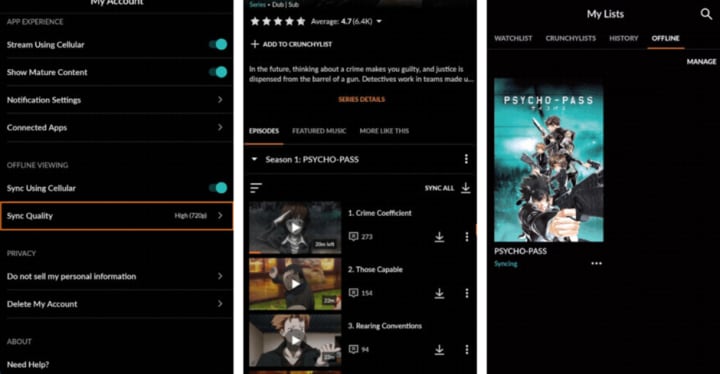
Step 1: Download and launch the Crunchyroll app. You should select the quality of the video to be downloaded before downloading. Just click "Account > Sync Quality".
Step 2: Find the video to download.
Step 3: Click the down arrow near the episode to download your target episode in Crunchyroll.
Step 4: Now, click "My Lists > OFFLINE" to find the downloaded video and watch it.
However, some restrictions exist even if you are able to access the download features. Check the limits below.
- There is no way to download the episodes straight into your computer, which would have been very inconvenient for people who like watching on computers.
- Downloads are also time-limited: 30 days if not viewed and 48 hours once viewing is started before an episode expires.
- Some anime might be available only in lower resolutions because of licensing and regional issues.
If you are looking for a more flexible downloading experience, you can bypass these limitations by finding some best Crunchyroll downloaders.
There are many available on the market. Simply search on the Internet, and you can find lots. Normally, these third-party downloaders have many features that the official app can’t offer. Here are some of their highlight features:
- Versatile Download: Download Crunchyroll anime to MP4/MKV files for playback on Windows and Mac offline. You can also transfer the videos freely to any device.
- Quality Preservation: Quality video is maintained at fast download speeds, supporting the original resolutions up to 720P and 1080P.
- Full Series Access: In case you want all episodes from a Crunchyroll series, you could download them all from any season.
- Audio and Subtitles Retention: It retains original audio tracks and subtitles when downloading.
- Subtitle Options: You can save the subtitles as SRT/SUP files apart or embed them in the video so you can easily access them offline.
- Metadata Details: It keeps detailed metadata, including titles and parameters, for better subsequent management.
- Removing Ads: There are no disturbances from the source videos' ads in viewing.
2. Netflix
Like Crunchyroll, a free account doesn’t permit downloading videos but you can download Netflix episodes if you have an active subscription and an ad-free plan. The devices you can download are available on phones, tablets, and Windows 11/10. You should note that Mac is not supported. Also, you should remember the storage length is 30 days if it is unviewed and it will still expire after being watched. Here are the steps to download Netflix anime on the computer.
Step 1: Download and install the Netflix app from the Microsoft Store.
Step 2: After it is installed, open it and log in to your account.
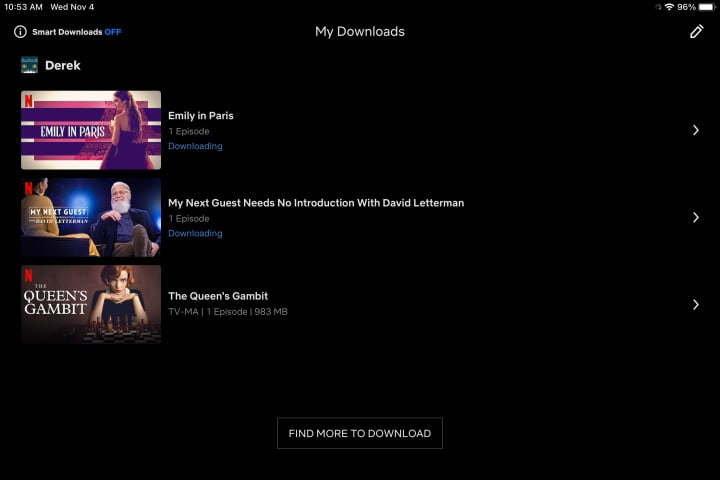
Step 3: Scroll through and locate the title you want to download and click the Download button to download movies from Netflix on a computer.

Step 4: After downloading, you can go to the “Download” folder to watch your downloaded anime.
3. HIDIVE
The download function is available for HIDIVE premium users and supports the iPhone, iPad, Android, and Fire; it does not support computers. Up to about 20 titles can be downloaded at a go. You must watch the video you download within 48 hours before the video expires. Here is how to carry out content downloading for offline viewing:
Step 1: Open your HIDIVE App through your phones. Make sure you are logged in with your premium account.
Step 2: Choose an anime series or movie you would like to download.
Step 3: Click the Download button to start and after that visit the Downloads to view.

Part 4:Conclusion
We hope that with these recommendations, you find the best anime streaming site for a huge library, classic hits, or exclusive originals that can meet your needs. With the information in the post and the download tool recommended, you can stream your favorite shows anywhere without any hassle, even offsite.
About the Creator
Lumi
I am rooted, but I flow.


Comments (2)
Very indepth! I love how anime has become more mainstream, Now I can enjoy it on Netflix rather than watching 16 parts on YouTube haha
Great sites!