
Highest PPI Monitor (Discover the Sharpest Displays)
Explore the highest PPI monitor options for ultra-clear visuals. Learn what PPI means, why it matters, and which monitors offer the best pixel density.

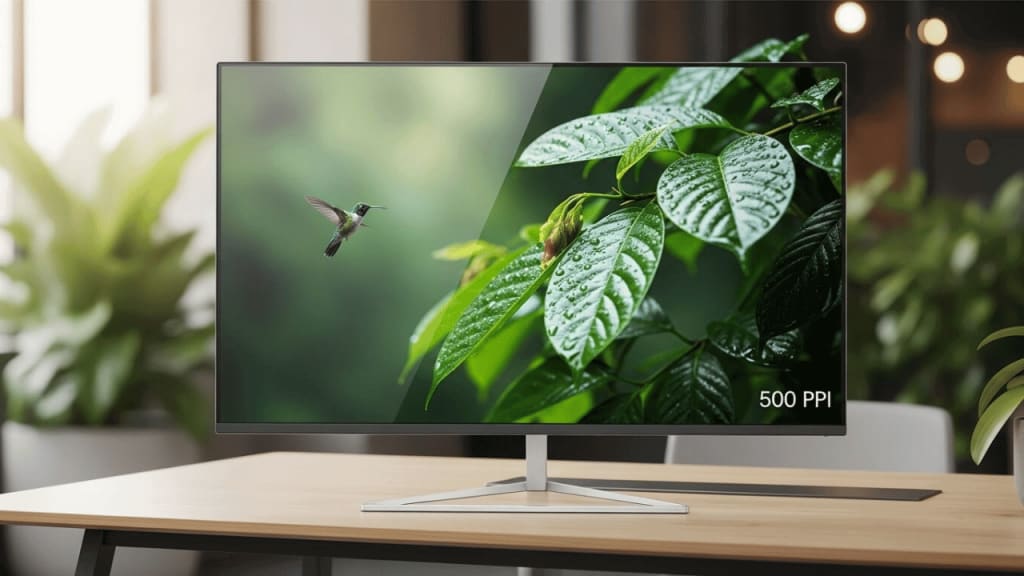
Highest PPI Monitor
When it comes to screen clarity, the highest PPI monitor is the king. PPI stands for Pixels Per Inch, and it tells us how many tiny dots (pixels) are packed into one inch of a screen. The more pixels you have, the sharper and clearer the image looks. So, if you want a monitor that shows every detail—whether you're gaming, designing, or watching movies—you need one with a high PPI.
In this guide, we’ll explain what PPI means, why it matters, and which monitors in 2025 offer the highest PPI. We’ll also help you choose the right one for your needs.
What Is PPI and Why Does It Matter?
PPI means Pixels Per Inch. It shows how many pixels are squeezed into one inch of a screen. A higher PPI means:
- 🖼️ Sharper images: You see more detail.
- 👀 Less eye strain: Your eyes don’t have to work hard to see clearly.
- 🎮 Better gaming and design: Everything looks smooth and crisp.
For example, a 4K monitor on a small screen has more PPI than a 4K monitor on a big screen. That’s because the pixels are packed tighter.
How to Calculate PPI
To find the PPI of a monitor, you need:
- The screen size (in inches)
- The resolution (like 3840 x 2160)
You can use this formula:
PPI = √(width² + height²) ÷ screen size
But don’t worry—you don’t need to do the math. We’ve already found the top monitors with the highest PPI for you.
Why Choose a High PPI Monitor?
Still wondering if you need a high PPI monitor? Here are three big reasons:
1. 📸 Better Visuals for Creative Work
Designers and photographers need to see every pixel. High PPI helps them work with fine details.
2. 🎮 Smoother Gaming Experience
Games look more real and immersive. You’ll notice smoother edges and better textures.
3. 👓 Less Eye Fatigue
High PPI means less pixelation. Your eyes won’t get tired as fast, even after long hours.
Things to Consider Before Buying
Before you buy the highest PPI monitor, think about:
- Screen size: Bigger isn’t always better. A smaller screen with high resolution gives more PPI.
- Refresh rate: Gamers need at least 120Hz for smooth gameplay.
- Color accuracy: Designers need true colors.
- Price: High PPI monitors can be expensive, so pick one that fits your budget.
The Top 4 Highest PPI Monitors That You Can Buy Today
- Dell UP3218K UltraSharp 32” 8K Monitor
- Apple 32-inch Pro Display XDR with Retina 6K Display
- LG 27MD5KL-B 27 Inch UltraFine 5K IPS Display
- GIGABYTE M32UC 32" 144Hz 4K UHD Curved Gaming Monitor
1. Dell UP3218K UltraSharp 32” 8K Monitor
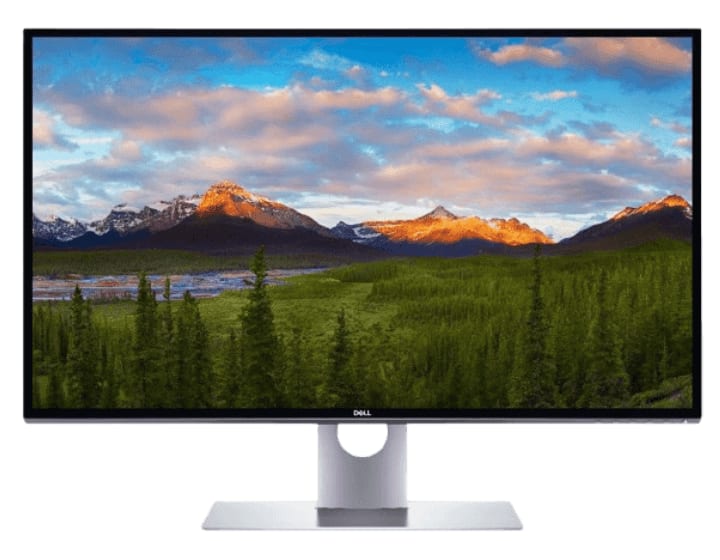
If you’ve ever wondered what true sharpness looks like on a screen, the Dell UP3218K UltraSharp 32” 8K Monitor is your answer. It's not just a monitor—it’s a visual masterpiece designed for professionals who demand clarity, precision, and pixel-perfect detail.
Whether you're editing high-resolution videos, working with complex CAD designs, or simply want the cleanest desktop view possible, this monitor redefines the standard for highest PPI displays.
🔍 Why Dell’s 8K UltraSharp Stands Out
Here’s what makes the Dell UP3218K a heavy hitter in the world of ultra-high-resolution monitors:
- Resolution: A staggering 7680 x 4320 pixels—over 33 million pixels!
- Pixel Density: Roughly 280 PPI, making it one of the highest pixel density monitors on the market.
- Size: 32 inches, balancing workspace real estate with pixel density.
- Colors: PremierColor technology for professional-grade accuracy.
- Design: Sleek silver/black finish, anti-glare screen, and minimal bezels for immersive viewing.
High resolution alone isn't enough—it's the dense pixel count that brings every image to life. With 280 PPI, you get textures, edges, and gradients that look clean even at microscopic zoom levels.
🎯 Who Is It For?
Let’s be honest: this isn’t for casual Netflix streaming. The UP3218K serves professionals in niches where clarity is non-negotiable:
Graphic Designers & Photo Editors
- Spot imperfections with razor-sharp accuracy.
- Render lifelike textures with true-to-life color depth.
3D Artists & Animators
- Visualize polygons and light effects in pristine detail.
- Use the extra resolution for multi-layer workflows.
Medical Imaging & Engineering
- Analyze scans and schematics with unparalleled precision.
- Useful for any field requiring high-fidelity visualization.
🤔 Can You Tell the Difference?
Absolutely. Most 4K monitors offer sharp viewing, but jump to 8K with ultra-high PPI and it’s a whole new experience. Icons, text, and images appear smoother, even from up close. It’s the kind of monitor that makes even fonts feel crisp.
Transitioning from 4K to 8K feels like switching from binoculars to a microscope. The detail isn’t just noticeable—it’s transformative.
🛠️ Features That Go Beyond Resolution
Here’s a quick rundown of standout features that add value beyond just the pixel count:
- Color Support: AdobeRGB, sRGB, Rec709, and DCI-P3 coverage.
- Connectivity: Dual DisplayPorts, USB 3.0 hub for workspace efficiency.
- Factory Calibration: Out-of-the-box accuracy—no guesswork.
And yes, you can split your workspace across this massive canvas. Imagine editing an image in Photoshop on one side and running Illustrator on the other—with no loss in clarity.
⚖️ Pros and Considerations
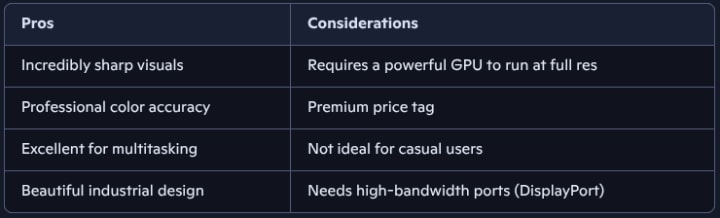
🧠 Smart Insights: Is It Worth the Investment?
If your work depends on ultra-high detail, the Dell UP3218K is a long-term investment, not just a flashy purchase. Its unmatched pixel density and color fidelity empower professionals to work smarter and faster. Yes, it’s pricey, but it pays back in precision and productivity.
For content creators, photographers, or architects, it’s like upgrading from oil paints to digital precision. Once you go 8K, going back feels almost... fuzzy.
2. Apple 32-inch Pro Display XDR with Retina 6K Display
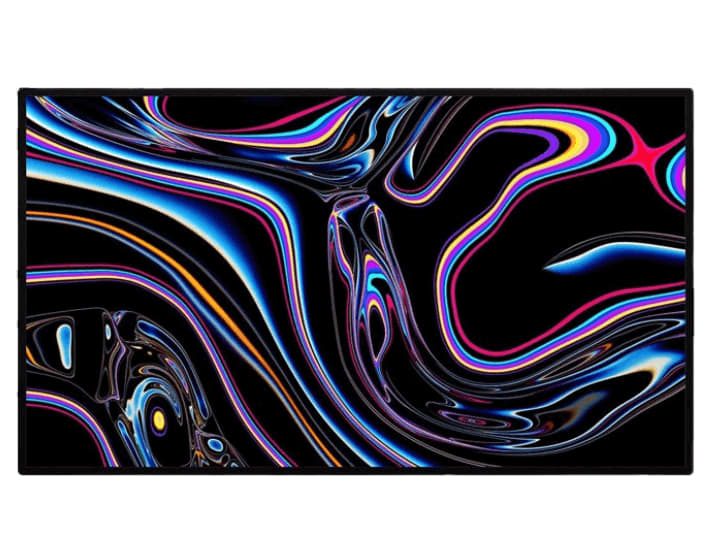
The second contender in our lineup of highest PPI monitors is none other than the Apple 32-inch Pro Display XDR with Retina 6K Display – Nano-Texture Glass. If you’ve ever dreamed of a screen that feels more like a window into reality than a digital display, this is it. Apple didn’t just build a monitor—they engineered a visual experience that redefines professional standards.
With a pixel density of 218 PPI, this Retina 6K display packs over 20 million pixels into a sleek 32-inch canvas. That means you’re getting nearly 40% more screen real estate than a 5K display—and yes, you’ll notice every pixel.
🌟 What Makes the Pro Display XDR Exceptional?
Let’s break down the features that make this monitor a top-tier choice for creatives, developers, and visual perfectionists:
- Resolution: 6016 x 3384 (Retina 6K)
- Pixel Density: 218 PPI
- Brightness: 1000 nits sustained, 1600 nits peak
- Contrast Ratio: 1,000,000:1
- Color Accuracy: P3 wide color gamut, 10-bit depth (over 1 billion colors)
- Surface Finish: Nano-texture glass for reduced glare without sacrificing detail
The Nano-texture glass is a game-changer. Unlike standard matte coatings, it’s etched at the nanometer level to scatter light—giving you stunning clarity even in bright environments.
🎨 Designed for Professionals Who Demand Precision
This isn’t just a monitor—it’s a tool for mastery. Here’s who benefits most:
Photographers & Videographers
- See true-to-life colors and subtle gradients.
- Edit HDR content with confidence.
Designers & Developers
- Work with pixel-perfect layouts and typography.
- Use reference modes tailored for print, web, and cinema.
Colorists & VFX Artists
- Grade footage with extreme dynamic range.
- Reduce blooming and halo effects with advanced LED backlighting.
🧠 Smart Engineering Behind the Scenes
Apple’s Pro Display XDR uses a 2D backlighting system with 576 blue LEDs, each modulated by custom controllers. This allows precise control over brightness zones, minimizing blooming and maximizing contrast.
And with True Tone technology, the display adapts to ambient lighting, ensuring consistent color perception throughout your workflow.
📦 What You Should Know Before Buying
Before you invest, consider these key points:
- Pro Stand Sold Separately: Yes, it’s an extra cost—but it offers tilt, height, and rotation adjustments.
- Connectivity: Thunderbolt 3 and USB-C ports for seamless integration with Mac systems.
- Price Tag: Premium performance comes at a premium price. But for professionals, it’s worth every pixel.
✅ Final Thought
The Apple Pro Display XDR isn’t just about resolution—it’s about revolution. With Retina 6K clarity, nano-texture innovation, and unmatched color fidelity, it’s built for those who see beyond the screen. If your craft demands precision, this monitor delivers it in every frame.
3. LG 27MD5KL-B 27 Inch UltraFine 5K IPS Display
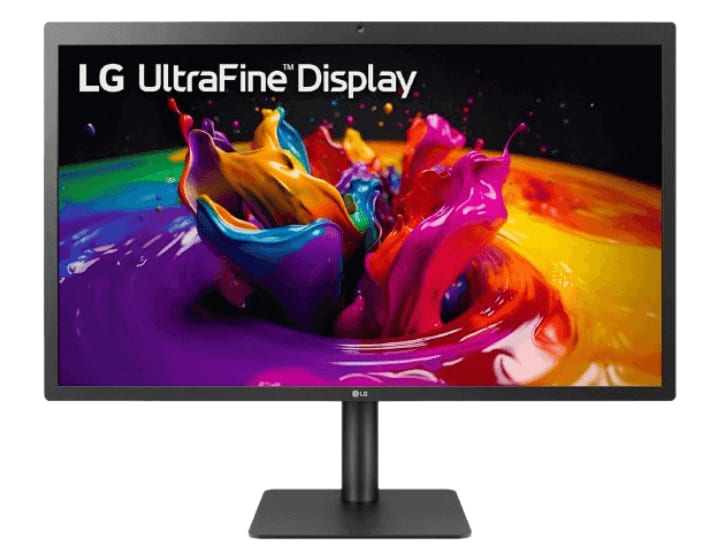
The third contender in our lineup of highest PPI monitors is the LG 27MD5KL-B UltraFine 5K IPS Display—a sleek, 27-inch powerhouse that’s tailor-made for macOS users. If you’re someone who values pixel-perfect clarity, vibrant color accuracy, and seamless Apple ecosystem integration, this monitor might just be your new favorite tool.
With a resolution of 5120 x 2880 and a pixel density of 218 PPI, the LG UltraFine 5K delivers stunning detail that’s ideal for creative professionals, developers, and anyone who spends hours in front of a screen.
🖼️ What Makes the LG UltraFine 5K Stand Out?
Let’s unpack the features that make this monitor a top-tier choice:
- Display Type: 27” IPS panel for wide viewing angles and consistent color
- Resolution: 5120 x 2880 (5K UHD)
- Pixel Density: 218 PPI for razor-sharp visuals
- Color Gamut: DCI-P3 99% for rich, accurate color reproduction
- Brightness: 500 nits for vibrant, well-lit images
- Ports: Thunderbolt 3 and USB-C for fast data, video, and power delivery (up to 94W)
This monitor doesn’t just look good—it performs with precision. Whether you’re editing high-res photos or coding in Xcode, every pixel works in your favor.
🍏 Seamless macOS Integration
One of the biggest perks? It’s built to work flawlessly with macOS. That means:
- Plug-and-Play Setup: No drivers, no fuss—just connect via Thunderbolt 3.
- System-Level Controls: Adjust brightness and volume directly from your Mac.
- Built-In Camera & Speakers: Perfect for FaceTime calls and video conferencing.
It’s like Apple designed it themselves—because they kind of did. LG built this monitor in close collaboration with Apple, and it shows.
🎯 Who Should Consider the LG 27MD5KL-B?
This isn’t just a pretty screen—it’s a productivity enhancer. Here’s who benefits most:
- Photographers & Designers: See every pixel and shade with stunning clarity.
- Developers: Enjoy crisp text and multitasking across multiple windows.
- Content Creators: Edit 4K and 5K video with confidence and precision.
- Mac Enthusiasts: Get the most out of your MacBook Pro or Mac Studio.
⚙️ Performance Meets Practicality
Beyond the visuals, this monitor is built for real-world use:
- Height & Tilt Adjustment: Customize your setup for comfort.
- VESA Mount Compatibility: Easily mount it to your workspace.
- Low Reflective Surface: Reduces glare without sacrificing detail.
And yes, it’s compact enough to fit on most desks while still offering a massive pixel canvas.
✅ Final Thought
The LG 27MD5KL-B UltraFine 5K isn’t just a monitor—it’s a precision instrument for creators and professionals who demand clarity, color fidelity, and macOS harmony. With its high pixel density, rich color support, and seamless Apple integration, it’s a smart investment for anyone serious about their screen.
4. GIGABYTE M32UC 32" 144Hz 4K UHD Curved Gaming Monitor
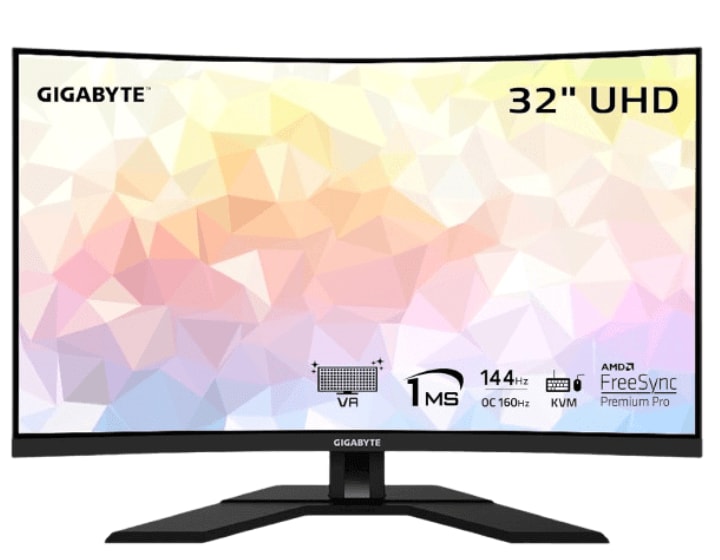
The fourth contender in our roundup of the highest PPI monitors is the GIGABYTE M32UC 32" 4K UHD Curved Gaming Monitor—a display that blends high pixel density with blazing-fast performance. If you’re a gamer, content creator, or multitasker who craves immersive visuals and fluid motion, this monitor might just be your next upgrade.
With a resolution of 3840 x 2160 packed into a 32-inch curved screen, the M32UC delivers a pixel density of approximately 137 PPI. While it doesn’t top the charts in raw pixel count, it strikes a compelling balance between clarity, speed, and affordability.
🎮 Why the GIGABYTE M32UC Is a Gamer’s Dream
Let’s dive into what makes this monitor stand out in the crowded 4K gaming space:
- Refresh Rate: Native 144Hz, overclockable to 160Hz for ultra-smooth gameplay
- Response Time: 1ms MPRT for lightning-fast reactions
- Panel Type: SuperSpeed VA for deep contrast and wide viewing angles
- HDR Support: VESA DisplayHDR 400 for enhanced brightness and color
- Color Accuracy: 93% DCI-P3 and 123% sRGB for vibrant visuals
Connectivity:
- 1x DisplayPort 1.4
- 2x HDMI 2.1 (perfect for PS5 and Xbox Series X)
- 1x USB Type-C
- 4x USB 3.2 ports
This monitor doesn’t just look good—it’s built for speed. Whether you're dodging enemies in a fast-paced shooter or editing 4K footage, the M32UC keeps up without breaking a sweat.
🧠 Smart Features That Boost Productivity
Beyond gaming, the M32UC is packed with features that make it a versatile tool for work and play:
- KVM Switch: Control multiple devices with one keyboard and mouse—ideal for streamers and multitaskers.
- OSD Sidekick: Adjust settings using your keyboard and mouse, no fiddling with buttons.
- PiP/PbP Modes: View multiple sources on one screen—great for tutorials, guides, or monitoring.
And thanks to its curved design, you get a more immersive experience that wraps around your field of view, reducing distortion and enhancing focus.
🧪 Performance Meets Practicality
Here’s a quick breakdown of what you’ll love—and what to consider:
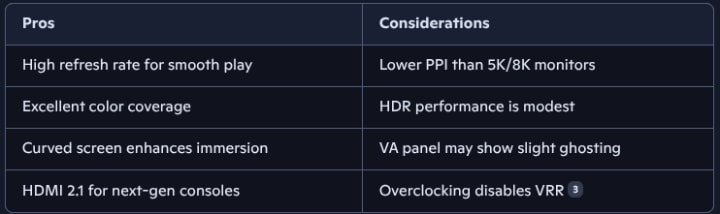
🧩 Who Should Buy the M32UC?
This monitor is ideal for:
- Competitive Gamers: Fast refresh and low input lag give you an edge.
- Console Players: HDMI 2.1 unlocks full 4K@120Hz potential.
- Content Creators: Wide color gamut and 4K resolution support detailed editing.
- Remote Workers: USB-C and KVM features streamline your setup.
✅ Final Thought
The GIGABYTE M32UC 32" 4K UHD Curved Gaming Monitor may not have the highest PPI on this list, but it delivers a winning combination of speed, clarity, and versatility. With its gamer-first features, pro-level color accuracy, and immersive curved design, it’s a smart pick for anyone who wants more than just pixels—it’s about performance that feels pixel-perfect.
Conclusion
Choosing the highest PPI monitor means choosing clarity, comfort, and quality. Whether you’re a gamer, designer, or just someone who loves sharp images, a high PPI monitor will make your screen time better. In 2025, options like the Dell UltraSharp UP3218K and Apple Pro Display XDR will lead the pack. But even budget-friendly models like the GIGABYTE M32UC offer great value.
So, take your pick and enjoy the view—your eyes will thank you.
FAQ
❓ What is a good PPI for a monitor?
A good PPI is above 100. For sharp visuals, aim for 200+.
❓ Is 4K better than 1080p?
Yes. 4K has more pixels, so it looks sharper.
❓ Can I use a high PPI monitor for gaming?
Absolutely! Just make sure it has a good refresh rate too.
❓ Do high PPI monitors cost more?
Usually, yes. But some budget models offer great value.
About the Creator
Perfect Tech Views
Welcome to Perfect Tech Views—your go-to source for clear, unbiased, and insightful tech knowledge. Whether you're a pro, a beginner, or just exploring gadgets, we've got you covered with expert guidance!
Keep reading
More stories from Perfect Tech Views and writers in Gamers and other communities.
Can You Use a PS4 Controller on a PS5? (Everything You Need to Know)
Can You Use a PS4 Controller on a PS5? If you're asking, can you use a PS4 controller on a PS5? You're not alone. Many gamers want to know if their old DualShock 4 controllers will work with the new PlayStation 5. The good news is, yes, you can use a PS4 controller on a PS5, but there are some important things to know first.
By Perfect Tech Views6 months ago in Gamers
Dodgers
The Los Angeles Dodgers have long been one of the most influential franchises in MLB, known for combining elite player development with the financial flexibility to pursue top-tier talent. From consistent postseason appearances to being counted among recent World Series winners, the Dodgers continue to shape league-wide conversations. As the new season approaches, Dodgers news is once again dominated by roster construction, payroll discussions, and persistent MLB trade rumors—especially those surrounding Kyle Tucker. The Dodgers’ Identity in Modern MLB Few teams balance tradition and innovation quite like the LA Dodgers. Their front office has mastered analytics while still valuing star players who can deliver in October. The current Dodgers roster reflects that philosophy, blending established veterans with emerging talent. Over the years, names like Cody Bellinger have defined eras of success, while new possibilities continue to fuel speculation. The Dodgers’ ability to remain competitive is also tied to their willingness to maintain a high Dodgers payroll. While they are not reckless spenders, they are strategic—targeting players who can elevate both performance and brand value. Kyle Tucker and Why He Fits the Dodgers Narrative Among the most discussed names in recent MLB rumors is Kyle Tucker. A consistent offensive presence and reliable defender, Tucker has emerged as one of the most complete players in modern baseball. Naturally, that has led to growing interest in a potential Kyle Tucker Dodgers scenario. So, what position does Kyle Tucker play? Tucker is primarily a right fielder, though his athleticism allows flexibility across the outfield. That versatility makes him especially attractive to teams like the Dodgers, who value adaptable Dodgers outfielders capable of handling high-pressure situations. The phrase “Tucker baseball” has become shorthand for a balanced skill set: power, patience, and postseason reliability. It’s no surprise that Kyle Tucker news often trends alongside big-market teams. Contracts, Agents, and the Cost of Stardom Any serious discussion of Tucker to Dodgers inevitably leads to contract considerations. The idea of a Kyle Tucker contract Dodgers deal raises questions about years, value, and long-term impact. While no official Kyle Tucker deal has been announced, speculation continues around what such a move would require. The Kyle Tucker agent would likely prioritize both financial security and a winning environment—two things the Dodgers can credibly offer. Still, committing to a potential Kyle Tucker Dodgers contract would require careful planning, especially with other stars already on the books. Misspellings like kyle.tucker, kyle tuxker, or even kyke tucker frequently appear in online searches, underscoring just how much attention surrounds him across the baseball world. How Tucker Could Shape the Dodgers Lineup If a Dodgers Tucker scenario ever materializes, it would have a major impact on the Dodgers lineup. A projected middle-of-the-order bat like Tucker could slot seamlessly into a Dodgers projected lineup, offering protection for existing stars and adding depth in late-game situations. Comparisons have been drawn between Tucker and former Dodgers standouts like Bellinger, particularly in terms of two-way impact. While Cody Bellinger brought elite defense and timely power, Tucker offers a more consistent offensive profile year over year. Competition From the Mets and Other MLB Teams Of course, the Dodgers are not alone in pursuing elite talent. The NY Mets, backed by owner Steve Cohen, have made it clear they are willing to spend aggressively. Mets news often mirrors Dodgers news, especially when it comes to top-tier MLB free agents and trade targets. Names like Edwin Diaz and Bo Bichette frequently appear in league-wide discussions, highlighting how interconnected roster decisions have become. Any move involving Tucker would likely ripple across the league, influencing strategies for teams like the Mets, who remain active in both free agency and trades. MLB Trade Rumors and the Bigger Picture Sites such as MLBTradeRumors regularly analyze scenarios involving Kyle Tucker to Dodgers, though nothing has been confirmed. These rumors reflect a broader truth: elite players drive conversation, even when deals never materialize. The Dodgers understand that not every rumor becomes reality. Still, being linked to players like Tucker reinforces the team’s image as a perennial contender. Whether through trades or internal development, the goal remains the same—build a roster capable of winning another championship. Looking Ahead: What This Means for the Dodgers As the season unfolds, the Dodgers will continue to evaluate opportunities that align with their long-term vision. The idea of Dodgers Kyle Tucker is compelling, but it’s only one chapter in a much larger story about sustained excellence. With a deep farm system, financial flexibility, and a proven track record, the Los Angeles Dodgers remain at the center of MLB news. Whether or not Tucker ever wears Dodger blue, the conversations surrounding him highlight how the franchise continues to influence the direction of the league. In the end, the Dodgers’ success has never hinged on a single move. It’s about smart decisions, calculated risks, and an unwavering commitment to winning—qualities that keep them relevant, respected, and always worth watching.
By Saboor Brohi about 19 hours ago in Gamers
Marvel Rivals Patch Notes: Season 6 "Night at the Museum" - Full Breakdown, Deadpool Abilities, and Hero Buffs
The wait is almost over! NetEase Games has finally pulled back the curtain on the next massive update for its hit superhero shooter. If you’ve been searching for the latest Marvel Rivals patch notes, you’re in the right place. Season 6, titled "Night at the Museum," is officially set to launch on January 16, 2026, and it’s bringing the Merc with a Mouth along for the ride.
By Info Post Gate3 days ago in Gamers



Comments