
Best SSD for Video Editing (Ultimate Guide)
Discover the best SSD for video editing. Enhance your workflow with these top-rated SSDs, offering speed, reliability, and efficiency.

If you're a video editor, you know that having the best SSD for video editing can make a world of difference. From faster data access speeds to improved reliability, the right SSD can streamline your workflow and boost productivity. In this article, we will explore the top SSDs for video editing in 2025, helping you make an informed decision.
Key Features to Look for in an SSD for Video Editing
When choosing the best SSD for video editing, there are several key features to consider:
- Read/Write Speeds: High read/write speeds are essential for handling large video files efficiently.
- Capacity: Ensure the SSD has enough storage to accommodate your video projects.
- Endurance: Look for an SSD with high endurance to withstand frequent read/write cycles.
- Form Factor: Choose an SSD that fits your setup, whether it's a portable drive or an internal SSD.
- Reliability: Opt for trusted brands known for producing reliable SSDs.
How to Choose the Right SSD for Your Needs
When selecting the best SSD for video editing, consider your specific needs and budget. Here are a few tips to help you make the right choice:
- Assess Your Workflow: Think about the types of projects you work on and the file sizes you typically handle.
- Budget: Determine how much you're willing to spend and look for an SSD that offers the best value for your money.
- Future-Proofing: Consider an SSD with a higher capacity and endurance to accommodate future projects and growth.
The Top 5 Best SSDs for Video Editing That You Can Buy Today
- SAMSUNG 970 EVO Plus SSD 1TB NVMe M.2
- WD_BLACK 1TB SN850 NVMe Internal Gaming SSD
- Crucial P5 Plus 1TB PCIe Gen4 3D NAND NVMe M.2 Gaming SSD
- Seagate FireCuda 530 1TB Solid State Drive
- SABRENT 1TB Rocket 4 Plus NVMe 4.0 Gen4 PCIe M.2 Internal SSD
1. SAMSUNG 970 EVO Plus SSD 1TB NVMe M.2

Specification: Read/Write Speeds: Up to 3,500/3,300 MB/s | Capacity: 250GB, 500GB, 1TB, 2TB | Endurance: 600TBW (Terabytes Written) for the 1TB model | Form Factor: M.2 NVMe | Reliability: Trusted brand with a 5-year warranty
When it comes to video editing, the SAMSUNG 970 EVO Plus SSD 1TB NVMe M.2 Internal Solid State Drive stands out as a top contender. This SSD is designed with V-NAND technology and offers storage and memory expansion that caters to the needs of gamers, graphic designers, and, most importantly, video editors. Let’s dive into why this SSD is a must-have for your video editing setup.
Key Features and Benefits
1. Exceptional Speed and Performance
The SAMSUNG 970 EVO Plus SSD delivers impressive read/write speeds of up to 3,500/3,300 MB/s. This speed ensures that you can access and transfer large video files quickly and efficiently, reducing wait times and boosting your productivity. Imagine being able to edit high-resolution videos without the frustrating lag – this SSD makes it possible.
2. Reliable Heat Control
One of the standout features of this SSD is its advanced heat control technology. The Dynamic Thermal Guard automatically monitors and maintains optimal operating temperatures, ensuring that your SSD remains cool even during intensive editing sessions. This reliability means you can focus on your creative process without worrying about performance drops due to overheating.
3. Ample Storage Capacity
With 1TB of storage space, the SAMSUNG 970 EVO Plus provides ample room for your video projects, raw footage, and software applications. You won’t need to constantly juggle files to free up space, allowing you to keep your workflow smooth and uninterrupted.
4. Durability and Endurance
The V-NAND technology used in the SAMSUNG 970 EVO Plus enhances its durability and endurance. This SSD is built to withstand frequent read/write cycles, making it a reliable choice for video editors who often work on large and complex projects. You can trust this SSD to handle your demanding workloads with ease.
Why Choose the SAMSUNG 970 EVO Plus for Video Editing?
Choosing the right SSD for video editing can make a significant difference in your editing experience. Here are a few reasons why the SAMSUNG 970 EVO Plus is the best SSD for video editing:
- High Performance: Its high read/write speeds allow for quick file access and transfer, which is crucial for video editing.
- Heat Management: The advanced heat control technology ensures consistent performance without overheating issues.
- Large Storage: 1TB of storage space is ideal for handling multiple projects and large video files.
- Enhanced Endurance: The V-NAND technology ensures the SSD can handle heavy editing tasks over time.
Boost Your Video Editing Workflow
Imagine working on a complex video project and needing to transfer gigabytes of footage seamlessly. The SAMSUNG 970 EVO Plus SSD's speed and efficiency can significantly reduce your editing time, allowing you to focus more on the creative aspects of your work. Whether you're editing 4K videos or working on intricate graphics, this SSD ensures that your workflow remains uninterrupted and efficient.
In summary the SAMSUNG 970 EVO Plus SSD 1TB NVMe M.2 is an exceptional choice for video editors looking for speed, reliability, and ample storage. Its advanced features and performance make it a valuable addition to any video editing setup. Ready to elevate your editing game? Consider making the switch to the SAMSUNG 970 EVO Plus SSD and experience the difference it can make in your projects.
2. WD_BLACK 1TB SN850 NVMe Internal Gaming SSD

Specification: Read/Write Speeds: Up to 7,000/5,300 MB/s | Capacity: 500GB, 1TB, 2TB | Endurance: 600TBW for the 1TB model | Form Factor: M.2 NVMe | Reliability: Backed by a 5-year warranty
The second contender is the WD_BLACK 1TB SN850 NVMe Internal Gaming SSD Solid State Drive - Gen4 PCIe, M.2 2280, 3D NAND, Up to 7,000 MB/s - WDS100T1X0E. This SSD is not just a powerhouse for gaming but also a top choice for video editors who need high-speed performance and reliability. Let’s explore what makes this SSD a fantastic option for your video editing needs.
Why Choose the WD_BLACK SN850 for Video Editing?
1. Lightning-Fast Read/Write Speeds
With read speeds up to 7,000 MB/s and write speeds up to 5,300 MB/s, the WD_BLACK SN850 offers exceptional performance. This speed ensures that your video editing software runs smoothly, and large files are transferred quickly, significantly reducing your waiting times. Have you ever experienced frustration with slow load times? With this SSD, that's a thing of the past.
2. Gen4 PCIe Technology
The Gen4 PCIe interface takes advantage of the latest in SSD technology, providing a significant boost in performance over Gen3 drives. This means faster data processing and better overall system responsiveness, which is essential for video editors working with high-resolution files.
3. Ample Storage Capacity
The 1TB capacity of the WD_BLACK SN850 offers plenty of space for storing your video projects, raw footage, and editing software. You won’t have to constantly worry about running out of space, allowing you to focus more on creating and less on managing your files.
4. Advanced 3D NAND Technology
The SSD is built with 3D NAND technology, which enhances its reliability and efficiency. This technology provides better endurance, ensuring that your SSD can handle the frequent read/write cycles typical in video editing tasks. You can count on the WD_BLACK SN850 to keep up with your demanding workflow.
5. Optimized for Gaming and Beyond
While this SSD is optimized for gaming, its high-speed performance and reliability make it a perfect choice for video editing as well. The features that make it great for gaming, such as rapid load times and robust performance, also benefit video editing, making it a versatile option.
Visual Appeal and Readability
To ensure that our content is visually appealing and easy to read, let’s highlight the key points in a structured manner:
- Speed and Performance: Up to 7,000 MB/s read speed.
- Interface: Gen4 PCIe for the latest technology boost.
- Capacity: 1TB of ample storage.
- Technology: Advanced 3D NAND for enhanced reliability.
- Versatility: Perfect for both gaming and video editing.
In summary the WD_BLACK 1TB SN850 NVMe Internal Gaming SSD Solid State Drive is a standout choice for video editors seeking high performance and reliability. Its impressive speed, advanced technology, and ample storage capacity make it a valuable addition to any video editing setup.
3. Crucial P5 Plus 1TB PCIe Gen4 3D NAND NVMe M.2 Gaming SSD

Specification: Read/Write Speeds: Up to 6,600/5,000 MB/s | Capacity: 500GB, 1TB, 2TB | Endurance: 600TBW for the 1TB model | Form Factor: M.2 NVMe | Reliability: 5-year limited warranty
The third contender is the Crucial P5 Plus 1TB PCIe Gen4 3D NAND NVMe M.2 Gaming SSD, up to 6600MB/s - CT1000P5PSSD8 Solid State Drive. This SSD is a fantastic choice for video editors, offering a blend of speed, reliability, and advanced technology. Let’s explore why the Crucial P5 Plus should be on your radar.
Why Choose the Crucial P5 Plus for Video Editing?
1. Impressive Read/Write Speeds
The Crucial P5 Plus SSD boasts read speeds of up to 6,600 MB/s, making it one of the fastest options available. This speed ensures that your video editing software runs smoothly and that you can transfer large files quickly. Have you ever found yourself frustrated by slow file transfers? With the Crucial P5 Plus, those delays will be a thing of the past.
2. PCIe Gen4 Interface
The PCIe Gen4 interface provides a significant boost in performance compared to older generations. This means faster data processing and better overall system responsiveness. For video editors working with high-resolution files, the Gen4 interface is a game-changer.
3. Ample Storage Capacity
With 1TB of storage space, the Crucial P5 Plus offers plenty of room for your video projects, raw footage, and editing software. You won’t have to constantly worry about running out of space, allowing you to focus more on creating and less on managing your files.
4. Advanced 3D NAND Technology
The SSD is built with 3D NAND technology, which enhances its reliability and efficiency. This technology provides better endurance, ensuring that your SSD can handle the frequent read/write cycles typical in video editing tasks. You can trust the Crucial P5 Plus to keep up with your demanding workflow.
5. Heat Management
The Crucial P5 Plus is equipped with advanced thermal management features that help maintain optimal operating temperatures. This ensures consistent performance even during intensive editing sessions, allowing you to focus on your creative process without worrying about overheating.
Key Benefits of the Crucial P5 Plus
- High-Speed Performance: Read speeds up to 6,600 MB/s.
- PCIe Gen4 Interface: Latest technology for faster data processing.
- Large Storage Capacity: 1TB to accommodate all your video files.
- 3D NAND Technology: Enhanced reliability and endurance.
- Thermal Management: Keeps your SSD cool during intense tasks.
In summary imagine being able to edit high-resolution videos with seamless transitions and rapid file access. The Crucial P5 Plus SSD offers the speed and reliability that video editors need to enhance their workflow and boost productivity. Whether you're working on 4K videos or handling complex graphics, this SSD ensures that your editing process remains smooth and efficient.
4. Seagate FireCuda 530 1TB Solid State Drive

Specification: Read/Write Speeds: Up to 7,300/6,900 MB/s | Capacity: 500GB, 1TB, 2TB, 4TB | Endurance: 1,275TBW for the 2TB model | Form Factor: M.2 NVMe | Reliability: 5-year warranty with 3-year Rescue Data Recovery Services
The fourth contender is the Seagate FireCuda 530 1TB Solid State Drive - M.2 PCIe Gen4 ×4 NVMe 1.4, PS5 Internal SSD, speeds up to 7300MB/s, 3D TLC NAND, 1275 TBW, 1.8M MTBF, Heatsink, Rescue Services (ZP1000GM3A023). This SSD is a powerful and reliable option for video editors who demand high performance and durability. Let’s delve into the features that make this SSD an excellent choice for your video editing needs.
Why Choose the Seagate FireCuda 530 for Video Editing?
1. Ultra-Fast Read/Write Speeds
The Seagate FireCuda 530 SSD offers blazing-fast read speeds of up to 7,300 MB/s. This exceptional speed ensures that your video editing software runs smoothly and that large files are transferred in the blink of an eye. Have you ever been frustrated by slow load times and laggy software? The FireCuda 530 eliminates these issues, allowing you to work efficiently and without interruption.
2. PCIe Gen4 ×4 NVMe Interface
The Gen4 ×4 NVMe 1.4 interface provides a significant boost in performance compared to older generations. This means faster data processing and better overall system responsiveness, which is essential for video editors working with high-resolution files and complex projects.
3. 3D TLC NAND Technology
The Seagate FireCuda 530 is built with advanced 3D TLC NAND technology, which enhances its reliability and efficiency. This technology ensures that your SSD can handle the frequent read/write cycles typical in video editing tasks. You can trust the FireCuda 530 to keep up with your demanding workflow.
4. High Endurance and Reliability
With an endurance rating of 1275 TBW (Terabytes Written) and an MTBF (Mean Time Between Failures) of 1.8 million hours, the FireCuda 530 is designed to last. This high endurance makes it a reliable choice for video editors who need an SSD that can withstand intensive use over time.
5. Built-In Heatsink
The FireCuda 530 comes with a built-in heatsink that helps manage heat during intensive tasks. This feature ensures consistent performance and prevents thermal throttling, allowing you to work on your projects without worrying about overheating.
6. Rescue Data Recovery Services
One unique feature of the Seagate FireCuda 530 is the inclusion of Rescue Data Recovery Services. In the event of data loss, you have access to a team of experts who can help recover your valuable files. This added peace of mind is invaluable for video editors who cannot afford to lose their work.
Key Benefits of the Seagate FireCuda 530
- Ultra-Fast Performance: Read speeds up to 7,300 MB/s.
- Advanced Interface: PCIe Gen4 ×4 NVMe 1.4 for the latest technology boost.
- 3D TLC NAND Technology: Enhanced reliability and efficiency.
- High Endurance: 1275 TBW and 1.8M MTBF for long-lasting performance.
- Thermal Management: Built-in heatsink to prevent overheating.
- Data Recovery Services: Rescue Data Recovery Services for added security.
In summary imagine editing high-resolution videos with seamless transitions and rapid file access. The Seagate FireCuda 530 SSD offers the speed, reliability, and advanced features that video editors need to enhance their workflow and boost productivity. Whether you're working on 4K videos or handling complex graphics, this SSD ensures that your editing process remains smooth and efficient.
5. SABRENT 1TB Rocket 4 Plus NVMe 4.0 Gen4 PCIe M.2 Internal SSD
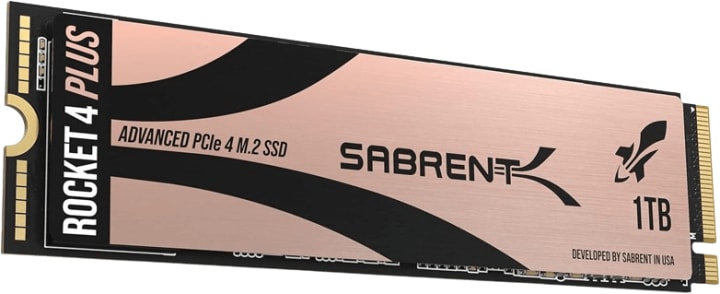
Specification: Read/Write Speeds: Up to 7,100/6,600 MB/s | Capacity: 500GB, 1TB, 2TB, 4TB | Endurance: 1,400TBW for the 2TB model | Form Factor: M.2 NVMe | Reliability: 5-year warranty with registration
The fifth contender is the SABRENT 1TB Rocket 4 Plus NVMe 4.0 Gen4 PCIe M.2 Internal SSD Extreme Performance Solid State Drive (Latest Version) (SB-RKT4P-1TB). Designed to deliver extreme performance, this SSD is a game-changer for video editors.
Its speed, capacity, and advanced features make it a reliable and efficient choice for tackling complex video projects. Let’s dive deeper into why the Sabrent Rocket 4 Plus deserves a place in your video editing setup.
Why Choose the Sabrent Rocket 4 Plus for Video Editing?
1. Blazing-Fast Speeds for Seamless Editing
With read speeds of up to 7,100 MB/s and write speeds up to 6,600 MB/s, the Sabrent Rocket 4 Plus sets a new standard for speed. This SSD ensures that you can transfer and access large video files quickly, making lag and delays a distant memory. Can you imagine editing 4K or even 8K videos without experiencing frustrating slowdowns? The Rocket 4 Plus delivers exactly that.
2. PCIe 4.0 NVMe Interface
Taking advantage of the PCIe 4.0 interface, this SSD offers double the bandwidth of PCIe 3.0 drives. The result? Faster data transfer rates and a smoother workflow. For video editors dealing with demanding projects, this performance boost is a game-changer.
3. Ample Storage for Large Projects
The Sabrent Rocket 4 Plus provides 1TB of storage space, which is ideal for storing large video files, project assets, and editing software. You won’t have to constantly juggle files or worry about running out of space, allowing you to work more efficiently.
4. Advanced Cooling Features
Heat management is crucial for maintaining consistent performance during intensive editing sessions. The Rocket 4 Plus is designed with robust cooling features that prevent overheating and thermal throttling. This means you can work on your projects for hours without worrying about a dip in performance.
5. Enhanced Reliability and Longevity
Built with advanced NAND flash memory and an endurance rating suited for heavy workloads, the Sabrent Rocket 4 Plus is designed to last. Its reliability ensures that your data is safe, even during intensive video editing tasks that require frequent read/write cycles.
Key Benefits of the Sabrent Rocket 4 Plus
- Unmatched Speeds: Up to 7,100 MB/s read and 6,600 MB/s write speeds for rapid file access and transfers.
- Advanced Interface: PCIe 4.0 technology for next-level performance.
- Generous Storage: 1TB capacity to handle even the largest video files.
- Thermal Management: Designed to keep temperatures low during heavy use.
- Durability: High endurance to support demanding video editing workflows.
In summary the Sabrent Rocket 4 Plus SSD is an exceptional choice for video editors seeking speed, reliability, and ample storage. Whether you’re working on 4K videos, rendering complex graphics, or managing large-scale projects, this SSD provides the performance you need to elevate your editing experience.
Conclusion
In conclusion, having the best SSD for video editing can significantly enhance your productivity and efficiency. The Samsung 970 EVO Plus, WD Black SN850, Crucial P5 Plus, Seagate FireCuda 530, and Sabrent Rocket 4 Plus are all excellent choices that offer speed, reliability, and high performance. By considering your specific needs and budget, you can find the perfect SSD to elevate your video editing experience.
FAQ
Q: What is the best SSD for video editing? A: The best SSD for video editing depends on your specific needs. Some top choices include the Samsung 970 EVO Plus, WD Black SN850, and Seagate FireCuda 530.
Q: Why are SSDs better for video editing than HDDs? A: SSDs offer faster read/write speeds, reduced load times, and greater reliability compared to traditional HDDs, making them better suited for video editing tasks.
Q: How much storage do I need for video editing? A: The amount of storage you need depends on the size and number of video files you work with. Typically, video editors should consider SSDs with at least 1TB of storage.
Q: Can I use an external SSD for video editing? A: Yes, you can use an external SSD for video editing. They offer portability and can provide similar performance to internal SSDs if they connect via high-speed interfaces like USB 3.1 or Thunderbolt 3.
About the Creator
Perfect Tech Views
Welcome to Perfect Tech Views—your go-to source for clear, unbiased, and insightful tech knowledge. Whether you're a pro, a beginner, or just exploring gadgets, we've got you covered with expert guidance!
Keep reading
More stories from Perfect Tech Views and writers in Gamers and other communities.
Acer Nitro XV273K (Monitor Review)
Welcome to our in-depth review of the Acer Nitro XV273K Pbmiipphzx 27" UHD 3840 x 2160 IPS AMD Radeon FreeSync and NVIDIA G-SYNC Compatible Monitor. This monitor, designed for gamers and content creators alike, offers a range of features that aim to enhance your visual experience. From Quantum Dot technology to 144Hz refresh rates, we will cover everything you need to know about this monitor.
By Perfect Tech Views12 months ago in Gamers
Rsvsr Helldivers 2 Cyberstan Siege: Beyond Kills, a Galactic Strategy Test
If you thought Helldivers 2 was just a high-octane cooperative shooter, think again. The recent Cyberstan Siege has turned the game into a test of strategy, coordination, and global teamwork. This is not just another mission—it’s a massive, galaxy-wide campaign that challenges every Helldiver to think beyond their blaster.
By Billo Nali6 days ago in Gamers




Comments