
Samsung Begins One UI 7.0 (Based on Android 15) Rollout for Galaxy S24 Series
Everything you need to know
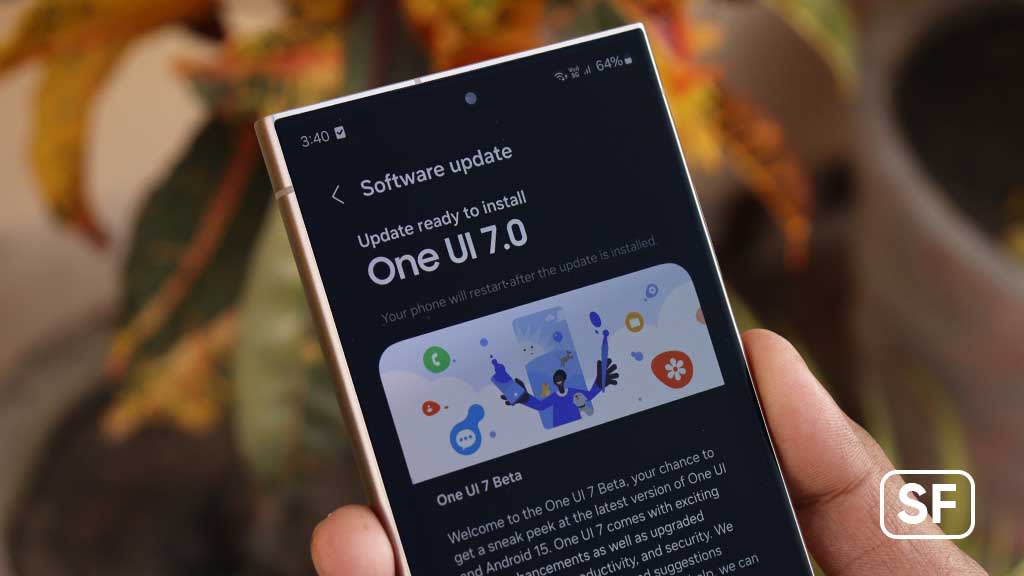
Everything You Need to Know About Samsung's One UI 7.0, based on Android 15, for the Galaxy S24 Series Samsung has officially begun rolling out its most recent significant software update for the Galaxy S24 series, One UI 7.0, based on Android 15. This is one of the quickest major OS updates to a Samsung flagship device, demonstrating the company's dedication to timely software support. Samsung introduces a slew of new features, optimizations, and refinements in One UI 7.0 that boost customization, security, performance, and AI capabilities. This update brings a more refined and intelligent user experience to Galaxy devices and builds on the foundation of One UI 6.0. What’s New in One UI 7.0?
1. Enhancements to Performance and Battery Performance The improved performance is one of One UI 7.0's most noticeable enhancements. Samsung has optimized system-level processes to ensure smoother animations, faster app launches, and better memory management.
Improved Thermal Management: The update includes improved thermal control algorithms to prevent overheating during demanding activities like 4K video recording and gaming. Battery Optimization: The integrated Advanced Battery Health features of Android 15 help extend the life of the battery by reducing the number of times it is plugged in. Faster App Switching – Apps now resume more quickly from the background, reducing reload times.
2. An interface that is more customizable and visually refined Samsung has further refined its user interface with One UI 7.0, offering more personalization options and smoother visuals.
New System Animations – Smoother transitions when opening/closing apps and navigating the UI.
Expanded Color Palette: More third-party applications can now benefit from system-wide theming. Enhanced Lock Screen Customization – More clock styles, widgets, and Always-On Display (AOD) options.
Dynamic Wallpaper Effects: When unlocking the device, wallpapers now subtly animate. 3. AI & Smart Features Get Smarter
Samsung continues to push Galaxy AI forward with new and improved intelligent features.
Upgraded Live Translate – Real-time translations now support more languages and work offline in select apps.
Smarter Circle to Search: Google's Circle to Search now integrates with a wider range of applications, including messaging and social media platforms. Enhanced Note Assist – Better summarization, formatting, and translation in Samsung Notes.
Bixby enhancements include contextual awareness and more natural voice responses for intelligent assistance. 4. Camera & Multimedia Enhancements
The Galaxy S24 series already boasts an impressive camera system, and One UI 7.0 further refines the photography and video experience.
Advanced Pro Mode – New manual controls for shutter speed, ISO, and white balance.
Improved Nightography – Better noise reduction and detail retention in low-light photos.
Enhanced Video Stabilization – Smoother footage when recording in motion.
Upgraded Expert RAW provides professional photographers with more granular editing options. 5. Stronger Security & Privacy Controls
With Android 15 as its foundation, One UI 7.0 introduces stronger security measures.
The most recent Android security patch contains Google's most recent fixes for vulnerabilities. Enhanced App Permissions – More control over which apps can access sensitive data.
Improvements to the Samsung Knox Vault include enhanced security against malware and unauthorized access. Rollout Timeline: When Will You Get One UI 7.0?
Samsung has started the One UI 7.0 rollout for the Galaxy S24 series in select regions, including South Korea, the U.S., and parts of Europe. Because the update is being released in stages, some users might get it sooner than others. Galaxy S24, S24+, S24 Ultra – First to receive the update (October 2024).
Galaxy S23 Series, Z Fold 5, Z Flip 5 – Expected by November-December 2024.
Older Flagships (S22, Fold 4, Flip 4) – Likely in early 2025.
How to Check for the Update Manually
If you own a Galaxy S24, you can manually check for One UI 7.0 by following these steps:
Open Settings.
Go to Software Update.
Select "Download & Install." If the update isn’t available yet, keep checking over the next few days, as Samsung releases it in batches.
Why This Update Matters
Samsung demonstrates its focus on providing a premium software experience alongside its hardware innovations by rapidly deploying One UI 7.0. The Galaxy S24 series gains even more power and ease of use by combining Samsung's own optimizations with the most recent features of Android 15. What Users Have to Say The update has been praised by early adopters for its: ✔ Smoother performance with fewer stutters.
Improved battery life as a result of optimized background processes ✔ More customization options for a personalized experience.
As is typical of any major update, some users have reported minor bugs; however, Samsung is anticipated to address these issues in subsequent patches. Final Thoughts
Samsung consolidates its leadership position in Android software support with the One UI 7.0 update. With enhanced AI, better performance, and deeper customization, Galaxy S24 users are in for a treat.
If you have received the update, let us know in the comments what you think so far! Keep an eye out for more technology news! 📱✨ #Samsung #OneUI7 #Android15 #GalaxyS24 #TechNews
About the Creator
Keep reading
More stories from Khan Mohammad Nirjhar and writers in Futurism and other communities.
Tourists Ripped Off at Popular Landmark by 'Impossible' Ticketing Schemes Attract Investigation
After numerous tourists reported being conned by deceptive ticketing schemes, one of the world's most famous landmarks is the subject of scrutiny. Exorbitant hidden fees, fake booking websites, and tickets that are impossible to secure have been reported by visitors to the historic site, resulting in widespread outrage and a formal investigation by consumer protection agencies. The issue has gained traction on social media, with travelers sharing stories of paying hundreds of dollars for tickets that either never arrived or turned out to be invalid. Due to third-party resellers charging up to ten times the official price, some tourists even reported being denied entry at the gates. How it Works: The Scam 1. Fake Official Websites
By Khan Mohammad Nirjhar11 months ago in Criminal
The RAF’s Foothold in the Eastern Med Is Slipping – £17k Drones Are to Blame
The Royal Air Force is facing growing operational challenges in the eastern Mediterranean as low-cost drones, costing as little as £17,000, increasingly threaten airspace security and force a reassessment of defensive postures. Officials acknowledge that these unmanned systems, often commercially available or easily modified, are disrupting reconnaissance, surveillance, and regional air operations, highlighting vulnerabilities even in technologically advanced militaries. The eastern Mediterranean has long been a strategic region for the United Kingdom, serving as a staging ground for intelligence gathering, military exercises, and rapid response missions. However, the proliferation of inexpensive drones has complicated these operations, creating operational hazards and reducing the RAF’s ability to maintain dominance in contested airspace. Drones: A Growing Threat Small drones, or unmanned aerial vehicles (UAVs), have become increasingly common in conflicts and contested zones worldwide. Analysts note that while each drone may cost only a fraction of traditional military aircraft, their ability to evade radar detection and conduct surveillance or even deliver payloads makes them a disproportionate threat. A spokesperson for the RAF noted that several recent incidents in the eastern Mediterranean involved drones approaching military airfields, monitoring aircraft movements, or interfering with exercises. “Even low-cost UAVs can present significant challenges to our operations,” the official said. “They require rapid detection, tracking, and, in some cases, neutralization to ensure mission safety.” The £17,000 drones cited by military sources are commercially available but often upgraded with military-grade sensors, GPS guidance, or payload modifications. Such upgrades make them capable of gathering intelligence or harassing military assets with minimal cost to adversaries. Operational and Strategic Impacts The presence of these drones has forced the RAF to adjust flight patterns, increase air patrols, and deploy counter-drone systems. These measures, while necessary, place additional strain on personnel and resources. Analysts warn that repeated drone incursions may gradually erode operational confidence and limit the RAF’s freedom of action in the region. Strategically, drones are challenging traditional concepts of air superiority. While the RAF continues to operate advanced jets and surveillance aircraft, small UAVs provide low-cost, persistent monitoring that can identify patterns, vulnerabilities, and deployment schedules without significant risk to operators. Military planners emphasize that the proliferation of inexpensive drones demonstrates how modern conflicts increasingly favor asymmetric approaches, where low-cost technology can counter high-end military assets. This shift is particularly visible in regions like the eastern Mediterranean, where multiple actors operate with differing levels of capability. Counter-Drone Measures In response, the RAF and the Ministry of Defence (MoD) have accelerated investments in counter-drone technology. These measures include radar and sensor systems capable of detecting small UAVs, electronic jamming equipment to disrupt communications, and rapid-response interception protocols. Exercises are now incorporating drone threat simulations, training pilots and ground crews to respond to swarming UAVs or reconnaissance missions. Officials stress that a layered approach, combining electronic, kinetic, and procedural defenses, is necessary to maintain operational integrity. Regional Implications The eastern Mediterranean remains a hotbed of military activity due to ongoing geopolitical tensions involving NATO members, regional powers, and non-state actors. The presence of low-cost drones increases uncertainty and complicates coordination among allied forces. Countries in the region, including Greece, Turkey, and Israel, are increasingly using UAVs for reconnaissance and patrol missions. The RAF must adapt to a dynamic environment where drones can operate alongside conventional aircraft, requiring both operational flexibility and investment in defensive technologies. Lessons for Future Operations Military analysts argue that incidents involving inexpensive drones highlight the importance of integrating counter-UAV strategies into broader air defense planning. The RAF is expected to continue developing detection networks, automated response systems, and intelligence sharing protocols to mitigate drone-related risks. Additionally, the challenge underscores the evolving nature of modern conflict, where small, cheap technologies can challenge established militaries, forcing continuous adaptation and strategic foresight. Balancing Costs and Capabilities While counter-drone systems are essential, they also represent a significant financial investment. Balancing the costs of defensive measures against the operational risks posed by low-cost UAVs remains a critical challenge for the RAF. Training, equipment procurement, and operational adjustments must be carefully coordinated to ensure efficiency without compromising readiness. Conclusion The RAF’s experience in the eastern Mediterranean demonstrates that even small, inexpensive drones can have outsized effects on military operations and strategy. As the proliferation of UAVs continues, the UK military faces a dual challenge: maintaining air dominance while adapting to new asymmetric threats. By investing in detection, response, and training, the RAF aims to preserve its operational foothold in the region. However, the rise of £17,000 drones illustrates a broader lesson for modern defense: technological sophistication alone does not guarantee superiority in the age of accessible, disruptive innovations.
By Fiaz Ahmed Brohia day ago in Futurism
Europe Gene Therapy Market Within Cell & Gene Therapy: Fast‑Growing Niche in a USD 7.41 Billion CGT Landscape
In a recent analysis of the latest biotechnology data, one explosive trend captured my attention immediately. The Europe gene therapy market is rapidly evolving into the most critical segment of the broader Cell & Gene Therapy (CGT) sector. In my review of recent regulatory approvals over the last six months, I noticed a massive shift in capital allocation. Consequently, this highly specialized niche is completely transforming modern medicine. Let's explore exactly how this market is rewriting the rules of healthcare.
By Joey Moore3 days ago in Futurism



Comments
There are no comments for this story
Be the first to respond and start the conversation.