
Home Theater Setup Guide: Everything You Need to Know
Step-by-Step Instructions for Building the Ultimate Home Entertainment Experience


Creating a home theater is one of the best ways to bring cinematic entertainment into your own space. With the right planning and equipment, you can enjoy movies, sports, gaming, and streaming shows with immersive sound and crystal-clear visuals—all from the comfort of home.
But where do you begin? Setting up a home theater involves more than just picking out a screen. You need to consider your room layout, audio configuration, lighting, and overall user experience. This guide will walk you through every step of the process so you can build the ultimate home viewing environment.
Why Build a Home Theater?
A home theater offers more than just big-screen entertainment—it creates an experience. Unlike a typical TV setup, a dedicated home theater is designed to mimic the ambiance of a commercial cinema, complete with surround sound, optimized visuals, and a cozy seating arrangement.
Key benefits include:
- A customizable viewing environment
- No crowds, noise, or ticket prices
- Ideal for binge-watching, gaming, and hosting movie nights
- Long-term value for families and entertainment lovers
Step 1: Choose the Right Room
The first and most important step is selecting the right space. Ideally, your home theater should be in a quiet room that you can control in terms of lighting and sound. Basements are popular because they’re naturally dark and quiet, but a spare bedroom or enclosed living room can work just as well.
Room setup tips:
- Look for minimal windows or use blackout curtains
- Choose carpeted flooring or use rugs to absorb sound
- Avoid oddly shaped rooms that can distort audio
Step 2: Decide Between a TV or Projector
Your choice of display depends on your space, budget, and visual preferences. Both TVs and projectors have pros and cons.
TVs offer brighter displays, are easier to set up, and work well in rooms with ambient light. A 4K UHD TV is excellent for a high-quality viewing experience.
Projectors deliver a true theater feel with screen sizes well beyond 100 inches. They require dim lighting and a suitable projection surface but create a more immersive vibe.
If space and light control aren't an issue, projectors are ideal for large-screen cinematic viewing.
Step 3: Choose Your Audio System
Sound is just as crucial as picture quality. Without a good audio setup, you’ll miss half the experience. There are several options based on your budget and room size:
Soundbars are a simple solution for smaller spaces. Some even support surround sound or Dolby Atmos.
- 5.1 Surround Sound Systems include five speakers and one subwoofer, offering directional audio for a realistic effect.
- 7.1 Systems or Dolby Atmos add even more depth with extra speakers, including ceiling or upward-firing options for 3D audio.
Speaker placement should follow your seating arrangement to ensure a balanced soundstage across the room.
Step 4: Plan for Comfortable Seating
Comfortable seating is essential for long viewing sessions. Depending on the room size and layout, you can go for a full row of reclining theater chairs, modular sofas, or even bean bags for a more relaxed feel.
Seating tips:
Place seats at an optimal distance from the screen (typically 1.5 to 2.5 times the screen’s width)
Avoid pushing seats directly against walls for better audio acoustics
Consider tiered seating if you're planning multiple rows
Step 5: Control Your Lighting
Lighting plays a big role in your viewing experience. Too much light can wash out your picture, especially with projectors. The best home theaters use layered lighting with dimmable fixtures, sconces, or LED strips to set the mood.
- Use blackout curtains to block natural light
- Install dimmable or smart lighting systems
- Keep lights away from the screen area to reduce glare
- Lighting control isn’t just about darkness—it’s about creating atmosphere.
Step 6: Pick Your Media Sources
To enjoy your favorite content, you’ll need reliable media sources. Most home theaters use a mix of the following:
- Streaming devices (like smart sticks or built-in apps)
- Blu-ray players for high-definition discs
- Gaming consoles for games and streaming
- AV receivers to manage input/output between devices and your display
- Ensure you have a fast and stable internet connection for seamless streaming.
Step 7: Manage Cables and Power
A clean setup improves both functionality and aesthetics. Use cable management tools to keep wires organized and out of sight. You can also invest in an AV rack or media cabinet to house all your devices neatly.
Don’t forget:
- Use surge protectors to protect expensive equipment
- Label your cables for easy troubleshooting
- Consider in-wall cable routing for a minimalist look
Step 8: Optional Enhancements
If you want to go beyond the basics, consider adding:
- Acoustic panels to reduce echo and improve sound clarity
- Bass traps in corners to manage low-frequency build-up
- Universal remote or smart home controls for convenience
- Popcorn machines or snack bars for a true theater feel
These upgrades can elevate your home theater from functional to fantastic.
Final Thoughts
Designing a home theater takes planning and attention to detail, but the reward is a personalized entertainment space you’ll enjoy for years. Whether you’re working with a large budget or a modest one, you can tailor your setup to fit your space, needs, and lifestyle.
From display choices and speaker systems to lighting and furniture, every decision plays a role in your viewing experience. With the tips in this guide, you’re now equipped with the knowledge to create a home theater that delivers comfort, performance, and excitement—just like the real thing.
About the Creator
Almoe Qatar
ALMOE Qatar is the region's top choice for all things Audio Visual and IT, offering an unparalleled range of products and solutions. With over 20 years in AV and IT, we are proud to be the trusted partner for businesses in Qatar.
Keep reading
More stories from Almoe Qatar and writers in Futurism and other communities.
What Is a Desktop Wristband Loading Cartridge and How Does It Work?
If you're in the healthcare, event management, or hospitality industry, chances are you've worked with wristbands for identification and access control. But if you're looking for a way to streamline the wristband printing process, a desktop wristband loading cartridge could be your new best friend. In this article, we'll break down what it is, how it works, and why it’s a must-have for high-efficiency operations.
By Almoe Qatar11 months ago in Futurism
Australia Pro AV Market: Hybrid Work Demand, Digital Signage & Smart AV Technologies
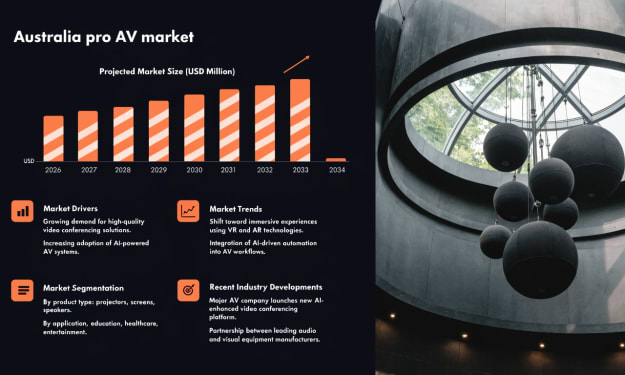
According to IMARC Group, the Australia pro AV market reached a value of USD 93.9 Million in 2025 and is projected to reach USD 133.6 Million by 2034, growing at a compound annual growth rate (CAGR) of 3.88% during 2026–2034. The market is expanding as organizations increasingly adopt advanced audiovisual solutions to support communication, collaboration and digital engagement. Hybrid work environments are encouraging businesses to invest in video conferencing systems, smart displays and integrated collaboration platforms that connect remote and in-office teams. At the same time, industries such as retail, hospitality and tourism are investing in digital signage to improve customer engagement and brand communication. As companies focus on creating interactive and technology-driven environments, professional AV solutions are becoming essential tools for modern workplaces, entertainment venues and commercial spaces across Australia.
By Kevin Cooper3 days ago in Futurism
Agentic AI in Energy Market to Exceed USD 10,700 Million By 2034
Agentic AI in Energy Market Overview The global Agentic AI in Energy Market is projected to reach approximately USD 10,700 Million by 2034, rising from nearly USD 480 Million in 2024. This expansion reflects a strong CAGR of 36.40% during the forecast period from 2025 to 2034. Market growth is being driven by the increasing use of autonomous artificial intelligence systems to manage complex energy operations, including power generation optimization, grid management, predictive maintenance, and energy demand forecasting. Energy companies are integrating agentic AI technologies to automate decision making processes and improve the efficiency of energy infrastructure.
By Roberto Crum3 days ago in Futurism



Comments
There are no comments for this story
Be the first to respond and start the conversation.