
What Is a Desktop Wristband Loading Cartridge and How Does It Work?
A Simple Guide to This Time-Saving Tool for Efficient Wristband Printing in Healthcare, Events, and More

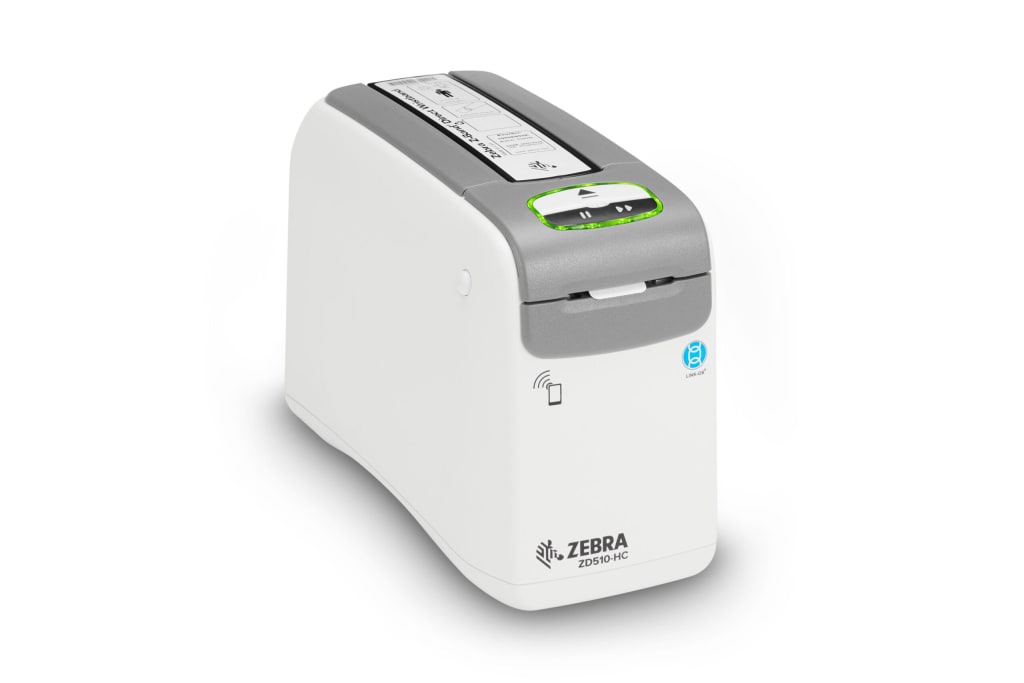
If you're in the healthcare, event management, or hospitality industry, chances are you've worked with wristbands for identification and access control. But if you're looking for a way to streamline the wristband printing process, a desktop wristband loading cartridge could be your new best friend. In this article, we'll break down what it is, how it works, and why it’s a must-have for high-efficiency operations.
What Is a Desktop Wristband Loading Cartridge?
A desktop wristband loading cartridge is a specially designed, easy-to-load cartridge that holds and feeds wristbands into a compatible desktop wristband printer. It simplifies the process of printing wristbands by allowing users to quickly swap out cartridges when one is empty—saving time and reducing errors.
These cartridges are typically used with thermal wristband printers from leading manufacturers like Zebra, Epson, and Brother. They are ideal for industries where speed, efficiency, and hygiene are critical—such as hospitals, concerts, festivals, and amusement parks.
How Does It Work?
Using a desktop wristband loading cartridge is incredibly straightforward. Here’s how it works:
1. Load the Cartridge
The cartridge comes pre-loaded or can be manually loaded with a roll of wristbands. These wristbands are usually thermal-sensitive, allowing them to be printed without the need for ink or toner.
2. Insert Into the Printer
Once loaded, the cartridge is inserted into a compatible desktop wristband printer. The printer recognizes the cartridge and aligns the wristbands for optimal print quality.
3. Print On-Demand
With the cartridge in place, users can print wristbands on demand—whether it’s patient ID bands in a hospital or access bands for a large event. The cartridge ensures smooth feeding and precise printing every time.
4. Quick Replacement
When the wristbands run out, simply remove the old cartridge and insert a new one. No threading, no fuss—just pop and go.
Benefits of Using a Wristband Loading Cartridge
Using a desktop wristband cartridge isn’t just about convenience. Here are the key benefits:
✅ Time-Saving
No more fiddling with rolls or manual feeds—cartridges speed up the setup and reload process significantly.
✅ User-Friendly
Minimal training is required. Most cartridges are designed for quick, intuitive loading.
✅ Reduces Downtime
With fast swap-outs, your wristband printing operation stays efficient and avoids bottlenecks.
✅ Consistent Print Quality
Cartridges maintain proper alignment and feed rate, which helps prevent misprints and jams.
✅ Hygienic and Safe
Especially in healthcare settings, sealed cartridges help maintain hygiene standards.
Common Applications
Healthcare: Patient identification wristbands.
Event Management: Access control for concerts, festivals, and sports.
Amusement Parks: Ride and meal access wristbands.
Hospitality: All-inclusive resort wristbands or hotel guest access.
Types of Wristband Cartridges and Printer Compatibility
Desktop wristband loading cartridges come in various sizes, materials, and colors to suit different needs. The two most common types are:
Direct Thermal Wristband Cartridges: These require no ink or toner and use heat to produce text and barcodes. Ideal for short-term use such as hospital visits or daily event access.
Synthetic or Waterproof Wristbands: These cartridges are loaded with wristbands made of durable materials that can withstand water, sweat, and extended wear, perfect for outdoor events and amusement parks.
Printer Compatibility
It’s important to note that wristband cartridges are often proprietary and designed to work with specific printer models. For example:
Zebra ZD510-HC is a popular desktop wristband printer that exclusively uses Zebra’s Z-Band cartridges.
Epson ColorWorks and Brother wristband printers may use different loading systems or materials.
Always check the printer’s specifications and approved cartridge models before purchasing replacements.
Tips for Efficient Wristband Cartridge Use
To get the most out of your wristband loading cartridges, keep these best practices in mind:
Store cartridges in a cool, dry place to prevent damage to thermal materials.
Keep extra cartridges on hand to avoid delays during high-volume printing periods.
Clean the printer regularly to maintain print quality and prevent residue buildup from wristband materials.
Use only manufacturer-approved cartridges to ensure compatibility and avoid voiding warranties.
By following these tips and choosing the right cartridge for your application, you can optimize wristband printing for reliability, speed, and performance.
Why Cartridge-Based Printing Is the Future of Wristband Management
As industries continue to prioritize speed, safety, and user convenience, cartridge-based wristband printing is quickly becoming the standard. Unlike traditional wristband rolls that require manual feeding and frequent adjustments, cartridge systems offer a cleaner, more efficient approach. They minimize human error, reduce the risk of printer jams, and improve staff productivity—especially in fast-paced environments like hospitals or large-scale events. With growing demand for contactless solutions and quick turnaround times, businesses are turning to cartridge-based wristband printers not just as a luxury, but as a necessity. Investing in this technology not only streamlines operations but also enhances the overall experience for staff and customers alike.
Final Thoughts
A desktop wristband loading cartridge is a simple but powerful tool that improves efficiency, accuracy, and ease-of-use in wristband printing applications. Whether you're managing thousands of patients or running a multi-day festival, the right cartridge-based system can transform your wristband printing workflow.
Looking to upgrade your current system or find compatible cartridges for your wristband printer? Make sure to check manufacturer guidelines and choose high-quality, brand-approved cartridges for best results.
About the Creator
Almoe Qatar
ALMOE Qatar is the region's top choice for all things Audio Visual and IT, offering an unparalleled range of products and solutions. With over 20 years in AV and IT, we are proud to be the trusted partner for businesses in Qatar.
Keep reading
More stories from Almoe Qatar and writers in Futurism and other communities.
Tech Behind the Glow: The Science of Integrated LEDs
LEDs are everywhere—from the lights in our homes to massive digital billboards in the heart of cities. But what really makes these tiny light sources so powerful, efficient, and transformative? Especially when we talk about integrated LED display, we’re diving into a smart combination of technology, design, and functionality.
By Almoe Qatar11 months ago in Futurism
Australia Off-Road Vehicles Market: Adventure Tourism, Electric Models & Rural Utility Demand
According to IMARC Group, the Australia off-road vehicles market reached a value of USD 490.28 Million in 2024 and is projected to reach USD 861.59 Million by 2033, growing at a compound annual growth rate (CAGR) of 5.80% during 2025–2033. The market is experiencing steady growth as recreational, agricultural and commercial users increasingly adopt off-road vehicles for both adventure and practical applications. The expansion of adventure tourism across Australia’s remote landscapes is driving demand for rugged 4WD vehicles, all-terrain vehicles (ATVs) and utility task vehicles (UTVs) capable of navigating challenging terrain. At the same time, rising adoption of electric off-road vehicles supported by environmental regulations and battery technology advancements is transforming the industry. Additionally, growing demand from agriculture, mining and rural operations is strengthening the market as these sectors rely on off-road vehicles for transportation, equipment handling and operational efficiency.
By Shrestha Roy2 days ago in Futurism




Comments
There are no comments for this story
Be the first to respond and start the conversation.