
8 Design Breakthroughs Shaping The Future of AI in 2025
How Key Interface Decisions Are Shaping the Next Era of Human-Computer Interaction

Hello, fellow designers! Interface designers are navigating uncharted territory. For the first time in over a decade, we’re witnessing a truly greenfield space in user experience design.
There’s no established playbook, no familiar patterns to rely on. Even the frontier AI labs are in a phase of experimentation, observing what resonates as they introduce novel ways to interact.
This moment echoes the dawn of touch-based mobile interfaces when designers actively created interaction patterns that have since become second nature.
Just as those early iOS and Android design choices defined an era of mobile computing, today’s breakthroughs are shaping how we’ll collaborate with AI for years.
The Wildwest
The speed at which these design choices ripple across the ecosystem is fascinating. When something works, competitors don’t just imitate it out of convenience — they adopt it because we’re all collectively discovering what makes sense in this new paradigm.
In this wild-west moment, dominant patterns are emerging. Below are the breakthroughs that have captured my imagination the most — the design choices shaping our collective understanding of AI interaction.
Some of these may seem obvious now, but each represents a crucial moment of discovery — a successful experiment in helping us better understand how humans and AI can work together.
By studying these influential patterns, we can move beyond simply replicating what works and instead begin shaping where AI interfaces go next.
The Breakthroughs
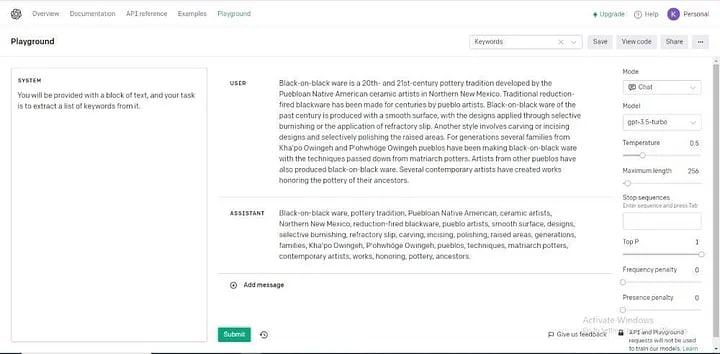
1. The Conversational Paradigm (ChatGPT)
Key Insight: Humans already know how to express complex ideas through conversation — why make them learn something else?
Impact: Established conversation as the fundamental paradigm for human-AI interaction.
The chat interface has become so ubiquitous that we hardly notice it, but its introduction was a defining moment. Before ChatGPT, OpenAI’s models were available in a developer console, but that interface failed to resonate widely. It felt like just another dev tool. While impressive, it didn’t capture the imagination of a broader audience.
The decision to shift this underlying technology into a conversational format made all the difference. OpenAI itself may not have fully anticipated its significance — they named it ChatGPT, hardly the brand name you’d choose if you thought you were launching a revolutionary consumer product. Yet, it became the single most important design choice of this AI generation. Since then, the chat interface has been widely adopted, influencing virtually every consumer AI tool that followed.
I once believed that the chat interface would eventually fade, but I no longer think so. Generative AI is fundamentally built around natural language, and conversation remains the most natural mechanic for sharing ideas. Clunky chatbots will evolve, but conversation as a foundational paradigm is here to stay.
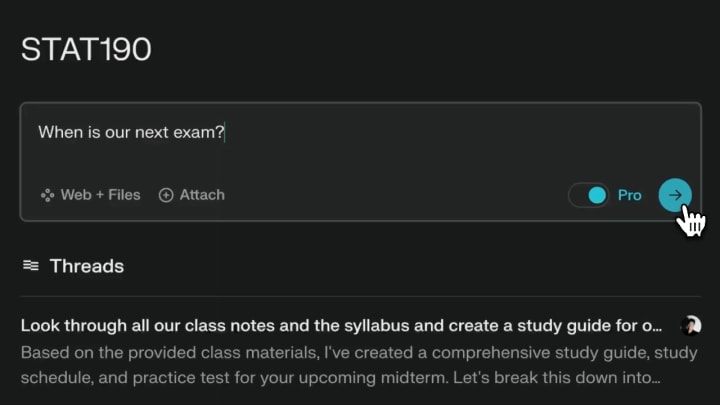
2. Source Transparency (Perplexity)
Key Insight: Without sources, users struggle to validate AI-generated responses for research.
Impact: Set new expectations for verifiable AI outputs in search and research tools.
Once people began using ChatGPT frequently, a common frustration emerged — there was no way to verify where its responses came from. While the model generated information from its vast training data, users had no visibility into its sources, making it difficult to trust legitimate research.
Perplexity changed the game by introducing real-time citations, allowing users to trace AI-generated answers back to their origins. This simple but crucial addition set a new standard, prompting OpenAI and others to integrate similar citation features. The breakthrough addressed a fundamental trust issue: users don’t just want answers — they want confidence in those answers.
This advancement was essential in positioning AI as a viable search tool, but its implications extend further. Large language models (LLMs) are not just search enhancers; they open the door to entirely new research and creative workflows.
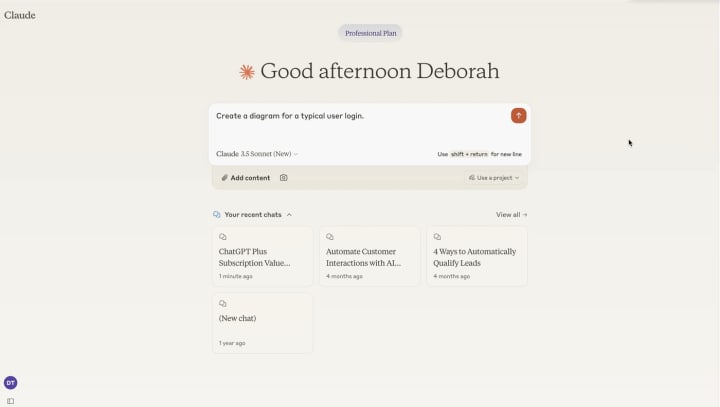
3. Creative Integration (Claude Artifacts)
Key Insight: AI-generated conversation can go beyond text — it can drive the creation of structured, reusable assets.
Impact: Enabled new creative workflows where dialogue produces tangible outputs.
The first time I used Artifacts, I felt like I was actively creating something with AI rather than just exchanging ideas. My previous chats with ChatGPT and Claude had been useful for brainstorming, and Perplexity had helped with research, but Artifacts gave me a true ‘a-ha’ moment. I realized I could start a creative workflow with a conversation, extract valuable insights, and transform them into tangible outputs ready for export and reuse.
We still have a long way to go in refining workflows after asset creation, but this breakthrough proved that AI collaboration will be central to the creative process. Instead of AI merely acting as an ‘assistant’ or ‘copilot,’ the dialogue itself becomes the driving force behind creative output.
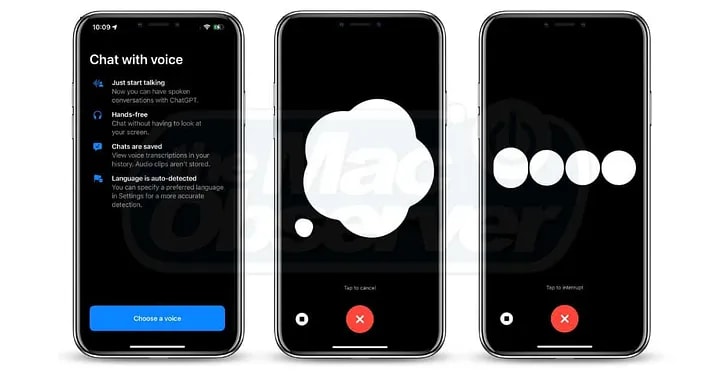
4. Natural Interaction (Voice Input)
Key Insight: Speaking allows for richer, more natural expression compared to typing.
Impact: Reduced friction in providing detailed context and exploring ideas with AI.
Voice input remains an underrated but powerful tool for AI interaction. Skepticism persists, largely due to a generation of unreliable voice assistants (looking at you, Siri). However, today’s AI-powered transcription is remarkably accurate.
Speaking out loud enables a more fluid and improvisational creative process. Typing naturally introduces self-editing, while spoken language captures ideas in their raw, unfiltered form. This richer input provides AI models with better context, improving the quality of responses.
What you’re left with is a much more natural creative ideation flow that gets captured and interpreted quickly and thoroughly by the AI. I’m very bullish on dictation as a central creative skill for the next generation. Start practicing it today because it does take some time to get used to if you’re new to it like I was.
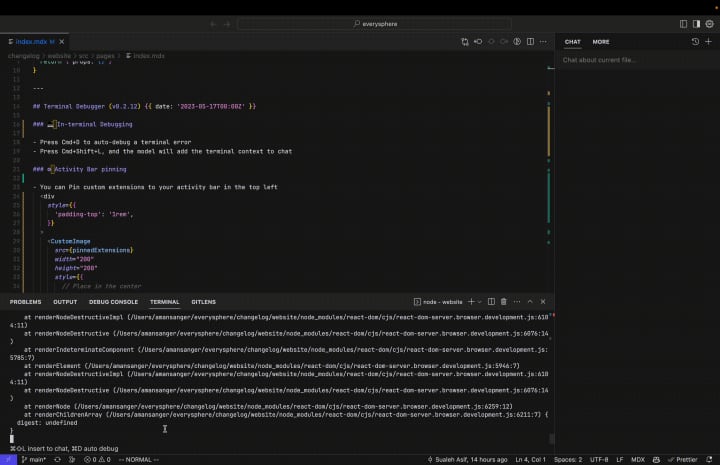
5. Workflow Integration (Cursor IDE)
Key Insight: Embedding AI within existing workflows enhances productivity.
Impact: Transformed code editors into AI-powered creative environments.
Cursor brought the AI-led creative workflow I first experienced with Claude artifacts directly into my existing codebases. Some features felt like obvious enhancements — ‘of course, an IDE should do this’ moments, like its powerful tab-to-complete functionality.
As a former professional UI developer, I hadn’t written code regularly in years. Getting back into it was always challenging due to unfamiliar syntax or framework changes. Cursor helped sidestep these blockers. For instance, opening an existing codebase can be overwhelming when you don’t know what’s available or where to find things. With Cursor, I can ask detailed questions about the code and get immediate, relevant answers.
Another major advantage is AI’s direct interaction with the file system. While working with Claude is great, it always requires an extra step to transfer outputs. Cursor eliminates this friction — its AI-generated suggestions are immediately available in their final destination, tightening the workflow considerably.

6. Ambient Assistance (Grok Button on X)
Key Insight: Users need AI help at the exact moment they encounter something they don’t understand.
Impact: Made contextual AI assistance instantly accessible alongside content.
The Grok button’s usefulness surprised me. With the constant flood of content on X, I often feel like I lack the right context to fully grasp certain posts. Grok’s direct integration at the content level provides instant, one-click contextualization, making real-time interpretation seamless. Whether it’s a meme, an article headline, or a cryptic post, the AI assistant helps decode what I’m seeing.
This kind of assistance will only grow in importance as online content becomes more ambiguous — AI-generated, biased, or deliberately misleading. Who published this? What’s their intent? How are they trying to influence me? These questions will become crucial.
While the Grok button’s execution on X still has rough edges, I quickly found myself wishing for a similar ‘give me more context’ functionality across the web. Eventually, OS-level assistants (like Gemini and Siri) may integrate this capability, but Grok is already proving how valuable ambient AI assistance can be when embedded effectively.
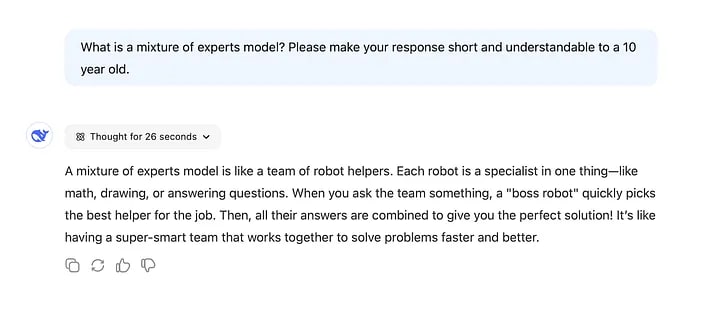
7. Process Transparency (Deepseek)
Key Insight: Showing how AI reaches conclusions builds user confidence and understanding.
Impact: Humanized AI responses by making machine reasoning visible and relatable.
Deepseek, which recently gained attention for its R1 reasoning model, made a critical design choice that changed the user experience — it exposed the model’s thought process. While it wasn’t the first reasoning model on the market, its decision to display AI “thinking” resonated with users.
This transparency builds trust. Users can assess whether the AI’s logic makes sense, and in some cases, the intermediate steps reveal valuable insights worth exploring further. It reminds me of the role progress bars played in early web apps — instant responses can feel jarring, while slow, opaque processes create uncertainty. Progress bars reassured users that the system was working. Similarly, exposing AI reasoning reassures users that the model is actively “thinking.”
Going forward, I don’t expect AI models to always display their reasoning by default, but making it accessible when needed will be essential for user confidence and engagement.
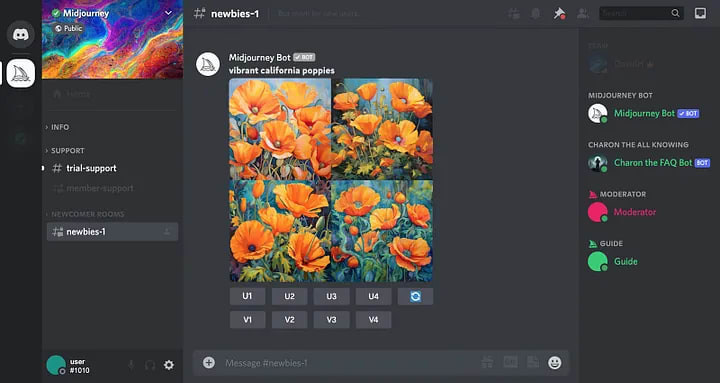
8. Interface Deferral (Midjourney)
Key Insight: Prioritizing core technology over a polished interface leads to better product decisions.
Impact: Demonstrated how focusing on capability first enables smarter interface choices.
Midjourney stands out because, unlike most design-focused AI tools, it initially avoided building a custom UI. Instead, it operated within Discord, a strategic choice that allowed the company to concentrate on perfecting its AI model rather than investing in interface development too soon.
Despite being a tool for visual creators, Midjourney’s real product is the AI that generates the images — not the interface itself. If the model weren’t exceptional, a web UI wouldn’t have mattered. By delaying a custom interface, the team controlled demand, filtering out casual users who weren’t willing to engage on Discord. This also fostered a highly engaged community that provided valuable feedback, shaping product improvements organically.
So, depending on the kind of AI you’re creating, Midjourney serves as a reminder that choosing not to build a custom UI can be a strategic design choice.
Final Thoughts
These eight breakthroughs aren’t just clever UI decisions — they’re the first chapters in a new story about how humans and machines work together. Each represents a moment when someone dared to experiment, try something unproven, and find a pattern that resonated.
From ChatGPT making AI feel conversational to Deepseek showing us how machines think — we’re witnessing the rapid evolution of a new creative medium. Even Midjourney’s decision to avoid a custom UI reminds us that everything we thought we knew about software design is up for reinterpretation.
The pace of innovation isn’t slowing down. If anything, it’s accelerating. But that’s what makes this moment so exciting: we’re not just observers, we’re participants. Every designer, developer, and creator working with AI today has the chance to contribute to this emerging language of human-AI interaction.
The initial building blocks are on the table. The question isn’t just “What will you build with them?” but “What new patterns will you discover?”
Happy designing!
About the Creator
Gading Widyatamaka
Jakarta-based graphic designer with over 5 years of freelance work on Upwork and Fiverr. Managing 100s logo design, branding, and web-dev projects.
Keep reading
More stories from Gading Widyatamaka and writers in Futurism and other communities.
Did DeepSeek Steal from OpenAI?
The recent battle between OpenAI and DeepSeek has reignited conversations about intellectual property, open-source ethics, and AI development. OpenAI, the dominant force in the generative AI space, has accused DeepSeek, a rising Chinese AI lab, of stealing their proprietary work. But in the ever-evolving AI landscape, defining what constitutes theft is complicated. While OpenAI is justified in its claims, the reality is far from black and white.
By Gading Widyatamaka11 months ago in Futurism
About Binding Prometheus
I want to start actively advocating on behalf of my own work, and the most valuable part of my canon is, without a doubt, Binding Prometheus, the play I have been working on since 2019 and only finished in 2023 as part of my MA. The play itself is an amalgamation of a million different inspirations. On one end, it evokes the Ancient Greek myth-play, deriving its own title from the earliest extant work of Western drama we have, Aeschylus’s Prometheus Bound. On the other end, it borrows significantly from the sci-fi bulwarks from over the years, namely Mary Shelley’s Frankenstein and Karel Capek’s Rossum’s Universal Robots. The play could be an episode of Black Mirror, I fear. I don’t know. I’ve only ever seen one episode of Black Mirror.
By Steven Christopher McKnight16 days ago in Futurism
Massage Equipment Market: Ergonomic Innovation, Wellness Demand & Market Momentum
According to IMARC Group's latest research publication, The global massage equipment market size reached USD 8.1 Billion in 2024. Looking forward, IMARC Group expects the market to reach USD 16.3 Billion by 2033, exhibiting a growth rate (CAGR) of 8.08% during 2025-2033.
By James Whitman5 days ago in Futurism


Comments
There are no comments for this story
Be the first to respond and start the conversation.