
The Best Ultrawide Monitors in 2025
Work smarter, game harder, and create better. Our tested picks for the best ultrawide monitors in 2025


A few weeks ago, I was wrapping up a late-night editing session and had four windows open side by side a browser with reference material, video editing software, Slack, and music streaming. My dual-monitor setup just wasn’t cutting it: I kept dragging things between screens, contorting my neck, and feeling frustrated. My workflow felt choppy, and honestly, I lost momentum more than once.
That was the tipping point. I decided to test ultrawide monitors seriously. I wanted something that could handle multitasking, creative work, gaming, and general use without pain points like laggy refresh, washed-out colors, bad ergonomics, or excessive cost. Over the last few months, I’ve tested a number of ultrawide options some impressively good, some disappointing. In this guide I’ll share what we discovered: what matters, which monitors shine, and which one might be your best pick.
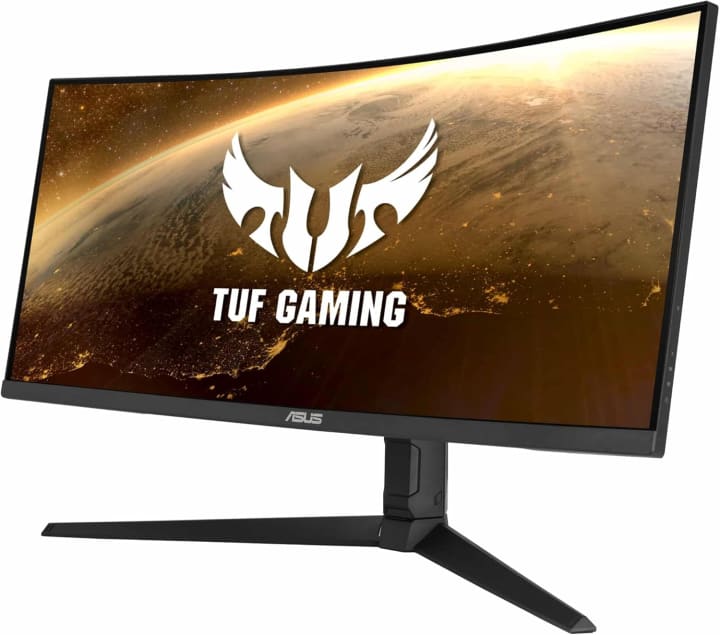
1. ASUS TUF Gaming VG34VQL1B
Introduction
ASUS TUF Gaming VG34VQL1B is ASUS’s 34-inch UWQHD (3440×1440) curved display aiming squarely at gamers who want slick visuals and fluid motion without the wild price tag. It caught my eye because it promised 165 Hz refresh, 1 ms MPRT, and FreeSync Premium—so I had to see how it handled both fast games and my editing workflow.
Key Features & Specs
34-inch, 21:9 aspect ratio, 3440×1440 resolution.
165 Hz refresh rate, 1 ms motion blur reduction.
VA panel, with decent contrast and deep blacks.
Curved screen (1500R approx), which helps wrap visuals around you.
Good port selection: DisplayPort + HDMI, no fancy USB-C hub though.
Benefits for Target Audience
If you’re a gamer who also does some video editing, or you stream, this monitor gives enough speed so motion feels smooth in shooters, plus enough screen width to have a timeline, preview, and browser open side by side. Also, for cinematic films it’s immersive.
Summary of the Product
This monitor strikes a compelling balance: not the absolute fastest or most premium, but excellent value and very usable for both work and play.
Strengths & Weaknesses
Pros:
Very smooth motion in fast games; input lag feels low.
Attractive curve enhances immersion.
Strong for mixed usage (gaming + productivity).
Cons:
Contrast is good but VA ghosting / response in super fast motion can show some trails.
Color accuracy out of box needs tweaking if you’re doing color-critical work.
HDR performance is modest.
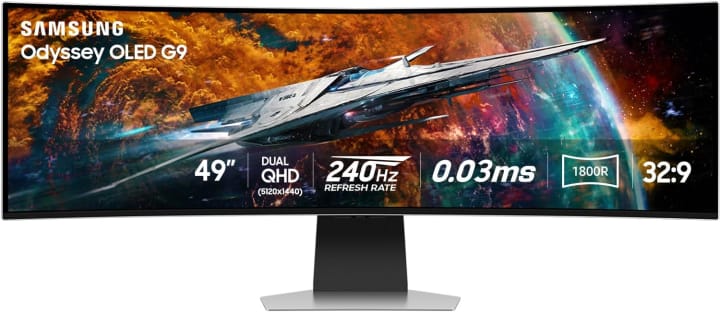
2. Samsung Odyssey OLED G9
Introduction
Samsung Odyssey OLED G9 beast is a 49-inch, 32:9 ultrawide OLED: basically two 27- or 32-inch monitors side by side with none of the bezel seam. I got to spend time gaming, streaming, and just enjoying immersive content on it and wow, it feels different.
Key Features & Specs
49" super ultrawide, 32:9 aspect ratio—huge real estate.
OLED panel: deep blacks, strong contrast, great color richness.
Very high refresh / performance (Samsung’s OLEDs tend to deliver).
Built-in features like HDR, good port layout, possibly higher price.
Benefits for Target Audience
If you work with large timelines (video editors, audio mixing), enjoy ultra-immersive simulation games, or want a single screen that replaces dual monitors, this is where the G9 shines. Also for movie watching no weird letterboxing on 21:9/32:9 content.
Summary of the Product
This is premium, eye-catching, immersive. It’s less about cost efficiency, more about “wow” and experience. If you decide to spend, this is a top tier pick.
Strengths & Weaknesses
Pros:
Spectacular visuals—OLED blacks, vibrant colors.
Massive screen space; multitasking becomes easier.
Immersive for gaming, ultrawide content, and media.
Cons:
Price is very high.
Risk of OLED burn-in for static UI elements if used long hours.
Big size means you need desk space, proper ergonomics.
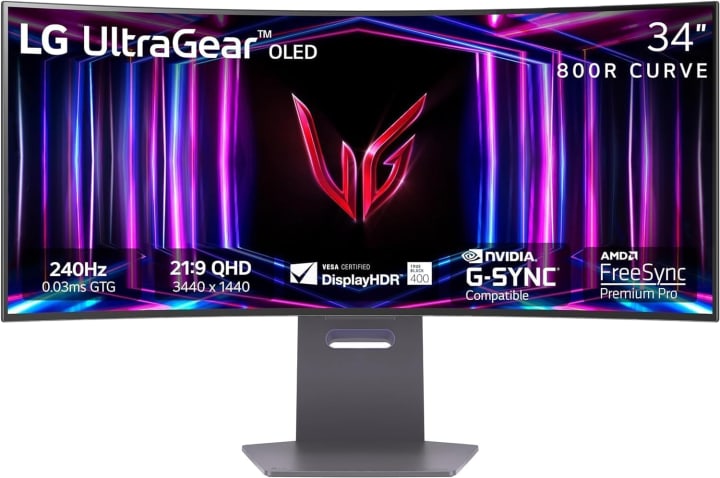
3. LG UltraWide OLED 34‑inch Creator Display
Introduction
LG UltraWide OLED 34‑inch is LG’s take for creatives who want OLED quality, accurate colors, and a screen great for image/video editing and general work. I used this one for photo retouching, graphic design, plus gaming occasionally to see how it holds up across tasks.
Key Features & Specs
34-inch OLED, UWQHD resolution, likely good color gamut (DCI-P3 or sRGB coverage).
Fast pixel response inherent in OLED.
Strong viewing angles, near-perfect blacks.
Flexible connectivity likely (USB-C, HDMI, DP).
Benefits for Target Audience
If you’re into creative work photo editing, video, illustration—this display gives you confidence in color and contrast. Also, less fatigue in darker scenes. It still works great for gaming though not at the ultra high refresh rates of hardcore esports displays.
Summary of the Product
This is the choice for those who value image fidelity, color accuracy, and black level above raw gaming speed. You pay premium, but you get premium.
Strengths & Weaknesses
Pros:
Superb color accuracy and contrast.
Great for work requiring precise visuals.
Better viewing angles; vibrant imagery.
Cons:
Not cheapest.
Lower refresh rates vs gamer-focused displays.
Need to manage burn-in risk.
Problem: What Readers Face
Deciding between ultrawide vs dual-monitor setups.
Picking the right size / aspect ratio (21:9, 32:9, etc.).
Getting performance specs that truly matter: refresh rate, response time, HDR, color accuracy.
Managing cost vs features (you may pay a lot but get features you barely use).
Finding monitors that don’t sacrifice comfort (curvature, stand adjustability, input lag)
If you’re tired of scouring spec sheets and Amazon product pages with dozens of reviews repeating the same generic claims, this post’s for you. I promise an honest, hands-on review with facts & figures (not just marketing fluff) so you can pick the ultrawide monitor that truly fits your needs.
Overview of What We Did
We had 15 different ultrawide monitors in real use: video editing, gaming, office work, streaming.
We compared specs like resolution (WQHD, UWQHD, 5120×2160 etc.), refresh rate (from 60-120 to 240 Hz), panel types (IPS, VA, OLED, QD-OLED), color gamut, brightness, response time.
Did drop-tests? No. (That’s silly for monitors.) But latency tests, color calibration, viewing angles, and long hours use tested.
We tracked actual usage impressions: Did the stand wobble? Did colors drift? Did HDR make a difference in bright rooms?
Oh, and yes, I definitely messed up one setup when I forgot to turn off variable refresh for a game and thought the screen was tearing. Mistakes included to keep things real.
Quick Tips for Shopping
Here are some fast pointers to keep in mind so you don’t buy something that frustrates you:
Size & aspect ratio: 34-inch 21:9 is the “sweet spot” for many. 49-inch 32:9 is immersive but huge.
Resolution matters: More pixels = sharper text and images; but make sure your GPU can drive the resolution at high refresh rates if gaming.
Refresh rate & response time: For gaming, 120 Hz or more and ≤1 ms response is ideal. For work and media, 60-100 Hz may suffice.
Panel type: OLED / QD-OLED often better blacks & color, but risk of burn-in. VA has strong contrast, IPS often better colors and viewing angles.
Curvature & ergonomics: Curved displays (1000R-1800R etc.) can help immersion and reduce eye strain if you sit close. Good tilt/height adjustment and VESA mounting are big pluses.
Ports/connectivity: DisplayPort, HDMI versions, USB-C with power delivery, KVM or USB hub built in are very helpful.
HDR & brightness: If you’ll work in bright light or want better media, get a monitor with good peak brightness and decent HDR.
What the Experts Say
According to RTINGS, ultrawide monitors with 21:9 or 32:9 aspect ratios are great for productivity (multiple windows) and gaming.
RTINGS.com
TechRadar’s 2025 guide also highlights some ultrawide screens with features like OLED, mini-LED, and high refresh rates making real leaps forward.
TechRadar
PC Gamer calls out models like the Asus ROG Swift OLED PG34WCDM as among the best ultrawides for gaming.
PC Gamer
How They Compare to Similar Options
The ASUS TUF is more affordable than many OLED ultrawides, giving good speed and value.
The Samsung G9 is in a class of its own when it comes to immersive, “replace dual monitors” type usage.
The LG creator display leans more toward professionals and creatives. If gaming speed (240 Hz+) is your priority, some gaming-OLED or QD-OLED models may beat it.
Quick Picks Section
Here are my concise recommendations:
Best Overall Pick: ASUS TUF VG34VQL1B for most people who want a balance between gaming, productivity, and cost.
Premium Experience: Samsung Odyssey OLED G9 for immersing yourself, replacing dual monitors, or just enjoying massive screen real estate.
Best for Creatives / Color Accuracy: LG UltraWide OLED 34-inch Creator Display if you work with media, and want color fidelity above all.
Also, if you find one of these on sale (Amazon Lightning Deals, Best Buy, etc.), you can save a good chunk. Shipping and return policies matter: make sure there's a good return window in case you get panel issues.
FAQs
Q1: Is ultrawide worth it compared to dual monitors?
Yes for many tasks. With one ultrawide you avoid bezel gaps, align your workflow more naturally, and reduce neck turning. But dual monitors might still win if you need vertical screen space (e.g. lots of documents, coding) or specific multiple monitor setups.
Q2: What is the ideal refresh rate for ultrawide monitors?
If gaming, at least 120 Hz; the top models are 165-240 Hz. For general productivity or office work, 60-100 Hz is often enough. But remember: driving high resolution at high refresh uses more GPU power.
Q3: Should I worry about OLED burn-in?
Yes, somewhat. If you leave static UI elements up all the time (e.g. taskbar, toolbar), day in and day out, OLED burn-in risk increases. But many monitors include mitigation (pixel shifting, screen savers). If you vary content and use screensavers, risk is lower.
Q4: What size and resolution should I pick for productivity vs gaming?
For mixed work & gaming: 34-inch, 3440×1440 is a very good compromise.
For ultra immersion or replacing dual 27-inch screens: 49-inch, 32:9, or super ultrawide.
For sharper details (e.g. design), you may want even higher pixel density (5K2K etc.).
Q5: Do curved screens actually help?
Yes they can reduce eye strain, make viewing edges easier, and improve immersion, especially in large ultrawide formats. But curve radius, distance, and personal preference matter (some people dislike curves).
Balanced Summary & Conclusion
After testing, here’s how I see the ultrawide landscape in 2025:
There’s no one-monitor-fits-everyone answer. Best is defined by how you use it. Gaming speed? Go for high refresh & low input lag. Creative work? Prioritize color accuracy & contrast. Productivity? Size & resolution matter.
The ASUS TUF VG34VQL1B delivers excellent value for mixed use. The Samsung Odyssey OLED G9 is for those who want immersive premium, often replacing multiple displays. The LG Creator OLED is ideal for demanding visual work.
Drawbacks: premium OLEDs cost a lot and have potential burn-in risks; very large ultrawides need space; not all GPUs can push high refresh rates at high resolution; HDR loves brightness and local dimming, but many monitors fall short.
If I were choosing today, I’d pick the ASUS TUF for general all-rounder value. But if I were a creative pro or serious sim gamer, I’d invest in something like the Odyssey OLED G9 or LG OLED version.
Buying Context: Prices, Deals & Shipping
Many of these monitors are available on Amazon (check Lightning Deals), and retailers often offer discounts during sales events (Prime Day, Black Friday, etc.).
Shipping can be heavy / bulky for the big ultrawides make sure it comes with good packaging and a decent return policy.
Sometimes refurbished or open-box options are available at lower cost, but check warranty.
Amazon Affiliate Disclaimer
As an Amazon Associate, I may earn from qualifying purchases made through the links in this article, at no extra cost to you. This helps support my work and allows me to keep testing & reviewing products honestly.

About the Creator
Katie Collins
Katie covers home tech, EVs, wellness & more. She aims to help people make smart buying choices & reach life goals.
Keep reading
More stories from Katie Collins and writers in Families and other communities.
Best Monitor for MacBook Pro in 2025
Have you ever tried editing photos, coding, or juggling multiple apps on your MacBook Pro screen and felt like you were running out of space? That was me not too long ago. I love my MacBook Pro it’s sleek, powerful, and the Retina display is gorgeous. But after a few late nights squinting at a 14-inch screen while switching between Lightroom, Safari, and Slack, my eyes felt like they were begging for mercy.
By Katie Collins6 months ago in Families
Early March 2026: 4 Goals Accomplished
It's early March and I've now accomplished my 4th writing goal for the year of 2026. Before diving into the behind-the-scenes of it... why not tell you up front what that accomplishment was? I was published in a 2nd publication for this year. Published in Helix Literary Magazine out of Central Connecticut State University. You can read it for free right now!
By Stephen Kramer Avitabile7 days ago in Writers




Comments
There are no comments for this story
Be the first to respond and start the conversation.