
Windows 11 KB5058411 Update Released with Powerful AI Features & Security Fixes
Microsoft’s latest KB5058411 update for Windows 11 version 24H2 introduces groundbreaking AI tools like Recall and Click to Do, alongside key security improvements.

In a significant move to enhance user experience and bolster system security, Microsoft has rolled out the Windows 11 KB5058411 update for version 24H2. This update, part of the May 2025 Patch Tuesday release, introduces a suite of AI-powered features alongside critical security patches, marking a pivotal step in the evolution of the Windows operating system.
AI Integration: A Leap Towards Intelligent Computing
The KB5058411 update brings forth several AI-driven functionalities designed to streamline user interactions and improve productivity. Among the most notable additions are:
- Recall: This feature allows users to revisit previously accessed content by capturing snapshots of their screen activity. By leveraging AI, Recall enables users to search for past interactions using natural language queries, effectively creating a searchable timeline of their digital activities. Importantly, this feature is opt-in and requires biometric authentication via Windows Hello, ensuring user privacy and security.
- Click to Do: Enhancing user engagement, Click to Do identifies actionable items on the screen, allowing users to execute tasks directly from the interface. Whether it's scheduling a meeting from an email or setting a reminder from a chat, this feature simplifies multitasking and boosts efficiency.
- Enhanced Search Capabilities: The update refines the Windows Search function by incorporating semantic indexing models. This advancement enables users to perform more intuitive searches across documents, photos, and settings using natural language, thereby reducing the time spent navigating through files and menus.
Security Enhancements: Fortifying the System
Beyond AI features, the KB5058411 update addresses a multitude of security vulnerabilities. Microsoft has patched 134 flaws, reinforcing the system's defenses against potential threats. These security improvements are crucial for maintaining the integrity of user data and ensuring the resilience of the Windows ecosystem against evolving cyber threats.
User Experience and Accessibility Improvements
- Settings Adjustments: Users can now manage which applications Windows recommends actions for, providing greater control over personalized suggestions and streamlining the user interface.
- Natural Language File Search: With the integration of AI, users can search for files in File Explorer using everyday language, making file retrieval more intuitive.
Installation and Availability
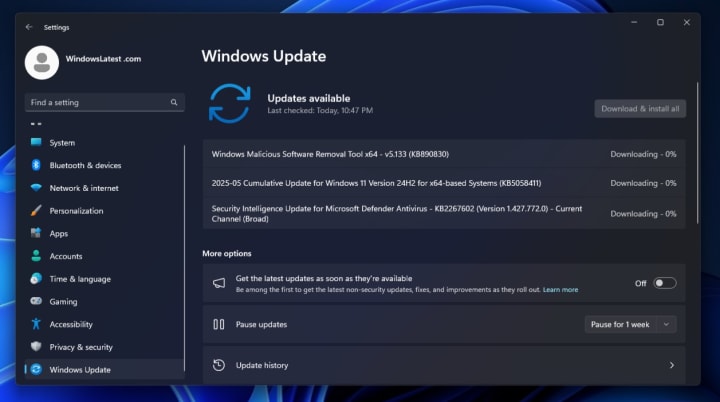
The KB5058411 update is mandatory and is being distributed through Windows Update. For users who prefer manual installation or encounter issues with automatic updates, Microsoft has provided direct download links for the .msu offline installers. It's worth noting that the update package is substantial, with sizes reaching up to 4.3GB on Intel and AMD systems, due to the inclusion of AI models and related components.
Looking Ahead: The Future of Windows 11
Microsoft's commitment to integrating AI into the Windows operating system signifies a strategic direction towards more intelligent and responsive computing environments. As these features become more deeply embedded into daily workflows, users can expect a more personalized and efficient computing experience.
However, the introduction of features like Recall has sparked discussions around privacy and data security. Microsoft has emphasized that such features are optional and have been designed with user privacy in mind, incorporating measures like local data storage and biometric authentication.
As Windows 11 continues to evolve, the balance between innovation and user trust will remain a focal point for Microsoft. The KB5058411 update represents a significant milestone in this journey, laying the groundwork for a more intelligent and secure operating system.
In addition to functional upgrades, the KB5058411 update also reflects Microsoft's broader strategy to align Windows 11 with its new "Copilot+ PC" initiative—devices specifically designed to harness the full power of AI on Windows. These AI-ready machines are expected to deliver optimized performance for features like Recall and natural language search, thanks to integrated neural processing units (NPUs). This hardware-software synergy is not just a marketing move; it represents a foundational shift in how Windows will operate in the AI era. For everyday users and professionals alike, this means that future updates won’t just bring fixes, but intelligent enhancements that adapt to workflows, anticipate needs, and ultimately redefine productivity.
About the Creator
Haroon Rashid
Haroon Rashid is a content writer that loves to write in-depth and high quality articles on Tech, News, Gaming, Sports, Mobiles and Startups. He has a experience of 2 years while he was contributed with Sumorb, News Break and Tech Bullion.
Keep reading
More stories from Haroon Rashid and writers in Education and other communities.
Is Mild Steel Practical for Combat Swords?
Sword making has excited warriors, collectors, and craftsmen for centuries. The most celebrated blades, especially Japanese swords, are works of metallurgical art, merging deadly function and breathtaking beauty. Forged through centuries of perfected methods, these weapons are more than tools of battle; they are cultural treasures demonstrating the height of traditional skill.
By Haroon Rashid6 months ago in Education
Language of Instruction at Vertex University From a Learning Challenge to an Academic and Professional Advantage
The mission of the contemporary university is no longer limited to delivering knowledge or fulfilling rigid academic requirements. Today, universities are expected to design learning experiences capable of producing real impact on students’ intellectual and professional trajectories—experiences in which learners clearly understand what they study, can apply it meaningfully, and see its direct relevance to their future careers.
By Vertex University P R E S Sabout 4 hours ago in Education
What Real Residents Reveal About Co-Living in New York City
Finding housing in New York City can be overwhelming, especially for students, interns, and professionals moving from different parts of the world. While listings and pricing matter, real-life experiences often give the clearest picture of what living in a shared space is actually like. Looking at resident reviews can help uncover what truly makes a co-living experience successful—or challenging.
By Ausfab Groupa day ago in Education
How, Too
Many people wonder how, too. You are not alone, and I am an expert. I will teach you how, too! First, you need to remit a small application fee and fill out an application describing the nature of your financial situation and how often payments will be made, as this will have great bearing on how well I teach you how, too.
By Harper Lewis3 days ago in Fiction




Comments
There are no comments for this story
Be the first to respond and start the conversation.