
Why Canonical Tags Make or Break Your SEO Content Quality
Failure to Properly Implement Canonical Tags can Spell Trouble for Your Website


Check this out: About 65% of mobile and 69% of desktop pages utilize rendered canonical tags according to the 2024 Website Almanac! This significant increase since 2022 highlights how canonical in SEO has become a critical component of modern website optimization. However, the percentage of mismatched canonical tags has also doubled during the same period, creating serious visibility problems for countless websites.
We've seen firsthand how proper canonicalization can transform search performance. In one remarkable case study, fixing canonical issues increased ranking keywords by an impressive 320%, with a 171% boost in top-10 positions. When search engines encounter multiple versions of similar content on different web pages, they struggle to determine which page to rank. This is where canonical tags prove invaluable since they consolidate link equity and help search engines identify your preferred version of a page. Without a doubt, mastering canonical tags is essential since Google reportedly evaluates approximately 40 distinct signals to determine the canonical version among duplicate pages.
In this comprehensive guide, I'll walk you through why canonical tags matter more than you might realize, show you real-world examples of canonical disasters, and provide practical solutions to prevent these issues from undermining your SEO efforts.
Why Canonical Tags Matter More Than You Think
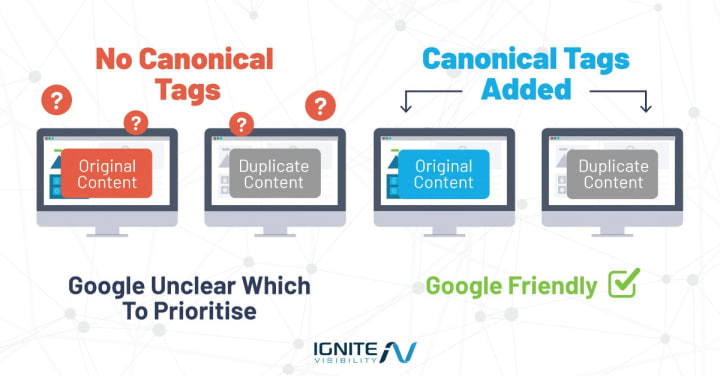
Image: Courtesy of Ignite.
Canonical tags might seem like a minor technical detail, but in reality, they're foundational to how search engines understand your content. Let's explore why these small HTML elements deserve major attention in your SEO strategy.
What Is A Canonical Tag In SEO?
A canonical tag is an HTML element that tells search engines which version of a webpage should be considered the original or "master" copy. The canonical tag is usually placed in the <head> section of your HTML and it looks like this: <link rel="canonical" href="https://www.example.com/page-name.html" />.
Essentially, canonical tags function as a citation system for your web pages. They signal to search engines, "This is the preferred version of this content that I want you to index and rank." This becomes especially crucial for websites with duplicate or very similar content across multiple URLs.
While many consider canonical tags optional, they're actually a critical component of technical SEO. Moreover, implementing self-referencing canonical tags (where a page points to itself as the canonical version) is considered a best practice even for unique pages.
How Canonical Tags Affect Content Quality And Rankings
The impact of canonical tags on your content quality and search rankings is substantial. First, they help consolidate link equity—the ranking power passed through links. Instead of having your backlinks spread across multiple similar pages, canonical tags direct all that ranking power to your preferred URL.
Furthermore, proper canonicalization improves crawl efficiency. Search engines have limited resources to crawl and index content. By using canonical tags, you help direct crawlers to focus on your main content versions, ensuring your crawl budget is used effectively.
The data speaks for itself: implementing correct canonical tags has been shown to significantly improve impressions, keyword rankings, and overall SEO traffic. In fact, proper canonical implementation can lead to:
- Increased number of ranked keywords
- Improved keyword positions in search results
- Higher organic traffic volumes
- Enhanced content authority and relevance signals
Additionally, canonical tags solve the duplicate content dilemma that plagues many websites. Although Google doesn't technically penalize for duplicate content, websites with well-structured canonicalization are more likely to improve their ranking potential.
The Rise Of Canonical Issues In Modern SEO Audits
Despite their importance, canonical issues are becoming increasingly common in technical SEO audits. Indeed, the percentage of mismatched canonical tags has doubled since 2022, indicating this problem is growing rather than diminishing.
Why is this happening? As websites become more complex, the opportunities for canonical confusion multiply. E-commerce sites with product variations, content management systems that generate multiple URLs for the same content, and sites with both mobile and desktop versions all face canonical challenges.
Consequently, Google increasingly finds itself choosing different canonical URLs than webmasters intended. This creates a significant problem known as "Duplicate, Google chose different canonical than user" in Search Console reports.
These canonical conflicts send mixed signals to search engines. Allan Scott from Google's Search team explained it perfectly: "When it comes to trying to figure out how to weight things, one of our biggest problems is we don't know what to do when a webmaster sends us conflicting signals. If your signals conflict with each other, the system will start falling back on lesser signals".
Given these challenges, regular canonical auditing is no longer optional, it's essential for maintaining and improving your site's visibility in search results.
1. Canonical Tags Gone Wrong: Real SEO Damage
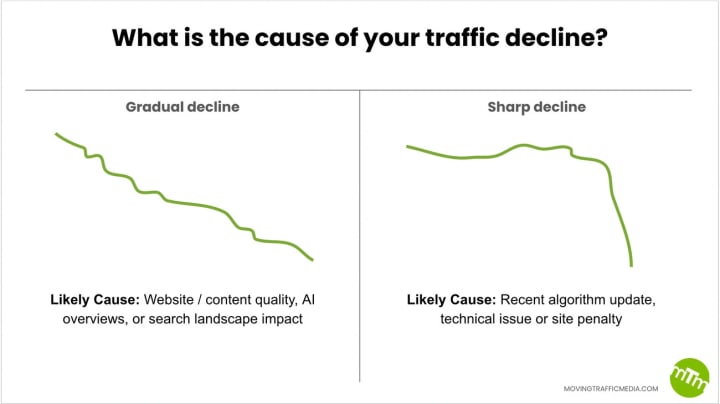
Image: Moving Traffic Media.
Website owners often underestimate how quietly canonical tag errors can devastate their SEO performance. Misconfigurations can lurk undetected for months, silently draining your site's visibility until the damage becomes painfully obvious. Let me walk you through a real-world canonical disaster and its consequences.
Case: Canonical Pointing To Outdated Domain
One of the most destructive canonical errors occurs when tags point to outdated or incorrect domains. This typically happens during site migrations or rebranding efforts when canonical references aren't properly updated. Consider this scenario: your company moves from oldsite.com to newsite.com, yet canonical tags on the new domain still reference URLs on the old domain.
This isn't merely a theoretical problem. As documented in several case studies, search engines frequently encounter pages where canonical tags point to:
- URLs that return 404 errors (non-existent pages)
- URLs on previous domains that no longer represent the current brand
- HTTP versions instead of HTTPS versions of pages
Google's developers clearly state that some content management systems or CMS plugins can make incorrect use of canonicalization techniques, pointing to undesired URLs. Checking your HTML with browser developer tools often reveals these hidden issues.
Impact: 320% Drop In Keyword Visibility
The consequences of canonical mishaps can be severe. When canonical tags direct search engines to the wrong URL, the results typically include:
- Dramatic ranking losses: Pages can suddenly disappear from search results as Google indexes the wrong version or none at all
- Traffic collapse: With rankings gone, organic traffic evaporates
- Wasted content investments: Your carefully crafted content becomes essentially invisible
Even experienced site owners can make these mistakes. A simple typo in a canonical URL or leaving canonicals unchanged after content moves can redirect ranking power away from intended pages.
Perhaps most concerning, canonical issues often manifest subtly. You might notice a decline in organic traffic to key pages or see ranking drops despite publishing fresh content. Once identified, the damage has typically already occurred.
Takeaway: Always Audit For Legacy Canonical Links
Given these risks, proactive canonical auditing is essential. Here are my recommended practices:
Firstly, regularly check canonical tags using Google Search Console's URL Inspection Tool. This shows which URL Google considers canonical for any given page. If the Google-selected canonical and user-declared canonical values don't match, Google is considering indexing another version of the same page.
Secondly, use specialized SEO tools like Screaming Frog or Sitebulb to crawl your site and identify canonical inconsistencies. These tools can quickly spot patterns of canonical errors across your site.
Thirdly, ensure canonical URLs use absolute paths rather than relative ones. Google recommends absolute paths to prevent subtle mistakes with relative paths. For instance, use <link rel="canonical" href="https://www.example.com/page/"> instead of <link rel="canonical" href="/page/">.
Occasionally, canonical issues stem from security compromises where malicious code inserts cross-domain canonical references. Regular security scans help prevent these attacks.
Remember: canonical tags are suggestions, not directives. They provide strong signals about your preferred pages, yet Google doesn't always follow them.
2. Paginated URLs and Canonical Conflicts
Pagination is often overlooked when implementing canonical tags, yet it represents one of the most common areas where SEO professionals make critical mistakes. For years, a persistent myth has circulated that all paginated pages should point their canonical tags to the first page of the series. Nevertheless, this approach can seriously damage your site's search performance.
Case: Blog Pagination Canonicalized to Root
Many content management systems, including WordPress, automatically set all pagination canonical tags to point back to the first page. This widespread default setting appears in numerous SEO plugins and is often implemented without question. The reasoning behind this practice seems logical at first glance – prevent duplicate content issues by telling search engines that page one contains the "master" content.
Here's what typically happens: A blog with 10 posts per page might have pagination URLs like /blog/page/2/ and /blog/page/3/. When these pages have canonical tags pointing to the main blog page (/blog/), you're essentially telling Google that these pagination pages don't contain unique content worth indexing. This misunderstanding stems from confusion about what causes duplicate content issues. While pagination pages share templates and navigation elements, the actual content entries differ substantially between pages.
Result: Orphaned Content and Crawl Issues
The consequences of incorrectly canonicalizing paginated pages are severe. When pagination pages all point to page one, search engines become discouraged from crawling beyond the first page. This creates a technical SEO nightmare – content that exists only on page two and beyond essentially becomes orphaned from search engines' perspective.
The problem compounds when these pages contain links to unique content that isn't linked elsewhere on your site. If Google doesn't crawl your pagination pages, it never discovers this content. Subsequently, tools like SEMRush may report numerous "orphaned" pages that aren't properly linked in your site structure.
Furthermore, this canonicalization error sends contradictory signals to search engines. When a paginated URL has content that differs from page one but includes a canonical tag pointing to page one, you're creating confusion about which content should be indexed. This ultimately leads to:
- Reduced crawl efficiency
- Content on later pages rarely appearing in search results
- Diminished ranking potential for deeper content
- Wasted content that never reaches its audience
Takeaway: Use Self-Referencing Canonicals for Paginated Pages
The correct approach for pagination involves implementing self-referencing canonical tags on each paginated page. This means page two should have a canonical tag pointing to itself, not to page one. By doing so, you're telling search engines that each pagination page contains unique, valuable content worth indexing.
If your site offers a "View All" option that displays all paginated content on a single page, you have two choices:
Set the canonical from each pagination page to the "View All" page (preferred if the full page loads efficiently)
Implement self-referencing canonicals on each pagination page (better for very large content sets)
For WordPress users facing this issue, custom code can override default plugin behavior. After implementing self-referencing canonicals, many sites see dramatic improvements in search visibility for content on deeper pagination pages. This approach doesn't create keyword cannibalization concerns since page one naturally accumulates more internal links and authority.
Remember: pagination canonical strategy should support your site's unique content discovery needs. Proper implementation ensures search engines can find, crawl, and index all your valuable content, regardless of where it sits in your pagination sequence.
3. Ecommerce SEO Canonical Pitfalls
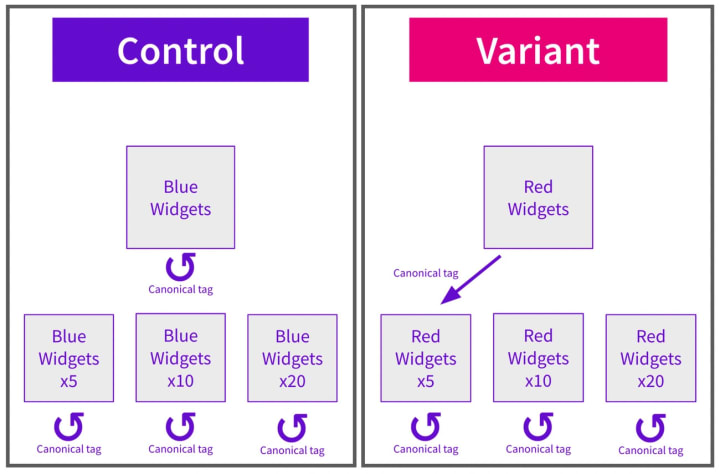
Ecommerce websites face unique canonical challenges primarily due to their complex architecture and product variations. Throughout my audits of online stores, I've encountered one canonical issue more frequently than others – improper handling of product variants.
Case: Product Variants With Conflicting Canonicals
Consider this scenario: your online store sells a beanie in both black and orange. Each color variant has its own URL:
- https://www.example.com/store/beanie-black
- https://www.example.com/store/beanie-orange
Many ecommerce platforms automatically generate self-referencing canonical tags for these variants, meaning each page declares itself as the canonical version. This creates conflicting signals for search engines attempting to determine which version to prioritize in search results.
The complexity increases with multiple variations. A single product might have color, size, and material options, potentially creating dozens of URLs with similar content. Each URL typically contains unique elements like variant-specific titles, barcodes, and attributes, yet shares substantial content with other variants.
Impact: Diluted Link Equity Across Color/Size Pages
The consequences of mishandled product variant canonicals can be severe. When search engines encounter multiple similar product pages without clear canonical guidance, they must divide ranking signals between them. This dilution of link equity occurs because backlinks, internal links, and social shares get spread across multiple URLs instead of concentrating on one authoritative version.
For example, if three websites link to your black beanie page and two others link to your orange variant, neither accumulates sufficient authority to rank competitively. Meanwhile, your competitor who properly consolidates link equity to a single canonical product page receives the combined benefit of all similar backlinks.
Takeaway: Canonical To Main Product Page Only When Content Is Identical
The solution depends on your product strategy and content uniqueness:
For products with low SKU counts where each color variant has significant search volume, implement self-referencing canonical tags on each variant. This approach works when each variant deserves its own ranking opportunity.
Conversely, for sites with thousands of products and minimal search volume differences between variants, canonicalize all variants to the main product page. This concentrates ranking signals and prevents unnecessary competition between your own pages.
The critical decision factor is content similarity. If variants contain nearly identical content with minor color or size differences, canonical tags should point to a single preferred URL. Henceforth, your SEO strategy should include regular audits of product variant canonicals to prevent accidental dilution of your hard-earned link equity.
4. Canonical Tags vs Redirects: When to Use What
Many SEO professionals struggle with deciding between canonicals and redirects. This decision point is critical as each tool serves different purposes in your SEO arsenal.
301 Redirect Vs Rel=Canonical: SEO Signal Strength
301 redirects are directives to search engines, whereas canonical tags are merely suggestions. This fundamental difference affects how search engines process these signals. 301 redirects tell Google that a page has permanently moved, literally redirecting users and crawlers to the new location. In contrast, rel=canonical tags simply indicate which version of multiple similar pages should be considered the original.
From an SEO perspective, 301 redirects pass virtually all of your old page's backlinks and authority to the new URL. Matt Cutts from Google has stated that canonical tags should be a secondary choice if you can't implement a 301 redirect, highlighting the stronger signal strength of redirects.
The implementation process differs significantly:
- With canonicals, users can access both versions of the page
- With redirects, users are automatically sent to the new URL with no access to the old one
When To Consolidate With Redirects Instead Of Canonicals
Use 301 redirects primarily in these scenarios:
- When permanently changing URL structures during site architecture updates
- During site migrations (HTTP to HTTPS or domain changes)
- When merging multiple pages into one comprehensive content piece
- For fixing broken links where old pages are completely removed
Conversely, canonical tags work best when you need multiple versions of similar content to remain accessible. This includes:
- E-commerce product pages with different tracking parameters
- Content that's syndicated to other websites
- Pages with different URL parameters for filtering or tracking
The key question to ask: "Do I need both pages to remain accessible to users?" If the answer is no, a redirect is typically the stronger option.
Takeaway: Use Redirects For Outdated Or Removed Content
Ultimately, redirects are the preferred solution for permanently moved content. When a page is outdated, unnecessary, or consolidated with other content, implementing a 301 redirect provides the clearest signal to both users and search engines.
Remember that 301 redirects are considerably more permanent than canonical tags. Once Google crawls these redirects, it's challenging to undo their effect. Therefore, use redirects decisively when you're certain about permanently moving content.
For content that needs to remain accessible through multiple URLs, canonical tags remain your best option – just ensure they don't create conflicting signals with your redirects.
5. Canonical Tags and Hreflang: Avoiding Mixed Signals
Multilingual websites present unique canonical challenges where technical misconfiguration can sabotage your international SEO efforts. The interaction between canonical tags and hreflang attributes is particularly prone to confusion.
Case: Hreflang Pointing To Localized Pages, Canonical To English
I often encounter this scenario during technical audits: a website has properly implemented hreflang tags pointing to appropriate language versions (like English, French, Dutch), yet simultaneously includes canonical tags pointing only to the English version. For example, the French page might have hreflang annotations correctly pointing to all language versions, yet its canonical tag exclusively references the English URL.
This creates a logical contradiction. The hreflang tag says, "This French page is relevant for French users," whereas the canonical effectively states, "Ignore this page and index the English version instead."
Impact: Google Ignores Both Signals
Given these conflicting instructions, search engines typically disregard both signals entirely. As noted by multiple experts, when canonical tags and hreflang attributes provide contradictory information, Google simply falls back to using other ranking signals to determine which page to index. This undermines your carefully planned international SEO strategy.
Takeaway: Canonical Should Match Language Version
The solution is straightforward: each language version should have a self-referencing canonical tag. Your French page should have a canonical pointing to itself, not to the English equivalent. Similarly, your Dutch page needs its own self-referencing canonical.
Google's developers explicitly confirm this approach—canonical tags should specify the proper URL for each language version. This ensures both signals work together rather than against each other.
Remember that hreflang is inclusive (showing all versions to appropriate audiences) while canonicals are exclusive (designating a preferred version). Keeping these signals aligned prevents Google from making unexpected canonicalization decisions that could hurt your international visibility.
6. Fixing Canonical Issues: Tools and Techniques
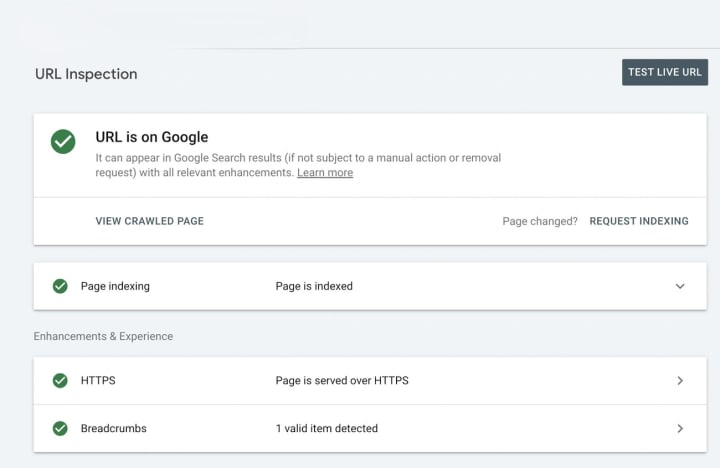
Discovering canonical issues before they impact your rankings requires both the right tools and a systematic approach. Let me walk you through the most effective methods to identify and resolve these hidden problems.
Using Google Search Console's URL Inspection
Google Search Console provides a quick way to check canonical status. Simply enter any URL into the Inspection Tool to see both the "User-declared canonical" (what you've specified) and "Google-selected canonical" (what Google actually uses). Whenever these values differ, it signals potential canonical configuration issues that need immediate attention. GSC additionally offers reports under "Indexing > Pages > Why pages aren't indexed" that highlight canonicalization errors across your site.
Crawling with Sitebulb or Screaming Frog
For comprehensive canonical auditing, specialized crawling tools offer deeper analysis:
Screaming Frog SEO Spider excels at identifying canonical issues with its dedicated Canonicals tab. It flags non-indexable canonicals, canonical chains, and loops—similar to redirect problems. The tool creates detailed exports of problematic canonical implementations.
Sitebulb provides visual reports with actionable hints about canonical issues. It automatically checks every internal URL for potential problems and presents findings through an intuitive interface.
Auditing Canonical Tag Consistency Across Templates
Typically, canonical issues occur at the template level where one misconfiguration affects numerous pages. Check for:
- Dynamic canonical tags generating incorrect versions
- Templates with missing canonical tags
- Canonical tags pointing to non-indexable pages
- Canonicals referencing URLs that redirect
Takeaway: Regular Audits Prevent Silent SEO Losses
Given that canonical issues can silently damage rankings, quarterly audits are essential for maintaining visibility. Such checks protect against technical failures that prevent proper indexing, hinder crawl efficiency, or create content cannibalization.
Conclusion
Canonical tags clearly serve as the unsung heroes of technical SEO. Throughout this guide, we've seen how these small HTML elements significantly impact search visibility and content quality. Consequently, neglecting canonical implementation can silently damage your rankings while proper implementation can dramatically boost your SEO performance.
Undoubtedly, the most crucial takeaway remains that canonical tags aren't optional—they're essential components of a solid SEO strategy. When implemented correctly, these tags help consolidate link equity, improve crawl efficiency, and solve duplicate content issues. However, as we've explored, canonical mistakes like pointing to outdated domains, improperly handling pagination, or creating conflicts with hreflang can devastate your search performance.
Therefore, you should regularly audit your canonicals using tools like Google Search Console, Screaming Frog, or Sitebulb. These proactive checks prevent the silent SEO damage that often goes unnoticed until traffic significantly drops. Remember that each site faces unique canonical challenges—e-commerce sites struggle with product variants, multilingual sites must balance hreflang with canonicals, and content-heavy sites need proper pagination strategies.
Still wondering whether to use redirects instead of canonicals? The rule remains simple: use redirects for permanently moved content and canonicals when multiple versions need to remain accessible. This distinction ensures you're sending the strongest possible signals to search engines.
The canonical landscape constantly evolves as websites grow more complex and search engines refine their algorithms. Nevertheless, the fundamentals stay consistent—canonical tags must accurately reflect your content structure and preferred URL hierarchy. Your vigilance in maintaining proper canonical implementation will ultimately reward you with better rankings, increased organic traffic, and stronger content authority.
Key Takeaways
Canonical tags are critical SEO elements that can dramatically impact your search visibility—when implemented correctly, they can increase keyword rankings by 320%, but when misconfigured, they silently destroy your organic traffic.
- Audit canonical tags quarterly to prevent silent SEO damage - Mismatched canonicals have doubled since 2022, creating invisible ranking losses that compound over time.
- Use self-referencing canonicals for paginated content - Pointing all pagination pages to page one orphans deeper content and wastes crawl budget.
- Implement 301 redirects for permanently moved content, canonicals for accessible duplicates - Redirects are directives while canonicals are suggestions to search engines.
- Align canonical tags with hreflang for multilingual sites - Conflicting signals cause Google to ignore both, undermining international SEO efforts.
- Consolidate product variants strategically based on content uniqueness - Identical variants should canonical to main pages; unique variants need self-referencing tags.
Regular canonical auditing using Google Search Console and crawling tools like Screaming Frog prevents the technical failures that silently erode your search performance while competitors gain ground.
FAQs
Q1. How do canonical tags impact SEO performance? Canonical tags significantly influence SEO by consolidating link equity, improving crawl efficiency, and solving duplicate content issues. When implemented correctly, they can boost keyword rankings and organic traffic. However, misconfiguration can silently damage your search visibility.
Q2. What is the proper way to use canonical tags for pagination? For paginated content, implement self-referencing canonical tags on each page. This tells search engines that each pagination page contains unique, valuable content worth indexing. Avoid pointing all pagination pages to the first page, as this can orphan deeper content and waste crawl budget.
Q3. How should e-commerce sites handle canonical tags for product variants? The approach depends on your product strategy and content uniqueness. For products with low SKU counts and significant search volume differences between variants, use self-referencing canonical tags on each variant. For sites with thousands of products and minimal differences, canonicalize all variants to the main product page to concentrate ranking signals.
Q4. When should I use 301 redirects instead of canonical tags? Use 301 redirects for permanently moved content, such as during site migrations, URL structure changes, or when merging multiple pages into one comprehensive piece. Canonical tags are better when you need multiple versions of similar content to remain accessible, like product pages with different tracking parameters.
Q5. How often should I audit my website's canonical tags? Regular canonical audits, ideally conducted quarterly, are essential for maintaining visibility and preventing silent SEO damage. Use tools like Google Search Console, Screaming Frog, or Sitebulb to identify issues such as incorrect implementations, conflicts with hreflang tags, or canonicals pointing to non-indexable pages.
About the Creator
Reuben Oyeyele
Reuben Oyeyele is an SEO specialist, a seasoned content writer and blogger with over 17 years of extensive experience in crafting compelling narratives that resonate with diverse audiences.
Keep reading
More stories from Reuben Oyeyele and writers in Education and other communities.
Mastering On-Page SEO: Essential Steps to Boost Your Website Rankings
On-page SEO is all about all the elements on your website which you can control. Imagine having a beautifully designed website but no one visits it. The truth is, without effective on-page SEO; even the most stunning websites can remain invisible. On-page SEO is the key to unlocking your site's potential and ensuring it's seen by the right audience. In this article, we will explore ten vital steps to optimize your pages, helping you climb higher in search rankings and capture the attention of your target audience.
By Reuben Oyeyele11 months ago in Education
The Importance of Strong Leadership in IT and Cybersecurity Teams
In today’s rapidly evolving digital landscape, IT and cybersecurity are no longer support functions—they are central to business success and resilience. With growing threats, complex infrastructures, and constant technological change, these departments face intense pressure to perform at the highest levels. At the heart of their performance is a critical factor that often determines whether a team succeeds or struggles: strong leadership.
By Keith Brautigam7 days ago in Education


Comments
There are no comments for this story
Be the first to respond and start the conversation.