
How Beginners Can Master Technical SEO in 7 Steps
Introduction to The Best Practices of Technical Search Engine Optimization

I frequently come across people who are just beginning their journey into the world of search engine optimization. The most common question they ask is "What is technical SEO and how do I master it". This is what prompted me to write this article in hope that most people out there may have a glimpse and understanding of the process. Therefore, I would like to share my expertise. Also, some methods I share may not be the "conventional", but I have seen them work.
When done right, technical SEO can lift your business sky high while on the other hand can tank your website if done wrong. To avoid being penalized by the search engines, just stick to the best practices of technical SEO and you should be fine.
The Basics of Technical SEO
Did you know that 75% of users never scroll past the first page of search results whether they use Google, Yahoo or any other search engine? If your website does not appear among the first 10 results (first page), I doubt if you will get any tangible organic traffic. Therefore, understanding the basics of technical SEO is crucial to ensure that your website's structure and navigation are optimized for search engines, enhancing crawlability and indexing. This article will guide you through the basic essential elements like:
- Website URL Structure
- Crawlability and Indexing
- Mobile-first design
- Site speed, and
- User experience
By the end, you'll have a comprehensive understanding of how to enhance your website's visibility and performance.
1. Website Architecture and Navigation
I would classify the page layout as a psychological thing because it can either attract the attention of your visitors or distract them. It can as well serve as the blueprint that guides users through a seamless throughout the page. A well-thought-out page layout ensures that every section of a web page is visible and accessible, enhancing user engagement and interaction. It's not just about aesthetics; it's about strategically placing elements to guide the user’s eye and intuitively lead them to essential information. This orchestrated visibility is crucial for maintaining user interest and reducing bounce rates.
Ease of navigation is another cornerstone of effective website architecture, directly impacting user satisfaction and retention. A logical, straightforward navigation system allows users to find what they’re looking for with the slightest effort and thus minimizes frustration and maximizes user engagement. This ease of navigation should extend beyond mere design to include a search engine-friendly URL structure. Such URLs not only enhance user experience by providing clear pathways but also improve search engine rankings, making your site more discoverable. Balancing these elements creates a cohesive digital environment where both users and search engines can thrive.
Example of bad URL structure:
https://yourdomain/?pagetitle&something%20%else
Example of good URL structure:
https://yourdomain/page-title-something-else
As you can see, the first is gibberish and practically neither communicates anything to you nor to the search engines while the second one clearly communicates what the page is about. As you see the URLs, so do the search engines.
2. Search Engine Crawling and Indexing
Crawling is the process by which search engines send out bots, or "spiders," to discover new and updated web pages. These bots meticulously navigate through links and absorb content and structure. The information gathered during crawling feeds into indexing, where search engines organize and store the data in massive databases. This ensures that when a user searches for something relevant, the most appropriate results can be quickly retrieved.
An important tool in this process is the sitemap, a piece of code which outlines the structure of a website and in so doing, provides search engines with a clear path for indexing. By submitting a sitemap to search engines, website owners can facilitate more efficient crawling, ensuring that all critical pages are indexed. Complementing this is the robots.txt file, which serves as a set of instructions for search engine bots to indicate which parts of a site should or should not be crawled. By strategically managing these files, businesses can optimize their site's visibility while protecting sensitive information from unwanted exposure.
The synergy between sitemaps for indexing and the directives provided by robots.txt files is pivotal for achieving optimal search engine performance. By understanding and leveraging these tools, businesses can enhance their online presence and ensure that their most valuable content is prioritized in search results. As search algorithms continue to evolve, staying informed about the intricacies of crawling and indexing will empower businesses to adapt and thrive in an ever-competitive digital landscape.
Example of a Sitemap Code
The URL: https://www.example.com/sitemap.xml
The code example:
<?xml version="1.0" encoding="UTF-8"?>
<urlset xmlns="http://www.sitemaps.org/schemas/sitemap/0.9">
<url>
<loc>https://www.example.com/homepage</loc>
<lastmod>2023-10-26</lastmod>
<priority>1.0</priority>
</url>
<url>
<loc>https://www.example.com/about-us</loc>
<lastmod>2023-09-15</lastmod>
<priority>0.8</priority>
</url>
</urlset>
After you have created your sitemap.xml file, the next step is to submit it to the search engines. For Google, you can use the Search Console.
Example of a Sitemap Code
The URL: https://www.example.com/robots.txt
The code example:
User-agent: *
Disallow: /folder/
Disallow: /image.png
Sitemap: https://www.example.com/sitemap.xml
One of the best practices of technical SEO is to include the sitemap in the robots.txt file. In this way, you are giving permission to the search engines to crawl and index the pages you included in the site map.
Note: It is not obligatory to include sitemaps in robots.txt file however it is advised. This is especially important for those who have not submitted their sitemaps to search engines. This, in my experience leads to faster indexing of newly created pages on a website.
There are various free tools for creating both sitemap.xml and robots.txt files. I would advice taking advantage of them.
3. The Broken Link Nightmare
There is nothing more frustrating for visitors than a broken link. Just as they thought they have found what they were looking for only to be met with "Ooopss! The page you are looking for does not exist!" or a page displaying a "404 error message".
Broken links can sabotage your website, quietly undermining the user experience and search engine rankings. Both internal and external links are pathways for guiding visitors through valuable content on your website as a whole. When these links fail, they not only create a frustration for visitors but also signal to search engines that a website's integrity is compromised. This can lead to diminished trust and authority, ultimately affecting visibility and traffic.
Addressing broken link issues requires a proactive approach, integrating regular audits and robust link management strategies. Utilizing advanced tools to identify and rectify broken links can transform this nightmare into an opportunity for optimization. By maintaining healthy link structures, businesses can ensure seamless navigation and enhance the user journey, thereby fortifying their SEO efforts. Ultimately, turning the broken link nightmare into a dream of efficient connectivity is pivotal for sustaining digital relevance and success.
What to Do When You Discover Broken Links on Your Website?
When I was just starting my journey in SEO, the most common practice was to create a special 404 page where you offer links to some other relevant pages. I have long discarded this method doe to various reasons. Instead, I do the following:
1. Find the broken page and create relevant content for the page.
2. Redirect the broken link to another relevant page using 30xx redirect codes. This is the fastest and less time-consuming option.
Two Most Used Redirect Codes
301 Redirect: The page has moved permanently.
302 Redirect: Page has been temporarily moved and should be back soon.
I would suggest you do more research into how to implement these codes. For Wordpress users, there are lots and lots of plugins that will make your life easier doing this.
4. Implementing Mobile-Friendly Design Techniques

This is a facet of web design which I advice designers to pay exceeding attention to. While I was working for a digital marketing company as an SEO expert covering Houston as well as other cities in Southeast Texas, I collaborated with web designers to make sure they design with mobile-first intentions.
Mobile-friendly design techniques are no longer optional; it's a critical necessity. People these days don't even surf the internet with desktops to say the least. Everybody does that either with cell phones or tablets. According to Google, "mobile first" is a pivotal Google ranking factor. Therefore, businesses must prioritize optimizing their websites for smaller screens. This approach not only enhances visibility in search engine results but also significantly boosts user engagement by ensuring that site layout remains coherent and accessible on mobile devices. The seamless transition from desktop to mobile viewing is vital, as users expect the same level of functionality regardless of the device they use.
Designers can leverage adaptive layouts and responsive design principles to ensure content automatically adjusts to varying screen sizes, maintaining usability without sacrificing aesthetics. Streamlining navigation and minimizing load times are equally crucial; these factors directly impact user experience and, consequently, conversion rates. A well-optimized mobile site can lead to increased customer retention and higher sales figures, as visitors are more likely to engage with a site that's easy to navigate and quick to load.
Moreover, adopting a mobile-first mindset means thinking beyond mere aesthetics—it's about understanding the context in which users interact with content on their phones. By incorporating touch-friendly elements and ensuring that all interactive components are easily tappable, businesses can create an intuitive interface that caters to the needs of mobile users. Ultimately, a thoughtful mobile-friendly design not only aligns with current digital trends but also sets the foundation for future growth by enhancing overall user satisfaction and driving business success.
5. Page Speed and Performance
I am sure all readers of this post had at one time or the other hit the back button on their browsers just because a web page was taking forever to load. Page speed and performance are not just technical concerns; they are critical components of user experience that directly impact business outcomes. A slow-loading website that forces visitors to hit the back button can result in a bad user experience that tarnishes your brand's reputation. In fact, studies show that even a one-second delay in page load time can drastically reduce Click-Through-Rate and conversions, underscoring the importance of optimizing your site's performance.
When potential customers encounter sluggish pages, it's not just their patience that's tested; your bottom line is at stake also. Poor performance can cause you to lose potential customers who might have otherwise engaged with your content or completed a purchase. Therefore, investing in efficient coding practices, leveraging content delivery networks, and optimizing images and scripts are no longer optional—they are essential strategies for maintaining competitive advantage. By prioritizing page speed, businesses can enhance user satisfaction, improve search engine rankings, and ultimately, drive more successful interactions with their audience.
How to Check Your Page Speed:
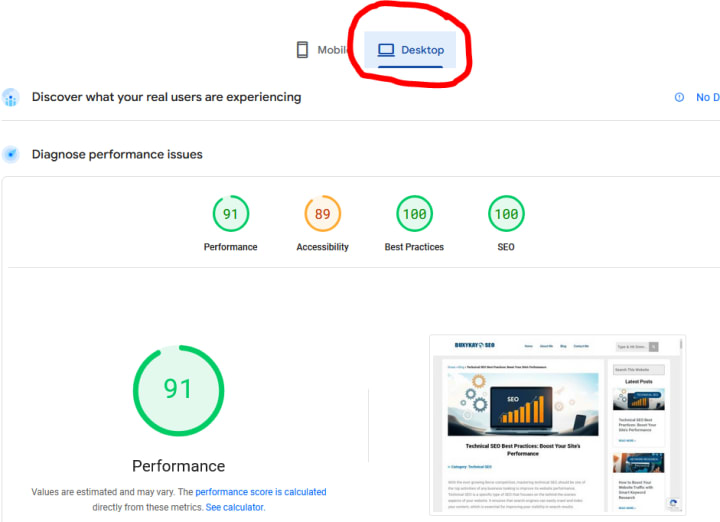
If you want to check how fast or how slow a page on your website is loading, I would recommend a free too which I personally use and one which Google themselves recommend from the search console. Head over to PageSpeed Insights. Plus your URL into the provided space, hit Analyze and you should get a report after a period of time depending on the size of the page in question.
Page Speed Results in Desktop Mode
Page Speed Results in Mobile Mode
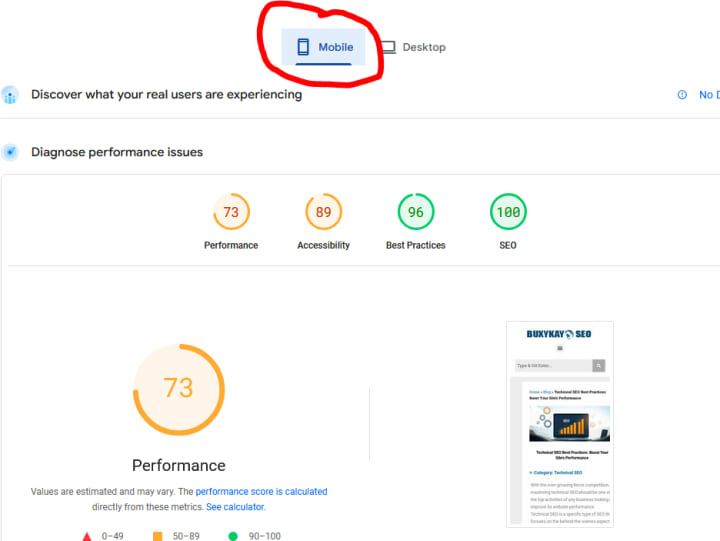
Note: From the images above, you can clearly see that the website's performance in mobile mode is not as good as with desktop. Obviously, more work needs to be done to improve that.
6. Structured Data and Schema Markup

Thanks to Directive Consulting for letting me use this picture.
This strategy falls into advanced technical SEO practices. It acts as a bridge between content creators and search engines. When you embed schema markup into your website's HTML, you provide a semantic vocabulary that makes search engines to better understand your content. This not only facilitates a more nuanced interpretation of complex information but also elevates your content's visibility in search engine results pages through rich snippets. Examples of such are the "yellow stars" displayed alongside of websites when you do a search for something or pictures displayed when you are searching for a recipe for instance. As search algorithms grow increasingly sophisticated, you just have to leverage structured data if you want to stay competitive in your industry.
The transformative power of schema markup lies in its ability to communicate directly with search engines, offering precise context about various elements on a webpage, such as product details, event schedules, or even recipe ingredients. This structured approach allows search engines to present users with the most relevant and enriched results, thereby improving user experience and engagement. Moreover, as voice search and AI-driven assistants become more prevalent, schema markup can significantly enhance your site's relevance, ensuring it meets the evolving demands of modern search behaviors.
Incorporating schema markup into your SEO strategy also opens doors to innovative opportunities, such as the potential for interactive and immersive search results. By embracing this advanced technical SEO practice, businesses can differentiate themselves in saturated markets, capturing attention with visually appealing and informative snippets. As the digital ecosystem continues to evolve, the strategic implementation of structured data will be a crucial determinant in achieving and sustaining online success.
There also many free online tools to help you create Schema structured data markup. Once you have generated the code, most of them offer validation and testing tools as well.
7. Monitoring and Analyzing SEO Performance Metrics
Conducting a comprehensive website technical audit at least twice a year can help identify issues such as broken links, slow page speeds, or indexing problems that may be hindering your site's performance. Utilizing audit tools can streamline this process, offering actionable insights that are critical for sustained growth.
Google Search Console and Google Analytics are indispensable resources for tracking SEO metrics, providing detailed reports on user behavior, traffic sources, and keyword performance. These platforms allow marketers to make data-driven decisions by highlighting which strategies are driving results and which need adjustment.
SEMrush and Ahrefs are fantastic and robust for this stage however, I would like to point out that they are not affordable for freelancers or low-budget entities. If you can afford paying as much as $150 for basic features, then go ahead and get either of them or both. On the contrary, stick with the free Google tools.
Integrating these insights with technical SEO practices ensures that your website not only attracts visitors but also delivers a seamless user experience. By prioritizing a regular website technical audit and leveraging advanced analytics tools, businesses can refine their strategies, enhance visibility, and achieve higher search rankings.
Achieving Mastery in Technical SEO
As a final note, your mastery of technical SEO will require a blend of continuous learning, practical application, and strategic thinking. As search engines evolve, so too must the methodologies you have in place to ensure visibility and accessibility online. Stay abreast of the latest algorithm updates and utilize advanced tools and techniques. In so doing, you can effectively optimize websites to meet and exceed industry standards. It is important to conduct regular audits and performance assessments to identify areas for improvement and sustain competitive advantage. As you advance your skills in technical SEO, remember that the key to success lies in adaptability and proactive engagement with emerging trends. Stay ahead of the curve by committing to ongoing education and experimentation.
Thanks for reading. I hope I have been of help.
About the Creator
Reuben Oyeyele
Reuben Oyeyele is an SEO specialist, a seasoned content writer and blogger with over 17 years of extensive experience in crafting compelling narratives that resonate with diverse audiences.
Keep reading
More stories from Reuben Oyeyele and writers in Education and other communities.
How Generative Engine Optimization Boosts Local SEO ROI
What Is Generative Engine Optimization (GEO) and Why It Matters for Local Businesses AI-generated answers are changing how customers find local businesses. This often happens before they ever click a website. If your brand isn’t showing up in those answers, you’re invisible to high-intent buyers.
By Reuben Oyeyele2 months ago in Education




Comments
There are no comments for this story
Be the first to respond and start the conversation.