
Unleashing the Power of JavaScript vs TypeScript: A Comprehensive Comparison
Discovering the Pros and Cons of Dynamic and Static Typing in Web Development
When it comes to web development, JavaScript is the king of the hill, but in recent years, TypeScript has been growing in popularity and making waves in the web development community. Both JavaScript and TypeScript are programming languages that can be used for front-end and back-end development, but they have some key differences that make them better suited for different use cases.
In this article, we'll take a deep dive into JavaScript and TypeScript, exploring their strengths, weaknesses, and differences, as well as real-world examples to help illustrate their unique features.
JavaScript: The Dynamic and Flexible Language
JavaScript is a high-level, dynamic, and interpreted programming language that was first introduced in 1995. It is the most widely used programming language on the web and is supported by all major browsers. JavaScript is often used to create dynamic and interactive web pages and is also used for server-side development using Node.js.
One of the key strengths of JavaScript is its flexibility. JavaScript is a dynamically typed language, which means that you don't have to specify the type of a variable when you declare it. This makes it easier to get started with and is well-suited for small projects or prototypes.
TypeScript: The Statically Typed Language
TypeScript is a statically typed superset of JavaScript that was first introduced in 2012 by Microsoft. TypeScript adds optional static typing to JavaScript and is designed to scale as your development team grows. TypeScript provides improved tooling, better type checking, and a more maintainable codebase.
A Thorough Comparison of Key Differences
1. Typing System
The biggest difference between JavaScript and TypeScript is the typing system. JavaScript is dynamically typed, meaning that the type of a variable can change at runtime. This is often referred to as "loose typing" and allows for flexibility in coding, but can also lead to type errors and make it harder to maintain large codebases.

On the other hand, TypeScript is statically typed, meaning that the type of a variable must be declared when it is defined and cannot be changed at runtime. This helps prevent type errors and makes it easier to maintain large codebases.

2. Classes and Interfaces
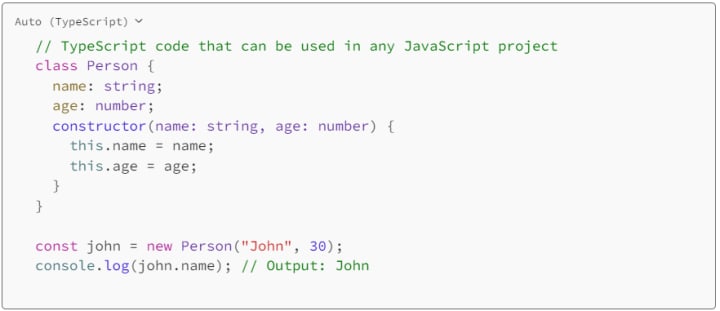
TypeScript provides improved support for object-oriented programming with features like classes and interfaces. Classes provide a way to define objects and their behavior, while interfaces provide a way to define a contract that classes must follow.

3. Tooling
TypeScript provides improved tooling, including improved code highlighting, better error reporting, and faster build times. This makes it easier to develop, debug, and maintain large codebases. TypeScript also provides a type checking system that helps prevent type errors and makes it easier to catch bugs early in the development process.
4. Compatibility
TypeScript is compatible with all major browsers and can be used with any JavaScript library or framework. This makes it easy to use TypeScript in existing projects or with other technologies.
5. Community
JavaScript has a much larger community, but the TypeScript community is growing rapidly. JavaScript has been around for over 25 years and is widely used, while TypeScript is relatively new, having been introduced in 2012. However, the TypeScript community is growing quickly and provides a wealth of resources, tutorials, and support for developers.
In conclusion, both JavaScript and TypeScript are powerful programming languages, but they are suited to different use cases. JavaScript is a dynamic, flexible language that is well-suited for small projects or prototypes, while TypeScript is a statically typed language that provides improved tooling and is better suited for large projects or teams.
About the Creator
Keep reading
More stories from writers in Education and other communities.
The Lean Advantage: How Small Improvements Create Massive Business Wins
In today’s fast-moving market, businesses don’t always need massive overhauls to see major growth. The real competitive advantage often comes from Lean process improvement—small, consistent changes that reduce waste, improve speed, and strengthen customer value. With a proactive approach, companies can spot inefficiencies early, prevent recurring problems, and build smarter systems before minor issues become costly setbacks.
By Duke Valentour6 days ago in Education



Comments
There are no comments for this story
Be the first to respond and start the conversation.