
Top 5 Best Free Video Editing Software in 2025
Whether you're a beginner seeking intuitive interfaces or a professional requiring advanced features, these five tools provide robust solutions.

Whether you're a content creator, entrepreneur, or business owner, high-quality videos are essential for engagement and brand growth. However, professional video editing software can be expensive, and not everyone has the budget for high-end tools. If you're just starting out or looking for budget-friendly solutions, free or freemium video editing software is your best bet. These tools provide powerful features without a hefty price tag, allowing you to create professional-grade videos without breaking the bank.
But with so many options available, how do you know which one to choose? We’ve done the research for you. Here’s an in-depth look at the top five freemium video editing software you should try in 2025.
1. CapCut
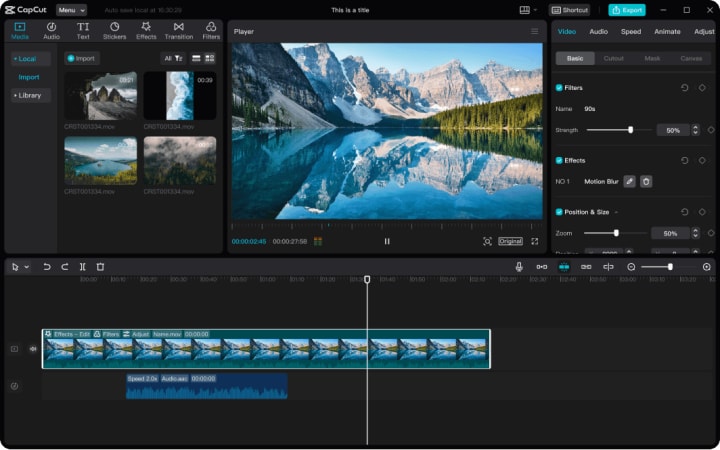
CapCut has rapidly emerged as a versatile video editing application, initially gaining traction among mobile users and now expanding its capabilities to desktop platforms. Known for its user-friendly interface and robust feature set, CapCut caters to both novices and professionals seeking quick edits or more intricate productions. As of March 2025, CapCut is available in version 13.9.0.
Key Features:
- Easy to Use: It's highly user-friendly and comes with simplified menus, drag-and-drop features, and intuitive interfaces. It can also work perfectly on mobile phones.
- AI-Powered Editing Tools: CapCut leverages artificial intelligence to automate tasks such as scene detection and background removal, streamlining the editing process.
- Cross-Platform Integration: Users can seamlessly transition projects between mobile devices and desktops, ensuring flexibility and continuity in editing workflows.
- Extensive Template Library: CapCut offers a vast collection of AI-powered and customizable templates, enabling users to create professional-grade videos with minimal effort.
Pricing of Paid Version: Starts from $9.99/month with a 7-day free trial
2. DaVinci Resolve
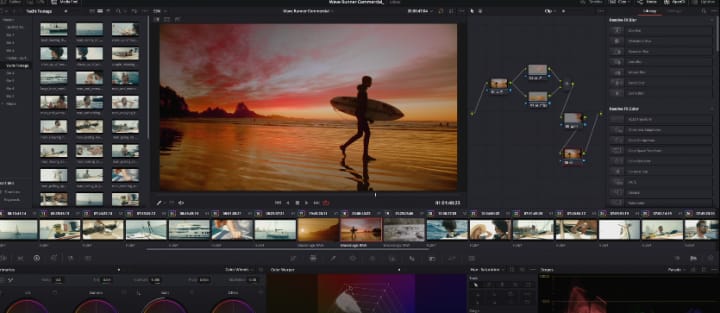
DaVinci Resolve is a choice of elite professionals due to its high-grade capabilities, particularly in color correction and grading. It is a one-stop solution for editing, color correction, visual effects, motion graphics, and audio post-production, which makes it a personal favorite for professional colorists, editors, VFX artists, and sound engineers. While it offers a premium version, the free variant provides an impressive array of tools that rival many paid software options. The current version, DaVinci Resolve 19, has been rolled out with DaVinci Neural Engine AI tools and over 100 feature upgrades.
Key Features:
- Pack of Strong Features: This tool includes the Emmy™ award-winning image technology and the latest version, which comes with 32-bit float processing, UltraNR noise reduction, YRGB color science, Fairlight audio processing (IntelliTrack AI), and much more.
- Advanced Color Grading: DaVinci Resolve's color grading tools are unparalleled, offering granular control over color correction to achieve cinematic quality.
- Fusion Visual Effects: Integrated visual effects and motion graphics tools allow for sophisticated compositing and animation within the same platform.
- Collaborative Workflow: The software supports multi-user collaboration, enabling editors, colorists, and sound designers to work simultaneously on the same project.
Pricing of Paid Version (DaVinci Resolve Studio): $295.00
3. Clipchamp
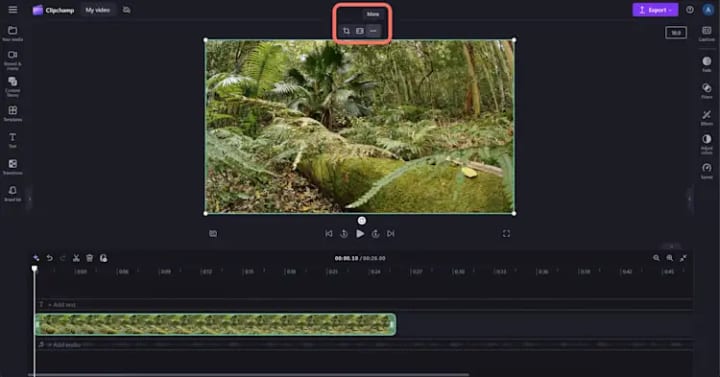
Acquired by Microsoft, Clipchamp has evolved into a robust, browser-based video editor that combines ease of use with powerful features. Its integration with Microsoft services makes it a convenient choice for Windows users.
Key Features:
- AI-powered editing tools: For effortless video editing, you can use its automated auto-captions (80+ languages), text-to-speech, video resizing, noise suppression, and auto-cuts.
- Cloud-Based Editing: Being browser-based, Clipchamp allows users to edit videos without the need for extensive local resources, facilitating work on various devices.
- Stock Media Library: The platform provides access to a comprehensive library of stock footage, audio tracks, and images, enhancing creative possibilities.
- Direct Export to Social Platforms: Clipchamp enables the direct export of videos to platforms like YouTube and Vimeo, streamlining the publishing process.
Pricing of Paid Version: $11.99/month
4. iMovie
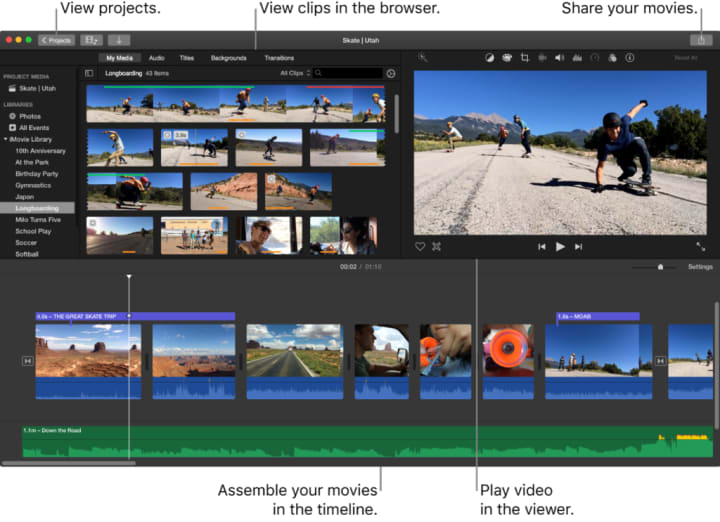
iMovie is Apple's flagship video editing software, pre-installed on macOS and iOS devices. Its intuitive design and seamless integration with Apple's ecosystem make it a popular choice for casual and semi-professional editors. As of 2025, iMovie is at version 10.4.3.
Unique Features:
- Seamless Apple Ecosystem Integration: iMovie allows effortless importing and exporting of media across Apple devices.
- High-Fidelity Filters: The software offers a range of cinematic filters and effects, enabling users to enhance their videos with professional aesthetics.
- Green Screen Effects: iMovie's chroma-keying capabilities allow users to replace backgrounds creatively, adding depth to their projects.
Pricing of Paid Version: Free
5. Filmora
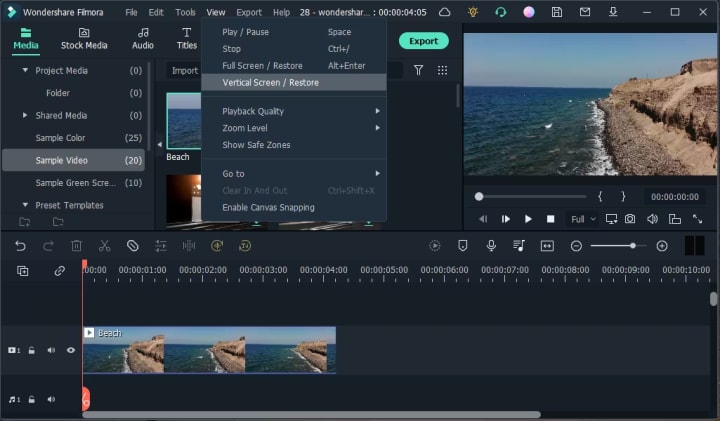
Filmora by Wondershare has carved a niche for itself by offering a balance between advanced features and user accessibility. Its drag-and-drop interface and rich effects library cater to creators seeking both simplicity and creative control. Filmora version 14 has launched with various new features, such as planar tracking and multi-camera editing.
Unique Features:
- Advanced AI tools: It comes with a bunch of handy AI tools for automated and manual editing, such as AI copilot, smart masking, and much more.
- Motion Tracking: Filmora's motion tracking allows users to attach elements to moving subjects, adding dynamic flair to videos.
- Audio Ducking: This feature automatically lowers background music during dialogue or voiceovers, ensuring clarity and balance in audio.
- Built-In Effects Store: Filmora provides access to an extensive library of effects, transitions, and elements, enabling users to enhance their videos creatively.
Pricing of Paid Version: Starts from $19.99/month with a 7-day free trial
Conclusion
Whether you're a beginner seeking intuitive interfaces or a professional requiring advanced features, these five platforms (Capcut, DaVinci Resolve, Clipchamp, iMovie, and Filmora) provide robust solutions.
While these five video editing tools provide fantastic features for beginners and professionals alike, video editing is still a time-consuming and skill-intensive process. If you want polished, high-quality videos without investing hours into editing, consider hiring an expert video editing agency.
A professional agency like Tribe Spark in Michigan ensures top-tier production quality, creative storytelling, and seamless execution. By hiring a trusted partner, you can focus on your work effectively and be at peace of mind.
About the Creator
Tribe Spark
Tribe Spark is a top digital marketing agency in Michigan, specializing in SEO, PPC, web design, video editing, and social media. We create data-driven strategies to help businesses grow.
Keep reading
More stories from writers in Education and other communities.
Frontier Strategies: Navigating Global Markets with Data-Driven Risk Management Solutions
Global companies face increasing uncertainty as they expand across continents, and they depend on sophisticated analytics to understand the forces shaping international performance. Moreover, leaders strengthen competitive positioning by integrating global risk signals into their planning, helping them anticipate disruptions before they intensify. Additionally, data tools reveal patterns across regulatory systems, regional economies, and supply chains that manual analysis would overlook. Consequently, organizations gain the clarity they need to make informed decisions as they adapt to rapidly changing global environments.
By Ehab Al Kuttuba day ago in Education
Active Bodies, Brave Minds: How Exercise Helps Children Grow Strong From the Inside Out
Raising children who are confident, adaptable, and emotionally strong is a goal shared by parents, educators, and communities alike. While many factors contribute to healthy development, regular exercise stands out as one of the most effective and natural ways to shape resilient, confident kids. Physical activity influences not only how children grow but also how they think, feel, and respond to the world around them.
By Marissa Haugha day ago in Education



Comments
There are no comments for this story
Be the first to respond and start the conversation.