
React Performance Optimization: How to Make Your App Faster
Effective Techniques to Improve the Speed and Responsiveness of Your React Application


While React is designed to be fast and efficient, there are many techniques you can use to optimize the performance of your React applications. In this article, we’ll explore some of these techniques and provide code examples to help you get started.
1. Memoization
One of the easiest ways to improve React performance is to use memoization. Memoization is the process of caching the result of a function call and returning the cached result when the same function is called again with the same arguments.
In React, you can use the useMemo hook to memoize the result of a function call. For example, suppose you have a component that calculates the sum of two numbers:

In this example, the sum is only calculated when a or b changes. If you type into either of the input fields, you will see that the console log statement is only printed once.
2. Code Splitting
Another way to optimize React performance is to use code splitting. Code splitting is the process of splitting a large codebase into smaller, more manageable chunks that can be loaded on demand. This can improve the initial load time of your application and reduce the amount of code that needs to be downloaded.
In React, you can use dynamic imports to implement code splitting. For example, suppose you have a component that only needs to be loaded when a button is clicked:
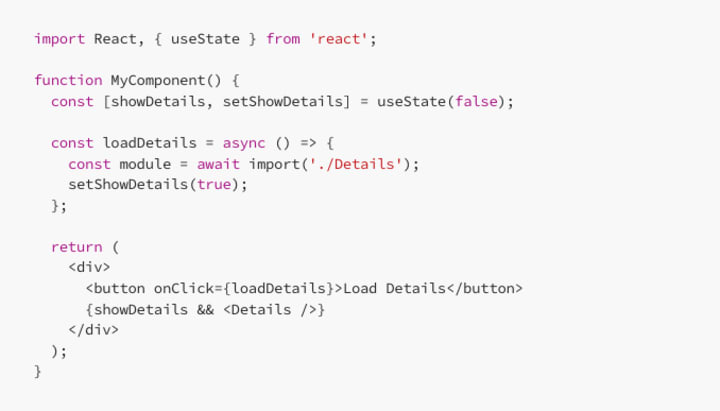
In this example, the Details component is only loaded when the Load Details button is clicked. This can reduce the initial load time of your application and improve overall performance.
3. React.memo
Another way to optimize React performance is to use React.memo function to memoize the result of a component’s render method. React.memo is similar to useMemo, but instead of memoizing a function call, it memoizes the result of a component’s render method.
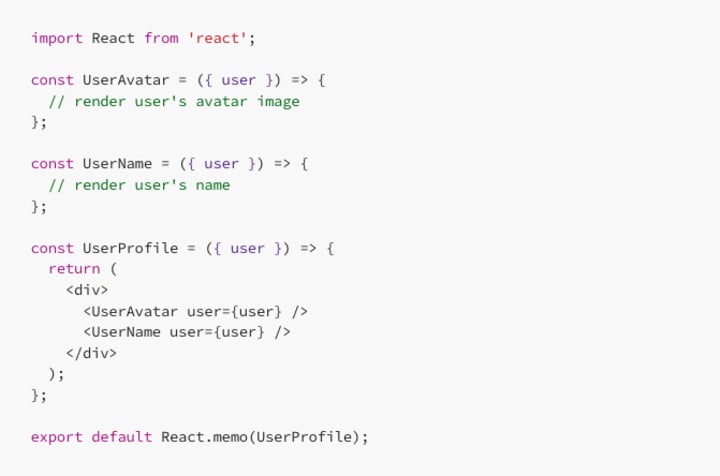
In this example, we have a UserProfile component that renders a user's avatar and name. The UserAvatar and UserName components are also used inside UserProfile. Since UserProfile only depends on the user prop and its child components do not depend on any props, we can optimize the performance of UserProfile by memoizing it using React.memo.
With React.memo, UserProfile will only re-render if the user prop has changed. If the parent component passes the same user object on subsequent renders, UserProfile will not re-render, improving the performance of your application.
4. Virtualization
Another technique for optimizing React performance is to use virtualization. Virtualization is the process of rendering only the items that are currently visible on the screen, rather than rendering all items in a list.
There are several libraries that can help you implement virtualization in React, such as react-virtualized and react-window.
Here’s an example of how you can use the react-window library to implement virtualization:
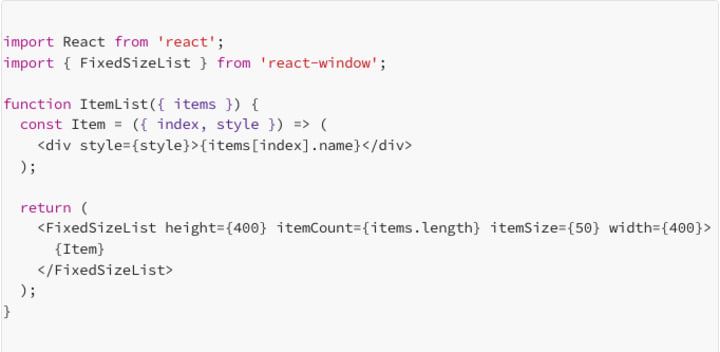
In this example, the FixedSizeList component from the react-window library is used to render only the items that are currently visible on the screen.
5. Memoization with useCallback
The useCallback hook is similar to useMemo, but it is used to memoize a function instead of a value. useCallback is useful when you need to pass a function down to child components as a prop, but you don’t want the child components to re-render every time the function changes.
For example, suppose you have a component that renders a button and a child component that needs to be updated when the button is clicked:

In this example, the handleClick function is created every time the ParentComponent is re-rendered. To prevent unnecessary re-renders of the ChildComponent, you can use the useCallback hook to memoize the handleClick function:

In this example, the handleClick function is only created when the count state changes, which can improve performance.
Conclusion
React performance optimization is an important topic for building fast and responsive user interfaces. By using techniques such as memoization, code splitting, React.memo, virtualization, and memoization with useCallback, you can improve the performance of your React applications and provide a better user experience.
About the Creator
FARDA KARIMOV
I'm a front-end engineer creating visually appealing and user-friendly web experiences. On Vocal Media, I share insights and advice on front-end development and design trends. Join me to explore the world of front-end development.
Keep reading
More stories from FARDA KARIMOV and writers in Education and other communities.
Understand JSX in React.js
React.js is a popular front-end JavaScript library used for building user interfaces. One of its core features is JSX, a syntax extension that allows developers to write HTML-like code within their JavaScript files. JSX is an essential part of React development, and understanding its syntax and how it works is crucial for building high-quality applications.
By FARDA KARIMOV3 years ago in Education
Why UMPCO Fasteners Still Solve Critical Aerospace Problems Today
When I started researching legacy aerospace fastener manufacturers, I wasn’t just looking for brand names—I was looking for solutions to real aviation problems. Structural failure, vibration fatigue, corrosion at altitude, and long-term reliability are challenges that every aerospace engineer eventually faces. One name that repeatedly surfaced in technical documentation and historical aerospace supply chains was UMPCO fasteners.
By Beckett Dowhan3 days ago in Education




Comments
There are no comments for this story
Be the first to respond and start the conversation.