
React-Native Custom Font Family
Custom font family
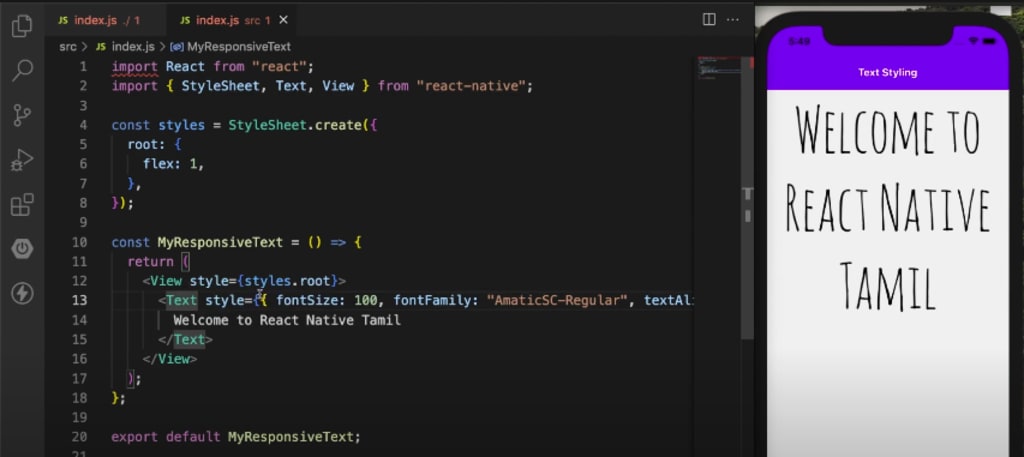
React Native allows you to use custom fonts in your app by adding them to your project and then referencing them in your styles. The process of adding custom fonts to a React Native project created with react-native-cli is a bit different than adding them to a project created with Expo. Here's an overview of the steps you'll need to take:
Add the font files to your project: You can add the font files to your project by placing them in the assets/fonts folder. You can create the folder if it doesn't exist yet.
Link the assets to your project: In the root of your project, run the command react-native link. This command will automatically link the font files to your project, including the Android and iOS specific files.
Use the custom font in your styles: To use the custom font in your styles, you'll need to use the fontFamily property. For example:
const styles = StyleSheet.create({
text: {
fontFamily: 'CustomFontName',
fontSize: 20,
},
});
Rebuild the project and run it: After completing the above steps, you should rebuild the project using react-native run-android or react-native run-ios and start the application on your emulator or device.
It's also good to keep in mind that if you're using a custom font that includes different styles (like bold or italic), you'll need to include the different styles of the font as separate files in your assets folder and reference them separately in your styles.
Also, when naming the font files, it should be the same name as the name that is provided in the fontFamily, also make sure to match the naming conventions for the OS you are running.
If you are having trouble getting custom fonts to work in your React Native project created with react-native-cli, I suggest checking the documentation for your platform (iOS or Android) for more information about adding and linking custom fonts.
Use the below code to apply custom font as default throughout the application:
Text.render = function render(props) {
props = {...props, style: [{color: 'red',
fontFamily: 'CustomFontName'}, props.style]}
return TextRendrer.apply(this, [props]);
}
There are a few reasons why you might want to use custom fonts in your React Native app:
Branding: Custom fonts can be used to create a unique and recognizable visual style for your app, and can help to reinforce your brand identity.
Accessibility: Custom fonts can be designed with readability in mind, which can make them more accessible for users with visual impairments.
Design: Custom fonts can be used to create a specific look and feel for your app, and can help to make your app stand out in the crowded app store.
Improved readability: Using custom fonts can improve the overall readability of your app, which can make it easier for users to understand and engage with the content.
Emotion and personality: Custom fonts can be used to create a certain mood, or express a particular emotion or personality.
Internationalization and localization: If you are building an app that targets multiple languages, you may want to use custom fonts that are appropriate for the languages you are targeting.
When choosing a custom font, it's important to consider legibility, and how it will work in different sizes and contexts within the app. It's also important to choose a font that is licensed for use on mobile devices, and consider how to properly format the font file for your platform and OS.
When choosing a custom font, it's important to consider legibility, and how it will work in different sizes and contexts within the app. Also, make sure to choose a font that is licensed for use on mobile devices, and consider how to properly format the font file for your platform and OS.
Additionally, it's a good practice to test the font with real users, to see if they find it legible, attractive and easy to read. This will ensure that the font serves its purpose and doesn't affect the overall user experience negatively.
Youtube link: https://www.youtube.com/watch?v=NzKaRQY75Rs
About the Creator
Aashik Hameed AJ
Im a software engineer.
Keep reading
More stories from Aashik Hameed AJ and writers in Education and other communities.
React Native Flatlist - swipe to delete item
What is react native reanimated? React Native is a framework for building mobile apps using JavaScript and React. It allows you to build apps for both iOS and Android using a single codebase. With React Native, you can use the same components and methods you would use in a React web app, but the components are mapped to their mobile equivalents, so you can create a truly native user experience.
By Aashik Hameed AJ3 years ago in Education
Hosting a Book Fair
How many of you remember the “best week ever!” from when you were a child? Book fairs were the staple of many of our childhoods with Scholastic leading the way. While there are many choices for book fairs today and I absolutely want to talk about them, that’s going to be a later article.
By Reb Kreyling6 days ago in Education
Communicating with Confidence: Building Trust Through Simplicity
Trust is the cornerstone of any meaningful relationship, whether professional or personal. At the heart of trust lies the ability to communicate clearly. People naturally respond to straightforward, reliable, and easy-to-understand information. Professionals who prioritize clarity establish credibility and foster confidence in others. Clients, colleagues, and partners feel assured that they can make informed decisions when the messages they receive are transparent and well-articulated.
By Stacey Yim4 days ago in Education




Comments
There are no comments for this story
Be the first to respond and start the conversation.