
React Native Flatlist - swipe to delete item
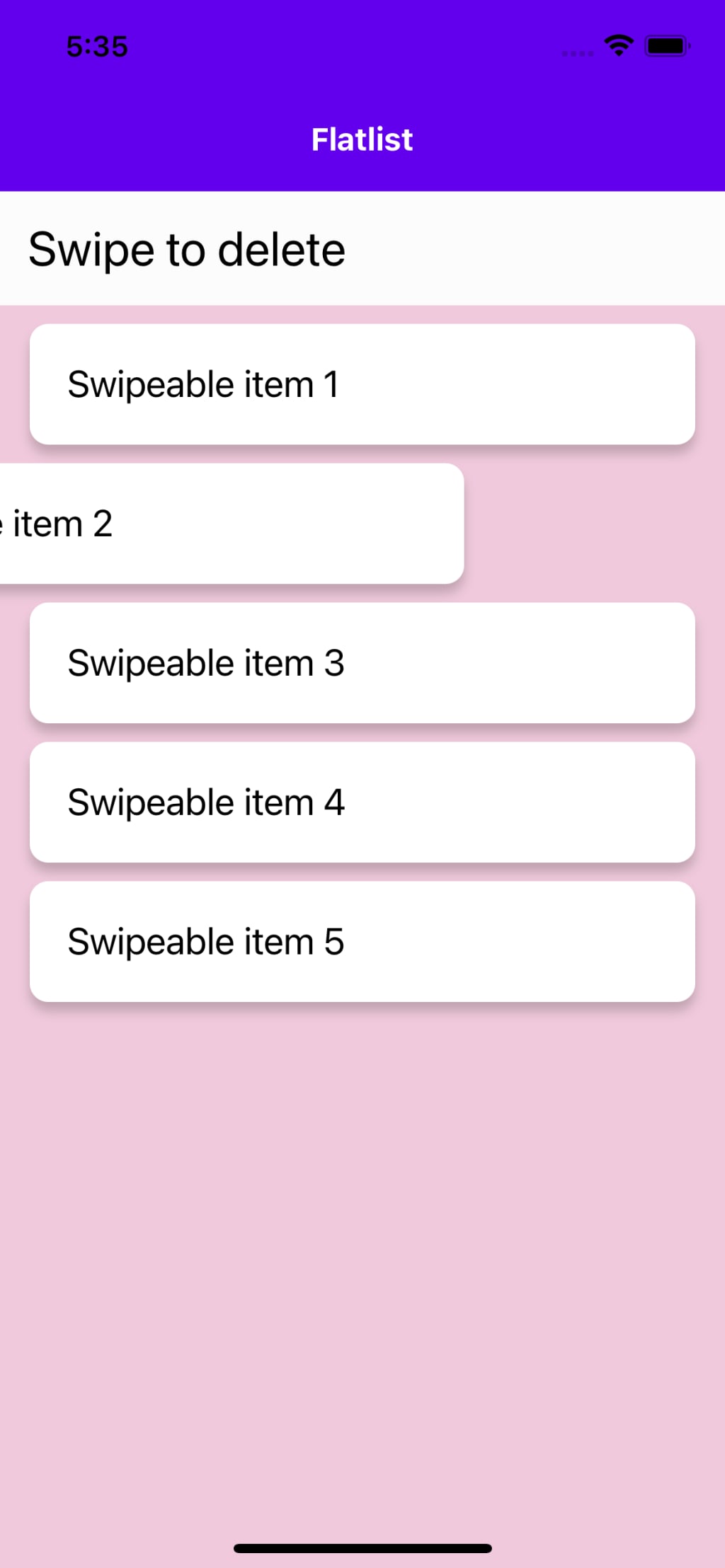
Swipeable flatlist item
What is react native reanimated?
React Native is a framework for building mobile apps using JavaScript and React. It allows you to build apps for both iOS and Android using a single codebase. With React Native, you can use the same components and methods you would use in a React web app, but the components are mapped to their mobile equivalents, so you can create a truly native user experience.
Reanimated is a library for building high-performance animations in React Native. It allows you to use JavaScript to animate your app's UI elements, rather than relying on the native animation libraries, which can often be clunky or difficult to work with. With Reanimated, you have more control over your animations, and you can create custom animations that wouldn't be possible with the native libraries alone.
Reanimated provides a set of primitives to create powerful animations which runs on the native thread, it also includes a lower-level declarative animation library, called Animated which uses an imperative programming model. When compared to native animated library its much more performant and flexible.
When using both React Native and Reanimated together, you can create engaging, smooth, and responsive user interfaces that look and feel like true native apps.
Advantages:
There are several advantages to using React Native and Reanimated together:
Cross-platform development: React Native allows you to build mobile apps for both iOS and Android using a single codebase. This can save a lot of time and effort, as you don't need to maintain separate codebases for each platform.
Performance: Reanimated allows you to create high-performance animations that run on the native thread, which means they're smoother and more responsive than animations created with JavaScript alone.
Flexibility: Reanimated provides a set of primitives that you can use to create custom animations that wouldn't be possible with the native libraries alone. This means you have more control over the look and feel of your app, and you can create truly unique and engaging user experiences.
Easy to learn: React Native uses a similar syntax to React, the most popular JavaScript library for building web applications. Therefore, developers already familiar with React, have an easy time learning React Native.
Large community: React Native and React has a large, active community of developers who contribute to the ecosystem by creating and maintaining libraries and tools. Therefore, you can leverage these contributions to increase the efficiency and quality of your codebase.
Reusability of code: With React Native, you can reuse up to 99% of the codebase of your web application, which helps you speed up development and maintainability.
Continuous integration and deployment: React Native apps can be easily integrated with popular CI/CD tools like Fastlane, CircleCI, Jenkins, and many more.
Code for Swipeable flatlist list item:
import React, { useRef } from "react";
import { View, FlatList, StyleSheet, Text, Dimensions } from "react-native";
import { PanGestureHandler } from "react-native-gesture-handler";
import Animated, { useAnimatedGestureHandler, useAnimatedStyle, useSharedValue, withTiming } from "react-native-reanimated";
const deviceWidth = Dimensions.get('window').width;
const threshold = -deviceWidth * 0.4;
const FlatListItem = ({ item }) => {
const dragX = useSharedValue(0);
const height = useSharedValue(65);
const opacity = useSharedValue(1);
const gestureHander = useAnimatedGestureHandler({
onActive: (e) => {
dragX.value = e.translationX;
},
onEnd: (e) => {
if (threshold < e.translationX) {
dragX.value = withTiming(0);
} else {
dragX.value = withTiming(-deviceWidth);
height.value = withTiming(0);
opacity.value = withTiming(0);
}
}
});
const itemContainerStyle = useAnimatedStyle(() => {
return {
transform: [
{
translateX: dragX.value,
}
],
height: height.value,
opacity: opacity.value,
marginTop: opacity.value === 1 ? 10 : 0
}
})
return (
<PanGestureHandler onGestureEvent={gestureHander}>
<Animated.View style={[styles.itemContainer, itemContainerStyle]}>
<Text style={styles.itemText}>Swipeable item {item}</Text>
</Animated.View>
</PanGestureHandler>
);
};
const SwipeableFlatlist = () => {
return (
<View style={styles.container}>
<Text style={styles.heading}>Swipe to delete</Text>
<FlatList
style={styles.flatlistStyle}
data={[1, 2, 3, 4, 5]}
renderItem={({ item }) => <FlatListItem item={item} />}
/>
</View>
);
};
const styles = StyleSheet.create({
container: {
flex: 1,
backgroundColor: "rgba(255,255,255, 0.8)",
},
flatlistStyle: { backgroundColor: "rgba(190,0,90, .2)" },
itemContainer: {
backgroundColor: "white",
borderRadius: 10,
marginHorizontal: 16,
shadowOpacity: 0.2,
shadowOffset: {
width: 0,
height: 5,
},
},
itemText: {
padding: 20,
fontSize: 20,
},
heading: {
padding: 15,
fontSize: 26,
},
});
export default SwipeableFlatlist;
Youtube link: https://youtu.be/eQAXkuyjpwY
In conclusion, "Swipe to delete" feature is an essential part of any mobile app and is widely used in applications like email clients, to-do lists, social media apps and many others. With React Native and Reanimated, you can easily create a smooth and responsive swipe to delete feature that looks and feels like a true native app.
Reanimated provides a set of primitives that can be used to create powerful animations and gestures, which can be used to implement swipe to delete feature. One common way to implement swipe to delete is by using the PanResponder component provided by React Native, which allows you to detect gestures such as swipe, drag, and pinch. You can use the PanResponder in conjunction with the Animated library provided by Reanimated, to animate the position and size of the elements on the screen, giving you the feel of native animations.
It's also possible to use libraries built on top of React Native and Reanimated, like react-native-gesture-handler, which can simplify the implementation and make it more accessible for developers.
When implementing a swipe to delete feature, it's important to consider the user experience and make it easy for users to understand and use. Providing clear visual cues, such as a background color change on swipe, and clear confirmation prompts before deletion can help make the feature more user-friendly.
About the Creator
Aashik Hameed AJ
Im a software engineer.
Keep reading
More stories from Aashik Hameed AJ and writers in Education and other communities.
Animated loading button in react native using reanimated
What is React Native? React Native is a framework for building native mobile apps using JavaScript and the React library. It is possible to use animation in React Native apps by using the Animated component provided by the framework.
By Aashik Hameed AJ3 years ago in Education
Crafted by Time: The Restoration and Enduring Spirit of the Sim Corder Mill
The Sim Corder Mill began as a testament to hard work, ingenuity, and a deep respect for craftsmanship. When it first operated, it stood as a vital engine of local industry, transforming raw materials into essential goods for the surrounding community. From the start, the mill reflected careful planning and skilled construction. Builders shaped every beam and fitted each mechanism with precision, knowing that the structure would carry both economic and personal significance.
By Grady Gaston6 days ago in Education
Can Training Farmers End Hunger?
What if one of the most powerful solutions to global hunger is not food aid, but knowledge? Around the world, millions of smallholder farmers grow the food that feeds their communities. Yet many of them struggle with low crop yields, unpredictable weather, poor soil quality, and limited market access. If farmers are at the center of food production, could empowering them with better skills be the key to ending hunger?
By Convoy of Hope5 days ago in Education
Review of 'Man on the Run'
My wife and I saw Man on the Run, a nearly 2-hour documentary on Amazon Prime, about Wings, Paul McCartney's group that flew around the world from shortly after The Beatles broke up in early 1970 to shortly after John Lennon was murdered at the end of 1980, making a Beatles reunion forever impossible.
By Paul Levinson7 days ago in Beat




Comments
There are no comments for this story
Be the first to respond and start the conversation.