
How ChatGPT Plugins Can Automate Your Daily Tasks
Introduction


Artificial intelligence is constantly on the lookout for new ways to maximize efficiency and productivity. Imagine if you could delegate your daily tasks to an intelligent assistant that never tires, makes no errors, and works at lightning speed.
Welcome to the world of ChatGPT plugins! These AI-powered tools are designed to automate a wide range of tasks, from SEO and digital marketing to script writing and stock market analysis, making your workday more efficient and productive.
This blog post is your comprehensive guide to understanding and leveraging the power of ChatGPT plugins. We will explore how these innovative tools can transform your daily tasks, streamline your operations, and give you more time to focus on strategic decision-making.
So, are you ready to revolutionize your workday? Let’s dive in and discover the power of automation with ChatGPT plugins!
What are Chatgpt Plugins?
ChatGPT plugins, also known as OpenAI plugins, are the next big thing in AI technology. They’re like turbochargers for your ChatGPT, enhancing its capabilities and allowing it to perform tasks that go beyond the simple conversation.
Imagine you’re a business owner and your team regularly faces issues and spends a significant amount of time on manual tasks. But now, we have a permanent solution to resolve this by automating your workflows using ChatGPT plugins.
These plugins enable you to automate a wide range of tasks, such as customer service and order tracking. For instance, a plugin can handle customer inquiries by providing instant and accurate responses, thereby enhancing the overall customer experience.
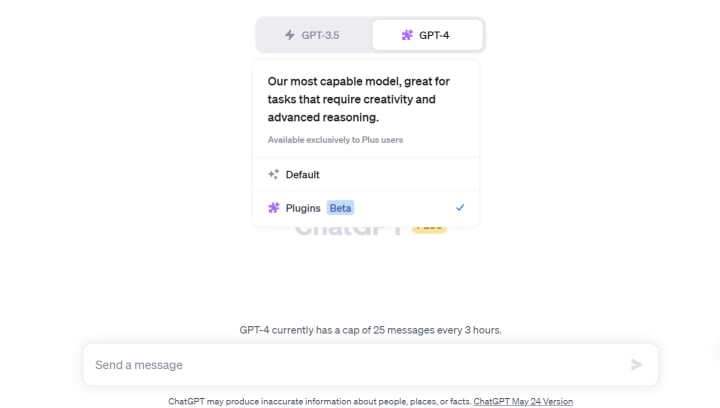
But the magic of ChatGPT plugins doesn’t stop at automation. They can also enhance the AI’s abilities. Take the SEO Core AI plugin, for instance. It can analyze your website’s SEO performance and provide actionable insights, helping you improve your site’s visibility without needing to be an SEO expert.
The beauty of ChatGPT plugins lies in their simplicity. You interact with them just like you would with a friend in a chat interface. It’s like having a personal assistant that’s always ready to help, no matter the task.
In essence, ChatGPT plugins are transforming the way we use AI. They’re not just enhancing ChatGPT; they’re revolutionizing our daily tasks. Whether you’re a business owner, a content creator, or an AI enthusiast, ChatGPT plugins are a game-changer.
To learn more about how ChatGPT plugins can automate and enhance your daily tasks, stay tuned. We’re just getting started on this exciting journey!
See also: ChatGPT’s Impact On Customer Experience
How to use Chatgpt Plugins
ChatGPT plugins are like a secret weapon for your AI chatbot. They enhance its capabilities, allowing it to perform a wide range of tasks. But how exactly do you use these plugins? Here’s a step-by-step guide :
Access the ChatGPT Plugin Store
Search for Plugins
Install Plugins
Enable Plugins
Ask ChatGPT for Guidance
Experiment with Different Prompts
Let’s break it down into detailed steps:
Access the ChatGPT Plugin Store: The first step is to access the ChatGPT Plugin Store. This is where you’ll find all the available plugins. Note that only ChatGPT Plus subscribers have access to the Plugin Store.
Search for Plugins: The Plugin Store has a search function that you can use to find plugins by keyword. This can be helpful if you’re looking for a specific type of plugin. For example, if you’re looking for a plugin to help with SEO, you could search for “SEO”.

Install Plugins: Once you’ve found a plugin you want to use, you can install it by clicking the “Install” button next to it. You can install as many plugins as you want, but you can only use a maximum of three plugins per chat.
Enable Plugins: After installing a plugin, you need to enable it in a new chat. You can do this by checking the box next to the plugin in the chat interface.
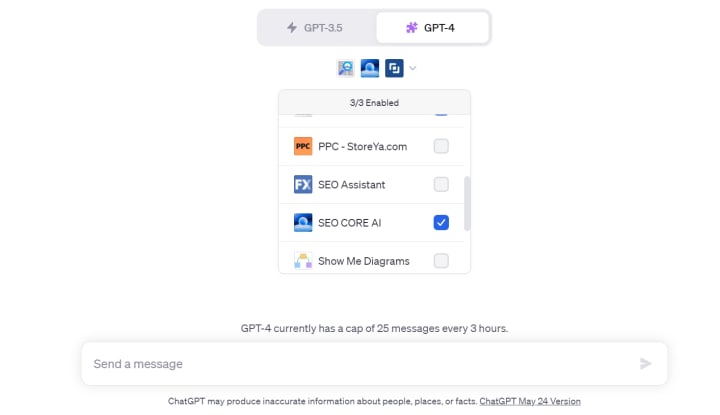
Ask ChatGPT for Directions: If you’re not sure how to use a plugin, you can ask ChatGPT for guidance. For example, you could ask, “How do I use the SEO Core AI plugin?” ChatGPT will then provide instructions on how to use the plugin.
Experiment with Different Prompts: Different plugins may respond better to different prompts. If you’re not getting the results you want, try rephrasing your prompt or asking your question in a different way.
Remember, the key to getting the most out of ChatGPT plugins is to experiment and explore. Don’t be afraid to try different plugins and prompts to see what works best for you. Now, let’s dive into how ChatGPT Plugins can automate your daily tasks and revolutionize your workflow.
Click here to read more: https://makevisionclear.com/how-chatgpt-plugins-automate-your-daily-tasks/
About the Creator
Sonali Jha
Sonali Jha is the Founder of Make Vision Clear, a digital marketing agency. She has 5+ years of industry experience and has worked with top brands worldwide.
Keep reading
More stories from Sonali Jha and writers in Education and other communities.
Global Recession And Impact On Businesses That Digital Marketing May Solve
During 2007-2009, the whole world faced a global recession when the U.S housing bubble burst out. This was known to be “The Great Recession.” This didn’t just affect the U.S, but also other countries globally had an impact. The recession deeply affected businesses and concerned them about their performance and growth.
By Sonali Jha3 years ago in Education
A brief history of alcohol
This chimpanzee stumbles across a windfall of overripe plums. Many of them have split open, drawing him to their intoxicating fruity odor. He gorges himself and begins to experience some… strange effects. This unwitting ape has stumbled on a process that humans will eventually harness to create beer, wine, and other alcoholic drinks. The sugars in overripe fruit attract microscopic organisms known as yeasts. As the yeasts feed on the fruit sugars they produce a compound called ethanol— the type of alcohol in alcoholic beverages.
By Munesh Yadav3 days ago in Education
Smart phones, Humans and Aliens.
WARNING. I will be tapping into one of your favorite creative tensions: The absurdity of humans worshipping their glowing rectangles as if they were tiny oracles. There’s something deliciously poetic about that contradiction, and it lends itself beautifully to an instructive proviso.
By Novel Allen7 days ago in Poets




Comments
There are no comments for this story
Be the first to respond and start the conversation.