
What Does the Green Dot Mean on Snapchat?
The green dot on Snapchat shows recent activity, indicating the user was active within 24 hours.
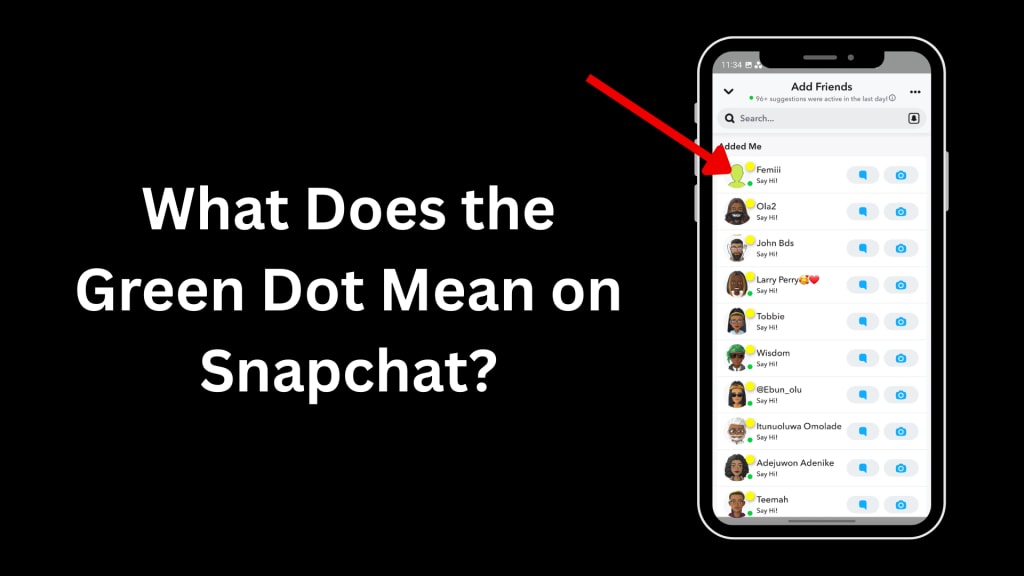
If you're an active Snapchat user or even someone just getting started with the app, you might have noticed a green dot next to certain profiles or usernames. It’s a tiny, easily overlooked symbol, but one that raises a lot of questions.
So, what does it actually mean? Is it showing someone’s real-time activity? Can you rely on it to know if someone’s online? Why do you see it only in certain places and not in others?
In this blog post, we'll break down the meaning of the green dot, how it works, its limitations, and what it means for your privacy on Snapchat. Whether you're trying to figure out if someone is online or simply want to understand the app’s features better, this article will help.
What Is the Green Dot on Snapchat?
The green dot on Snapchat is known as the Activity Indicator. When you see this symbol, it means that the user has recently been active on the app. It's Snapchat’s way of giving users a hint that a particular friend or potential friend has been online in the last 24 hours.
Unlike apps like WhatsApp or Messenger, Snapchat doesn’t have a traditional “online” or “last seen” status feature. So, the green dot isn’t quite the same as showing someone is currently online—but it’s the closest thing Snapchat offers in terms of activity visibility.
Must Read: Snap Planets
Where Does the Green Dot Appear?
Interestingly, the green dot doesn’t appear just anywhere on Snapchat. It’s found specifically in a few locations, and notably not in the chat list.
Here’s where you’ll usually see it:
- Add Friends section: If you're scrolling through the list of suggested friends or mutuals, you might notice a green dot next to some of them.
- Quick Add list: Again, when Snapchat suggests users you might know, a green dot might appear.
- Search results: Searching for a username? If that person has been active in the last 24 hours, a green dot might show beside their name.
Where you won’t see the green dot:
- Inside active chat windows
- On friend stories
- On your Snap Map
- Next to Bitmoji avatars in conversations
This is Snapchat’s way of keeping things subtly private. It’s more about knowing someone is still active on the platform, rather than tracking their every move.
How Long Does the Green Dot Stay?
Snapchat hasn’t made it crystal clear how long the green dot lasts after someone has used the app. But based on user experiences and documentation from Snapchat’s support, we can say:
- The green dot is likely visible for up to 24 hours after a user was last active.
- It is not real-time—meaning the person may no longer be on the app even if the green dot is still there.
- It may disappear earlier depending on certain privacy settings or Snapchat server updates.
In short, the green dot means recent activity, not necessarily current presence.
Is the Green Dot Always Accurate?
No. And here’s why:
Snapchat gives users control over their Activity Indicator. If someone has chosen to disable it in their settings, you won’t see a green dot next to their profile, even if they’ve just used the app.
This means:
- No green dot ≠ not active
- Green dot visible = the user has allowed activity status to be shown
This can be a little misleading for people trying to use the dot as a true "online" indicator.
How to Turn Off the Green Dot on Snapchat
Don’t want others to see your activity status? Here’s how you can disable the green dot:
- Open Snapchat and tap on your Bitmoji/profile icon.
- Tap the gear icon ⚙️ in the top-right to access Settings.
- Scroll down to “Privacy Controls.”
- Tap “Activity Indicator.”
- Toggle it off.
Once disabled, others will no longer see a green dot next to your name in suggested lists or the Add Friends section.
Can You Use the Green Dot to Spy on Someone?
Let’s be honest—many people ask about the green dot because they’re curious if someone is online, ignoring them, or still using Snapchat.
While the green dot gives some insight into whether someone has been active, it’s not intended as a spying tool. It’s vague and limited for a reason.
If you really want to know if someone is actively using Snapchat, here are more reliable clues:
- Check their Snap Score: If it increases, they’ve been active.
- Watch for story uploads: Posting stories = recent activity.
- Use Snap Map: If their Bitmoji is moving or updating location, that’s another sign they’ve opened the app.
How the Green Dot Helps You on Snapchat
Although limited, the green dot is still useful, especially for finding new friends or reconnecting with old ones.
For example:
- Want to message someone you haven’t talked to in a while? If you see the green dot, you know they’ve used the app recently, so your message won’t go unseen.
- Adding a new contact? If they have a green dot, they’re more likely to accept quickly.
- Building Snapstreaks? The green dot tells you who’s active and more likely to participate.
In short, the green dot can help you decide who to interact with.
Privacy Concerns: Should You Worry?
Some users have raised concerns about the green dot invading privacy. But in truth, it’s less intrusive than other social media indicators. You can’t see who is “online now” or how long they were active. It’s just a general sign of recent activity.
Plus, since Snapchat allows you to disable the indicator, it puts privacy back in your hands.
If you're worried about who can see your status or how much you appear online, turning off the green dot is your best option.
Final Thoughts
The green dot on Snapchat is a small, subtle feature with a very specific purpose: to show recent activity of users who allow it. It’s not a real-time online indicator, and it doesn’t appear everywhere on the app. Instead, it's mainly used in the Add Friends area to help users connect with active accounts.
If you're trying to figure out whether someone is online or ghosting you, the green dot isn’t enough to confirm that. However, it’s a handy tool to gauge general usage and activity—especially when trying to engage with new people or rekindle connections.
At the end of the day, Snapchat’s green dot is just one of many small features that add layers to your social experience on the app.
About the Creator
Jerry
Dedicated website for Spotify. Here we share tips and tricks to master your Spotify experience.
'Till Death We Do Art
There would be nothing divine in this world without art. Nature may surpass the divine to all intents and purposes, but like everything it absorbs and is absorbed by, it remains here, stuck on the surface of this world, ever-present, physically bound to the universe.
By Avocado Nunzella BSc (Psych) -- M.A.P 17 days ago in Art
Golden Journey
Once in a small town named Willow Creek, something extraordinary was about to happen. The sun was setting, casting long shadows and a golden glow across the landscape. Among the townspeople was a curious boy named Ethan. A dreamer with bright green eyes and messy brown hair, Ethan was often lost in his thoughts. He wanted to explore worlds beyond his own, driven by the tales of adventure his grandmother used to tell him.
By Hamad Afridi 4 days ago in Art
Rachel Reviews: Lakefront Wolves by Joseph Deegan
Meet Finn. He's an 18 year old kid who has potential. He's bright with great school scores and he's also an athlete, a footballer of some prowess. He has it all going for him, it would seem, and yet, he's determined to send what could be a well-planned, stable existence firmly off the rails. He drinks, he smokes, he takes drugs, he has violent tendencies and he's in danger of losing not only his mind but all that he holds dear.
By Rachel Deeming4 days ago in BookClub




Comments
There are no comments for this story
Be the first to respond and start the conversation.